
In Fast2SMS, your WhatsApp Business Account ID (WABA ID) and Phone Number ID are in WhatsApp Manager > Numbers, in the Business IDs column, each with a copy button. In Meta’s own tools, the WABA ID is shown as your Messaging account ID in Meta Business Suite, and developers see both IDs in the Cloud API Setup panel.
This guide shows where to find each ID, what each one means after Meta’s 2026 account changes, and which ID to use where, so you do not mix up the Phone Number ID with your phone number or the Template ID with the Message ID.
What each WhatsApp ID means
| ID | What it identifies | Where you use it |
|---|---|---|
| Business Portfolio ID | Your business in Meta Business Suite (earlier called Business Manager) | Business verification, sharing accounts with a partner |
| WABA ID (WhatsApp Business Account ID) | Since Meta’s September 2026 update, your Messaging account: templates, billing and webhooks. The value did not change | Template APIs, webhooks, support tickets |
| Phone Number ID | One business phone number on WhatsApp. It is a long Meta ID, not the mobile number itself | Sending messages, choosing the sender number |
| WhatsApp account (WAAC) ID | The new account that holds one phone number | Not available yet. Meta plans it for the first half of 2027 |
| Message ID (Fast2SMS) | Fast2SMS’s ID for one template, shown on the template card | The message_id in the Fast2SMS WhatsApp API |
| Template ID (Meta) | Meta’s ID for the same template, shown half masked on the card | Meta’s own template APIs |
How to find your WABA ID and Phone Number ID in Fast2SMS
-
Open WhatsApp Manager and click Numbers
In the WhatsApp menu, open WhatsApp Manager and click Numbers. Every connected or pending number has its own row.
-
Read the Business IDs column
The Business IDs column lists the Business Portfolio ID, WABA ID and Phone Number ID for that number. Two numbers in the same business can share one WABA ID but always have different Phone Number IDs. Use the search box to find a number if you have many.
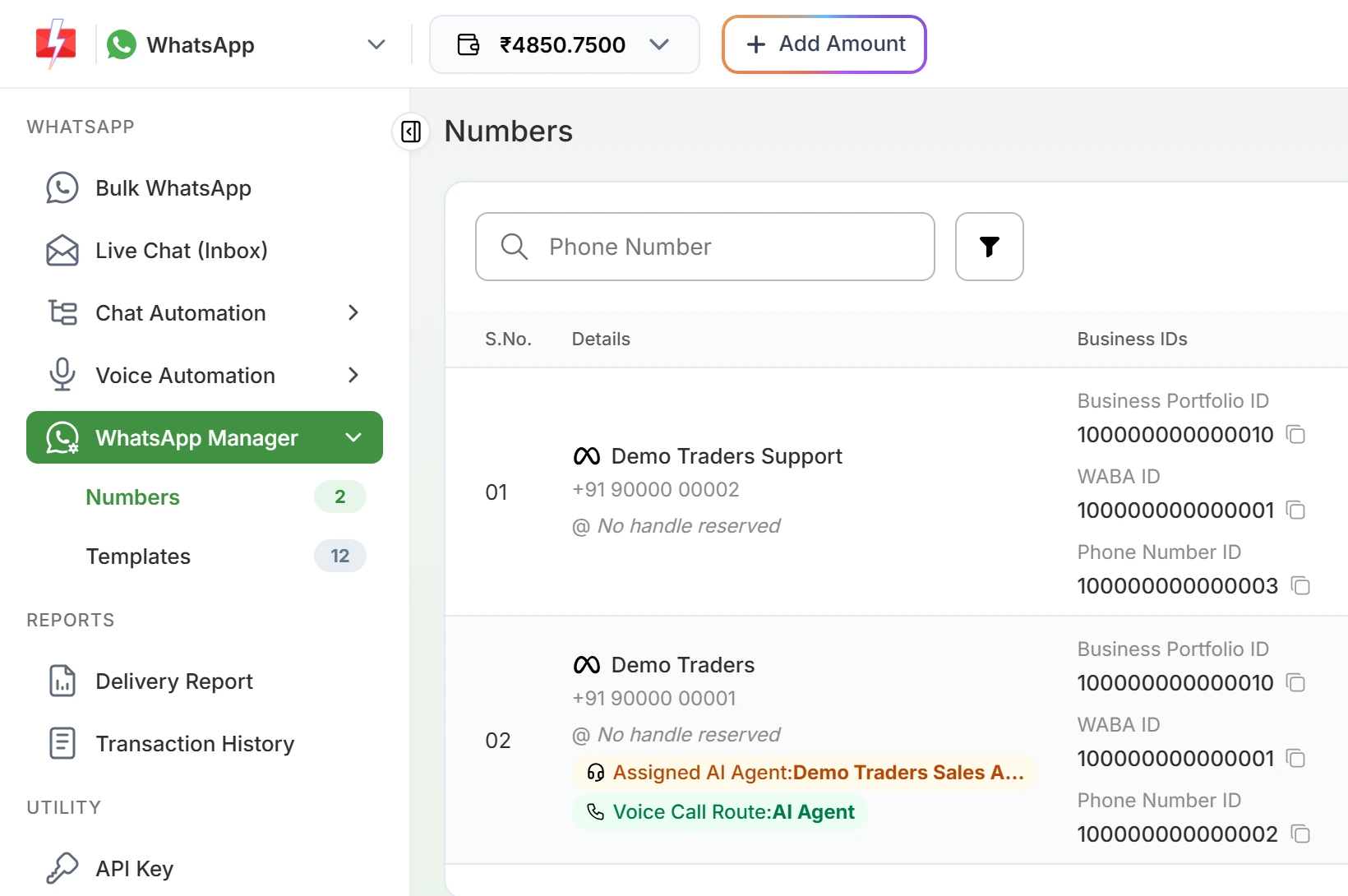
Each number shows its portfolio, WABA and Phone Number IDs. -
Copy the ID you need
Click the copy icon next to the ID. Paste it as it is, with no spaces.
-
Open the account in Meta if you need to
Click the three-dot menu on the number and choose Meta Manager. It opens Meta’s WhatsApp Manager template page for that WABA in a new tab.
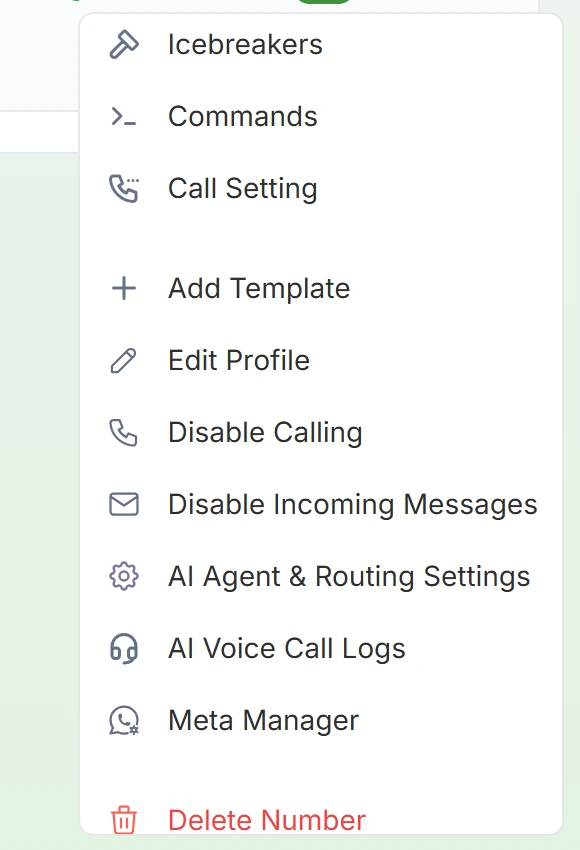
Meta Manager opens the same account at Meta.
Get the IDs by API
Developers can list numbers with their WABA ID, Phone Number ID, quality rating, messaging limit and connection status:
curl -G "https://www.fast2sms.com/dev/dlt_manager/whatsapp" \
  -H "authorization: YOUR_API_KEY" \
  --data-urlencode "type=number"
Use type=template to list templates with their Fast2SMS message_id and Meta template_id. WhatsApp webhooks from Fast2SMS also carry phone_number_id and waba_id with every event.
How to find the IDs in Meta’s tools
- WABA ID in Meta Business Suite: go to Settings > Accounts > Messaging accounts and select the account. Meta’s docs say your existing WABA ID now identifies your Messaging account (WhatsApp accounts and Messaging accounts). Meta’s setup guide also points to WhatsApp Manager, under Settings > WhatsApp accounts.
- Business Portfolio ID: it is the
business_idvalue in the Meta Business Suite address bar, as the same Meta guide notes. - Both IDs for direct developers: in the Meta App Dashboard, open WhatsApp > API Setup. Meta’s Cloud API Get Started guide says the panel shows your Messaging account ID, and asks you to keep the phone number ID and Messaging account ID for later use.
- Phone Number IDs by API: a GET request to
/WABA_ID/phone_numberson Meta’s Graph API returns each number with its ID.
Common mix-ups and fixes
| Problem | Fix |
|---|---|
| “WhatsApp Phone Number ID is invalid or not connected.” | You sent the mobile number, a WABA ID or the ID of a number that is not Connected. Copy the Phone Number ID from the Numbers tab and check the Status column. |
| “WhatsApp Template ID (message_id) is invalid or not approved.” | You used Meta’s Template ID. The Fast2SMS API needs the Message ID from the template card, of an APPROVED template. |
| Partner asks for your business ID | They usually mean the Business Portfolio ID. When you share an account with a partner in Meta, you need the partner’s portfolio ID instead. |
| The WABA ID looks different in a new Meta screen | Meta now calls it the Messaging account ID. The number itself is the same. |
Frequently asked questions
What is a WhatsApp Business Account ID?
It is Meta’s ID for the account that holds your templates and billing. Since September 2026 Meta calls it the Messaging account ID, but the value and the API field name waba_id are unchanged.
Is the Phone Number ID the same as my WhatsApp number?
No. It is a long number that Meta assigns to your business phone number. APIs use it instead of the phone number.
Where is the Phone Number ID in Fast2SMS?
WhatsApp Manager, then Numbers, in the Business IDs column next to each number.
Do I need the Phone Number ID to send a template by API?
No. It is optional for template messages. Without it, a connected number of the template’s account is used. Session messages need the Phone Number ID or the display number.
Can two numbers have the same WABA ID?
Yes. Several numbers can sit under one WABA, but each has its own Phone Number ID.
What is a WAAC ID and do I need it?
It is the ID of the new WhatsApp account that holds one number. Meta plans to release it in the first half of 2027, so for now keep using the Phone Number ID.
Where do I find my Business Portfolio ID?
In Fast2SMS it is in the same Business IDs column. In Meta Business Suite it is the business_id value in the page address.