
Appointment reminder SMS cut no-shows for clinics, salons, service centres, coaching classes and consultants. With the Fast2SMS DLT SMS API you can send a confirmation when the booking is made and schedule reminders for the day before and a few hours before, all from your booking software. This guide shows the templates to register, the schedule_time parameter, two ways to handle reschedules and cancellations, and how to check delivery.
A simple reminder plan
| When | Example SMS (your DLT template) |
|---|---|
| At booking | Dear {#var#}, your appointment at {#var#} is confirmed for {#var#} at {#var#}. – Demo Clinic |
| 1 day before | Reminder: {#var#}, you have an appointment tomorrow at {#var#}, {#var#}. Call {#var#} to reschedule. – Demo Clinic |
| 2 to 3 hours before | Dear {#var#}, see you today at {#var#} at {#var#}. – Demo Clinic |
| On cancel or change | Dear {#var#}, your appointment on {#var#} is {#var#}. – Demo Clinic |
These are examples. Register your own wording on your DLT portal as transactional / Service Implicit templates. A call-back number in the SMS may need to be whitelisted on your DLT portal.
Before you start
- Approved DLT templates for the messages above, added in DLT Manager and linked to your sender ID.
- API key with API Access on.
- Wallet balance for your bookings.
- Your booking system stores each appointment’s mobile number, date and time, and can run code when a booking is made, changed or cancelled.
Set up
-
Note the Message IDs
Open DLT Manager, Content Template, and note the Message ID of each reminder template and the Sender ID it is linked to.
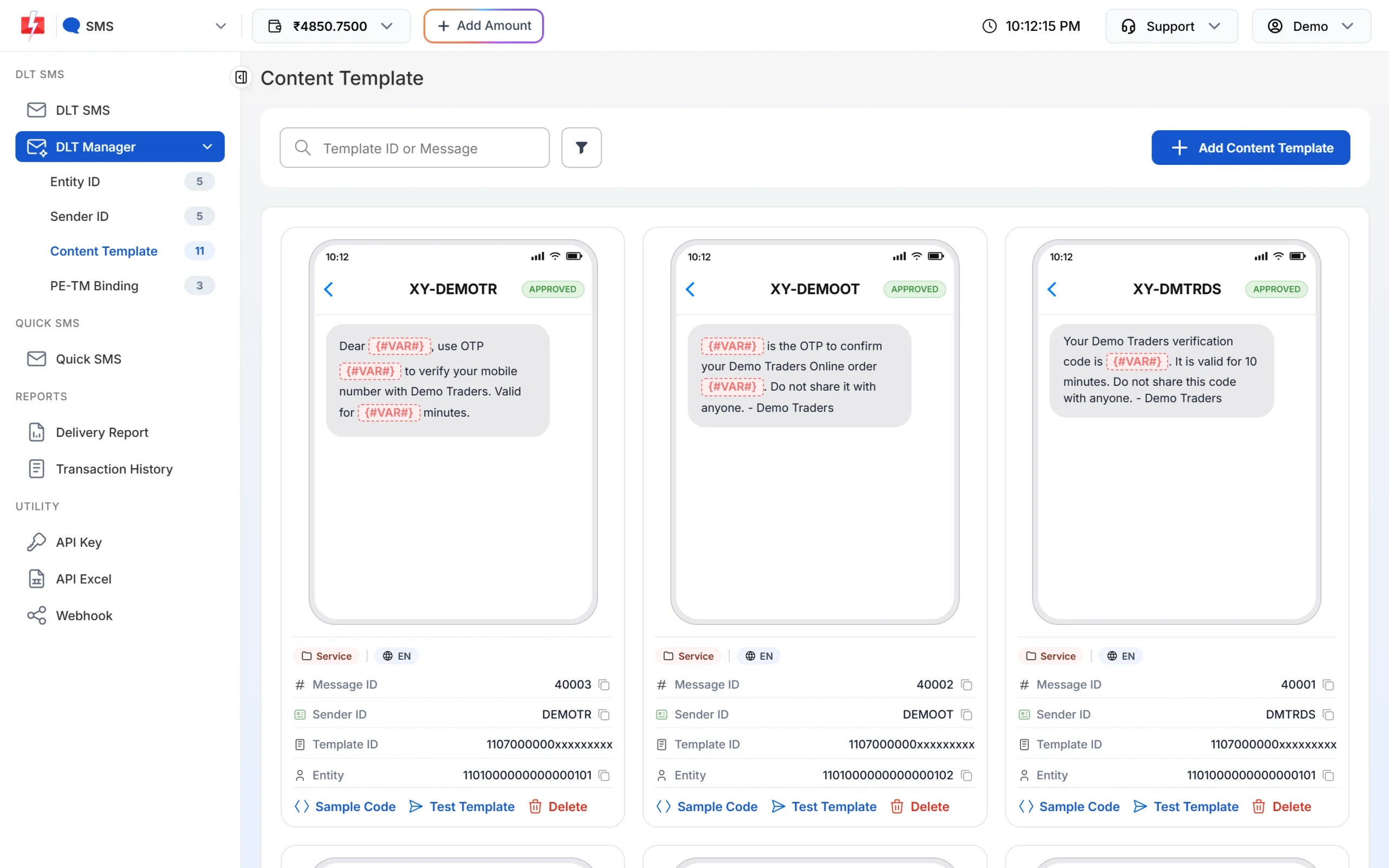
One Message ID per reminder type. -
Copy your API key
Go to Account Setting, API Key, click View and copy the key after entering the OTP sent to your account mobile. Keep it in your server settings.
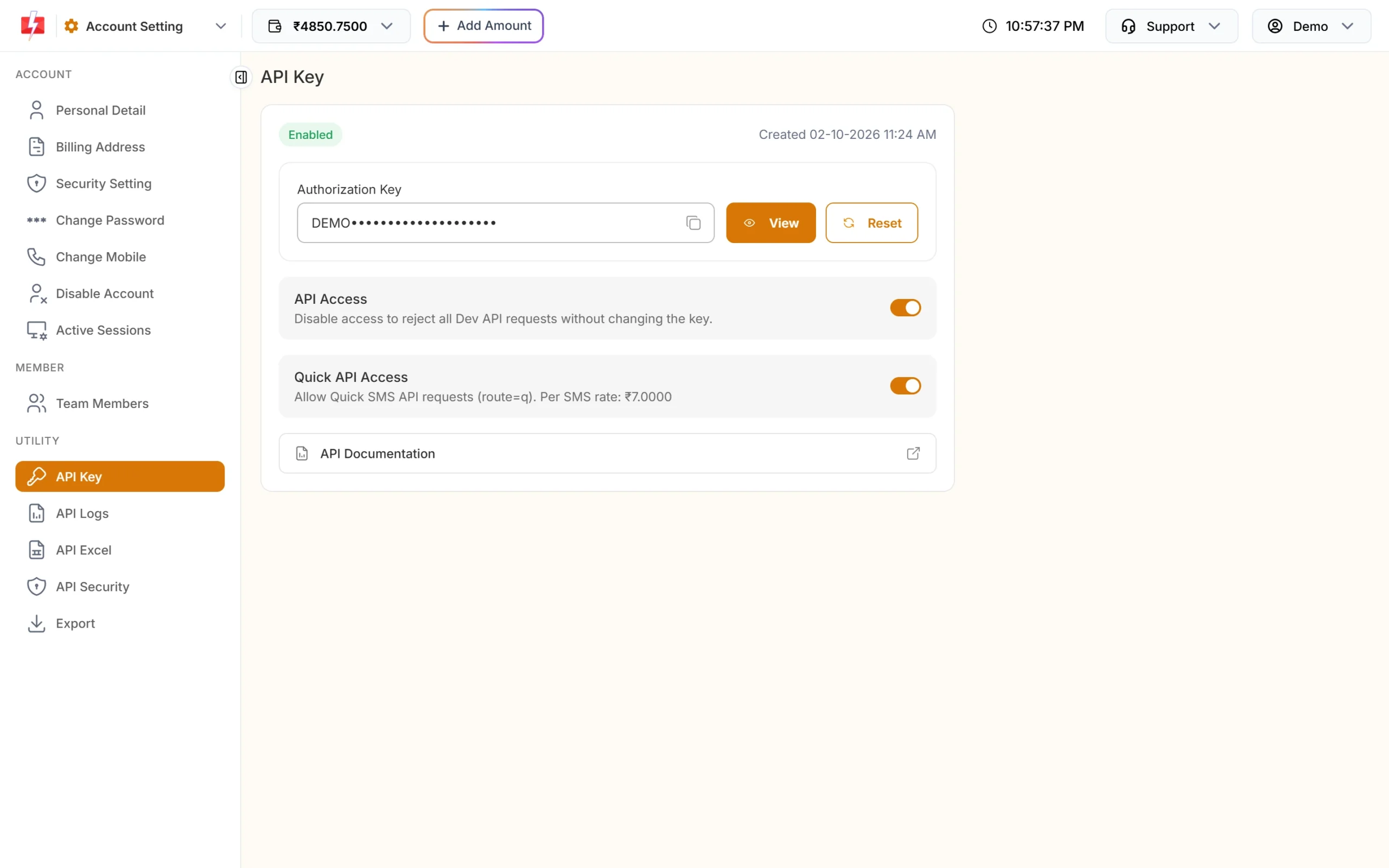
Store the key on your server only.
Schedule a reminder with schedule_time
Add schedule_time to a normal DLT SMS call. It takes a future time as DD-MM-YYYY-HH-MM in Indian time (IST), or a Unix timestamp.
curl -X POST "https://www.fast2sms.com/dev/bulkV2" \
  -H "authorization: YOUR_API_KEY" \
  -H "Content-Type: application/json" \
  -d '{"route":"dlt","sender_id":"DEMOTR","message":"10021","variables_values":"Rahul|Demo Clinic, Pune|10:30 AM|9000000001","numbers":"9999999999","schedule_time":"24-11-2026-18-00","udf1":"appt-5521"}'
A good reply is {"return":true,"request_id":"S...","message":["SMS scheduled successfully."]}. Save the request ID on the appointment.
In Python, building both reminders from the appointment time:
from datetime import datetime, timedelta
import os, requests

def schedule_reminder(mobile, message_id, variables, send_at, ref):
    if send_at <= datetime.now() + timedelta(minutes=2):
        return None                          # too late to schedule, skip or send now
    r = requests.post(
        "https://www.fast2sms.com/dev/bulkV2",
        headers={"authorization": os.environ["FAST2SMS_API_KEY"]},
        json={
            "route": "dlt",
            "sender_id": "DEMOTR",
            "message": message_id,
            "variables_values": "|".join(v.replace("|", " ")[:40] for v in variables),
            "numbers": mobile,
            "schedule_time": send_at.strftime("%d-%m-%Y-%H-%M"),   # server clock must be IST
            "udf1": ref,
        },
        timeout=(5, 15),
    )
    data = r.json()
    return data["request_id"] if data.get("return") is True else None

appt = datetime(2026, 11, 25, 10, 30)    # appointment time in IST
schedule_reminder("9999999999", "10021", ["Rahul", "Demo Clinic, Pune", "10:30 AM", "9000000001"],
                  appt - timedelta(days=1), "appt-5521-d1")
schedule_reminder("9999999999", "10022", ["Rahul", "10:30 AM", "Demo Clinic, Pune"],
appt - timedelta(hours=3), "appt-5521-h3")int(send_at_utc.timestamp()). That avoids time zone mistakes.A wrong format or a time in the past returns status_code 424 with “Invalid Schedule Date & Time. The selected time is not greater than the current time.” (HTTP 401). Nothing is scheduled.
Reschedules and cancellations: two approaches
A. Schedule ahead and cancel when things change
Send each reminder with schedule_time at booking time. If the appointment is cancelled or moved, cancel the scheduled SMS in the panel: Delivery Report, SMS Report, Schedule, then Cancel on that row. The amount is credited back to your wallet. A schedule can only be cancelled before it is sent.
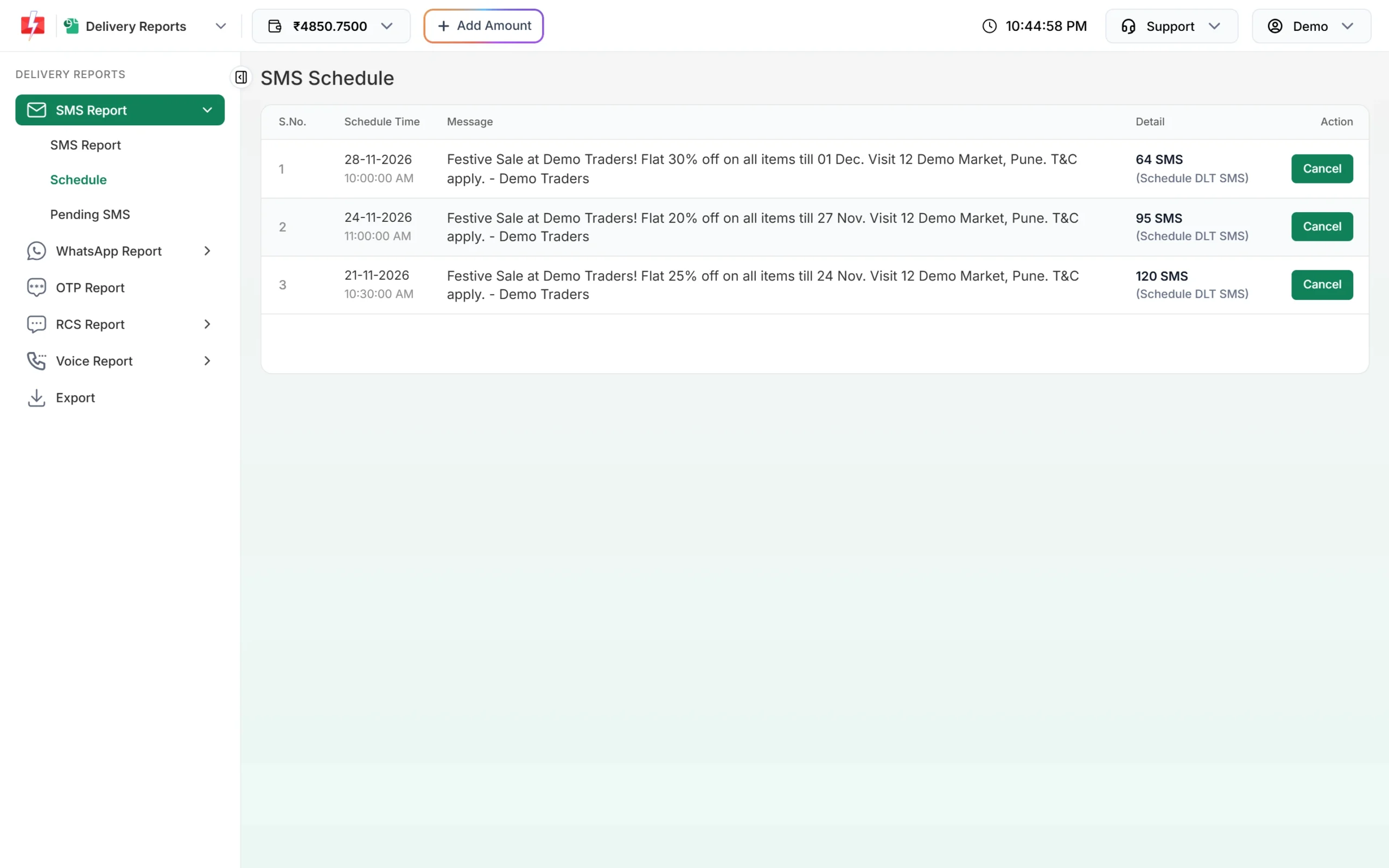
This suits small volumes where someone at the front desk handles changes.
B. Send due reminders from a job every few minutes
Do not schedule far ahead. Instead, run a job every 5 or 10 minutes that finds appointments whose reminder time has arrived, skips cancelled ones, sends the SMS right away (without schedule_time) and marks it as sent. Reschedules and cancellations then need no extra step, because the job always reads the latest booking data. This suits busy clinics and software products.
# run every 5 minutes (cron, Celery beat, etc.)
for appt in db.appointments_due_for_reminder(kind="d1"):   # status = booked, reminder_d1_sent is empty
    rid = send_now(appt.mobile, "10021", [appt.name, appt.place, appt.time_text, appt.helpline], ref=f"appt-{appt.id}-d1")
    db.mark_reminder_sent(appt.id, "d1", rid)                # save before the next run
Mark the reminder as sent right after the call, and do not retry a send after a timeout without checking first, so a patient never gets the same reminder twice.
Check that reminders reached people
- Webhook: set one up under Webhook, SMS. You get
status(delivered or failed) with yourudf1reference, for messages sent by API. - DLR API:
GET /dev/dlr/{request_id}after the send time. Use it or the webhook, not both. - Delivery Report: scheduled SMS show in the report after they are sent; upcoming ones are under Schedule.
If a reminder fails, a quick call from your staff or a voice call reminder can fill the gap.
Rules to know
- Night hold: transactional templates go out at any time. If a template is promotional, or the sender is numeric, SMS sent late at night are held until the next morning, and scheduled times in that window move to the morning. Keep reminders on Service Implicit templates.
- Variables: each value is cut to 40 characters. Long clinic addresses may need a shorter form.
- Bulk:
/dev/custom(many different messages in one call) does not supportschedule_time. For scheduled reminders, use one bulkV2 call per appointment, or approach B. - Charges: plan rate times SMS parts per number. See the bulk SMS pricing page.
Common problems and fixes
- Reminder came at the wrong hour: your server time is not IST. Use Unix timestamps.
- “Invalid Schedule Date & Time”: the time is in the past or the format is not DD-MM-YYYY-HH-MM. Check zero padding, for example 05-12-2026-09-05.
- Patient got a reminder for a cancelled booking: the scheduled SMS was not cancelled. Use approach B, or cancel in Schedule when you cancel the booking.
- Error 424 Invalid Message ID: use the Message ID from DLT Manager, linked to your sender.
Frequently asked questions
How early can I schedule an SMS?
Any future time works. For reminders, scheduling the day before and a few hours before is common.
Can I cancel a scheduled SMS by API?
Cancel it in the panel under Delivery Report, Schedule. If you need full control from code, use approach B and send reminders when they are due.
Is the money returned if I cancel?
Yes. Cancelling a scheduled SMS before it is sent credits the amount back to your wallet.
Can patients reply to confirm?
SMS from a sender ID cannot take replies. For confirm or cancel by reply, use WhatsApp, or a voice call where the person presses a key.
Can I send reminders on WhatsApp as well?
Yes, with an approved WhatsApp utility template and the WhatsApp API.
Which template type should reminders use?
Transactional / Service Implicit, so they are delivered at any hour and are not mixed with offers.