
You can send SMS and OTP from Python with the Fast2SMS API using the requests library and a few lines of code. This guide covers a DLT SMS from your own sender ID, a login OTP with Smart OTP (send, verify and resend), delivery reports by API and by webhook, and error handling. The last section has a complete Python module you can drop into a Flask, Django, FastAPI or plain script project.
Before you start
- Python 3.8 or later and the
requestspackage. - API key from API Key under UTILITY, with API Access on.
- DLT SMS: an approved sender ID and content template in DLT Manager. Note the Message ID of the template.
- OTP: a Smart OTP template in OTP Template List. Note its OTP ID.
- Wallet balance for what you send. Each SMS, OTP send and OTP resend is charged.
- Run it on your server. Never ship the API key inside a mobile app, desktop app or browser code.
Find the values you need in the panel
-
API key
Go to Account Setting, API Key. Click View, enter the OTP that comes to your account mobile and copy the Authorization Key.
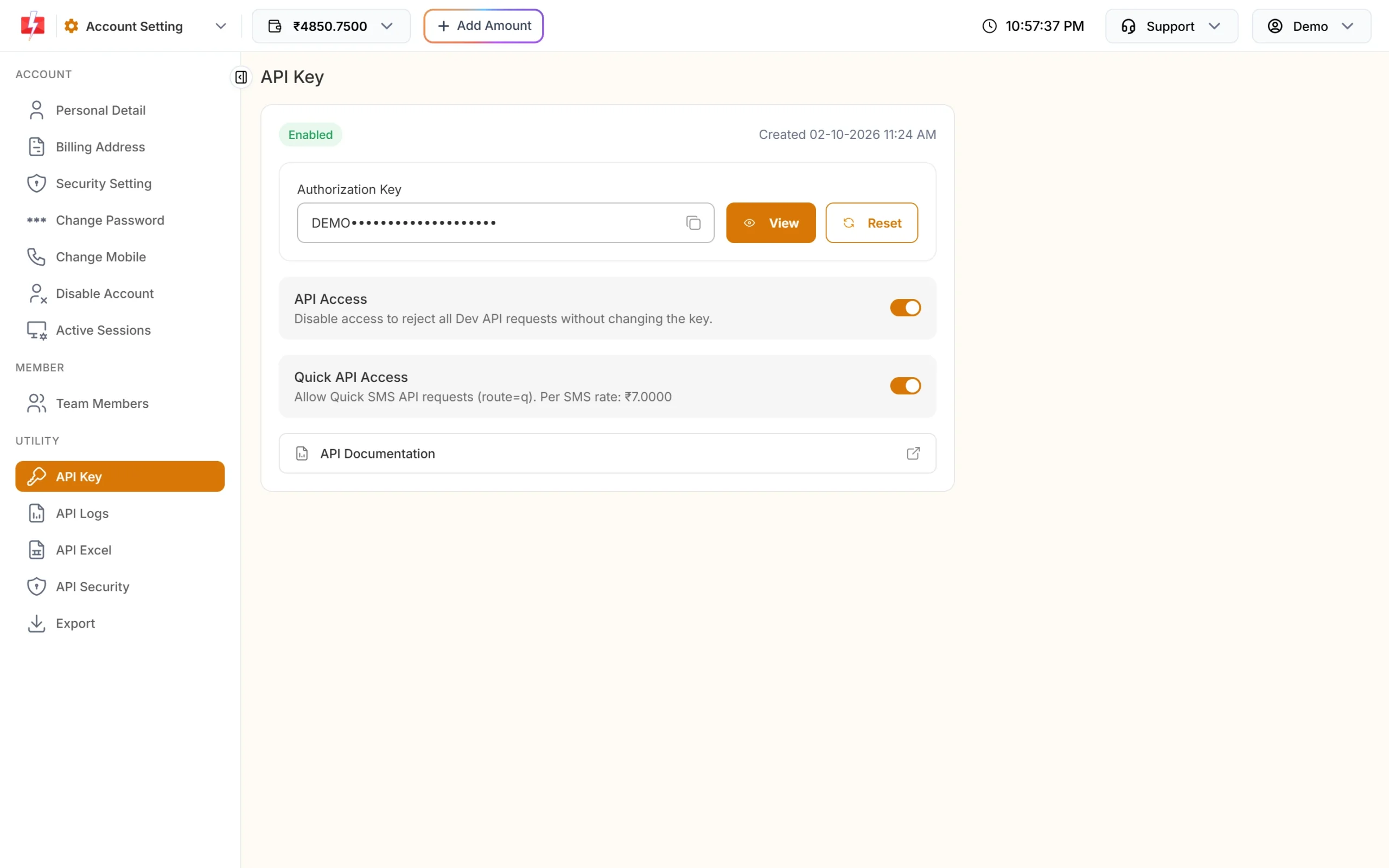
Keep API Access on, or every request gets error 413. -
Message ID and sender ID for DLT SMS
In the SMS app open DLT Manager, Content Template. Copy the Message ID and the Sender ID from the card of the approved template you want to send.
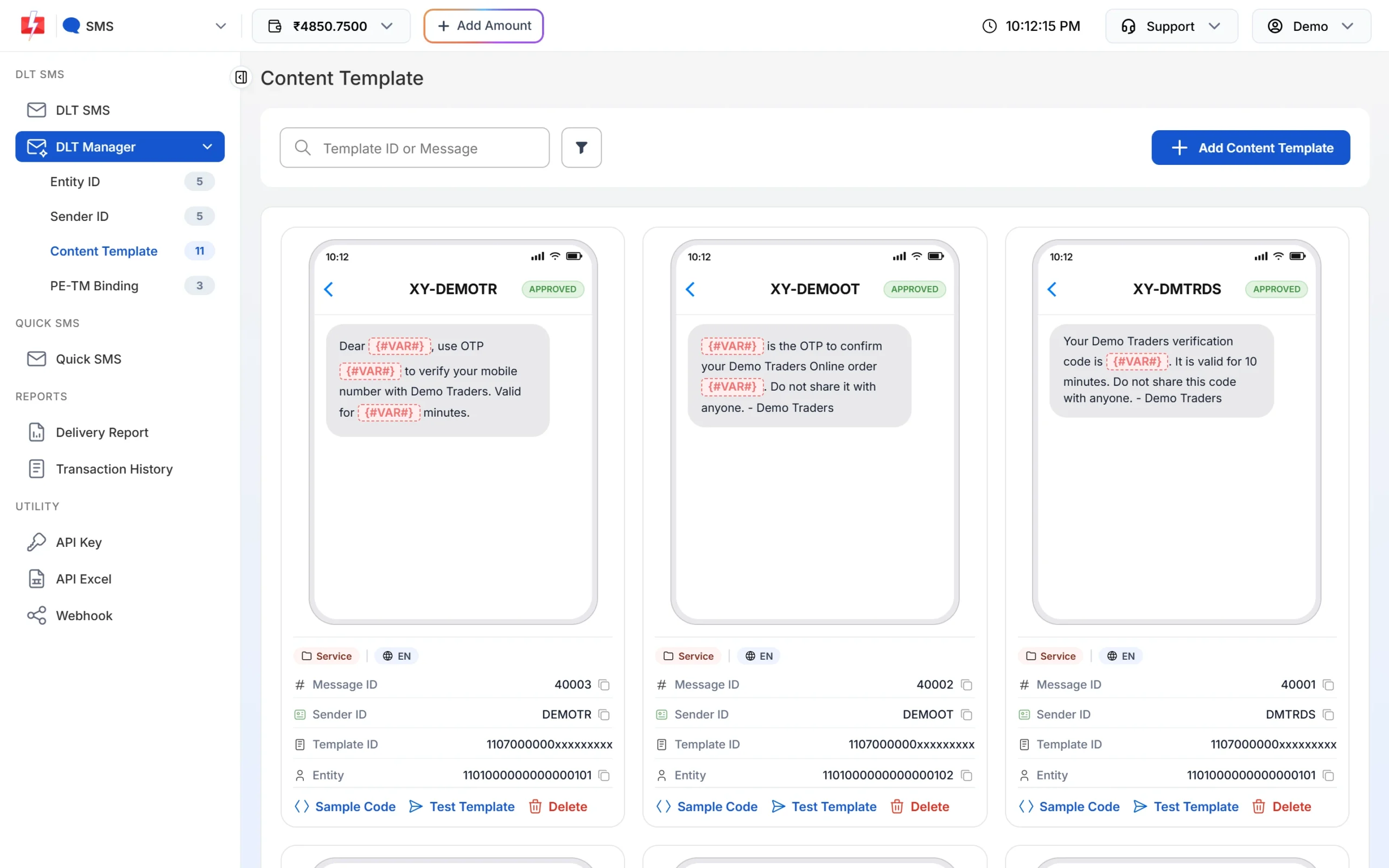
The Message ID is the short number on the card. -
OTP ID for Smart OTP
Open Smart OTP, OTP Template List, and copy the OTP ID of the template you want to use for login.
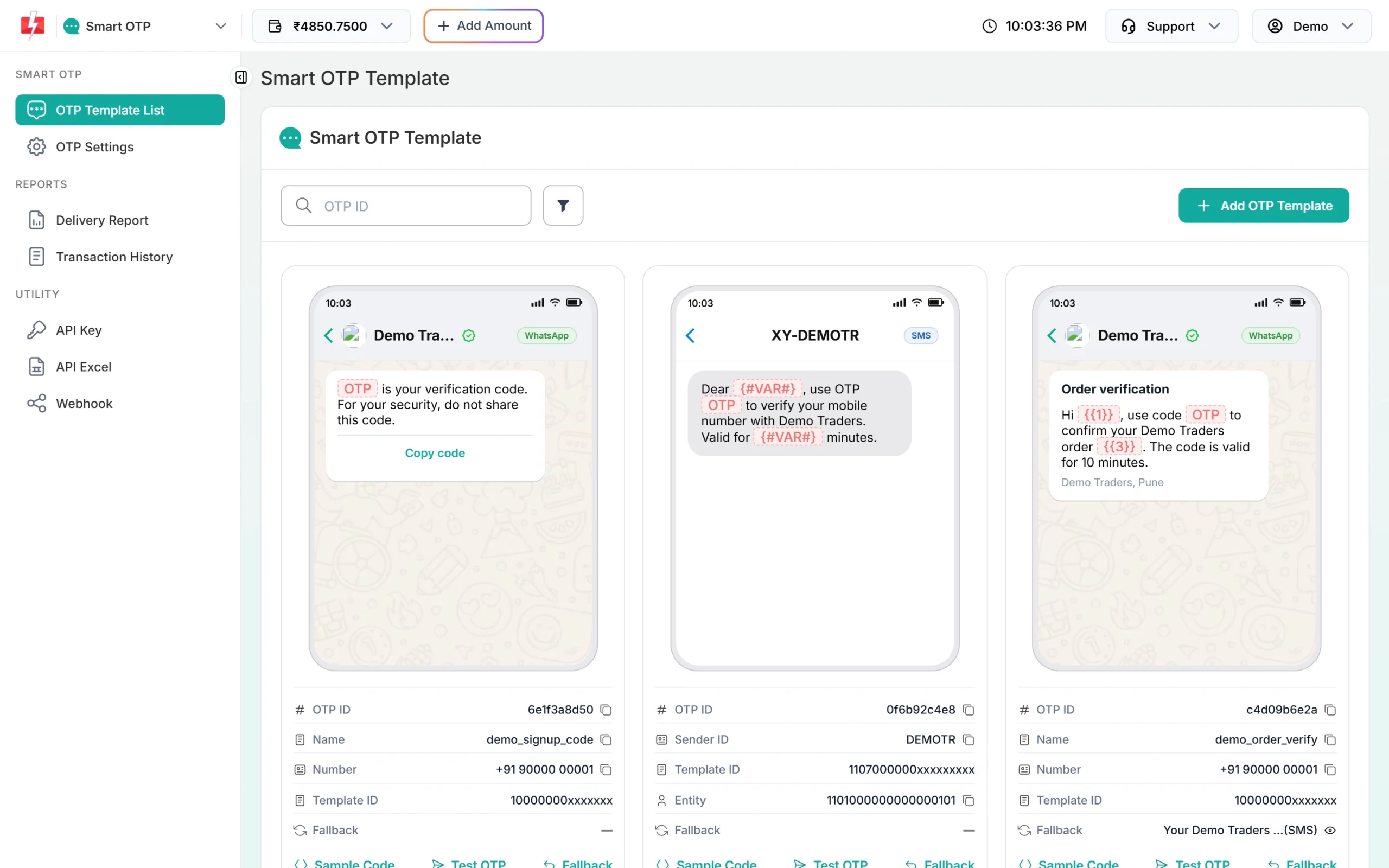
Each Smart OTP template has its own OTP ID.
Install and set up
pip install requests
export FAST2SMS_API_KEY="YOUR_API_KEY"     # on Windows: set FAST2SMS_API_KEY=YOUR_API_KEY
Keep the key in an environment variable or your framework’s settings, never in Git. A shared helper makes every call the same:
import os
import requests

BASE_URL = "https://www.fast2sms.com"
API_KEY = os.environ["FAST2SMS_API_KEY"]

session = requests.Session()
session.headers.update({"authorization": API_KEY, "Accept": "application/json"})


def post(path, payload):
    r = session.post(BASE_URL + path, json=payload, timeout=(5, 15))
    try:
        data = r.json()
    except ValueError:
        return False, r.status_code, {"message": "Non-JSON response"}
    ok = r.ok and data.get("return") is True
    return ok, r.status_code, data
timeout=(5, 15) means 5 seconds to connect and 15 seconds to read. Without a timeout, a slow network can block your web worker.
authorization header. Do not add “Bearer “. The OTP endpoints do not remove it and reply “Invalid authorization key”.Send a DLT SMS in Python
DLT SMS goes to /dev/bulkV2 with route=dlt. You pass the template’s Message ID and the values for its variables, and Fast2SMS builds the approved text.
The example uses Message ID 10001 on sender DEMOTR, with four variables: name, order number, amount and date.
ok, http, data = post("/dev/bulkV2", {
    "route": "dlt",
    "sender_id": "DEMOTR",            # exact case from DLT Manager
    "message": "10001",               # Message ID, not the 19-digit Template ID
    "variables_values": "|".join(["Rahul", "DT10458", "1240", "21 Nov"]),
    "numbers": ",".join(["9999999999", "8888888888"]),
    "udf1": "order-DT10458",          # optional reference, returned in webhooks
})

if ok:
    print("Queued, request ID:", data["request_id"])   # S...
else:
print("Not sent:", data.get("status_code", http), data.get("message"))- Values follow the order of
{#var#}in the template. Each value is cut to 40 characters. - The sender ID must match exactly, including upper and lower case.
- On success
data["message"]is a list,["SMS sent successfully."]. That means queued, not delivered. - Add
"schedule_time": "25-11-2026-10-30"(DD-MM-YYYY-HH-MM in IST) to send later. - Add
"sms_details": 1to get the character count, SMS parts and amount in the reply.
Send and verify an OTP with Smart OTP
With Smart OTP, Fast2SMS makes the code, sends it and checks it. Your Python app only passes the mobile number and later the code the user typed.
Send
ok, http, data = post("/dev/otp/send", {
    "mobile": "9999999999",
    "otp_id": "YOUR_OTP_ID",
    "otp_expiry": 5,      # minutes (1 to 10080), default 15
    "otp_length": 6,      # 4 to 10, default 6
})
print("OTP sent" if ok else data.get("message"))
Verify
def verify_otp(mobile, otp):
    ok, http, data = post("/dev/otp/verify", {"mobile": mobile, "otp": otp})
    return ok, data.get("message", "")

ok, msg = verify_otp("9999999999", "482913")
if ok:
    print("Verified, log the user in")
else:
    print("Not verified:", msg)   # Invalid OTP / OTP expired / OTP not found or already verified
No OTP ID is needed to verify. Fast2SMS checks the latest unverified OTP for that mobile. A new send to the same number cancels all older OTPs, so do not send again on page refresh.
Resend
ok, http, data = post("/dev/otp/resend", {"mobile": "9999999999"})
print("Sent again" if ok else data.get("message"))
Resend sends the same OTP and is charged again. It is allowed within 10 minutes of the first send and up to 5 sends in total, so the user gets 4 resends. Between sends there is a wait set in OTP Settings (default 10 seconds); a request inside the wait gets “Please wait N seconds before requesting a new OTP”.
Get the delivery status
A success reply only means the message was accepted. Use either the DLR API or a webhook to learn the final status. Do not use both for the same messages, because reading a DLR by API can stop the webhook for those rows.
DLR API
def delivery_report(request_id):
    r = session.get(f"{BASE_URL}/dev/dlr/{request_id}", timeout=(5, 15))
    data = r.json()
    if not data.get("success"):
        return []
    return [(row["mobile"], row["status"]) for row in data["data"][0]["delivery_status"]]

for mobile, status in delivery_report("Sa1B2c3D4e5F6g7"):
    print(mobile, status)     # Delivered, Failed or Sent (report pending)
The DLR API looks back 7 days. A 404 with “No DLR found for the given request_id…” means a wrong ID, an old ID, or only invalid numbers.
Webhook receiver (Flask)
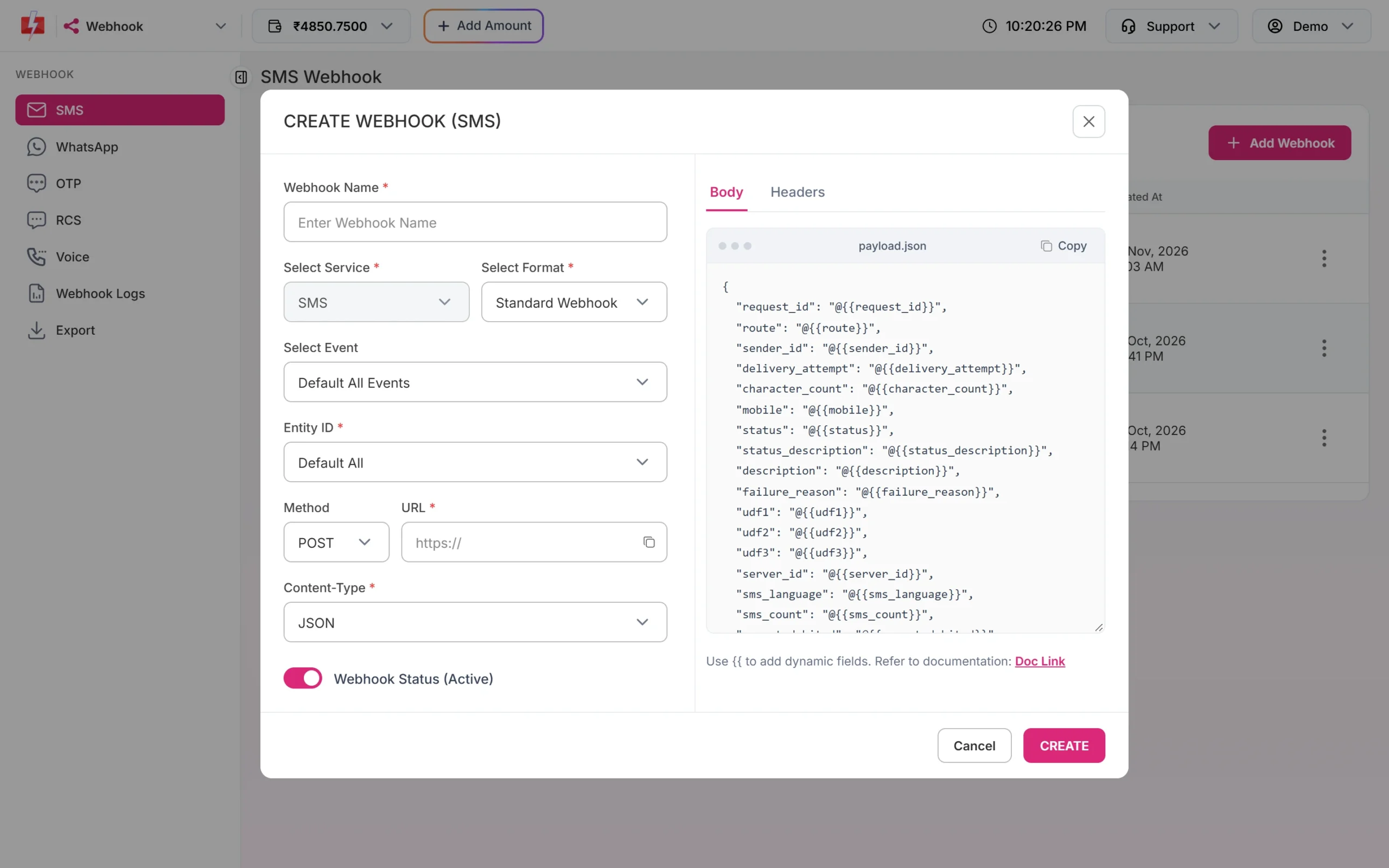
Create the webhook in the panel: Webhook, then SMS or OTP, Add Webhook, format Standard Webhook, method POST, content type JSON and your public URL.
import os
from flask import Flask, request, abort

app = Flask(__name__)

@app.post("/fast2sms/webhook")
def fast2sms_webhook():
    # Optional: a custom header you added in the webhook's Headers tab
    if request.headers.get("X-Webhook-Token") != os.environ.get("MY_WEBHOOK_TOKEN"):
        abort(401)

    event = request.get_json(silent=True) or {}
    request_id = event.get("request_id")
    mobile = event.get("mobile")
    status = event.get("status")              # delivered or failed
    reason = event.get("status_description")
    # save_status(request_id, mobile, status, reason)
    return "OK", 200
Reply within 10 seconds with any 2xx code. On a timeout, HTTP 408, 429 or 5xx, Fast2SMS tries again up to 3 times, 60 seconds apart. Check every attempt in Webhook Logs. Webhooks are sent only for messages sent through the API, and only for reports that arrive within 24 hours.
In Django, the same view is a function decorated with @csrf_exempt and @require_POST that reads json.loads(request.body).
Error handling
- Always check
return. The wallet check can reply with HTTP 200 and"return": falsewith status_code 416. Do not trustr.okalone. - Do not wrap sends in an automatic retry. Libraries like
urllib3.Retryortenacitycan resend after a read timeout, which sends and charges twice. Retry only if the connection never opened. Verify is free and can be retried once. - Catch network errors with
requests.exceptions.ConnectionErrorandrequests.exceptions.Timeout. - Use API Logs in the panel to see the exact request and reply of the last 7 days.
| Reply | Meaning | Fix |
|---|---|---|
| 412 Invalid Authentication, Check Authorization Key | Key wrong, old or missing (SMS endpoints) | Copy the key again from API Key. |
| Invalid authorization key | Key wrong or has “Bearer ” (OTP endpoints) | Send the bare key. |
| 413 Authorization Key Disabled | API Access is off | Turn on API Access. |
| 414 IP is blacklisted from Dev API section | API Security blocks your server IP | Whitelist the IP in API Security. |
| 406 Invalid Sender ID | Sender not yours or wrong case | Copy it from DLT Manager. |
| 424 Invalid Message ID | Wrong ID, or template not linked to the sender | Use the Message ID from the same card as the sender. |
| 411 Invalid Numbers | No valid number in the list | Send 10-digit mobiles starting with 6 to 9. |
| 416 You don’t have sufficient wallet balance | Low balance | Recharge. |
| Invalid OTP ID | OTP ID wrong, deleted or from another account | Copy it from OTP Template List. |
| Please wait N seconds before requesting a new OTP | Resend wait | Show a countdown in your app. |
| OTP expired / Invalid OTP | Too late, or wrong code | Ask for a new OTP, or let the user retry. |
| Maximum verification attempts reached | Too many wrong codes | Send a new OTP. |
Full copy-paste example: fast2sms.py
"""fast2sms.py - small Fast2SMS client for DLT SMS and Smart OTP."""
import os
import requests


class Fast2SMSError(Exception):
    pass


class Fast2SMS:
    def __init__(self, api_key=None, base_url="https://www.fast2sms.com"):
        self.base_url = base_url
        self.session = requests.Session()
        self.session.headers.update({
            "authorization": api_key or os.environ["FAST2SMS_API_KEY"],
            "Accept": "application/json",
        })

    def _call(self, method, path, payload=None):
        try:
            r = self.session.request(method, self.base_url + path, json=payload, timeout=(5, 15))
        except requests.exceptions.RequestException as exc:
            raise Fast2SMSError(f"Network error: {exc}") from exc
        try:
            data = r.json()
        except ValueError:
            return {"ok": False, "http": r.status_code, "message": "Non-JSON response", "raw": r.text}
        ok = r.ok and (data.get("return") is True or data.get("success") is True)
        msg = data.get("message", "")
        if isinstance(msg, list):
            msg = " ".join(msg)
        return {
            "ok": ok,
            "http": r.status_code,
            "status_code": data.get("status_code"),
            "request_id": data.get("request_id"),
            "message": msg,
            "raw": data,
        }

    def send_dlt(self, sender_id, message_id, variables, numbers, **extra):
        payload = {
            "route": "dlt",
            "sender_id": sender_id,
            "message": str(message_id),
            "variables_values": "|".join(str(v) for v in variables),
            "numbers": ",".join(numbers),
        }
        payload.update(extra)          # schedule_time, sms_details, udf1...
        return self._call("POST", "/dev/bulkV2", payload)

    def send_otp(self, mobile, otp_id, expiry=5, length=6, variables=None):
        payload = {"mobile": mobile, "otp_id": otp_id, "otp_expiry": expiry, "otp_length": length}
        if variables:
            payload["variables_values"] = "|".join(variables)
        return self._call("POST", "/dev/otp/send", payload)

    def verify_otp(self, mobile, otp):
        return self._call("POST", "/dev/otp/verify", {"mobile": mobile, "otp": otp})

    def resend_otp(self, mobile):
        return self._call("POST", "/dev/otp/resend", {"mobile": mobile})

    def delivery_report(self, request_id):
        return self._call("GET", f"/dev/dlr/{request_id}")


if __name__ == "__main__":
    f2s = Fast2SMS()

    res = f2s.send_dlt("DEMOTR", 10001, ["Rahul", "DT10458", "1240", "21 Nov"], ["9999999999"])
    print("SMS:", res["ok"], res["request_id"] or res["message"])

    res = f2s.send_otp("9999999999", "YOUR_OTP_ID")
    print("OTP send:", res["ok"], res["message"])

    code = input("Enter the OTP: ").strip()
    res = f2s.verify_otp("9999999999", code)
    print("Verified" if res["ok"] else f"Not verified: {res['message']}")
The DLR API replies with success instead of return, so _call accepts either. Fast2SMS also has Python starter kits for Flask and Django with this client, a login page, a mock server and tests, if you want a ready project.
Common problems and fixes
- KeyError: ‘FAST2SMS_API_KEY’: the environment variable is not set for the user or service that runs your app (systemd, gunicorn, cron). Set it there.
- Error 414 only in production: API Security is on and the production server’s public IP is not whitelisted.
- SSLError on old servers: update
certifiand your OS CA certificates. Do not useverify=False. - Hindi variable values break: pass normal Python strings and let
requestssend JSON. Do not encode them yourself. - Celery task sends twice: a task retry after a timeout resends the SMS. Turn off automatic retries for send tasks.
Frequently asked questions
Is there an official Fast2SMS pip package?
You do not need one. The API is JSON over HTTPS, and the small class above covers DLT SMS, OTP and delivery reports.
Can I use httpx or aiohttp instead of requests?
Yes. Send the same JSON body and the authorization header. The endpoints do not depend on the client library.
How do I send different messages to different numbers in one call?
Use POST /dev/custom with a requests list, one item per message. For the same text to many numbers, one bulkV2 call with comma-separated numbers is enough.
Can I send OTP with my own DLT template instead of Smart OTP?
Yes. Send your approved OTP template with route=dlt and the code in variables_values. Your Python app must then create, store and check the code itself.
Is verify charged?
No. Only sends and resends are charged.
How long can an OTP stay valid?
Set otp_expiry in minutes, from 1 to 10080. The default is 15 minutes. For login, 5 to 10 minutes is common.