
To send different SMS to different numbers in one API call, use the Fast2SMS /dev/custom endpoint. You post one JSON body with a list of messages, each with its own numbers, template and values. It works for DLT SMS, DLT Manual and Quick SMS. This page shows the request format for each route, code in cURL, PHP, Python and Node.js, the replies and the errors, including the duplicate-number rule.
When to use /dev/custom
- Each customer needs a different text, for example different order numbers, amounts or due dates.
- You send several templates at once, for example order confirmations and payment reminders together.
- You want one request and one request ID for a batch, instead of many separate calls.
If everyone gets the same text, use /dev/bulkV2 with a comma-separated numbers list instead. It is simpler and also supports scheduling.
Before you start
- Your API key from API Key, with API Access on.
- For DLT SMS: the Message ID and linked Sender ID of each template, from DLT Manager > Content Template.
- For DLT Manual: the approved text, Entity ID and Template ID of each message.
- For Quick SMS: Quick API Access on and at least ₹100 in total recharges.
- Enough wallet balance for the whole batch. The total cost is checked before anything is sent.
Endpoint
| URL | https://www.fast2sms.com/dev/custom |
| Method | POST only |
| Body | JSON (Content-Type: application/json) |
| Header | authorization: YOUR_API_KEY |
Fields
| Field | DLT SMS (dlt) |
DLT Manual (dlt_manual) |
Quick SMS (q) |
|---|---|---|---|
route (top level) |
dlt |
dlt_manual |
q |
requests (top level) |
A list with at least 1 item. Each item is one message. | ||
requests[].sender_id |
Required. Your approved sender | Required | Not used |
requests[].message |
Required. Message ID | Required. Full approved text | Required. Your text |
requests[].variables_values |
If the template has variables. Separated by | |
Not used | Not used |
requests[].entity_id, requests[].template_id |
Not used | Required in every item | Not used |
requests[].numbers |
Required. Comma-separated 10-digit Indian mobiles | ||
udf1, udf2, udf3 |
Optional, at the top level or in each item | ||
/dev/custom, DLT Manual items always need entity_id and template_id. The text matching from DLT Manager that works on bulkV2 is not used here. schedule_time is also not supported on this endpoint.Send a batch of DLT SMS
-
Collect your Message IDs
Open DLT Manager > Content Template and note the Message ID and Sender ID of every template in the batch. Only Approved templates can be sent.
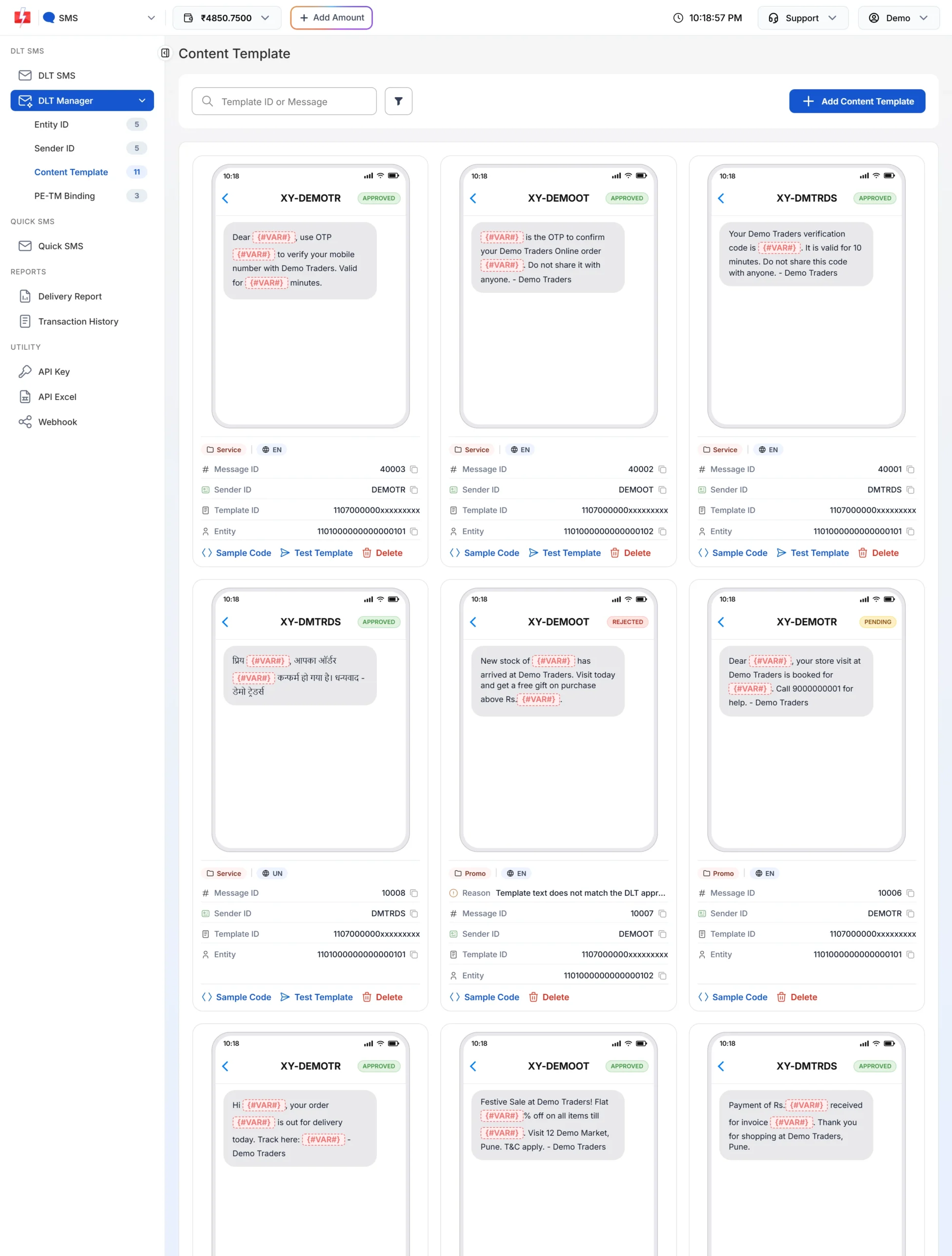
Each item in the batch needs a Message ID and its linked sender. -
Build one item per message
For each customer or group, add an item with the sender, Message ID, variable values and numbers. Do not put the same number in two items.
-
Post the JSON and save the request ID
Send the body to
/dev/custom. Checkreturnin the reply and save therequest_id.
cURL: DLT SMS
curl -X POST "https://www.fast2sms.com/dev/custom" \
  -H "authorization: YOUR_API_KEY" \
  -H "Content-Type: application/json" \
  -d '{
    "route": "dlt",
    "requests": [
      {"sender_id":"DEMOTR","message":"10001","variables_values":"Rahul|DT10458|1240|21 Nov","numbers":"9999999999"},
      {"sender_id":"DEMOTR","message":"10001","variables_values":"Priya|DT10459|860|22 Nov","numbers":"8888888888"}
    ]
  }'
cURL: DLT Manual
curl -X POST "https://www.fast2sms.com/dev/custom" \
  -H "authorization: YOUR_API_KEY" \
  -H "Content-Type: application/json" \
  -d '{
    "route": "dlt_manual",
    "requests": [
      {"sender_id":"DEMOTR","message":"Dear Rahul, your order DT10458 of Rs.1240 is confirmed and will be delivered by 21 Nov. - Demo Traders",
       "entity_id":"YOUR_ENTITY_ID","template_id":"YOUR_TEMPLATE_ID","numbers":"9999999999"},
      {"sender_id":"DEMOTR","message":"Dear Priya, your order DT10459 of Rs.860 is confirmed and will be delivered by 22 Nov. - Demo Traders",
       "entity_id":"YOUR_ENTITY_ID","template_id":"YOUR_TEMPLATE_ID","numbers":"8888888888"}
    ]
  }'
cURL: Quick SMS
curl -X POST "https://www.fast2sms.com/dev/custom" \
  -H "authorization: YOUR_API_KEY" \
  -H "Content-Type: application/json" \
  -d '{"route":"q","requests":[
        {"message":"Demo Traders: your repair item is ready for pickup.","numbers":"9999999999"},
        {"message":"Demo Traders: your repair item will be ready tomorrow.","numbers":"8888888888"}]}'
Python: batch from your order list
import requests

orders = [
    {"name": "Rahul", "id": "DT10458", "amount": 1240, "date": "21 Nov", "mobile": "9999999999"},
    {"name": "Priya", "id": "DT10459", "amount": 860, "date": "22 Nov", "mobile": "8888888888"},
]

items = [{
    "sender_id": "DEMOTR",
    "message": "10001",
    "variables_values": "|".join(str(v).replace("|", " ")[:40] for v in (o["name"], o["id"], o["amount"], o["date"])),
    "numbers": o["mobile"],
} for o in orders]

r = requests.post(
    "https://www.fast2sms.com/dev/custom",
    headers={"authorization": "YOUR_API_KEY"},
    json={"route": "dlt", "requests": items},
    timeout=30,
)
print(r.status_code, r.json())
PHP
<?php
$orders = [
    ['Rahul', 'DT10458', 1240, '21 Nov', '9999999999'],
    ['Priya', 'DT10459', 860, '22 Nov', '8888888888'],
];

$items = [];
foreach ($orders as [$name, $id, $amount, $date, $mobile]) {
    $items[] = [
        'sender_id'        => 'DEMOTR',
        'message'          => '10001',
        'variables_values' => implode('|', [$name, $id, $amount, $date]),
        'numbers'          => $mobile,
    ];
}

$ch = curl_init('https://www.fast2sms.com/dev/custom');
curl_setopt_array($ch, [
    CURLOPT_POST           => true,
    CURLOPT_RETURNTRANSFER => true,
    CURLOPT_TIMEOUT        => 30,
    CURLOPT_HTTPHEADER     => ['authorization: YOUR_API_KEY', 'Content-Type: application/json'],
    CURLOPT_POSTFIELDS     => json_encode(['route' => 'dlt', 'requests' => $items]),
]);
echo curl_exec($ch);
curl_close($ch);
Node.js
const orders = [
  { name: "Rahul", id: "DT10458", amount: 1240, date: "21 Nov", mobile: "9999999999" },
  { name: "Priya", id: "DT10459", amount: 860, date: "22 Nov", mobile: "8888888888" },
];

const requests = orders.map((o) => ({
  sender_id: "DEMOTR",
  message: "10001",
  variables_values: [o.name, o.id, o.amount, o.date].join("|"),
  numbers: o.mobile,
}));

const res = await fetch("https://www.fast2sms.com/dev/custom", {
  method: "POST",
  headers: { authorization: "YOUR_API_KEY", "Content-Type": "application/json" },
  body: JSON.stringify({ route: "dlt", requests }),
});
console.log(res.status, await res.json());Replies
Success:
{"return": true, "request_id": "Sa1B2c3D4e5F6g7", "message": ["SMS sent successfully."]}Errors on this endpoint do not all look the same. Check for "return": true, and treat anything else as a failure.
| HTTP | Reply | Meaning and fix |
|---|---|---|
| 400 | {"status":"error","message":["The requests.0.numbers field is required.", ...]} |
A required field is missing. The message names the item (0 = first item). This check runs before your key is checked. |
| 400 | {"status":"error","message":["Duplicate numbers are not allowed in requests."]} |
The same number is in two items. Merge those messages or send them in separate calls. |
| 400 | "Sender ID is not valid." |
DLT SMS: the sender is not your approved sender, or the case is different. |
| 400 | "Message is not valid." |
DLT SMS: the Message ID is not approved or not linked to that sender. |
| 400 | 416 “You don’t have sufficient wallet balance” | The total cost of the batch is more than your balance. Recharge or split the batch. |
| 400 | status_code 500 “<block reason> (requests.N)” | The entity, sender or template of item N is on the DLT block list. |
| 500 | 408 “Invalid Route” | An item is missing its sender, message or numbers, or on DLT Manual its entity_id or template_id. |
| 500 | 998 “Route is blocked in your account, use DLT SMS route.” | Quick SMS on an account set to DLT only. |
| 401 | 412 / 413 / 414 / 428 | Key, API Access, IP whitelist or Quick API Access problem. |
Good to know
- Night hold: groups from a numeric (promotional) sender sent after 9 PM are delayed to 10 AM the next day.
- Cost: each item is charged like a normal send: rate x valid numbers x SMS parts. Quick SMS items use your Quick SMS rate.
- Single message: a body with one item and one number is handled like a normal bulkV2 send, and you get the bulkV2 reply and errors.
- Delivery: track the batch by its request ID in Delivery Report, or with an SMS webhook.
Frequently asked questions
Can I use GET for /dev/custom?
No. Send a POST with a JSON body.
Can I mix routes in one request?
No. route is set once at the top level and applies to every item. Send a separate request for each route.
Can I schedule a /dev/custom batch?
No, schedule_time is not supported here. To schedule, use /dev/bulkV2 with one call per text.
Why does it say duplicate numbers are not allowed?
The same mobile number appears in more than one item. Repeats across items are refused unless duplicate numbers are enabled for your account. Remove the repeat, or send the second message in another call.
Does DLT Manual on /dev/custom work without template_id?
No. Each DLT Manual item must have both entity_id and template_id.
Is there a limit on items per request?
No fixed limit is published. Send very large batches in smaller parts, so that one bad item or a network timeout does not hold up everything.