
The sender ID in the Fast2SMS API is the 3 to 6 character header your SMS comes from, such as DEMOTR. On the DLT SMS route it must be one of your own approved sender IDs in DLT Manager, written in exactly the same case, and the template you send must be linked to it. This page explains the sender ID rules for each API route and how to avoid error 406 “Invalid Sender ID”.
Sender ID rules by route
| Route | sender_id rule |
|---|---|
DLT SMS (route=dlt) |
Required. Must be one of your own Approved senders in DLT Manager. The match is case-sensitive. The template (Message ID) must be linked to this sender. Shared or global senders are not accepted. |
DLT Manual (route=dlt_manual) |
Required. Must be 3 to 6 characters. Fast2SMS does not check it against DLT Manager, so it must be right at DLT or the operator rejects the SMS. |
Quick SMS (route=q) |
Not used. The SMS goes from a random sender. |
| Smart OTP API | Not sent. The sender comes from the DLT template linked to your OTP ID. |
Check your sender ID before you code
-
Open Sender ID in DLT Manager
In the SMS app, open DLT Manager > Sender ID. Each row shows the sender, its entity, the date added and the status.
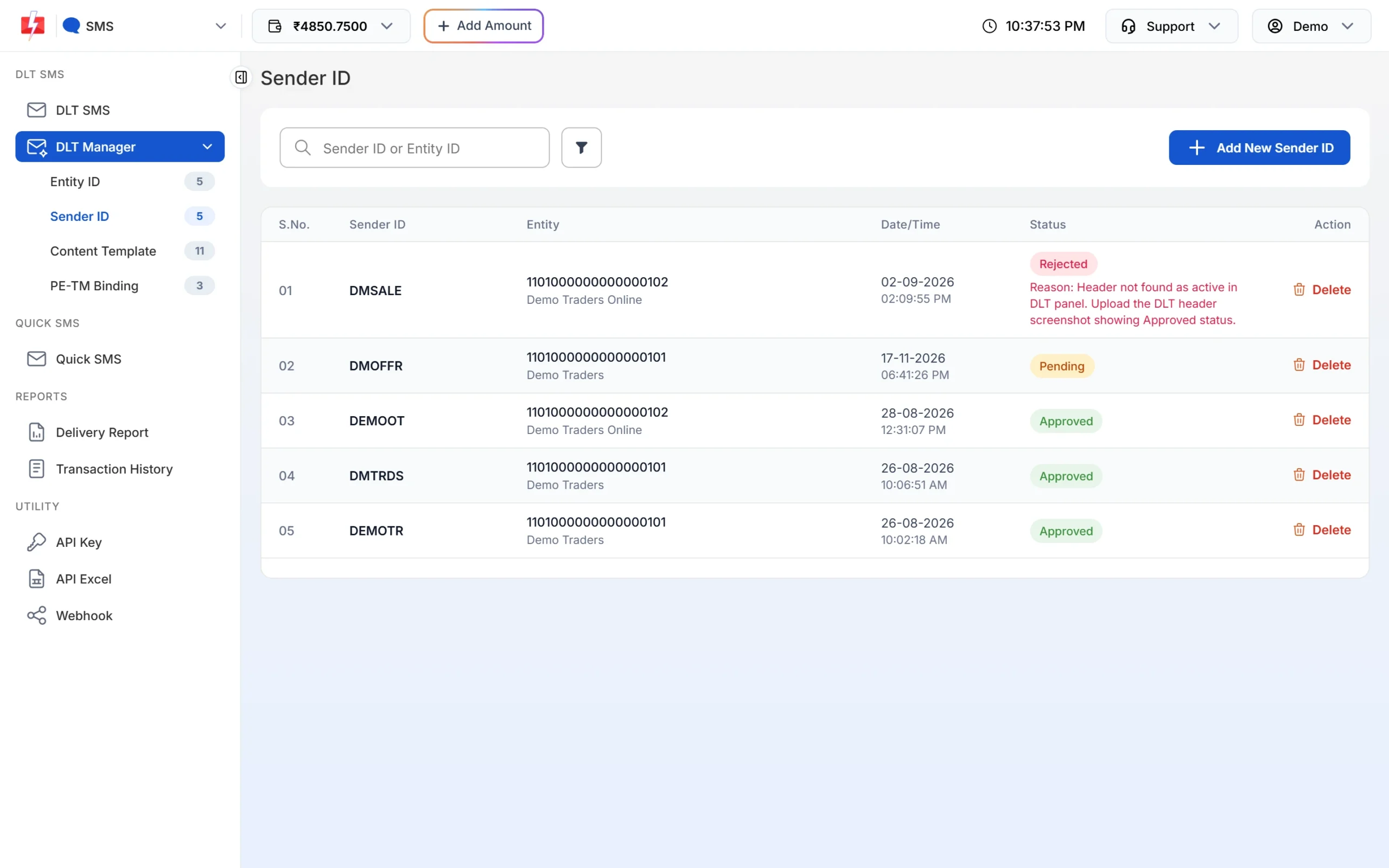
Only senders marked Approved work on the DLT SMS route. -
Make sure it is Approved
Pending senders are still being checked. Rejected senders show the reason in red, for example that the header was not found as active on the DLT portal. Fix the reason and add the sender again.
-
Copy it exactly
Copy the sender as shown.
DEMOTR,demotrandDemoTRare different values for the API. -
Check the template is linked
Open Content Template. The Sender ID row on each card shows which sender the template is linked to. If your sender is not there, the API replies with 424 for that Message ID.
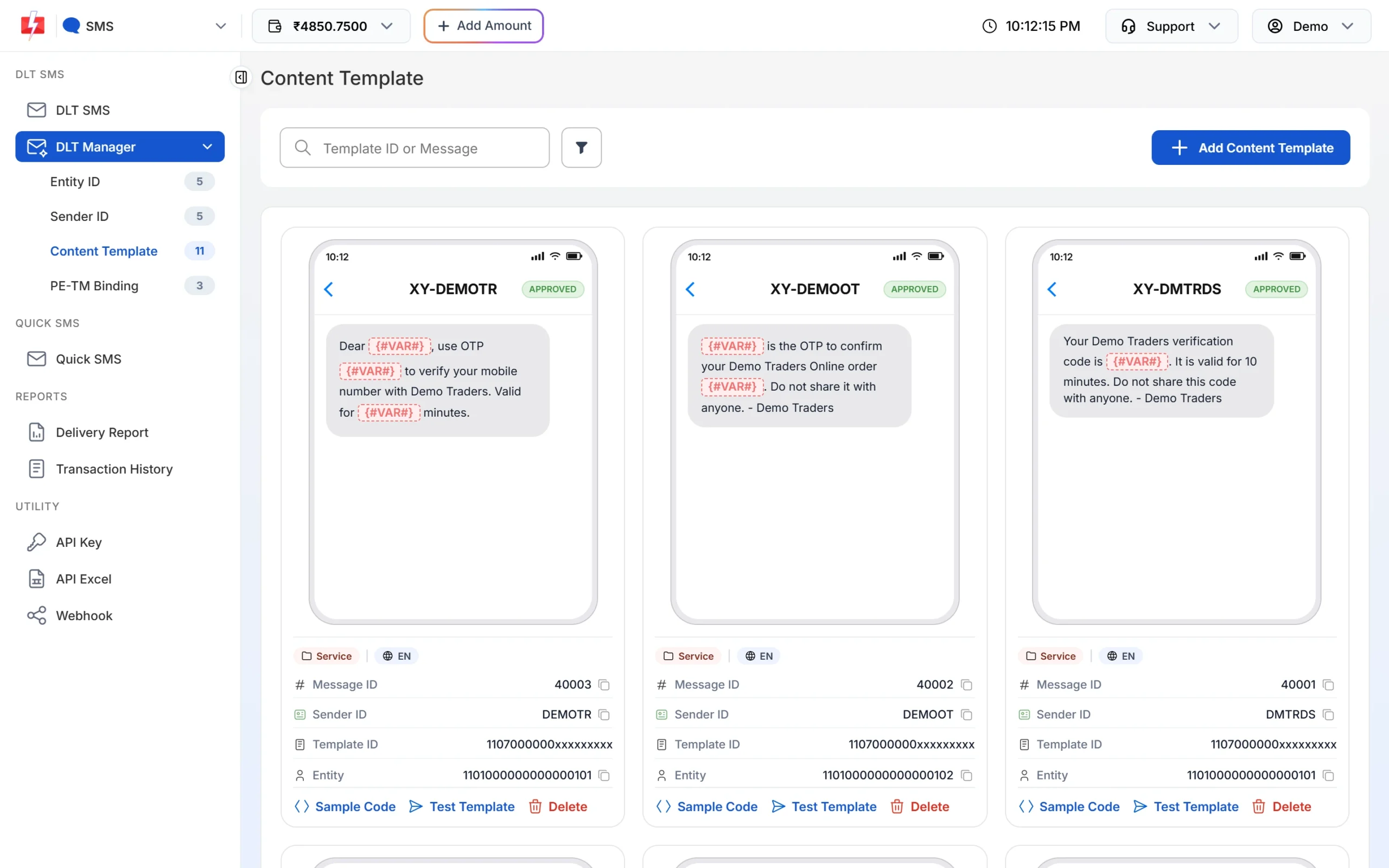
Send the Message ID together with the sender shown on its card.
Get your approved senders by API
Your software can read the list instead of hard-coding it:
curl "https://www.fast2sms.com/dev/dlt_manager?type=sender" \
  -H "authorization: YOUR_API_KEY"
It lists your senders that are not rejected, with their entity. Check the status in DLT Manager too, since a Pending sender cannot be used yet. Use type=template to get each sender with its templates and their Message IDs.
Python: check a sender before sending
import requests

def approved_senders(api_key):
    r = requests.get("https://www.fast2sms.com/dev/dlt_manager",
                     headers={"authorization": api_key},
                     params={"type": "template"}, timeout=20)
    return {s["sender_id"]: s for s in r.json().get("data", [])}

senders = approved_senders("YOUR_API_KEY")
sender = "DEMOTR"   # exact case
if sender not in senders:
    raise SystemExit(f"{sender} is not in DLT Manager for this account")
ids = [t["message_id"] for t in senders[sender]["templates"] if t["status"] == "Approved"]
print("Message IDs you can send with", sender, ids)
PHP
<?php
$ch = curl_init('https://www.fast2sms.com/dev/dlt_manager?type=sender');
curl_setopt_array($ch, [
    CURLOPT_RETURNTRANSFER => true,
    CURLOPT_HTTPHEADER     => ['authorization: YOUR_API_KEY'],
]);
$res = json_decode(curl_exec($ch), true);
curl_close($ch);

$list = array_column($res['data'] ?? [], 'sender_id');
echo in_array('DEMOTR', $list, true) ? 'DEMOTR found in DLT Manager' : 'DEMOTR not found';
Node.js
const res = await fetch("https://www.fast2sms.com/dev/dlt_manager?type=sender", {
  headers: { authorization: "YOUR_API_KEY" },
});
const { data = [] } = await res.json();
console.log(data.some((s) => s.sender_id === "DEMOTR") ? "DEMOTR found in DLT Manager" : "DEMOTR not found");Error 406 “Invalid Sender ID” and how to fix it
{"return": false, "status_code": 406, "message": "Invalid Sender ID"}| Cause | Route | Fix |
|---|---|---|
Different case, for example demotr instead of DEMOTR |
dlt | Copy the sender exactly from DLT Manager. |
| Sender is Pending or Rejected in DLT Manager | dlt | Wait for approval, or fix the reason and add it again. |
| Sender was never added to DLT Manager | dlt | Add it in DLT Manager > Sender ID under the right entity. |
| Sender belongs to another Fast2SMS account | dlt | Use the API key of the account that owns the sender. |
Extra space, quote or prefix such as XY-DEMOTR |
dlt, dlt_manual | Send only the 3 to 6 character header, with no prefix or spaces. |
| Fewer than 3 or more than 6 characters | dlt_manual | Send the header as approved at DLT. |
On /dev/custom the same problem comes back as "Sender ID is not valid.".
Numeric sender IDs
A 6-digit numeric sender is used for promotional messages. Templates added with a numeric sender are saved as Service Explicit or Promotional, and SMS from a numeric sender are held at night and sent the next morning (outside roughly 10 AM to 9 PM).
Frequently asked questions
Is the sender ID case-sensitive in the Fast2SMS API?
Yes, on the DLT SMS route. It must match the sender in DLT Manager letter for letter, including capital letters.
Can I use any sender ID with DLT Manual?
The API only checks the length on DLT Manual. But the operator checks it against DLT, so a sender that is not approved and linked to the template will fail, and the SMS is not refunded.
Can one template use two sender IDs?
Yes, if you ticked both senders when you added the template. You can send its Message ID with either sender.
Why is my sender approved at DLT but rejected in Fast2SMS?
Read the reason in red on the Sender ID page, for example that the header was not found as active on the DLT portal. Fix it and add the sender again with a clear screenshot from your DLT portal that shows the approved status.
Can I send without a sender ID?
Only on Quick SMS, which uses a random sender. DLT routes always need your own sender.
How long can a sender ID be?
3 to 6 characters. Fast2SMS accepts senders of that length in DLT Manager and on the DLT Manual route.