
To verify phone numbers with OTP in a Flutter app using Fast2SMS, the app calls your own backend and the backend calls the Fast2SMS API. The API key never goes into the Flutter build. This guide gives you the backend endpoints, the Dart code for the app (send, verify, resend with a countdown), OTP autofill on Android and iPhone, DLT SMS alerts, delivery reports and error handling. The same backend works for React Native, with a short example at the end.
How the pieces fit
- The Flutter app posts the mobile number to your backend, for example
/api/otp/send. - Your backend calls Fast2SMS
/dev/otp/sendwith the API key and your Smart OTP OTP ID. - The user enters or autofills the code. The app posts it to
/api/otp/verify. - Your backend calls Fast2SMS
/dev/otp/verify. If it passes, the backend returns a session token to the app.
A key placed in Dart code, .env assets or --dart-define ends up inside the APK or IPA and can be extracted. That is why the backend step is not optional.
Before you start
- A backend: Node.js, PHP, Python, Java, .NET or a serverless function. It only needs to make HTTPS calls.
- API key from API Key under UTILITY, with API Access on, stored on the backend.
- Smart OTP template and its OTP ID from OTP Template List.
- Wallet balance. Each OTP send and resend is charged.
- Flutter 3 with the
httppackage.
Set up in the panel
-
Create or pick a Smart OTP template
Open Smart OTP, OTP Template List. Copy the OTP ID from an SMS or WhatsApp OTP card. To add one, click Add OTP Template and link your approved DLT or WhatsApp authentication template.
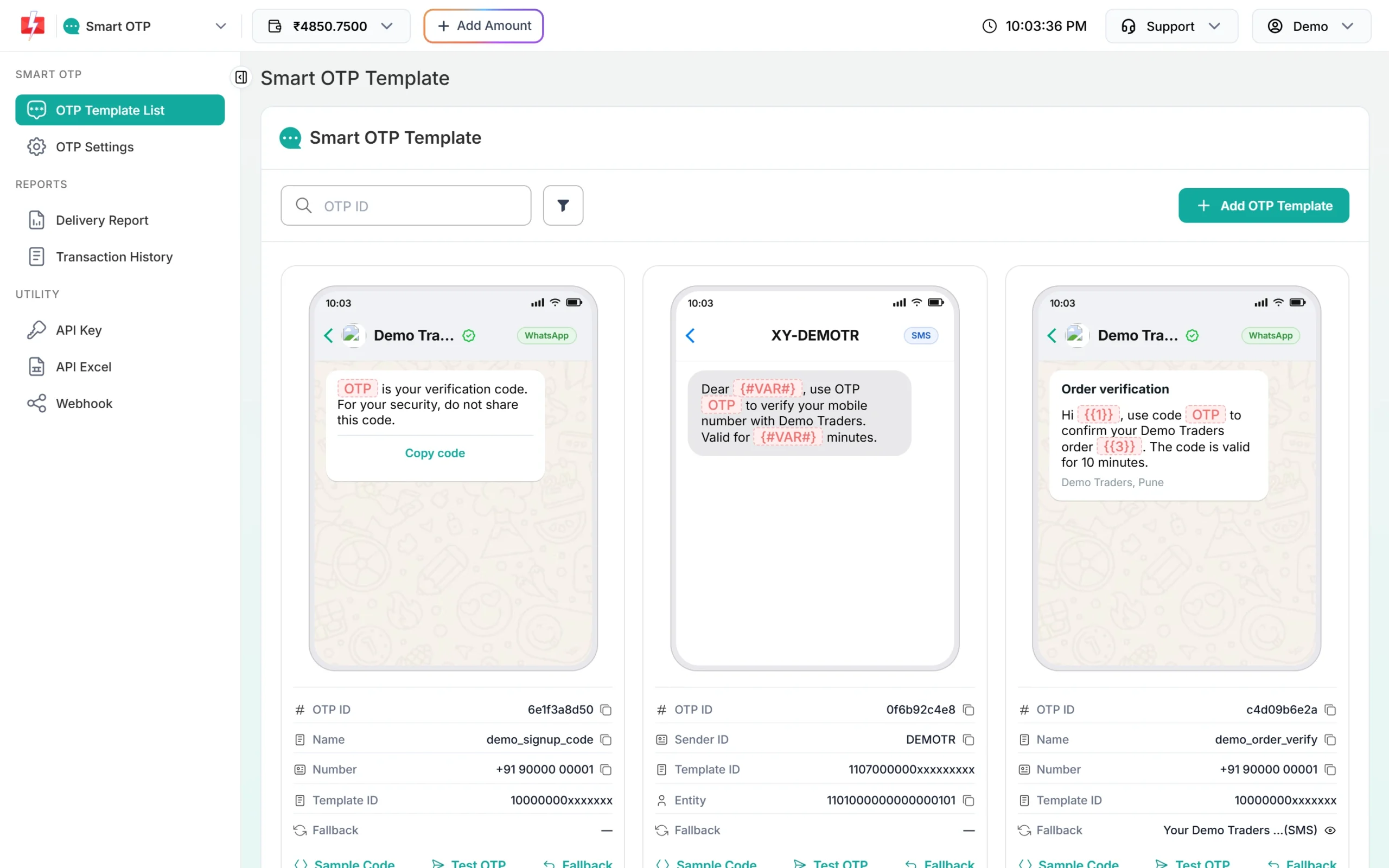
Keep the OTP ID on your backend with the API key. -
Check the OTP settings
Open OTP Settings. Note the SMS Resend / Time Limit in seconds; your Resend button countdown should use the same number. Max Verify OTP Limit sets how many wrong codes are allowed.
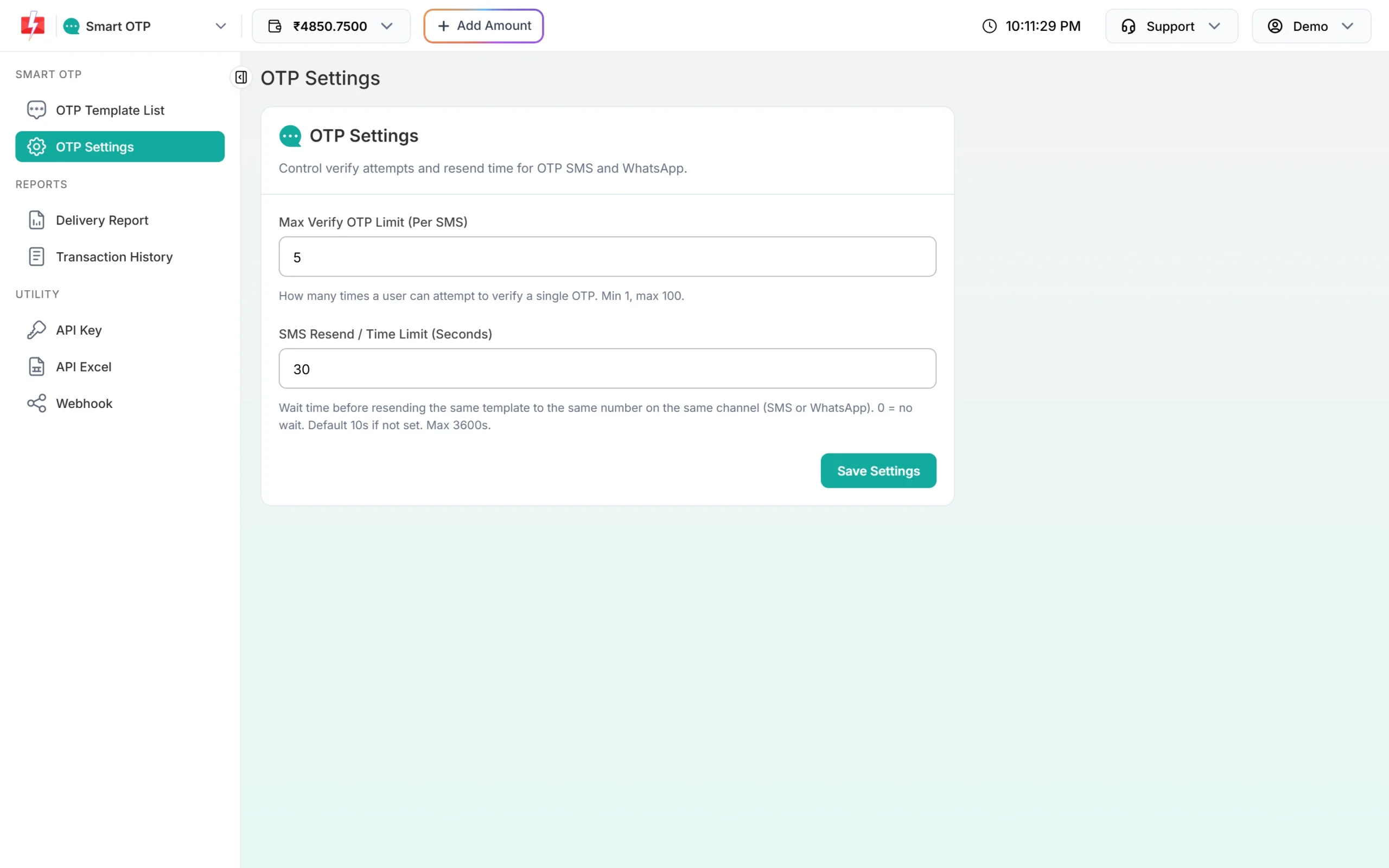
Use the resend time for the app’s timer. -
Copy the API key to the backend
In Account Setting, API Key, click View, enter the OTP sent to your account mobile and copy the key into your backend’s environment variables.
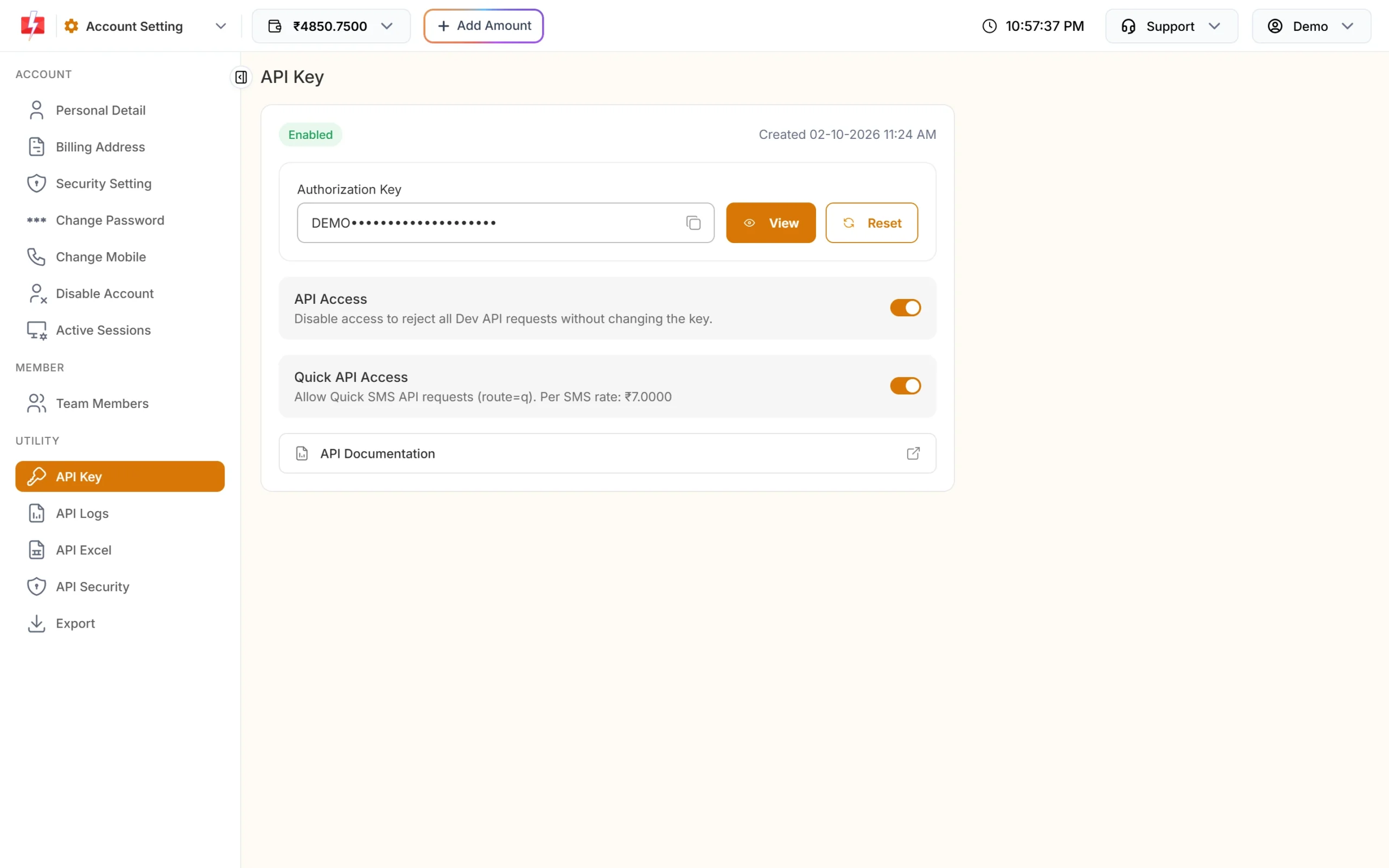
The key stays on the server.
Backend endpoints (Node.js example)
This Express server is enough for the app. The same three calls in PHP, Python, Java or C# are in the language guides linked at the end.
import express from "express";

const app = express();
app.use(express.json());

const KEY = process.env.FAST2SMS_API_KEY;
const OTP_ID = process.env.FAST2SMS_OTP_ID;

async function fast2sms(path, body) {
  const res = await fetch("https://www.fast2sms.com" + path, {
    method: "POST",
    headers: { authorization: KEY, "Content-Type": "application/json" },   // bare key
    body: JSON.stringify(body),
    signal: AbortSignal.timeout(15000),
  });
  const data = await res.json();
  return { ok: res.ok && data.return === true, message: data.message };
}

const clean = (m = "") => String(m).replace(/\D/g, "").slice(-10);

app.post("/api/otp/send", async (req, res) => {
  const mobile = clean(req.body.mobile);
  if (!/^[6-9]\d{9}$/.test(mobile)) return res.status(400).json({ error: "Enter a valid mobile number" });
  // Add your own rate limits here (per IP, per device, per mobile)
  const r = await fast2sms("/dev/otp/send", { mobile, otp_id: OTP_ID, otp_expiry: 5 });
  r.ok ? res.json({ sent: true }) : res.status(400).json({ error: r.message });
});

app.post("/api/otp/verify", async (req, res) => {
  const r = await fast2sms("/dev/otp/verify", { mobile: clean(req.body.mobile), otp: String(req.body.otp || "").trim() });
  if (!r.ok) return res.status(400).json({ error: r.message });
  res.json({ verified: true, token: "create-your-session-token-here" });
});

app.post("/api/otp/resend", async (req, res) => {
  const r = await fast2sms("/dev/otp/resend", { mobile: clean(req.body.mobile) });
  r.ok ? res.json({ sent: true }) : res.status(400).json({ error: r.message });
});

app.listen(3000);- Verify checks the latest unverified OTP for that mobile. Each new send cancels older OTPs.
- Resend sends the same code again and is charged. It works for 10 minutes after the first send, with up to 5 sends in all, counting the first.
- Requests inside the wait time get “Please wait N seconds before requesting a new OTP”.
Flutter: call the backend from Dart
flutter pub add httpimport 'dart:convert';
import 'package:http/http.dart' as http;
class OtpResult {
final bool ok;
final String? error;
final String? token;
OtpResult(this.ok, {this.error, this.token});
}
class OtpApi {
OtpApi({this.baseUrl = 'https://api.yourapp.com'});
final String baseUrl;
Future<OtpResult> _post(String path, Map<String, String> body) async {
try {
final res = await http
.post(Uri.parse('$baseUrl$path'),
headers: {'Content-Type': 'application/json'}, body: jsonEncode(body))
.timeout(const Duration(seconds: 20));
final data = res.body.isEmpty ? <String, dynamic>{} : jsonDecode(res.body) as Map<String, dynamic>;
if (res.statusCode == 200) return OtpResult(true, token: data['token'] as String?);
return OtpResult(false, error: (data['error'] ?? 'Something went wrong. Try again.').toString());
} catch (_) {
return OtpResult(false, error: 'No internet connection. Try again.');
}
}
Future<OtpResult> send(String mobile) => _post('/api/otp/send', {'mobile': mobile});
Future<OtpResult> resend(String mobile) => _post('/api/otp/resend', {'mobile': mobile});
Future<OtpResult> verify(String mobile, String otp) => _post('/api/otp/verify', {'mobile': mobile, 'otp': otp});
}OTP autofill in Flutter
- iPhone: set
autofillHints: const [AutofillHints.oneTimeCode]andkeyboardType: TextInputType.numberon the code field. iOS then offers the code from the SMS above the keyboard. - Android: use a pub.dev package that wraps Google’s SMS Retriever API (needs your 11-character app hash in the SMS) or the SMS User Consent API (no hash, the user taps Allow). In India the SMS must match your DLT template, so a hash must be fixed text in the approved template.
Whatever reads the code, the app only passes it to /api/otp/verify. The backend makes the decision.
Full copy-paste example: OTP login screen
import 'dart:async';
import 'package:flutter/material.dart';
import 'otp_api.dart';

class OtpLoginPage extends StatefulWidget {
  const OtpLoginPage({super.key, this.resendWaitSeconds = 30}); // same as OTP Settings
  final int resendWaitSeconds;
  @override
  State<OtpLoginPage> createState() => _OtpLoginPageState();
}

class _OtpLoginPageState extends State<OtpLoginPage> {
  final _api = OtpApi();
  final _mobile = TextEditingController();
  final _code = TextEditingController();
  bool _sent = false, _busy = false;
  int _resendIn = 0;
  String? _error;
  Timer? _timer;

  String get _digits {
    final d = _mobile.text.replaceAll(RegExp(r'\D'), '');
    return d.length > 10 ? d.substring(d.length - 10) : d;
  }

  void _startTimer() {
    _timer?.cancel();
    setState(() => _resendIn = widget.resendWaitSeconds);
    _timer = Timer.periodic(const Duration(seconds: 1), (t) {
      if (_resendIn <= 1) t.cancel();
      setState(() => _resendIn = _resendIn > 0 ? _resendIn - 1 : 0);
    });
  }

  Future<void> _send({bool resend = false}) async {
    if (!RegExp(r'^[6-9]\d{9}$').hasMatch(_digits)) {
      setState(() => _error = 'Enter a valid 10-digit mobile number');
      return;
    }
    setState(() { _busy = true; _error = null; });
    final r = resend ? await _api.resend(_digits) : await _api.send(_digits);
    setState(() { _busy = false; _error = r.error; if (r.ok) _sent = true; });
    if (r.ok) _startTimer();
  }

  Future<void> _verify() async {
    setState(() { _busy = true; _error = null; });
    final r = await _api.verify(_digits, _code.text.trim());
    setState(() { _busy = false; _error = r.error; });
    if (r.ok && mounted) {
      // Save r.token securely (e.g. flutter_secure_storage) and open the home screen
      ScaffoldMessenger.of(context).showSnackBar(const SnackBar(content: Text('Verified')));
    }
  }

  @override
  void dispose() { _timer?.cancel(); _mobile.dispose(); _code.dispose(); super.dispose(); }

  @override
  Widget build(BuildContext context) {
    return Scaffold(
      appBar: AppBar(title: const Text('Login with OTP')),
      body: Padding(
        padding: const EdgeInsets.all(16),
        child: Column(crossAxisAlignment: CrossAxisAlignment.stretch, children: [
          TextField(
            controller: _mobile,
            enabled: !_sent,
            keyboardType: TextInputType.phone,
            decoration: const InputDecoration(labelText: 'Mobile number', prefixText: '+91 '),
          ),
          if (_sent)
            TextField(
              controller: _code,
              keyboardType: TextInputType.number,
              autofillHints: const [AutofillHints.oneTimeCode],
              maxLength: 6,
              decoration: const InputDecoration(labelText: 'Enter OTP'),
            ),
          if (_error != null) Padding(
            padding: const EdgeInsets.symmetric(vertical: 8),
            child: Text(_error!, style: TextStyle(color: Theme.of(context).colorScheme.error)),
          ),
          const SizedBox(height: 12),
          FilledButton(
            onPressed: _busy ? null : (_sent ? _verify : () => _send()),
            child: Text(_sent ? 'Verify' : 'Send OTP'),
          ),
          if (_sent)
            TextButton(
              onPressed: _busy || _resendIn > 0 ? null : () => _send(resend: true),
              child: Text(_resendIn > 0 ? 'Resend in $_resendIn s' : 'Resend OTP'),
            ),
        ]),
      ),
    );
  }
}
React Native: same backend
async function sendOtp(mobile) {
  const res = await fetch("https://api.yourapp.com/api/otp/send", {
    method: "POST",
    headers: { "Content-Type": "application/json" },
    body: JSON.stringify({ mobile }),
  });
  const data = await res.json();
  if (!res.ok) throw new Error(data.error || "Could not send OTP");
}
// On the code input: textContentType="oneTimeCode" (iOS) and autoComplete="sms-otp" (Android)
DLT SMS alerts and delivery reports
- Alerts such as order confirmed or booking reminder should be sent by your backend when the event happens, with
/dev/bulkV2,route=dlt, your sender ID, the template’s Message ID and the variable values. - Delivery status goes to your backend too: add an OTP or SMS webhook under Webhook in the panel, or call
GET /dev/dlr/{request_id}from the server for SMS. Use one of the two, not both. The app can ask your backend if it needs to show the status.
Error handling
| Message your backend gets | Show in the app |
|---|---|
| Please wait N seconds before requesting a new OTP | Keep the countdown running. |
| Invalid OTP | “Wrong code. Try again.” |
| OTP expired | “Code expired. Tap Resend OTP.” |
| Maximum verification attempts reached. OTP is no longer valid. | “Too many tries. Request a new code.” |
| OTP not found or already verified | “Please request a new code.” |
| OTP resend window (10 minutes) has expired / Maximum resend limit (5 times) reached | Restart with a fresh send, or ask the user to try later. |
| Invalid authorization key / Invalid OTP ID / 413 / 414 / low balance | A general error. Fix it on the server side. |
On the backend, never retry a send automatically after a timeout, because it can send and charge twice. Verify can be retried once.
Common problems and fixes
- Works on emulator, fails on device: the app points to
localhostor10.0.2.2. Use your public HTTPS backend URL. - Android blocks HTTP: cleartext traffic is off by default. Use HTTPS.
- Two OTPs arrive: the send function runs twice (double tap or rebuild). Disable the button while
_busyis true. - iOS does not suggest the code: check
autofillHintson the field and that the SMS shows the code clearly. - Bots ask for thousands of OTPs: add rate limits on the send endpoint and app attestation (Play Integrity, App Attest).
Frequently asked questions
Is there a Fast2SMS Flutter package?
You do not need one. The app talks to your backend with the http package, and the backend calls the Fast2SMS HTTP API.
Can I use a serverless cloud function as the backend?
Yes. Any server-side code that can make HTTPS requests and keep a secret works. Store the key in the function’s secret settings.
Can the OTP go on WhatsApp?
Yes. Use the OTP ID of a WhatsApp Smart OTP template on the backend. The Flutter code stays the same.
Does resend give a new code?
No. It sends the same code again. Calling send again creates a new code and cancels the old one.
Is verify charged?
No. Only sends and resends are charged.
How long is the OTP valid?
Your backend sets otp_expiry in minutes (1 to 10080, default 15).