
If your users say the OTP SMS never came, and it seems to happen more on one network such as Airtel or Jio, the cause is usually not the network itself. It is the phone, the signal, a full inbox, a block on the number, or a problem with your DLT template. The OTP report in Fast2SMS shows the operator’s reason for every failed OTP, so you can tell which one it is in a minute. This page lists the reasons by operator (Airtel, Jio, Vi and BSNL), what each one means, and what you and your user can do about it.
The short answer
An OTP SMS that does not arrive on one operator usually fails for one of these reasons:
- The phone is switched off, out of coverage or has weak signal.
- The phone’s message storage is full.
- The number is not active, is suspended or does not exist.
- The SIM was recently swapped, or the user is on roaming.
- The number is blocked, or the SMS was filed in the phone’s spam folder.
- Your DLT entity, sender ID or template has a problem, so the operator rejects the message.
The OTP report tells you which of these happened. You do not need to guess, and you do not need to contact the operator first.
Find the reason in the OTP report
-
Open the OTP report and search the number
In Smart OTP, click Delivery Report. You see OTP Reports for the last 2 days with Total, Delivered, Read, Failed, Sent and Pending counts. Use the filter button and the Mobile Number tab to find the user’s number.
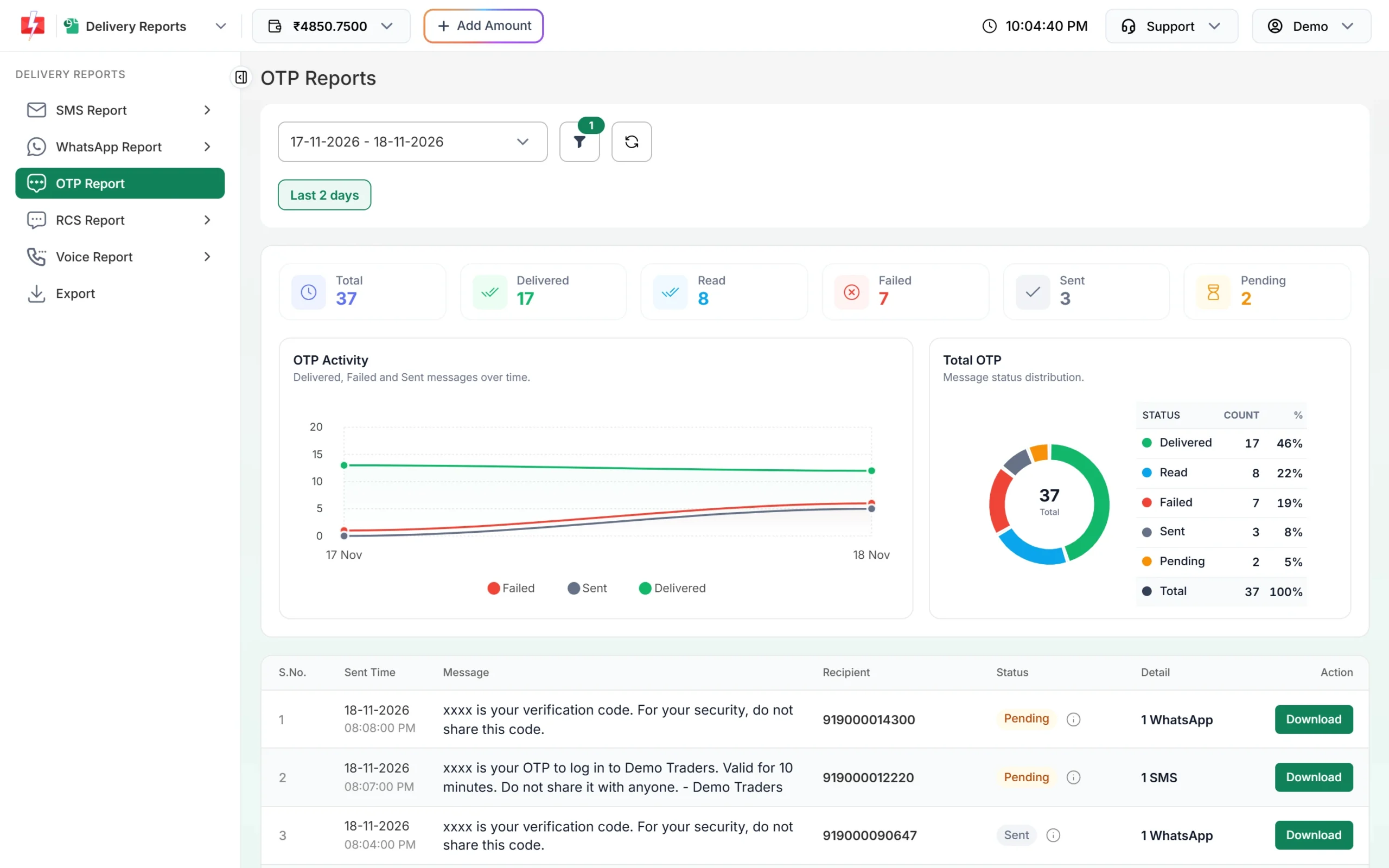
Every OTP request is listed with its channel and status. -
Open the row and read the Description
Click the row. Delivery Details shows the status, a channel badge and a Description. For a failed SMS, the Description is the operator’s reason, such as “Number switch off or low signal” or “Handset memory full”.
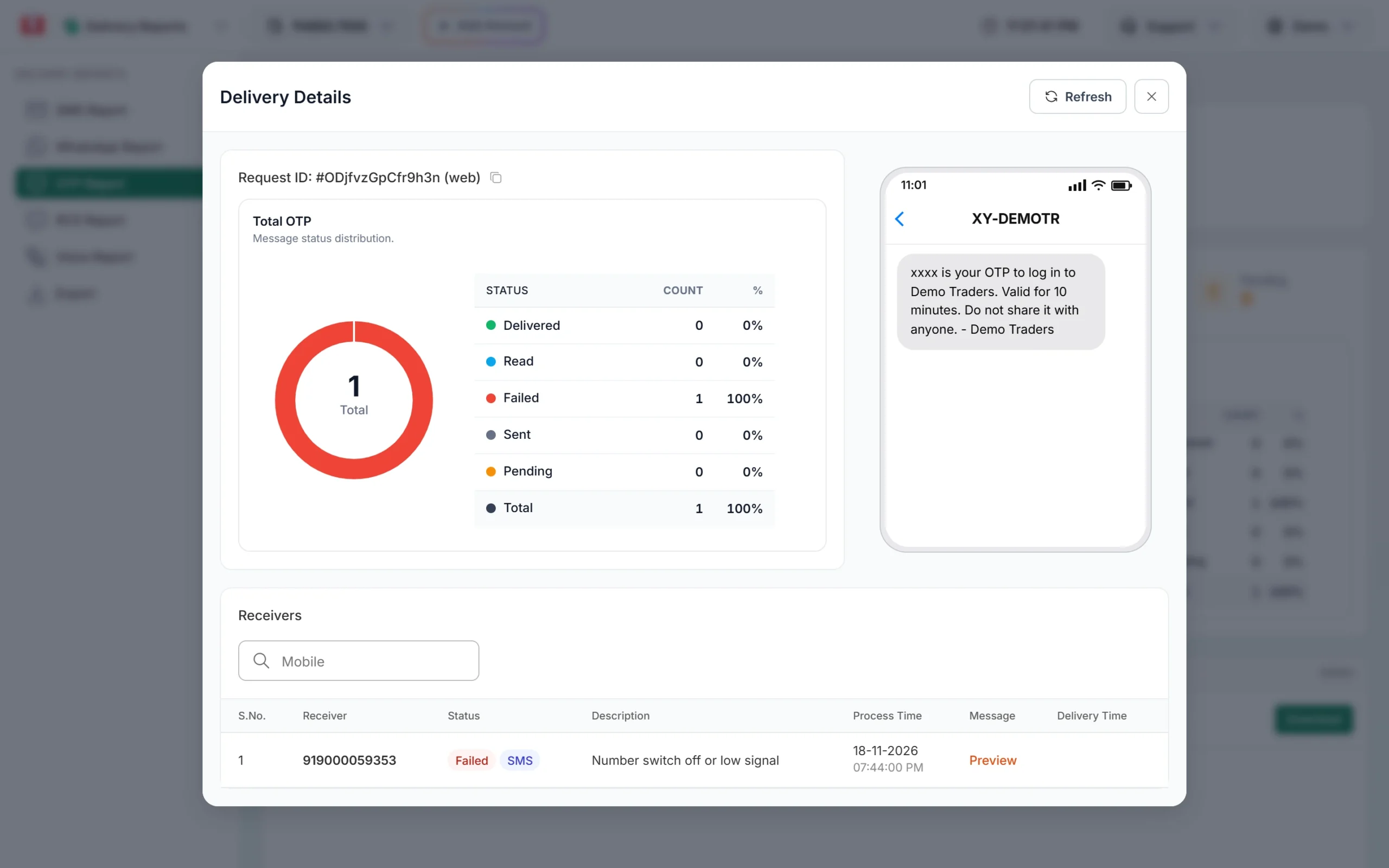
The Description line is the reason the operator gave.
If the number is not in the report at all, the OTP was never sent. Check API Logs for the error, for example a wrong OTP ID, a resend wait or a low wallet. The OTP not received checklist covers those cases.
What each reason in the report means
These are the reasons Fast2SMS shows for a failed SMS. They are the same for every operator.
| Description in the report | What it means | What to do |
|---|---|---|
| Number switch off or low signal | The phone could not be reached when the operator tried | Ask the user to check signal and try again, or let a WhatsApp fallback deliver the code |
| Number not reachable | The network could not find the phone | Same as above. Common in basements, lifts and while travelling |
| Handset memory full | The phone has no space for new SMS | The user deletes old messages and requests a new OTP |
| Number not exist / Unknown subscriber | The number is not active on that network | Ask the user to check the number they typed |
| Number suspended by operator | The operator has stopped service on the number | The user has to sort it out with their operator |
| Operator rejected / Operator error | The operator refused the message | Check your DLT template and sender ID. If they are fine, contact support with the request ID |
| Number blocked | The number is on a block list | See blocked numbers |
| DND activated | The number has DND and the message was sent as promotional | OTPs must use a transactional or service DLT template. DND does not stop those |
OTP SMS not received on Airtel
For Airtel numbers, the Description is often based on an Airtel error code. The ones that come up most for OTPs are:
- 1, Unknown subscriber: the number is not an active Airtel number. It may have been ported to another network or closed.
- 21, 34, 41, 60, 61, Absent subscriber: the phone is off or not on the network.
- 22, Not supported roaming: the user is roaming on a network that did not accept the SMS.
- 13, Barred call: the number has a bar on it.
- 40, Memory capacity exceeded: the phone’s SMS storage is full.
- 611, Invalid entity ID or header: a DLT problem on your side, not the user’s. Check that your sender ID belongs to your entity.
The full list is in Airtel SMS error codes.
OTP SMS not received on Jio
Jio numbers give their own codes. The common ones for OTPs are:
- 1, Unknown Subscriber and 404, Invalid Mobile Number: the number is wrong or not active on Jio.
- 6 and 27, Absent subscriber: the phone is off or out of coverage.
- 21, Facility not supported: Jio’s description says this happens on roaming or after a SIM swap. Ask the user to restart the phone and try again after some time.
- 122, Memory capacity exceed: the inbox is full.
- 13, Call Barred: the number has a bar on it.
- 601 to 620 (entity, telemarketer and header errors): a DLT problem on the sender’s side. These fail for every Jio number, not just one user.
The full list is in Jio SMS error codes.
OTP SMS not received on Vi or BSNL
For Vi and BSNL numbers, read the Description in the report. It shows the reason in plain words, using the same list as the table above. The causes are also the same: no signal, a full inbox, an inactive number, a block, or a DLT problem. If a DLT platform code appears, the SmartPing SMS error codes page explains it.
If OTPs fail for many numbers on one operator at the same time, and the reasons point to DLT (entity, header or template), the problem is your DLT setup, not the users. Fix it once and every number starts receiving again.
When the report says Delivered but the user has no SMS
Delivered means the operator handed the SMS to the phone. If the user still cannot see it:
- Ask them to check the spam or blocked folder of their messages app. Phone spam filters can hide business SMS. See why business SMS go to spam.
- Ask if they blocked your sender name in the past.
- Ask them to look for the latest SMS from your sender ID, not an older one. Each new OTP cancels the older codes for that number.
More on this in SMS shows Delivered but the customer did not receive it.
What to tell your user
You can show these tips under the OTP box, or your support team can read them out:
- Check that the mobile number is typed correctly and the SIM is in this phone.
- Check signal. Turn airplane mode on and off, or restart the phone.
- Delete some old SMS if the inbox is full.
- Look in the spam or blocked messages folder.
- If you are travelling abroad, see OTPs on international roaming.
- Wait for the resend timer before asking for a new code, and use only the newest code.
What you can change on your side
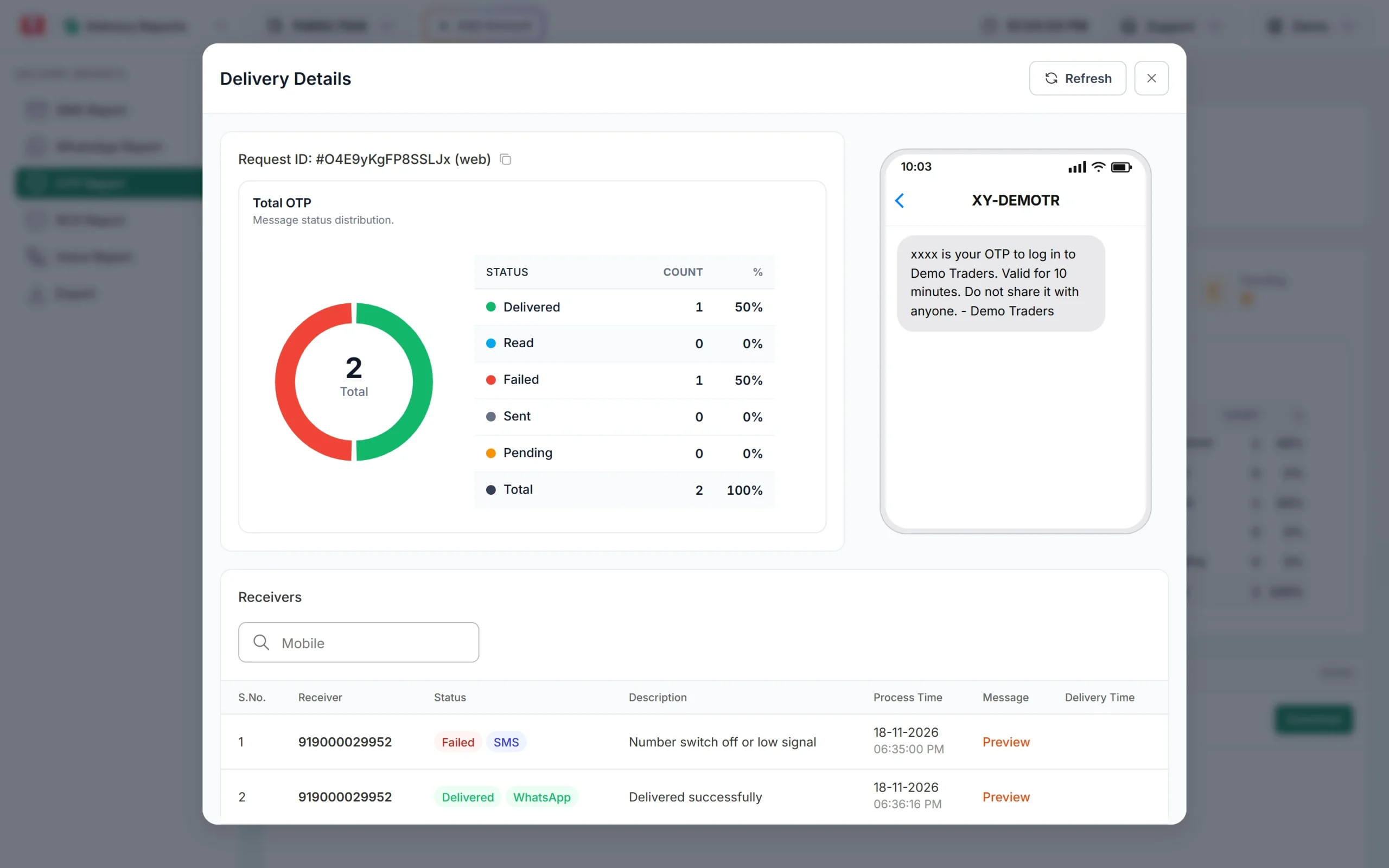
- Add a WhatsApp fallback. In Smart OTP, an SMS OTP template can have a WhatsApp fallback. If the SMS fails, the same code is sent on WhatsApp within about 2 minutes. The fallback is charged at the WhatsApp rate and shows as its own line. See multi-channel OTP explained.
- Check your DLT template. The text must match the approved template, and the template must be linked to the sender ID you use. See DLT OTP template rules.
- Show a resend timer that matches your OTP Settings, so users do not tap resend too early.
- Offer a second channel on the screen, for example “Get the code on WhatsApp”, for users who keep failing on SMS.
Frequently asked questions
Why are OTPs failing only on Airtel numbers?
Open a few failed rows and read the Description. If it says the phone is off or not reachable, it is the users’ phones. If it points to entity, header or template, your DLT setup needs a fix, and it will usually affect other operators too.
Does Jio block OTP SMS?
No. Jio delivers OTPs sent with an approved DLT template like any other operator. A failed OTP on Jio has a reason code, and the report shows it.
Does DND stop OTP SMS on Airtel, Jio, Vi or BSNL?
No. DND stops promotional SMS. OTPs sent with a transactional or service DLT template reach DND numbers at any time of day on every operator.
Why does the OTP come late on some networks?
A late OTP is usually a phone that was out of coverage and got the SMS when it came back. See why OTP SMS are delayed.
The user changed from Airtel to Jio. Do I need to do anything?
No. You send to the mobile number and the network routes it. If the report shows “Unknown subscriber” for a number that was recently moved, ask the user to restart the phone and try again later.
Can I test whether an OTP reaches a number on a given network?
Yes. Click Test OTP on your template card and enter the number. It is a real send and is charged like an API send.