
Retail shop and kirana SMS templates for e-bills, loyalty points, credit dues and home delivery updates are registered on DLT as Service Implicit, because they go to your own customers about their own purchase or account. A payment or points redemption confirmation sent right after it happens is Transactional, and weekend sales or new stock alerts are Promotional. Below are 17 copy-paste templates for supermarkets, kirana stores, pharmacies and other shops, in English and Hindi, each with variable tags, the DLT category, a filled sample, the character count and SMS parts.
Which DLT category for shop and kirana SMS
| Message | DLT category | DND numbers and timing |
|---|---|---|
| E-bill link, credit (udhaar) balance, points earned, points expiring, member welcome | Service Implicit | Reaches DND numbers, any hour |
| Payment received, points redeemed, redemption OTP, sent right away | Transactional | Reaches DND numbers, any hour |
| Order received, out for delivery, delivered, item out of stock, ready for pickup | Service Implicit | Reaches DND numbers, any hour |
| Weekend sale, festival offer, new stock arrived | Promotional | Not to DND numbers, 10 AM to 9 PM only |
Replace “Demo Mart” with your shop name as registered on DLT, and keep it as fixed text. Counts are for the sample shown. Links such as https://demo.example/b are placeholders: any link or callback number in a template must be whitelisted as a CTA on your DLT portal first, or the SMS fails. These templates follow the usual DLT rules, but approval is always the operator’s decision.
Bill, payment and credit templates
1. E-bill link
DLT category: Service Implicit. Variables: {#alphanumeric#}, {#numeric#}, {#url#}. Whitelist first: your link domain as a CTA on your DLT portal.
Thank you for shopping at Demo Mart. Your bill {#alphanumeric#} of Rs {#numeric#} is here: {#url#} - Demo MartSample message (114 characters, English, 1 SMS): Thank you for shopping at Demo Mart. Your bill B88213 of Rs 2340 is here: https://demo.example/b/88213 – Demo Mart
2. Payment received
DLT category: Transactional. Variables: {#numeric#}, {#alphanumeric#}.
Payment of Rs {#numeric#} received at Demo Mart for bill {#alphanumeric#}. Thank you. - Demo MartSample message (80 characters, English, 1 SMS): Payment of Rs 2340 received at Demo Mart for bill B88213. Thank you. – Demo Mart
3. Credit (udhaar) balance reminder
DLT category: Service Implicit. Variables: {#alphanumeric#}, {#numeric#}.
Dear {#alphanumeric#}, your pending balance at Demo Mart is Rs {#numeric#}. Please clear it by {#alphanumeric#}. - Demo MartSample message (97 characters, English, 1 SMS): Dear Suresh, your pending balance at Demo Mart is Rs 1650. Please clear it by 30 Nov. – Demo Mart
4. Credit payment received
DLT category: Transactional. Variables: {#alphanumeric#}, {#numeric#}.
Dear {#alphanumeric#}, we received Rs {#numeric#} towards your Demo Mart account. Balance now Rs {#numeric#}. - Demo MartSample message (96 characters, English, 1 SMS): Dear Suresh, we received Rs 1000 towards your Demo Mart account. Balance now Rs 650. – Demo Mart
Loyalty points templates
5. Member welcome
DLT category: Service Implicit. Variables: {#alphanumeric#}.
Welcome to Demo Mart Rewards, {#alphanumeric#}. Your member ID is {#alphanumeric#}. Show it at billing to earn points. - Demo MartSample message (110 characters, English, 1 SMS): Welcome to Demo Mart Rewards, Priya. Your member ID is DM40921. Show it at billing to earn points. – Demo Mart
6. Points earned
DLT category: Service Implicit. Variables: {#numeric#}.
You earned {#numeric#} points on your Demo Mart bill today. Your total balance is {#numeric#} points. - Demo MartSample message (96 characters, English, 1 SMS): You earned 46 points on your Demo Mart bill today. Your total balance is 820 points. – Demo Mart
7. Redemption OTP
DLT category: Transactional. Variables: {#numeric#}.
{#numeric#} is your OTP to redeem Demo Mart points. Share it only at the billing counter. - Demo MartSample message (94 characters, English, 1 SMS): 7310 is your OTP to redeem Demo Mart points. Share it only at the billing counter. – Demo Mart
8. Points redeemed
DLT category: Transactional. Variables: {#numeric#}, {#alphanumeric#}.
{#numeric#} points redeemed on your Demo Mart bill {#alphanumeric#}. Balance: {#numeric#} points. - Demo MartSample message (83 characters, English, 1 SMS): 500 points redeemed on your Demo Mart bill B88301. Balance: 320 points. – Demo Mart
9. Points expiring
DLT category: Service Implicit. Variables: {#numeric#}, {#alphanumeric#}.
{#numeric#} points in your Demo Mart Rewards account expire on {#alphanumeric#}. - Demo MartSample message (74 characters, English, 1 SMS): 320 points in your Demo Mart Rewards account expire on 31 Dec. – Demo Mart
Keep it to the facts. “Shop this weekend and get double points” makes it promotional.
Order and home delivery templates
10. Order received
DLT category: Service Implicit. Variables: {#alphanumeric#}, {#numeric#}.
Your Demo Mart order {#alphanumeric#} for Rs {#numeric#} is received. We will deliver it by {#alphanumeric#}. - Demo MartSample message (98 characters, English, 1 SMS): Your Demo Mart order HD5521 for Rs 1180 is received. We will deliver it by 6 PM today. – Demo Mart
11. Out for delivery
DLT category: Service Implicit. Variables: {#alphanumeric#}, {#cbn#}. Whitelist first: your callback number as a CTA on your DLT portal.
Your Demo Mart order {#alphanumeric#} is out for delivery. For help call {#cbn#}. - Demo MartSample message (86 characters, English, 1 SMS): Your Demo Mart order HD5521 is out for delivery. For help call 9000000001. – Demo Mart
12. Item out of stock
DLT category: Service Implicit. Variables: {#alphanumeric#}, {#cbn#}. Whitelist first: your callback number as a CTA on your DLT portal.
{#alphanumeric#} in your Demo Mart order {#alphanumeric#} is out of stock. Call {#cbn#} to choose a replacement.Sample message (102 characters, English, 1 SMS): Toor dal 1 kg in your Demo Mart order HD5521 is out of stock. Call 9000000001 to choose a replacement.
13. Ready for pickup
DLT category: Service Implicit. Variables: {#alphanumeric#}.
Your Demo Mart order {#alphanumeric#} is packed and ready for pickup at the counter till {#alphanumeric#}. - Demo MartSample message (96 characters, English, 1 SMS): Your Demo Mart order HD5521 is packed and ready for pickup at the counter till 9 PM. – Demo Mart
Offer templates (promotional)
Anything that asks people to come and buy is promotional, with or without a discount. Register it under Promotional with an opt-out line in the fixed text and send it between 10 AM and 9 PM.
14. Weekend sale
DLT category: Promotional. Variables: {#numeric#}, {#alphanumeric#}, {#cbn#}. Whitelist first: your callback number as a CTA on your DLT portal.
Demo Mart Weekend Sale: up to {#numeric#}% off on groceries and home needs on {#alphanumeric#}. To stop such SMS, call {#cbn#}.Sample message (116 characters, English, 1 SMS): Demo Mart Weekend Sale: up to 30% off on groceries and home needs on Sat and Sun. To stop such SMS, call 9000000001.
15. New stock arrived
DLT category: Promotional. Variables: {#alphanumeric#}, {#url#}, {#cbn#}. Whitelist first: your link domain and your callback number as a CTA on your DLT portal.
New {#alphanumeric#} stock is now in at Demo Mart, 12 Station Road. See the range: {#url#} To stop such SMS, call {#cbn#}.Sample message (137 characters, English, 1 SMS): New winter wear stock is now in at Demo Mart, 12 Station Road. See the range: https://demo.example/new To stop such SMS, call 9000000001.
Hindi shop SMS templates
Hindi SMS are Unicode: 1 part holds 70 characters and 2 parts hold 133.
16. Udhaar reminder (Hindi)
DLT category: Service Implicit. Variables: {#alphanumeric#}, {#numeric#}.
प्रिय {#alphanumeric#}, Demo Mart पर आपका बकाया Rs {#numeric#} है। कृपया {#alphanumeric#} तक जमा करें।Sample message (75 characters, Unicode, 2 SMS parts): प्रिय Suresh, Demo Mart पर आपका बकाया Rs 1650 है। कृपया 30 Nov तक जमा करें।
17. Home delivery (Hindi)
DLT category: Service Implicit. Variables: {#alphanumeric#}, {#cbn#}. Whitelist first: your callback number as a CTA on your DLT portal.
आपका Demo Mart ऑर्डर {#alphanumeric#} डिलीवरी के लिए निकल चुका है। मदद के लिए {#cbn#} पर कॉल करें।Sample message (91 characters, Unicode, 2 SMS parts): आपका Demo Mart ऑर्डर HD5521 डिलीवरी के लिए निकल चुका है। मदद के लिए 9000000001 पर कॉल करें।
Category mistakes to avoid
Under TRAI’s 2025 rules, any offer inside a bill, points or delivery message makes the whole message promotional.
| Mistake | What happens | Do this instead |
|---|---|---|
| E-bill SMS ending with “10% off on your next visit” | Treated as promotional: blocked for DND customers and held after 9 PM | Send the bill alone. Put the offer in a separate promotional template. |
| Points expiry SMS that says “shop now to use them” | Becomes promotional | State the points and the date only. |
| New stock or sale SMS registered as Service Implicit | Likely rejection | Register it as Promotional with an opt-out line. |
| Redemption OTP registered as Promotional | Not delivered at night or to DND numbers, so the customer waits at the counter | Register OTPs as Transactional. |
Tips for shop templates
- Write Rs, not the rupee symbol, in English templates. The symbol turns the SMS into Unicode and cuts each part to 70 characters.
- Bill numbers and order IDs in
{#alphanumeric#}, amounts and points in{#numeric#}, the e-bill link in{#url#}. - Send bills from your billing software. If you use Tally, see the Tally SMS templates for DLT. Other software can call the DLT SMS API.
- Keep one opt-out list. Remove people who opt out from your promotional CSV files and Address Book groups before each sale.
How to add these templates in Fast2SMS DLT Manager
A template from this page works only after the operator approves it on your DLT portal. Then you add it to Fast2SMS once and send it as often as you need. The full steps are in how to register a DLT content template and DLT Manager in Fast2SMS.
-
Register the template on your DLT portal
Log in to the DLT portal where your business is registered and add a content template. Pick the category shown with the template, link it to one approved header, paste the text with its variable tags and add a sample message with real-looking values. Whitelist any link or callback number as a CTA before you submit. The operator’s reviewer decides whether it is approved. When it is, note the Content Template ID and take a screenshot of the approved row.
-
Add it in DLT Manager
In the Fast2SMS SMS app, open DLT Manager > Content Template and click Add Content Template. Select your entity, tick the Sender ID, enter the Content Template ID and choose Service Implicit for Transactional and Service Implicit templates, or Service Explicit or Promotional for promotional ones under Template Type. Paste the approved text exactly as the portal shows it in Copy-Paste Approved Message Text, upload the screenshot and click Submit. Have many templates? Use Upload Excel with the template file exported from your DLT portal.
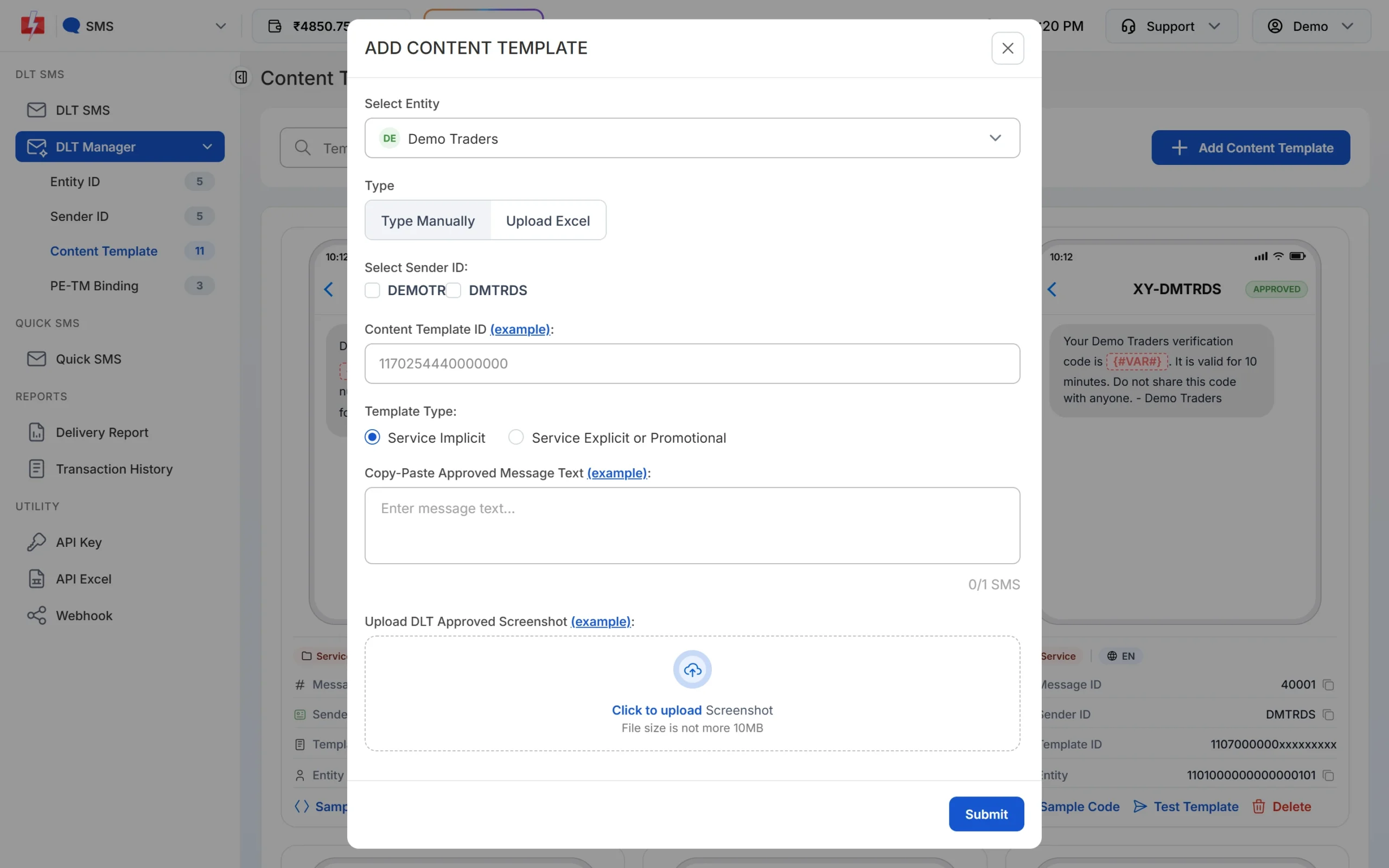
Pick the Template Type that matches the category on your DLT portal. -
Wait for Approved, then test
The template is saved as Pending while Fast2SMS checks it against your screenshot. When the card shows APPROVED, it also shows a Message ID, which is the value you pass as
messagein the API. Click Test Template to send one SMS to your own number and check the text and any link. -
Send or schedule from DLT SMS
Open DLT SMS, choose the Sender ID, add numbers under Send To (List, Address Book or CSV File) and click Select DLT Template. Fill each variable, or map the variables to columns of your CSV so each person gets their own values. The counter under the preview shows characters and SMS parts. Click Send, check the Message Preview & Confirmation popup, then click Confirm & Send, or use Schedule to pick a date and time. Promotional templates go out only between 10 AM and 9 PM. If you send one late in the evening, Fast2SMS holds it and sends it the next morning.
Each SMS part is charged as one SMS for every valid number, so a template that runs into 2 parts costs twice as much per person as a 1-part template. Duplicate and invalid numbers are not charged. See the current rates on the bulk SMS pricing page.
Sending in bulk? For high SMS volumes our team offers discounted rates. Talk to our team or see SMS pricing.
Frequently asked questions
Which DLT category is used for a shop bill SMS?
Service Implicit for an e-bill link, and Transactional for a payment confirmation sent right after the customer pays.
Can a kirana store send SMS with its own name?
Yes, after DLT registration of the shop as an entity, with an approved header and templates. Shops without GST can see DLT registration without GST.
Can I send udhaar reminders by SMS?
Yes. A reminder about money a customer owes you is Service Implicit and reaches DND numbers. Keep it polite and free of offers.
Do loyalty points SMS reach DND numbers?
Yes, when they are registered as Service Implicit and contain no offer.
Can I send offers to all my customers?
Yes, on a Promotional template with an opt-out line, between 10 AM and 9 PM. Customers on DND will not get them.
Can I send the same SMS in Hindi?
Yes. Register a Hindi template as Unicode on your DLT portal. Each Unicode part holds 70 characters.
Are these templates sure to be approved?
No. The operator’s reviewer decides. If one is rejected, read the remark on your portal and fix that point.