
Duplicate SMS usually come from your own code, not from Fast2SMS: a request times out, your app retries it, and both requests are sent and charged. The Fast2SMS SMS API has no idempotency key, so the safe pattern is to check whether the first request was accepted before you send again. This guide shows how to retry safely, where to look up a request, and which Fast2SMS settings help against duplicates.
Why duplicates happen
- Client timeouts: your HTTP client gives up before our answer arrives. The request may already be accepted, so a blind retry sends a second message.
- Retry loops: code that retries on any error, including errors that mean “accepted” or “refused for good”.
- Double clicks and double jobs: a form submitted twice, or two workers picking the same job from a queue.
- Duplicate numbers in one request: the same mobile listed twice in a file or a
/dev/customcall.
Each accepted request is charged, so duplicates cost money and annoy customers. They also hurt DLT and WhatsApp quality when customers complain.
Read the response before you retry
Every send API answers with JSON. Decide on the return field and the request_id, not only on the HTTP code.
| What you got | What it means | Retry? |
|---|---|---|
"return": true with a request_id |
Accepted. The message is queued. | No. Save the request_id. |
"return": false with a status_code such as 406, 411, 412, 424 |
Refused. Nothing was sent. | Not until you fix the cause. The same request will fail again. |
| 416 “You don’t have sufficient wallet balance” | Refused. This one can come back with HTTP 200, so always read return. |
Only after a recharge. |
| “Please wait N seconds before requesting a new OTP” (Smart OTP) | Refused by your resend wait time. | No. Use the Resend OTP API after the wait. |
| No answer, timeout, connection reset | Unknown. The request may or may not have been accepted. | Only after you check, as below. |
| HTTP 5xx | Server error. You cannot be sure whether the request was accepted. | Check first, then retry once with a delay. |
How to check if a request went through
-
Search API Logs
Open Account Setting > API Logs. Every call made with your API key is listed with the endpoint, HTTP code, time and the response. Search by mobile number, request ID, IP or endpoint. If your call is listed with a
request_idand Success, it was accepted. API logs are kept for 7 days.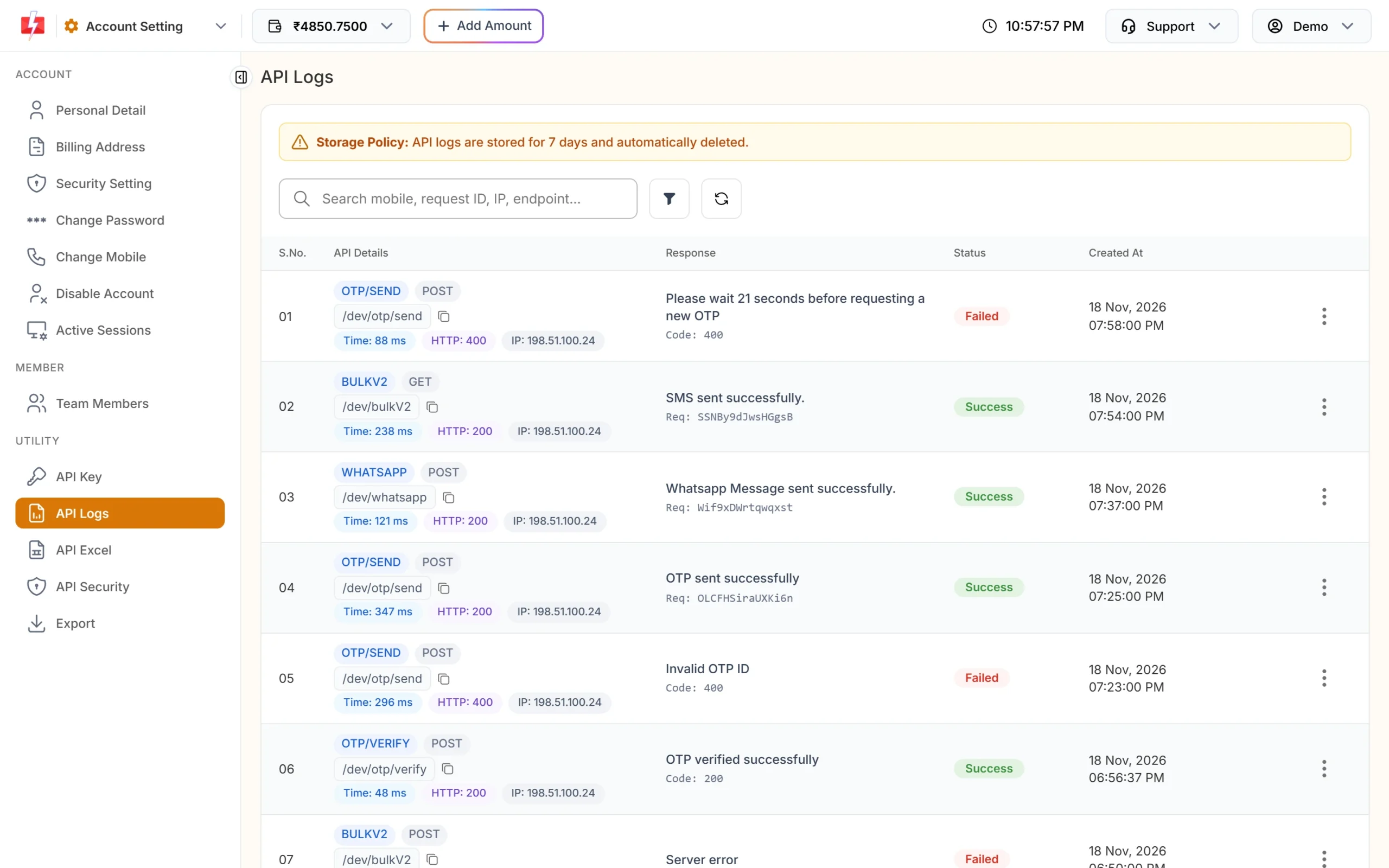
API Logs shows each call and its result. -
Filter by time and status
Click the filter button to narrow the list by date range, status, method, HTTP code, response time or IP. Choose the minute of your timeout to find the call quickly.
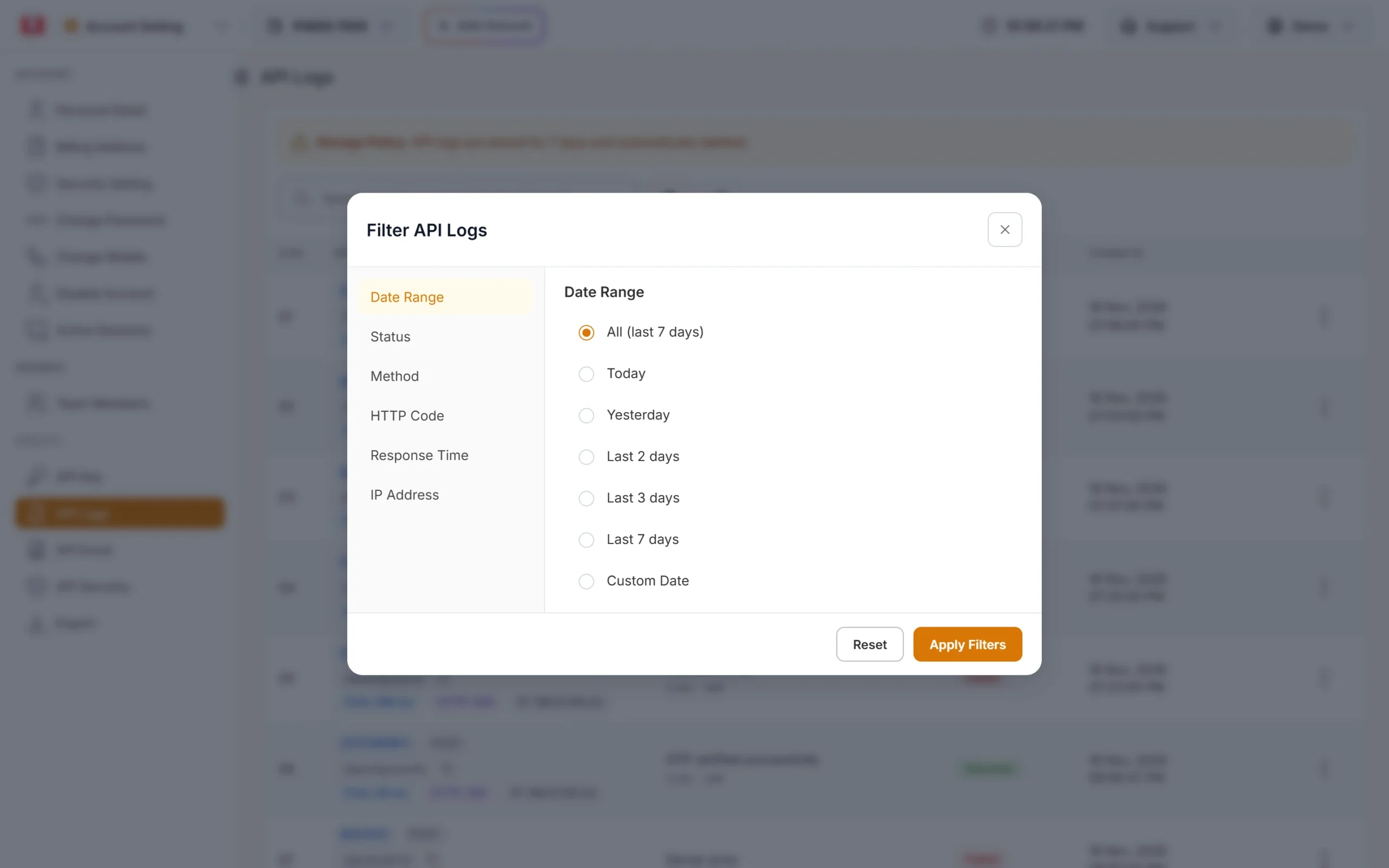
Narrow the logs to the time of the timeout. -
Check the charge
In Transaction History, filter by Request ID to see if that send was charged. A charge means the message was processed.
-
Retry only if nothing is there
If the call is not in API Logs and there is no charge, it is safe to send again. Note that calls with a wrong or missing API key are not logged at all.
Make your own sends idempotent
The SMS API does not take an idempotency key, so keep the protection in your system:
- Give each message your own unique ID, for example the order ID plus the message type, and save it with the status “sending” before you call the API.
- Pass the same ID in
udf1. It is stored with the message and comes back in webhooks, so you can link reports to your record. - Save the
request_idas soon as you get it and mark the record “sent”. - Before any retry, check your record. If it already has a request_id, do not send again.
- Use a database unique key on your message ID so two workers cannot create the same send.
import requests

def send_once(db, msg_id, payload):
    row = db.get(msg_id)
    if row and row.get("request_id"):
        return row["request_id"]          # already sent, never send twice

    db.save(msg_id, status="sending")
    payload["udf1"] = msg_id
    try:
        r = requests.post(
            "https://www.fast2sms.com/dev/bulkV2",
            headers={"authorization": "YOUR_API_KEY"},
            json=payload,
            timeout=30,
        )
        data = r.json()
    except requests.RequestException:
        db.save(msg_id, status="unknown")  # check API Logs before retrying
        return None

    if data.get("return") is True:
        db.save(msg_id, status="sent", request_id=data["request_id"])
        return data["request_id"]

    db.save(msg_id, status="failed", error=data.get("message"))
return NoneSmart OTP: use Resend, not a second Send
- Each call to Send OTP creates a new OTP and cancels every older unverified OTP for that mobile. Calling Send twice gives your user two different codes, and only the newest works.
- Resend OTP sends the same code again. It works within 10 minutes of the first send and up to 5 sends in total. Each resend is charged.
- The SMS Resend / Time Limit in OTP Settings blocks a new send to the same number and OTP ID until the wait is over. It also stops accidental double sends.
- Disable the “Send OTP” button in your app after one click until the API answers.
Duplicate numbers inside one request
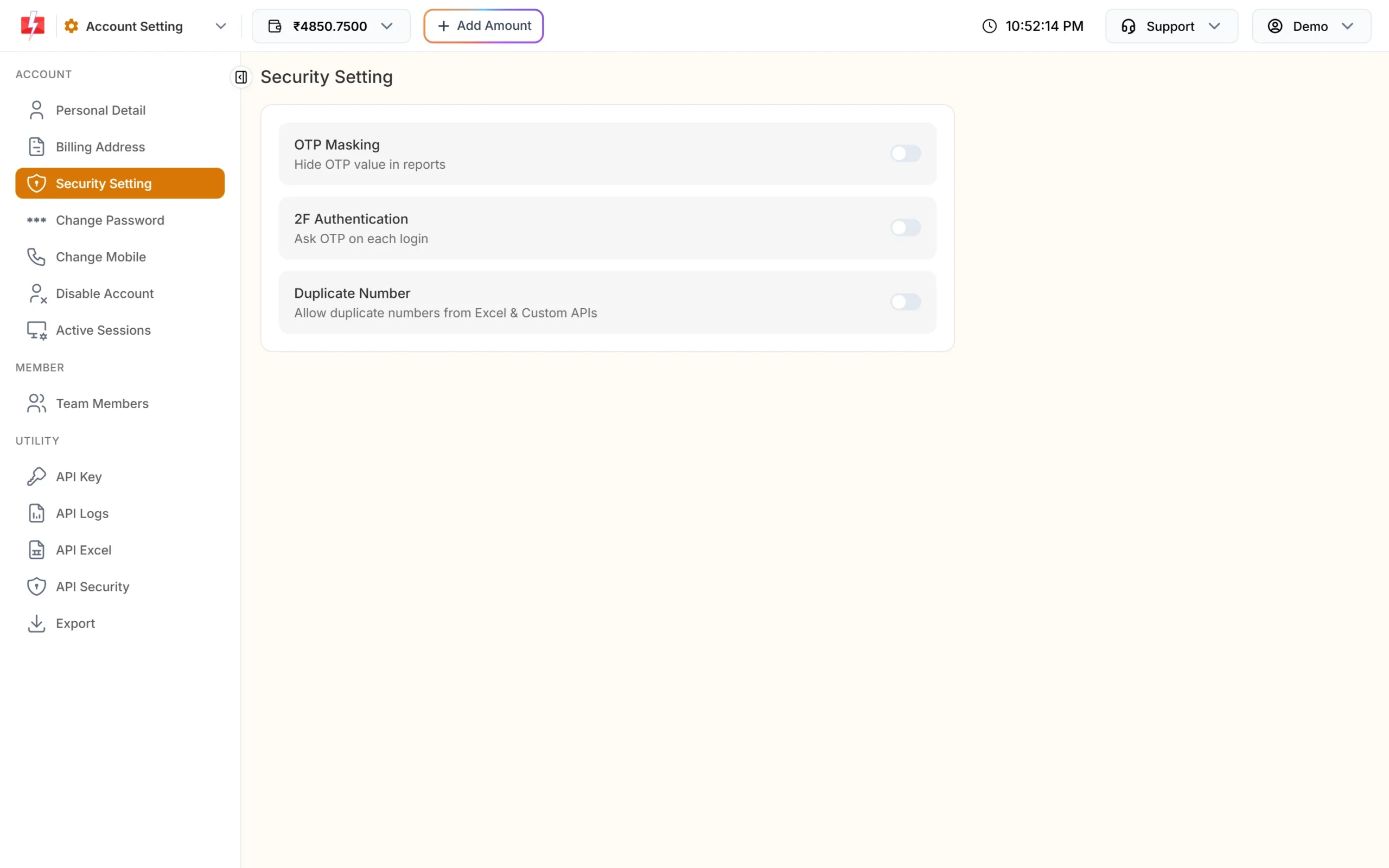
Under Account Setting > Security Setting, the Duplicate Number switch reads “Allow duplicate numbers from Excel & Custom APIs”. Keep it off and duplicate numbers from Excel files and custom APIs are removed automatically. Turn it on only if you really need to send two different messages to the same number in one request. Changing it asks for your password.
From the panel, the Message Preview & Confirmation popup shows duplicate numbers separately before you send, and they are not charged.
Webhooks can also arrive twice
If your server is slow or returns an error, Fast2SMS retries the webhook, and you can resend a log row by hand. Your webhook receiver should update the record that matches request_id and mobile, never insert a new one, so a repeated report changes nothing.
Common problems and fixes
My customer got the same SMS twice
Search API Logs for the mobile number. Two calls means your system sent twice. Check your retry logic and job queue. One call with the number listed twice means a duplicate in your list.
My app shows a timeout but the SMS was delivered
The request was accepted before your client gave up. Increase the timeout and check API Logs before retrying.
The user got two OTPs and the first one does not work
Your app called Send OTP twice. Only the newest OTP is valid. Use Resend OTP for “send again” buttons.
Frequently asked questions
Does the Fast2SMS SMS API support an idempotency key?
No. Keep your own unique message ID, pass it in udf1, and check your records and API Logs before retrying.
Am I charged for duplicate requests?
Yes. Each accepted request is a separate send and is charged. Duplicate numbers inside one panel send are removed before charging.
How do I know if a timed-out request was sent?
Search API Logs by mobile number or time. If the call shows Success with a request_id, it was accepted. You can also filter Transaction History by request ID.
Does Fast2SMS block the same SMS to the same number?
Not for DLT SMS. The same template can be sent to the same number again, so the protection must be in your code.
How long are API logs kept?
7 days. Export them from Account Setting > Export if you need them longer.
Should I retry on HTTP 5xx?
Check API Logs first, then retry once after a short delay. Do not retry in a tight loop.