
Bulk SMS for e-commerce works best when each order update goes on the channel that suits it: DLT SMS for alerts that must reach every buyer, WhatsApp for rich order updates and replies, a Key Press voice call for confirming COD orders, and Smart OTP for login and checkout codes. This guide maps every message an online store or D2C brand sends to the right channel, gives sample templates to register, and shows how to set it all up in Fast2SMS.
It is written for Shopify and WooCommerce store owners, D2C founders and the operations team that handles orders, returns and campaigns.
Which channel for which e-commerce message
Most order messages are service messages the buyer expects, so they go out at any hour and reach DND numbers. Offers, sale alerts and cart reminders are promotional and follow stricter rules.
| Message | Best channel | Why |
|---|---|---|
| Order placed / confirmed | WhatsApp utility, with SMS as backup | WhatsApp shows the order details and a “Track Order” button. SMS reaches buyers who are not on WhatsApp. |
| COD order confirmation | WhatsApp utility with reply buttons, or a Key Press voice call | The buyer confirms with one tap or one key press before you ship, which cuts fake orders and returns. |
| Shipped with tracking link | SMS (Service Implicit) and WhatsApp utility | Short, time-bound and expected. The link must be whitelisted on your DLT portal. |
| Out for delivery | SMS (Service Implicit) | The buyer may be outside without data. SMS still arrives. |
| Delivered, rate your order | WhatsApp utility | A review request about a specific order can be utility. A generic survey is not. |
| Refund processed | SMS and WhatsApp utility | Money messages need proof of delivery. Both channels give you a report per number. |
| Login, signup or checkout OTP | Smart OTP (SMS or WhatsApp, with fallback) | Codes go on a priority route, and a failed code is re-sent on the other channel. |
| Abandoned cart reminder | WhatsApp marketing | It nudges a sale, so it is marketing. Images and a “Complete order” button help. |
| Sale, new launch, back in stock | WhatsApp marketing, RCS carousel or promotional SMS | Promotional rules apply: consent, DND and sending hours. |
Sample DLT SMS templates for online stores
Every business SMS in India must match a content template registered on a DLT portal. The samples below are examples to adapt and register under your own brand. They are not pre-approved. Keep your brand name as fixed text, use typed variables, and keep to three variables or fewer. Every link or callback number in a variable must be whitelisted on your DLT portal first.
| Use | Example template to register | Category |
|---|---|---|
| Order confirmed | Your YourBrand order {#alphanumeric#} of Rs {#numeric#} is confirmed. Track it here: {#url#} | Service Implicit |
| COD confirmation | You placed a Cash on Delivery order {#alphanumeric#} of Rs {#numeric#} with YourBrand. Confirm or cancel it here: {#url#} | Service Implicit |
| Shipped | Your YourBrand order {#alphanumeric#} has been shipped. Track your parcel at {#url#} | Service Implicit |
| Out for delivery | Your YourBrand order {#alphanumeric#} is out for delivery today. Please keep Rs {#numeric#} ready if you chose Cash on Delivery. | Service Implicit |
| Delivered | Your YourBrand order {#alphanumeric#} has been delivered. For any help, call us on {#cbn#}. | Service Implicit |
| Refund | Refund of Rs {#numeric#} for your YourBrand order {#alphanumeric#} has been processed. It can take a few working days to show in your account. | Service Implicit |
| Login OTP | {#numeric#} is your OTP to log in to YourBrand. Do not share it with anyone. | Service Implicit |
| Sale offer | YourBrand End of Season Sale: flat {#numeric#}% off till {#alphanumeric#}. Shop now at {#url#} T&C apply. | Promotional |
| Back in stock | {#alphanumeric#} is back in stock at YourBrand. Order before it sells out: {#url#} | Promotional |
WhatsApp templates for e-commerce: utility vs marketing
Meta puts every WhatsApp template in a category. Utility is for messages about a specific order or account, such as confirmations, shipping updates and refund notices. Marketing covers offers, cart reminders and launches. Authentication is only for one-time codes. If you add a coupon to an order update, Meta treats the whole template as marketing, which costs more. Keep the two apart.
| Template | Category | Example body (variables in double braces) | Button |
|---|---|---|---|
| order_confirmation | Utility | Hi {{1}}, thank you for shopping with YourBrand. Your order {{2}} of Rs {{3}} is confirmed and will be delivered by {{4}}. | Visit website: Track Order |
| cod_confirm | Utility | Hi {{1}}, you placed a Cash on Delivery order {{2}} for Rs {{3}}. Please confirm so we can ship it. | Custom: Confirm order, Cancel order |
| shipping_update | Utility | Your order {{1}} has been shipped. Expected delivery: {{2}}. | Visit website (dynamic URL): Track parcel |
| invoice_ready | Utility | Hi {{1}}, the invoice for your order {{2}} is attached. | Document header (PDF) |
| cart_reminder | Marketing | Hi {{1}}, you left {{2}} in your cart. It is still available. Complete your order before it sells out. | Visit website: Complete order |
| festive_sale | Marketing | Hi {{1}}, our Festive Sale is live. Get flat {{2}} off on selected items till {{3}}. | Image header, Copy offer code |
| login_otp | Authentication | Fixed by Meta: “{{1}} is your verification code.” | Copy code or One-tap auto-fill |
In Fast2SMS, a template can have a header (Text, Image, Video, Document or Location), a body of up to 1,024 characters, a footer and buttons. A document header takes a PDF, which is handy for invoices. Marketing messages need the buyer’s opt-in, for example a WhatsApp checkbox at checkout.
Voice calls for online stores
A recorded call is useful for one job in e-commerce: confirming high-value or COD orders before you ship. Use a Key Press (DTMF) campaign. The key each buyer presses is saved in the report, so you can download it and cancel the orders nobody confirmed.
Sample script (Key Press): “Namaste, this is YourBrand. You placed a cash on delivery order today. To confirm the order, press 1. To cancel it, press 2. Thank you for shopping with YourBrand.”
Use a Call Patch campaign when you want buyers to talk to your team, for example “Press 1 to speak to our order desk” for bulk or custom orders. Things to know before you plan voice:
- Calls go only to non-DND numbers, between 10 AM and 9 PM. DND numbers are not dialled and not charged.
- Every voice file is checked by the operator and must say your brand name clearly. Cashback, prize, lucky draw and reward claims are not allowed, so do not use voice for “you have won” style offers.
- You pay only for answered calls. The amount for unanswered calls comes back to your wallet.
Smart OTP for logins, signups and COD checks
Smart OTP is our recommended way to send OTPs. You link an approved DLT OTP template or a WhatsApp authentication template to an OTP ID, then your store calls the send and verify API with that ID. If the first channel fails, the same code is re-sent on the other channel within 120 seconds. Stores use it for:
- Login with mobile number instead of a password.
- Signup verification, so fake numbers do not enter your customer list.
- COD verification, so you ship only to buyers who own the number they typed.
The free WooCommerce plugin has OTP login, signup verification and COD OTP built in. The Shopify app has an optional OTP login. Both use an OTP ID from the Smart OTP menu.
RCS for product launches
RCS shows your brand name and logo in the phone’s normal messages app, and a Carousel message can show 2 to 10 product cards with images and buttons. It suits launches and sales. To get a brand approved you need a working website, an email on the same domain, a GST certificate, Terms and Privacy pages and an opt-in form on your site. Promotional RCS can go to a number at most 4 times a month, between 7 AM and 10 PM. Phones that cannot receive RCS are marked Non-RCS and refunded. No SMS is sent in their place.
How to get started on Fast2SMS (step by step)
-
Create your account and open the apps
Sign up at fast2sms.com and log in. The dashboard shows one tile per channel: SMS, WhatsApp, Smart OTP, RCS and Voice, with Shopify and WooCommerce in the Integration row. Add money to your wallet with Add Amount.
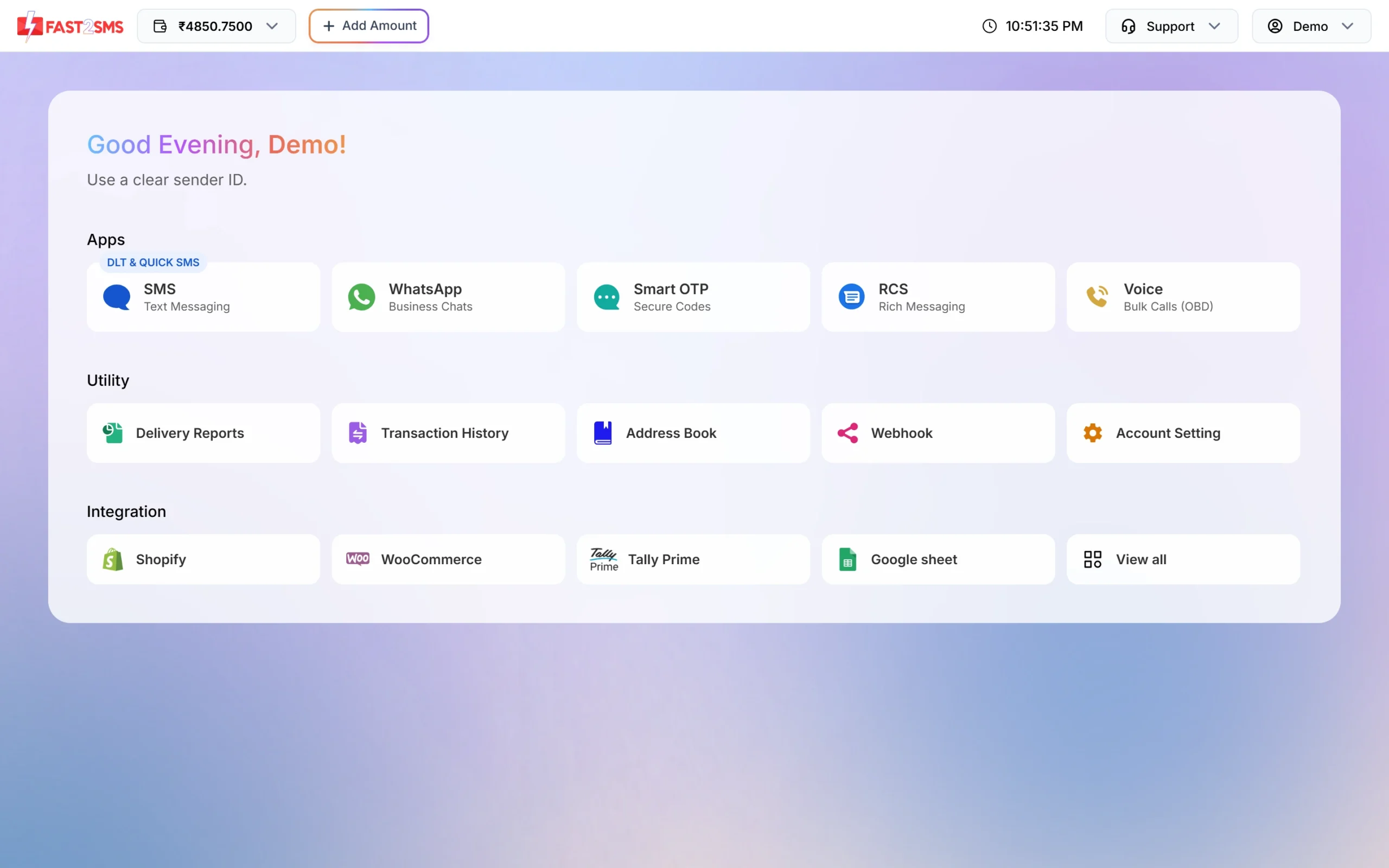
Every channel and the store integrations start from the dashboard. -
Add your DLT entity, sender ID and templates
Register on a DLT portal first. Then open SMS > DLT Manager, add your Entity ID and sender IDs, and add each approved template under Content Template. Pick the sender IDs, paste the Content Template ID and the approved text, choose the template type and upload the DLT screenshot. Finish the PE-TM binding on the same menu so your SMS are not blocked.
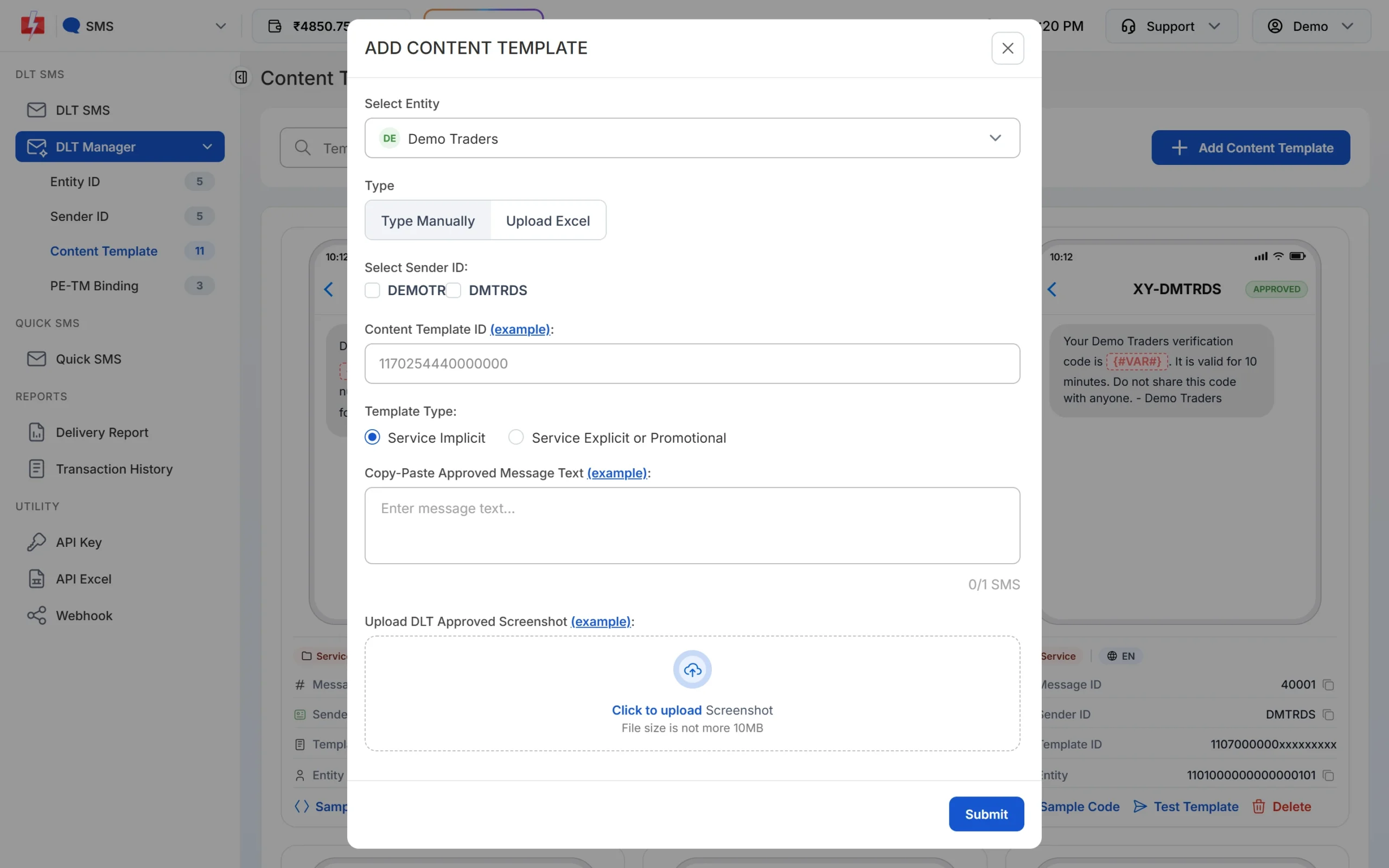
Add each DLT-approved template once. It is then available for sending. -
Connect WhatsApp and create order templates
Open WhatsApp, click Login with Facebook and connect your business number. Then go to WhatsApp Manager > Templates > Add Template and submit your order, shipping and offer templates. Approved cards show the category, the Message ID used in the API and buttons such as Track Order.
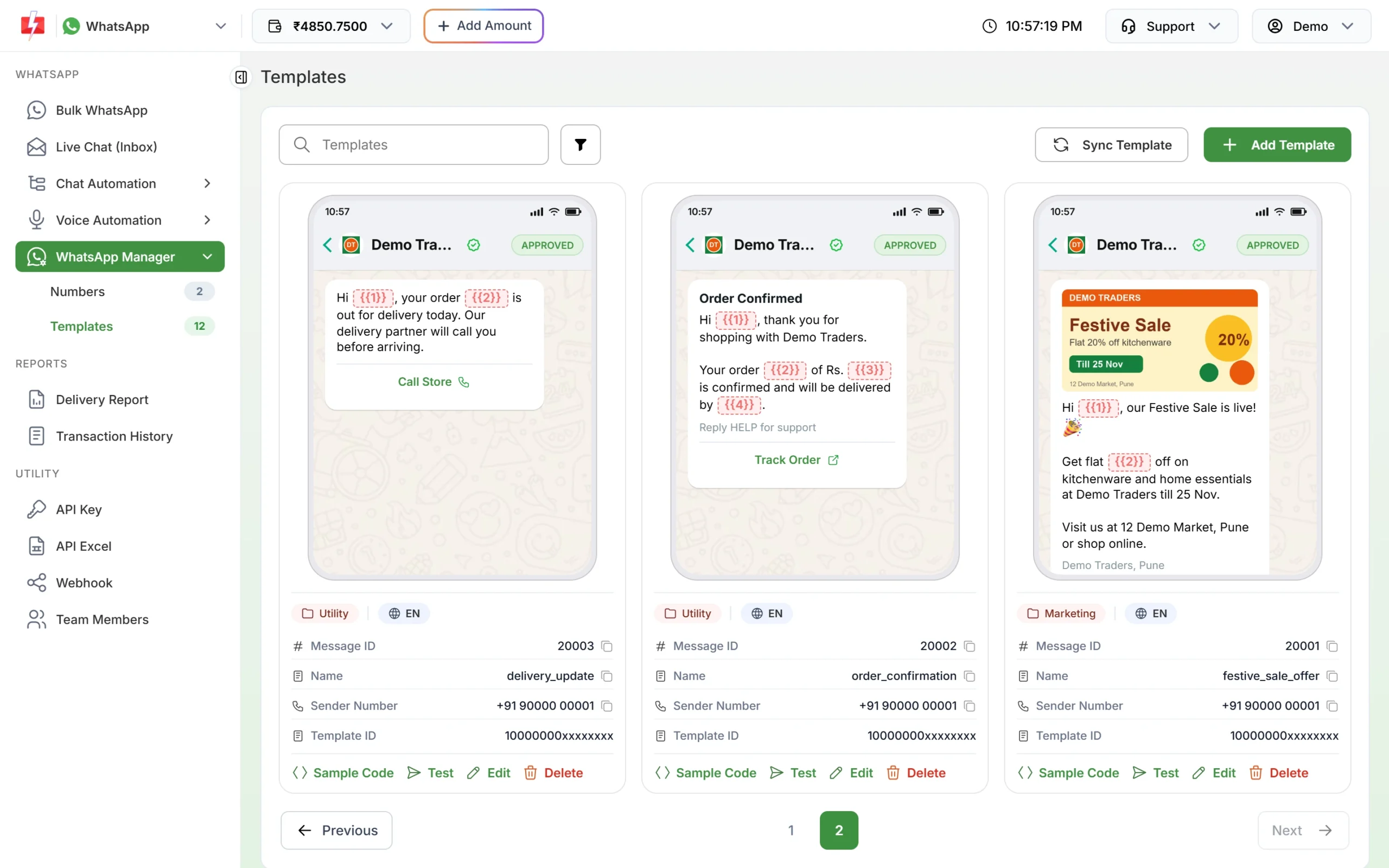
Order updates are Utility. The sale template is Marketing. -
Install the Shopify app or the WooCommerce plugin
Click Shopify or WooCommerce on the dashboard. The Shopify card opens the app in the Shopify App Store and the WooCommerce card opens the free plugin on WordPress.org. Copy your API key from API Key, paste it into the app or plugin, then switch on the order events you want and map each one to an approved template.

The integration cards open the app store pages in a new tab. -
Create a Smart OTP template with fallback
Open Smart OTP > Add OTP Template. Choose your DLT OTP template, mark which variable holds the code, tick SET FALLBACK TEMPLATE and pick a WhatsApp authentication template. Click Assign OTP Template and copy the OTP ID into your store or plugin.
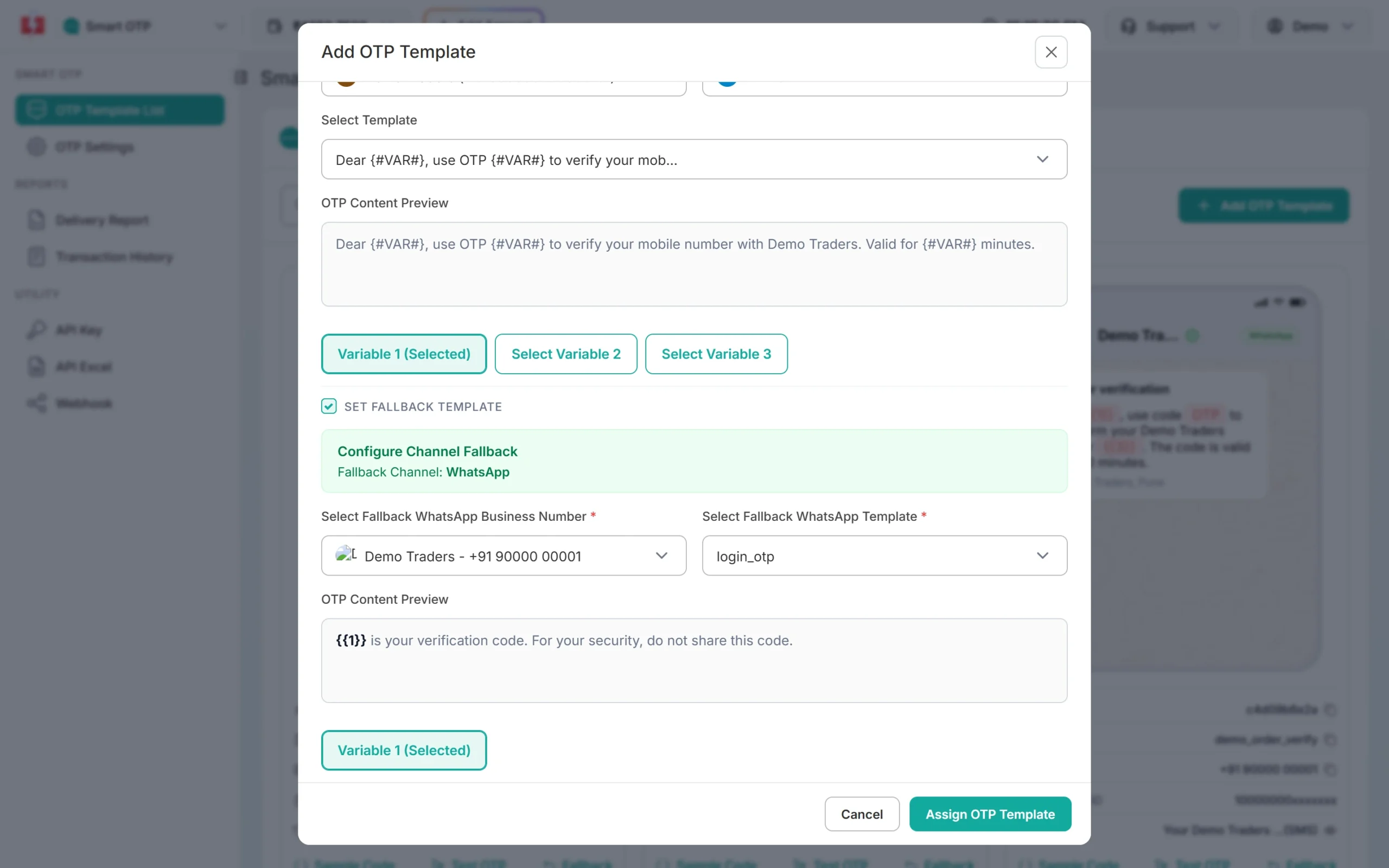
An SMS OTP with a WhatsApp fallback. -
Send a sale campaign and check the report
For a sale, open Bulk WhatsApp, pick your marketing template, add numbers by list, Address Book group or CSV, and click Send or Schedule. The confirmation popup shows the cost before anything goes out. Afterwards, open Delivery Report > WhatsApp Report to see Delivered, Read, Failed, Sent and Pending counts for each campaign.
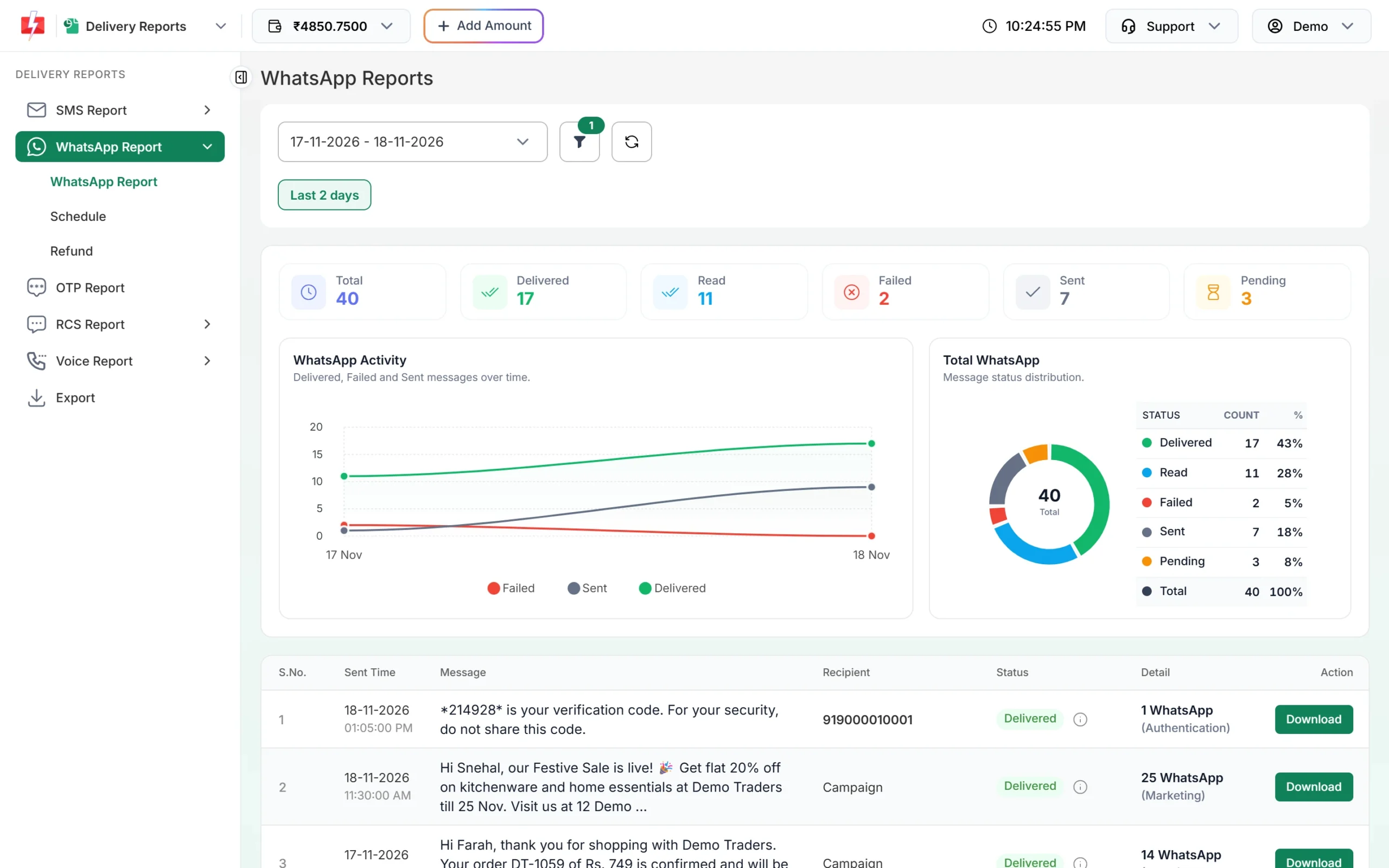
Delivered, Read and Failed counts for every campaign.
Automation options for stores
- Shopify app: 12 order events, each with its own SMS and WhatsApp switch, including order placed, COD orders, shipped, out for delivery, delivered, refunds and abandoned checkout, plus admin alerts to up to 10 team numbers. See the Shopify SMS and WhatsApp page.
- WooCommerce plugin: order status SMS and WhatsApp, OTP login, signup verification and COD verification with a verified badge on the order. See the WooCommerce plugin page.
- API for custom stores: send DLT SMS with the template’s Message ID, WhatsApp templates with their Message ID, and OTPs with Smart OTP. API Excel gives a ready file of your approved templates with sample requests for each channel.
- Webhooks: get Sent, Delivered, Read and Failed reports for messages sent through the API, and incoming WhatsApp replies, on your own URL, so your order system knows when a COD buyer tapped “Confirm order”.
- CSV upload and scheduling: upload a customer file with one column per variable, and schedule a sale for a fixed time or the same time every day across a date range.
- More connectors: Google Sheets, Pabbly Connect and others are on the integrations page.
Compliance notes for e-commerce
- DLT match: every SMS must match an approved template word for word, with values only in the variable places.
- Sending hours: Fast2SMS sends promotional SMS between 10 AM and 9 PM. A sale SMS sent at night is held until the next morning, so schedule “ends tonight” offers well before 9 PM. Order updates on Service Implicit templates go out 24×7.
- Consent: send WhatsApp and promotional messages only to buyers who opted in, and honour every opt-out.
- No sensitive data: never put full card numbers, bank account numbers or passwords in any message, and never ask buyers to share an OTP with your delivery staff on a call.
- Links: whitelist your store domain and tracking domain on your DLT portal, or SMS with those links will fail.
How to estimate the cost
Each channel is charged differently. DLT SMS are charged per number and per SMS part: one part holds 160 English characters or 70 Hindi characters, so long order texts cost more. WhatsApp is charged per message by template category, and marketing costs more than utility. Voice is charged per 15-second pulse for answered calls only. RCS is charged per message by type. Duplicate and invalid numbers are removed before you pay.
See the current rates on the SMS pricing, WhatsApp pricing, RCS pricing and voice call pricing pages. A bigger recharge moves your account to a cheaper SMS plan. Failed and pending WhatsApp messages are refunded to your wallet automatically about two days later. Failed DLT SMS are not refunded automatically.
Frequently asked questions
Do I need DLT registration to send order SMS from my store?
Yes. Every business SMS in India needs a DLT entity, sender ID and approved template. WhatsApp and RCS do not use DLT.
Which DLT category should I use for order updates?
Service Implicit. It covers messages a buyer expects because of an order, such as confirmation, shipping, delivery and refund. Offers go in the promotional category.
Will order SMS reach customers who are on DND?
Yes, if the template is Service Implicit. Promotional SMS do not reach DND numbers.
Is an abandoned cart reminder promotional?
Yes. It asks the buyer to complete a purchase, so register it as promotional on DLT and as a Marketing template on WhatsApp.
How can I reduce RTO on COD orders?
Ask the buyer to confirm before shipping, with a WhatsApp utility template with Confirm and Cancel buttons, a COD OTP, or a Key Press call. See Shopify COD verification and WooCommerce COD OTP verification.
Is the Fast2SMS Shopify app free?
Yes. The app and the WooCommerce plugin are free to install. You pay only for the messages you send from your wallet.
Related guides
- WhatsApp utility templates for e-commerce and D2C: 14 order, return and refund templates
- Fast2SMS Shopify app: order notifications
- WooCommerce SMS and WhatsApp order notifications
- Shopify abandoned cart recovery on WhatsApp and SMS
- How to create a WhatsApp template
- Smart OTP setup guide
- Bulk SMS for e-commerce