
These WhatsApp utility templates for e-commerce and D2C brands cover the whole order journey after checkout: order received, COD check, packing, shipping, delivery problems, returns, refunds and invoices. Each one comes with the body text, sample values for Meta’s review, the buttons to add and the reason it fits the utility category. At the end you will find messages that look similar but are marketing, so you can keep the two apart and pay the lower utility rate only where it is genuine.
Before you use these templates
- Your WhatsApp number is connected in Fast2SMS, and your customers agreed to get WhatsApp messages from you. See WhatsApp opt-in and opt-out rules.
- Pick Utility as the template type. Meta still decides the final category and can change it later, so nobody can promise that a template stays utility.
- Every body below starts and ends with fixed words, never a variable, because Meta rejects that. Keep it that way when you edit. See template character limits and variable rules.
- Fast2SMS allows up to 3 quick reply (Custom) buttons, 2 Visit website buttons and 1 Call Phone Number button per template. See WhatsApp template buttons.
- Replace “Demo Traders”, the links and the time periods with your own store details and policies.
Order placed and confirmed
1. Order received
Template name: order_received_ecom
Hi {{1}}, thank you for your order {{2}} at Demo Traders. We have received Rs {{3}} and will pack your items within {{4}}. You will get the tracking details here once it ships.- Sample values: {{1}} = Priya, {{2}} = DT-10482, {{3}} = 1,299, {{4}} = 24 hours
- Header and buttons: Visit website, Dynamic URL: “View order” (link ending in the order number, such as https://demotraders.in/orders/DT-10482)
- Why it is utility: It confirms an order the customer just placed and paid for, with no offer.
2. Cash on delivery check
Template name: cod_order_verify
Hi {{1}}, you placed a cash on delivery order {{2}} for Rs {{3}} at Demo Traders. Please confirm it with a button below so we can pack and ship it.- Sample values: {{1}} = Rahul, {{2}} = DT-10483, {{3}} = 849
- Header and buttons: Custom (quick reply): “Confirm order” and “Cancel order”
- Why it is utility: It asks the buyer to confirm their own order. Do not add “pay online and save 5%”, which would make it marketing.
3. Payment not completed
Template name: payment_pending_order
Hi {{1}}, the payment for your order {{2}} did not go through, so the order is on hold. You can pay Rs {{3}} with the button below within {{4}} to keep the order.- Sample values: {{1}} = Anjali, {{2}} = DT-10484, {{3}} = 2,150, {{4}} = 24 hours
- Header and buttons: Visit website, Dynamic URL: “Pay now” (link ending in the order number)
- Why it is utility: It reports a failed payment on an order the customer started. The deadline is about that order, not a sales push.
Packing, shipping and delivery
4. Order packed
Template name: order_packed
Hi {{1}}, your order {{2}} is packed and will be handed to our courier partner by {{3}}. We will share the tracking number as soon as it ships.- Sample values: {{1}} = Priya, {{2}} = DT-10482, {{3}} = today evening
- Header and buttons: None
- Why it is utility: A status update on the customer’s own order.
5. Shipped with tracking
Template name: order_shipped_tracking
Hi {{1}}, your Demo Traders order {{2}} is on its way with {{3}}, tracking number {{4}}. The expected delivery date is {{5}}, and you can follow the parcel with the button below.- Sample values: {{1}} = Priya, {{2}} = DT-10482, {{3}} = Demo Courier, {{4}} = DC99812345, {{5}} = 22 Nov
- Header and buttons: Visit website, Dynamic URL: “Track parcel” (link ending in the tracking number)
- Why it is utility: It gives shipping details for one order. A tracking link is a service button.
6. Delivery attempt failed
Template name: delivery_attempt_failed
Hi {{1}}, our courier could not deliver your order {{2}} today because {{3}}. We will try again on {{4}}. Please use a button below if you want to change the address or time.- Sample values: {{1}} = Rahul, {{2}} = DT-10483, {{3}} = the house was locked, {{4}} = 21 Nov
- Header and buttons: Custom (quick reply): “Change address” and “Call me”
- Why it is utility: It reports a problem with the customer’s own delivery and asks what they want done.
7. Address needs more detail
Template name: address_details_needed
Hi {{1}}, we need a little more detail to deliver your order {{2}}. The pin code {{3}} does not match the city on the order. Please reply with your full address and a landmark.- Sample values: {{1}} = Meera, {{2}} = DT-10490, {{3}} = 411001
- Header and buttons: None. The reply arrives in Live Chat (Inbox), where your team can answer.
- Why it is utility: It asks for information needed to complete the customer’s order.
8. Order delayed
Template name: order_delay_notice
Hi {{1}}, your order {{2}} will reach you later than planned because {{3}}. The new expected delivery date is {{4}}. We are sorry for the delay.- Sample values: {{1}} = Priya, {{2}} = DT-10482, {{3}} = heavy rain in your area, {{4}} = 24 Nov
- Header and buttons: Visit website, Dynamic URL: “Track parcel”
- Why it is utility: A change to the customer’s own delivery. If you want to give a goodwill coupon, send it as a separate marketing template.
Cancellations, returns and refunds
9. Order cancelled
Template name: order_cancelled_request
Hi {{1}}, your order {{2}} has been cancelled as you requested. Rs {{3}} will be refunded to your original payment method within {{4}} working days.- Sample values: {{1}} = Rahul, {{2}} = DT-10483, {{3}} = 849, {{4}} = 5 to 7
- Header and buttons: None
- Why it is utility: It confirms an action the customer took on their order.
10. Return request received
Template name: return_request_received
Hi {{1}}, we have received your return request {{2}} for {{3}} from order {{4}}. Our courier partner will pick it up on {{5}}. Please keep the item packed with its tags.- Sample values: {{1}} = Anjali, {{2}} = RT-2041, {{3}} = the blue kurta, size M, {{4}} = DT-10484, {{5}} = 23 Nov
- Header and buttons: Custom (quick reply): “Change pickup date”
- Why it is utility: It confirms a return the customer asked for.
11. Return picked up
Template name: return_picked_up
Hi {{1}}, the item from order {{2}} was picked up today. We will start your refund after it passes a quality check, which takes up to {{3}} working days.- Sample values: {{1}} = Anjali, {{2}} = DT-10484, {{3}} = 2
- Header and buttons: None
- Why it is utility: A status update on the customer’s return.
12. Refund sent
Template name: refund_sent
Hi {{1}}, your refund of Rs {{2}} for order {{3}} has been sent to your {{4}}. The reference number is {{5}}. It can take a few hours to show in your account.- Sample values: {{1}} = Anjali, {{2}} = 2,150, {{3}} = DT-10484, {{4}} = UPI ID ending @okdemo, {{5}} = RF7781203
- Header and buttons: None
- Why it is utility: It reports money returned on the customer’s own order.
13. Replacement shipped
Template name: replacement_shipped
Hi {{1}}, the replacement for your order {{2}} has been shipped with {{3}}. Please hand the original item to the courier when the replacement is delivered.- Sample values: {{1}} = Meera, {{2}} = DT-10490, {{3}} = Demo Courier
- Header and buttons: Visit website, Dynamic URL: “Track replacement”
- Why it is utility: It follows an exchange the customer requested.
14. Invoice for an order
Template name: gst_invoice_order
Hi {{1}}, the GST invoice for your order {{2}} is attached. Please keep it for warranty claims and your records.- Sample values: {{1}} = Priya, {{2}} = DT-10482
- Header and buttons: Document header (PDF). You attach each customer’s invoice when you send.
- Why it is utility: It shares a document about the customer’s own purchase.
These would be marketing
These messages also go to buyers, but each one tries to sell. Send them as marketing templates, and only to customers who agreed to get offers.
| Message | Why Meta treats it as marketing | What to do instead |
|---|---|---|
| Hi {{1}}, you left {{2}} in your cart. Complete your order before it sells out. | Abandoned cart reminders are on Meta’s own list of marketing examples. | Create a marketing template and send it to opted-in shoppers. |
| Hi {{1}}, your order {{2}} was delivered. Shop again this week and get 10% off. | An offer added to a delivery update makes the whole template marketing. | Use the delivery template above, and send the offer separately. |
| Hi {{1}}, the {{2}} you liked is back in stock. Buy it now. | It invites a new purchase, even if the customer asked to be told. | Send it as marketing. |
For more offer wording, see WhatsApp marketing message examples.
What these templates cost
At the time of writing, Fast2SMS charges ₹0.25 per utility message and ₹0.95 per marketing message, and your account may have its own rates. A store that sends 5 updates on each of its 2,000 orders a month sends 10,000 messages: ₹2,500 as utility, or ₹9,500 if a promotional line turned those templates into marketing. See WhatsApp API price in India.
Sending in bulk? For high WhatsApp volumes our team offers discounted rates. Talk to our team or see WhatsApp pricing.
How to add these e-commerce templates in Fast2SMS
-
Open the template form
Go to WhatsApp Manager > Templates and click Add Template. If you have more than one WhatsApp number, pick the sender number at the top right.
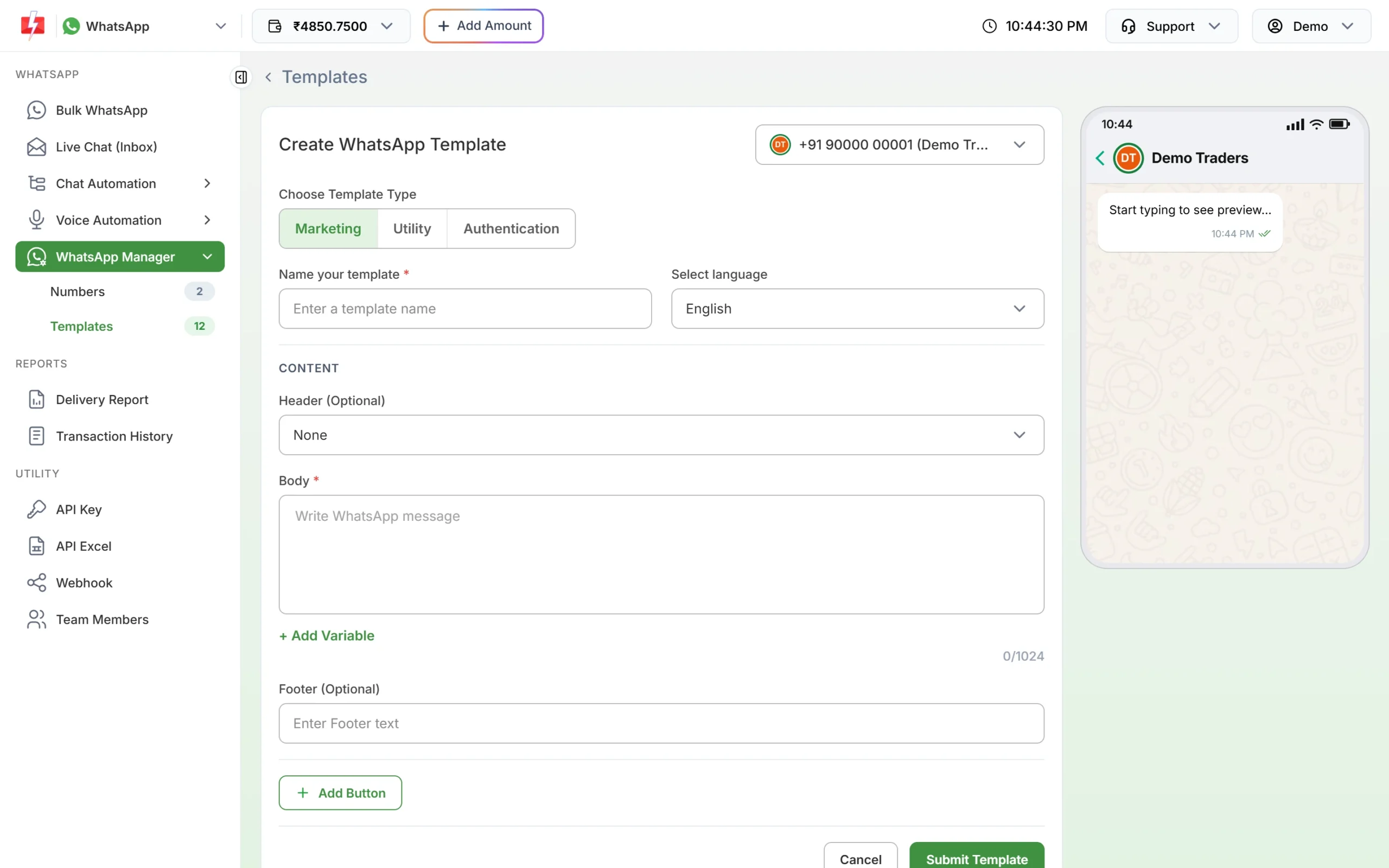
Click Utility under Choose Template Type. -
Choose Utility and paste the text
Under Choose Template Type, click Utility. Type the template name, for example order_packed, and pick the language. Paste the body, put each value in with + Add Variable, and fill the boxes under Samples for body content with the sample values from this page.
-
Add the header and buttons, then submit
For the invoice template, set Header to Document and upload a sample PDF (up to 100MB). Click Add Button for the buttons listed with each template, then Submit Template. Meta reviews it, usually within 24 hours.
-
Check the category after approval
Click Sync Template to fetch the latest status. The badge under each approved card shows the category Meta gave it. If a template you submitted as Utility shows Marketing, Meta approved it as marketing; read the template again for any promotional line.
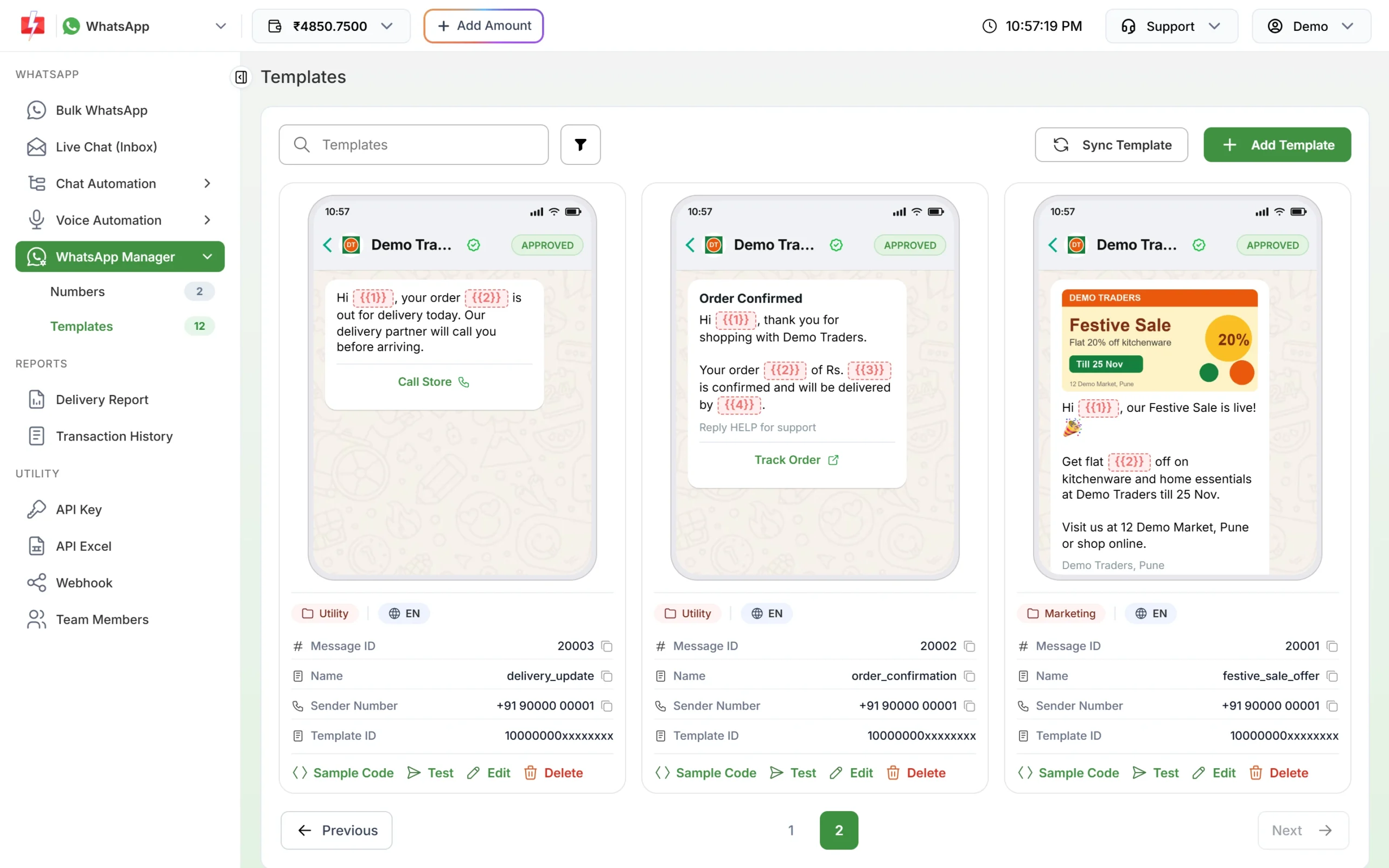
Approved utility templates with Track Order and Call Store buttons. -
Send it
For a few orders, pick the template in Bulk WhatsApp; the picker has a Utility tab and lists only approved templates. For every order, send it from your store with the WhatsApp template API using the template’s Message ID.
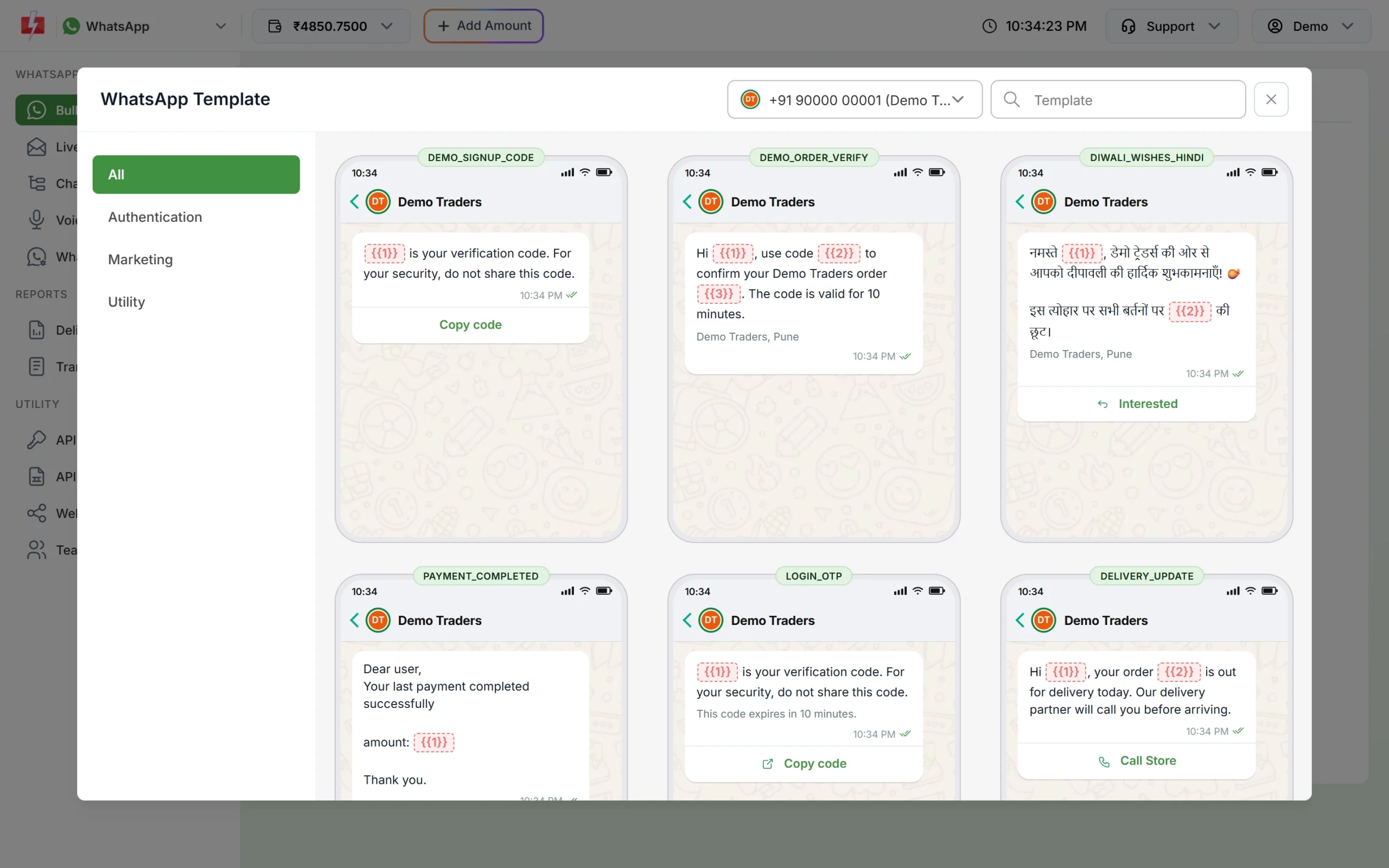
Only approved templates are listed, with a Utility tab.
Frequently asked questions
Is an abandoned cart reminder a utility message?
No. Meta lists abandoned cart reminders as marketing. Send them as a marketing template to customers who opted in.
Is a cash on delivery confirmation utility?
Yes, when it only asks the buyer to confirm their own order. An offer to switch to prepaid with a discount makes it marketing.
Can I ask for a review in a utility template?
A question about one specific order, such as whether anything was damaged, fits utility. A general survey or a reward for a review does not. See customer feedback and NPS on WhatsApp.
Can I send the invoice PDF on WhatsApp?
Yes. Use a utility template with a Document header and attach each customer’s invoice when you send.
Do I need a different template for each courier?
No. Put the courier name in a variable, as in the shipped template above.
Can I send these from Shopify or WooCommerce?
Yes. Fast2SMS connects with Shopify and WooCommerce for order updates. See SMS and WhatsApp for e-commerce for the setup.