
A WhatsApp utility template costs less than a marketing template, but only when the message really is about a specific order, payment, booking or account that the customer started or agreed to, with nothing promotional in it. Many businesses pay the marketing rate for plain order and payment updates because one line of offer text slipped into the template. This guide shows how to write WhatsApp utility templates correctly: Meta’s rule, the words that make a template marketing, 15 before and after rewrites, how to split a mixed message in two, and what it saves you.
Meta’s rule for WhatsApp utility templates
At the time of writing, Meta’s template guidelines say a utility template must be non-promotional, with no promotional or persuasive intent. It must also be either specific to the customer (about something they did or asked for) or essential to them, such as a fraud or safety alert. Meta groups utility messages into these kinds:
| Kind of utility message | What it covers |
|---|---|
| Opt-in management | Confirming that the customer turned WhatsApp updates on or off |
| Order management | Confirmation, shipping, delivery, returns and refunds for an order the customer placed |
| Account alerts or updates | Payment reminders, bills, balance updates and account changes, with no upsell |
| Feedback surveys | Questions about one specific order or interaction. A general survey is not utility. |
| Continue a conversation | Picking up a support request the customer started on your website, app or call centre |
| Essential or critical | Fraud warnings, service outages, product recalls, warranty alerts, safety and legal or regulatory notices |
Two more rules decide many cases: a template that mixes utility and marketing content is marketing, and so is a template whose meaning is unclear, such as one that only says “Congratulations” or is mostly variables.
What turns a template into marketing
- Offers, discounts, cashback, coupon codes and free gifts
- Upsell and cross-sell: “upgrade”, “add”, “you may also like”
- Invitations to browse or buy: “check out”, “shop now”, “explore our new range”
- Renewal pushes with an incentive, such as “renew now and get 2 months free”
- Generic newsletters, greetings and announcements sent to everyone
- A reward for feedback, or a push to download your app
- Sales buttons, such as “Shop Now” or Copy offer code
What the category costs you
In Fast2SMS every message is charged by its template’s category. At the time of writing the rates are ₹0.25 per utility message and ₹0.95 per marketing message (authentication is ₹0.25 and session replies are ₹0.13). Your account may have its own rates, and the panel always shows them. A utility template costs the utility rate whether or not the customer wrote to you in the last 24 hours. See which WhatsApp messages are free and which are charged.
| Order updates per month | Sent as utility | Sent as marketing | Extra cost of marketing |
|---|---|---|---|
| 1,000 | ₹250 | ₹950 | ₹700 |
| 10,000 | ₹2,500 | ₹9,500 | ₹7,000 |
| 50,000 | ₹12,500 | ₹47,500 | ₹35,000 |
Sending in bulk? For high WhatsApp volumes our team offers discounted rates. Talk to our team or see WhatsApp pricing.
Price is not the only reason. A customer who has stopped marketing messages from your business does not get marketing templates (error 131050), and Meta can hold back marketing messages to people who already get many. So an order update approved as marketing may not reach the buyer waiting for it.
7 rules for rewriting a template as utility
-
Name the transaction
Refer to the order, invoice, booking, policy or account the message is about, with a variable for its number, amount or date. A message that could go to every customer on your list reads as a broadcast.
-
Delete the promotional sentence, do not soften it
“You may also like our new range” is still an upsell. Remove it completely.
-
Swap sales buttons for service buttons
“Track Order”, “Download Invoice”, “Reschedule” or a Call Phone Number button for support fit utility. “Shop Now” and Copy offer code do not.
-
Keep the tone factual
Drop “hurry”, “don’t miss”, “exclusive” and “limited time”. A deadline is fine only when it is a real one about the customer’s own transaction, such as a payment due date or a pickup slot.
-
Make the fixed text explain itself
A reviewer should understand the message even with the variables blank. Fill Samples for body content with realistic values, such as “Priya” and “DT-10482”.
-
Do not hide offers in variables
Meta reviews the template text and your samples. Filling a variable with “Get 20% off today” when you send turns an approved utility template into a promotion. It breaks the rule the category is based on, and it is the kind of misuse Meta limits accounts for.
-
Keep codes in authentication templates
One-time passwords and verification codes belong in an authentication template. Meta does not allow passcodes in utility or marketing templates.
15 before and after examples
Each “before” mixes an update with selling, so Meta would treat it as marketing. Each “after” keeps only the part about the customer’s own transaction.
| # | Before (marketing) | After (utility) | What changed |
|---|---|---|---|
| 1 | Hi {{1}}, your order {{2}} is confirmed. Use code EXTRA10 for 10% off your next order. | Hi {{1}}, your order {{2}} of Rs {{3}} is confirmed. We will send you the tracking details once it ships. | Coupon removed, amount added |
| 2 | Hi {{1}}, your order {{2}} has shipped. While you wait, check out our new arrivals. | Hi {{1}}, your order {{2}} has shipped with {{3}}. Use the button below to track it. | Browse prompt removed, “Track Order” button added |
| 3 | Hi {{1}}, your order was delivered. Rate us 5 stars and win a Rs 500 voucher. | Hi {{1}}, your order {{2}} was delivered on {{3}}. Was anything missing or damaged? Tap a button below to tell us. | Feedback tied to one order, reward removed |
| 4 | Sorry, your order {{1}} is delayed. Here is a 15% coupon for the wait: SORRY15. | Hi {{1}}, your order {{2}} is delayed because of {{3}}. The new delivery date is {{4}}. We are sorry for the wait. | Coupon removed, reason and new date added |
| 5 | Payment of Rs {{1}} received. Upgrade to Gold membership and save more. | Dear {{1}}, we have received Rs {{2}} for invoice {{3}} on {{4}}. Thank you for the payment. | Upsell removed |
| 6 | Hi {{1}}, your plan expires on {{2}}. Renew now and get 2 months free. | Hi {{1}}, your {{2}} plan renews on {{3}}. Rs {{4}} will be charged to the payment method saved on your account. | Incentive removed; close to Meta’s own billing reminder example |
| 7 | Invoice {{1}} is ready. Pay before {{2}} and get 5% cashback. | Dear {{1}}, your invoice {{2}} for Rs {{3}} is attached. Payment is due on {{4}}. Please ignore this if you have already paid. | Cashback removed, invoice PDF as header |
| 8 | Reminder: your appointment on {{1}}. Bring a family member for a free health check. | Hi {{1}}, this is a reminder of your appointment with {{2}} on {{3}} at {{4}}. Please use the buttons to confirm or reschedule. | Offer removed, quick replies added |
| 9 | Your room at {{1}} is booked. Add airport pickup at 20% off. | Hi {{1}}, your booking {{2}} at {{3}} is confirmed for {{4}} to {{5}}. Check-in starts at 12 noon. | Add-on offer removed |
| 10 | Welcome to Demo Traders on WhatsApp. Here are this week’s best deals. | Hi {{1}}, you have turned on WhatsApp updates from Demo Traders. You will get your order and delivery updates here. Reply STOP to turn them off. | Now an opt-in confirmation, deals removed |
| 11 | New login on your account. Protect yourself with Premium Security at Rs 99. | Hi {{1}}, there was a new login to your Demo Traders account on {{2}} from {{3}}. If this was not you, change your password and call us. | Paid add-on removed, “Call Support” button |
| 12 | Your request {{1}} is resolved. Meanwhile, explore our festive collection. | Hi {{1}}, your support request {{2}} is resolved. Reply to this message if you still need help with it. | Browse prompt removed |
| 13 | Your warranty ends on {{1}}. Extend it now at 30% off. | Hi {{1}}, the warranty for your {{2}} (serial {{3}}) ends on {{4}}. Keep your invoice ready if you need a repair before that date. | Extension offer removed; warranty alerts are on Meta’s essential list |
| 14 | EMI of Rs {{1}} due on {{2}}. You are also pre-approved for a top-up loan. | Hi {{1}}, the EMI of Rs {{2}} for your loan account ending {{3}} is due on {{4}}. Please keep the amount in your bank account. | Loan offer removed, account number masked |
| 15 | You are registered for {{1}}. Bring a friend at 50% off. | Hi {{1}}, your registration for {{2}} on {{3}} is confirmed. Your entry pass number is {{4}}, please show it at the gate. | Referral offer removed |
Every “after” starts and ends with fixed words, because Meta rejects templates that start or end with a variable. See template variable rules.
Messages that cannot be rewritten as utility
Some messages exist only to sell, so no wording makes them utility: abandoned cart reminders (Meta lists these as marketing), price drop and back in stock alerts, festival and birthday greetings, launches, newsletters and “we miss you” messages. Send them as marketing templates, only to customers who agreed to get offers. See WhatsApp marketing message examples.
How to split one mixed message into two
If you really want both the update and the offer, send them as two templates instead of one mixed marketing template.
-
Sort the sentences
Mark each sentence as “about this order or account” or “selling”. In “Your order DT-10482 is confirmed. Use EXTRA10 for 10% off your next order.”, the first sentence is the update and the second is the offer.
-
Build the utility template
Use only the update sentences, add the order number and amount as variables, and add a service button such as “Track Order”.
-
Build a separate marketing template
Put the offer in its own marketing template. A Copy offer code button fits here.
-
Send each to the right people
Send the utility template to every customer the update is for. Send the marketing template only to customers who agreed to receive offers. Meta suggests a separate opt-in for each kind of message. See WhatsApp opt-in and opt-out rules.
Be honest with the numbers. If you send both templates to everyone, each customer costs ₹0.25 + ₹0.95 = ₹1.20 at the time of writing, which is more than one mixed marketing message at ₹0.95. Splitting saves money when the offer goes to fewer people. For example, 10,000 order confirmations as one mixed marketing template cost ₹9,500. Split, the 10,000 utility updates cost ₹2,500 and the offer to 3,000 opted-in customers costs ₹2,850, so ₹5,350 in total.
Write and submit the utility template in Fast2SMS
-
Open the template form
Go to WhatsApp Manager > Templates and click Add Template. If you have more than one number, pick the sender number at the top right.
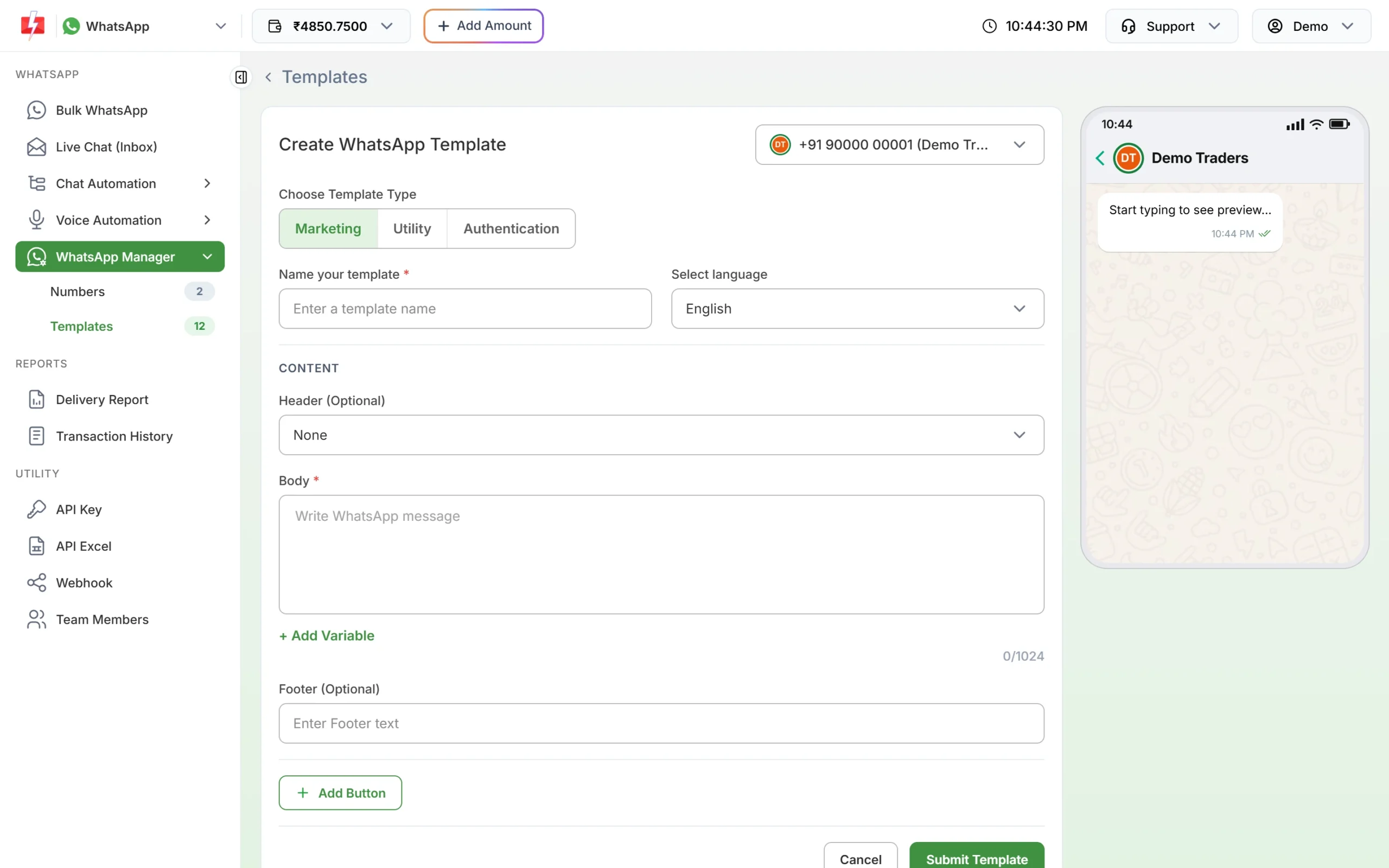
Click Utility under Choose Template Type. -
Choose Utility and name the template
Under Choose Template Type, click Utility. Type a name such as order_shipped and pick the language the text is written in.
-
Paste the body, add buttons and submit
Paste the “after” text, click + Add Variable where each value goes and fill a realistic sample for each. Add service buttons with Add Button, then click Submit Template. Meta reviews it, usually within 24 hours.
-
Check the category Meta gave it
Click Sync Template to fetch the latest status. Each card shows the category under the preview. If you submitted Utility and the card shows Marketing, Meta approved it as marketing.
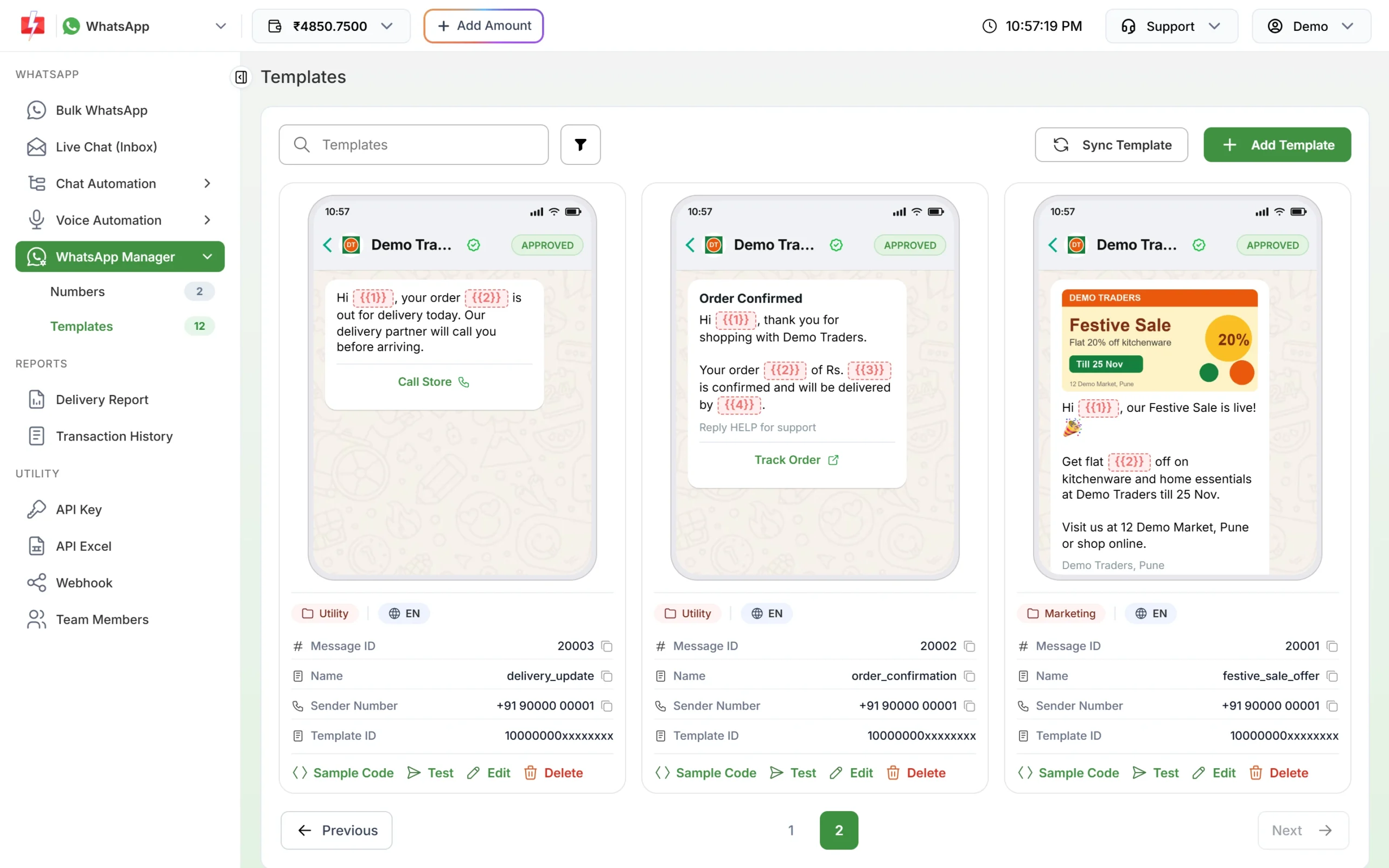
The category badge under each approved template. -
Check the rate before you send
In Bulk WhatsApp, after you click Send, the Message Preview & Confirmation window shows the cost per message for the template’s category and the total.
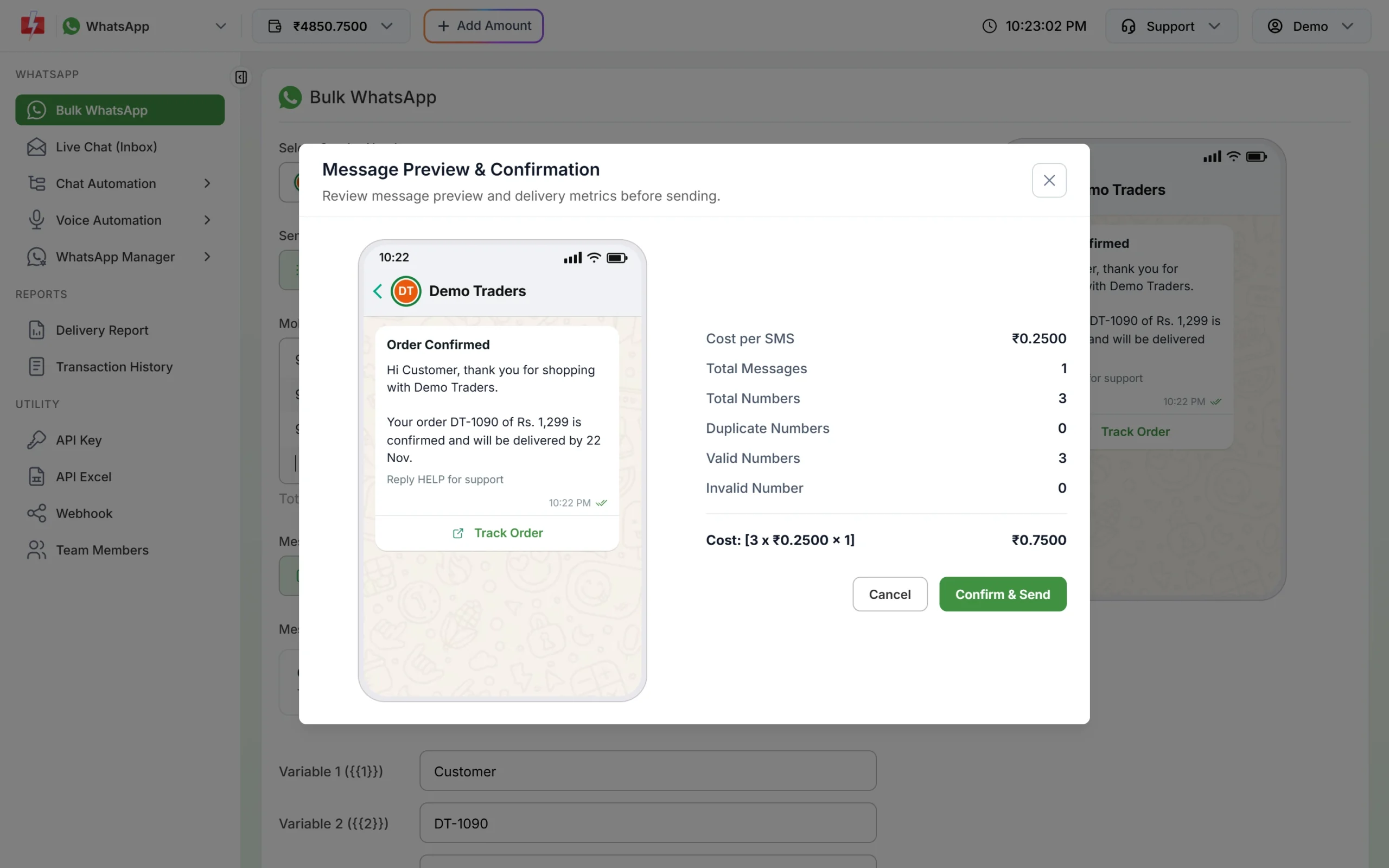
A utility template is charged at the utility rate.
What happens if utility is misused
At the time of writing, Meta checks categories at three points:
- When you submit: since 9 April 2025, a template submitted as utility that Meta sees as marketing is approved as marketing.
- After approval: since July 2024, Meta re-checks approved templates regularly. A utility template it moves to marketing usually gets one day’s notice by email. It stays approved but is charged as marketing.
- On the account: businesses that keep labelling marketing as utility face account-level steps.
| Step | What happens | How long |
|---|---|---|
| Warning | Admins get a written warning. From then on, utility-to-marketing changes happen at once, with no notice. | Ongoing |
| Rate limiting | Utility messages are capped in a rolling 24-hour window, and messages over the cap are rejected. Marketing and authentication are not affected. | At least 7 days |
| Utility restriction | All approved utility templates become marketing, and you cannot create utility templates or request category reviews. | 7 days, or 30 for repeat cases |
| Portfolio restriction | The same restriction across every WhatsApp account in your business portfolio. | 30 days |
Messages stopped by these limits fail with error 131064. Fast2SMS refunds failed messages to your wallet automatically, but your customers still miss their updates. If a template was already moved, see editing an approved template or its category.
Frequently asked questions
Is it allowed to rewrite a marketing template as utility?
Yes, if the new template is only about the customer’s own order, payment, booking or account and has no promotional content. If the message still exists to sell, it should stay marketing.
Will Meta approve my rewritten template as utility?
Meta decides the category, and nobody can promise it. Templates that follow the rules on this page have a fair chance, but Meta can still approve them as marketing or move them later.
Can I keep a small offer in the footer?
No. The footer is part of the template, so an offer there makes the whole template marketing. Send the offer as a separate marketing template.
Can I change the category of my approved marketing template to utility?
No. Meta does not allow the category of an approved template to be edited. Create a new utility template with the rewritten text, then switch your campaigns and API calls to its Message ID.
Is a utility template cheaper inside the 24-hour window?
Not on Fast2SMS. Every template is charged at its category rate, so a utility template costs ₹0.25 at the time of writing whether or not the customer wrote to you recently.
Related guides
- WhatsApp utility vs marketing templates: examples that get the right category
- WhatsApp error 131064: limited for template category violations
- Can I edit an approved WhatsApp template or change its category?
- WhatsApp API price in India
- WhatsApp opt-in and opt-out rules
- WhatsApp template examples by use case