
To schedule SMS with the Fast2SMS API, add schedule_time to your /dev/bulkV2 request. Fast2SMS keeps the SMS and sends it at that time. It works on the DLT SMS, DLT Manual and Quick SMS routes. This page shows the two time formats, code that builds the time correctly in IST, how to see and cancel scheduled SMS, and how to fix “Invalid Schedule Date & Time”.
Where scheduling works
| API | schedule_time |
|---|---|
/dev/bulkV2 with route=dlt |
Supported |
/dev/bulkV2 with route=dlt_manual |
Supported |
/dev/bulkV2 with route=q (Quick SMS) |
Supported |
/dev/custom (different SMS per number) |
Not supported |
| Smart OTP API | Not supported. OTPs go out at once. |
The two time formats
| Format | Example | Means |
|---|---|---|
DD-MM-YYYY-HH-MM in IST, 24-hour clock |
21-11-2026-10-30 |
21 November 2026, 10:30 AM India time |
21-11-2026-18-45 |
21 November 2026, 6:45 PM India time | |
| Unix timestamp (seconds) | 1795237200 |
21 November 2026, 10:30 AM India time (the same moment worldwide) |
The time must be in the future. If your server runs in another time zone (many cloud servers use UTC), use the Unix timestamp. It has no time zone, so it cannot be off by five and a half hours.
Schedule an SMS by API
-
Build the send request as usual
Prepare your normal
route=dlt,dlt_manualorqrequest with sender, message, variables and numbers. -
Add schedule_time
Add
schedule_timewith a future time in one of the two formats. The code samples below build it for you. -
Check the reply
A good reply is
{"return": true, "request_id": "S...", "message": ["SMS scheduled successfully."]}. Save the request ID. -
See it in the Schedule list
Open Delivery Report > SMS Report > Schedule. Upcoming scheduled SMS are listed with the schedule time, the message and the SMS count.
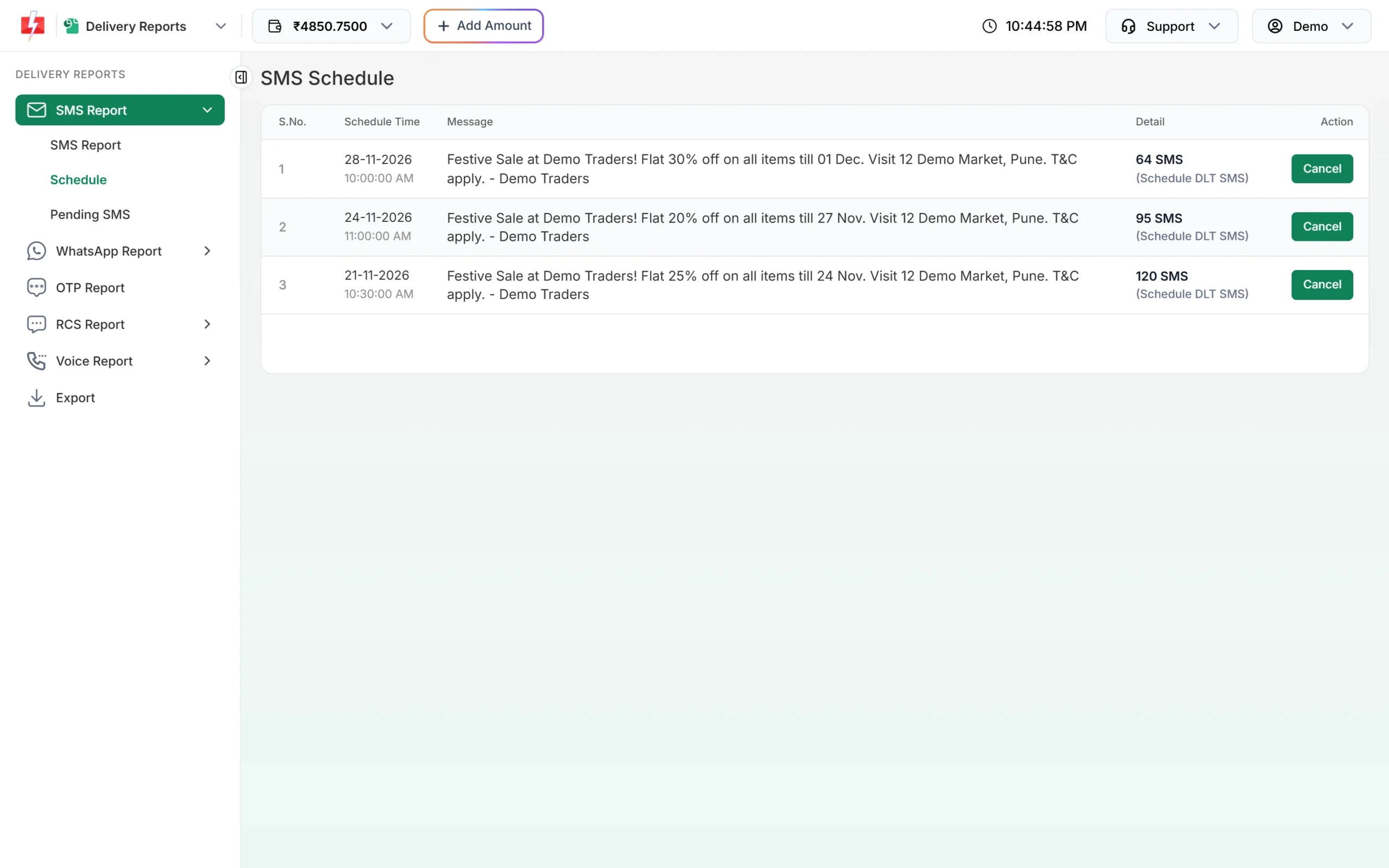
Upcoming scheduled SMS, each with a Cancel button.
Code examples
cURL
curl -X POST "https://www.fast2sms.com/dev/bulkV2" \
  -H "authorization: YOUR_API_KEY" \
  -H "Content-Type: application/json" \
  -d '{"route":"dlt","sender_id":"DEMOTR","message":"10001","variables_values":"Rahul|DT10458|1240|21 Nov","numbers":"9999999999","schedule_time":"21-11-2026-10-30"}'
PHP
<?php
// 10:30 AM IST tomorrow, in DD-MM-YYYY-HH-MM
$when = new DateTime('tomorrow 10:30', new DateTimeZone('Asia/Kolkata'));
$scheduleTime = $when->format('d-m-Y-H-i');   // or $when->getTimestamp() for Unix time

$ch = curl_init('https://www.fast2sms.com/dev/bulkV2');
curl_setopt_array($ch, [
    CURLOPT_POST           => true,
    CURLOPT_RETURNTRANSFER => true,
    CURLOPT_HTTPHEADER     => ['authorization: YOUR_API_KEY', 'Content-Type: application/json'],
    CURLOPT_POSTFIELDS     => json_encode([
        'route'            => 'dlt',
        'sender_id'        => 'DEMOTR',
        'message'          => '10001',
        'variables_values' => 'Rahul|DT10458|1240|21 Nov',
        'numbers'          => '9999999999',
        'schedule_time'    => $scheduleTime,
    ]),
]);
echo curl_exec($ch);
curl_close($ch);
Python
from datetime import datetime, timedelta
from zoneinfo import ZoneInfo
import requests

ist = ZoneInfo("Asia/Kolkata")
when = (datetime.now(ist) + timedelta(days=1)).replace(hour=10, minute=30, second=0, microsecond=0)

payload = {
    "route": "dlt",
    "sender_id": "DEMOTR",
    "message": "10001",
    "variables_values": "Rahul|DT10458|1240|21 Nov",
    "numbers": "9999999999",
    "schedule_time": when.strftime("%d-%m-%Y-%H-%M"),  # or str(int(when.timestamp()))
}
r = requests.post("https://www.fast2sms.com/dev/bulkV2",
                  headers={"authorization": "YOUR_API_KEY"}, json=payload, timeout=20)
print(r.json())
Node.js
// Unix timestamp avoids time zone mistakes. Here: 2 hours from now.
const scheduleTime = Math.floor(Date.now() / 1000) + 2 * 60 * 60;

const res = await fetch("https://www.fast2sms.com/dev/bulkV2", {
  method: "POST",
  headers: { authorization: "YOUR_API_KEY", "Content-Type": "application/json" },
  body: JSON.stringify({
    route: "dlt",
    sender_id: "DEMOTR",
    message: "10001",
    variables_values: "Rahul|DT10458|1240|21 Nov",
    numbers: "9999999999",
    schedule_time: String(scheduleTime),
  }),
});
console.log(await res.json());
Java
import java.time.ZoneId;
import java.time.ZonedDateTime;
import java.time.format.DateTimeFormatter;

ZonedDateTime when = ZonedDateTime.now(ZoneId.of("Asia/Kolkata"))
        .plusDays(1).withHour(10).withMinute(30);
String scheduleTime = when.format(DateTimeFormatter.ofPattern("dd-MM-yyyy-HH-mm"));
// Add "schedule_time": scheduleTime to your bulkV2 JSON body.
// Or use when.toEpochSecond() for a Unix timestamp.
C# (.NET)
var ist = TimeZoneInfo.FindSystemTimeZoneById("Asia/Kolkata"); // "India Standard Time" on older Windows
var nowIst = TimeZoneInfo.ConvertTime(DateTime.UtcNow, ist);
var when = nowIst.Date.AddDays(1).AddHours(10).AddMinutes(30);
string scheduleTime = when.ToString("dd-MM-yyyy-HH-mm");
// Or: DateTimeOffset.UtcNow.AddHours(2).ToUnixTimeSeconds().ToString()
Go
ist, _ := time.LoadLocation("Asia/Kolkata")
now := time.Now().In(ist)
when := time.Date(now.Year(), now.Month(), now.Day()+1, 10, 30, 0, 0, ist)
scheduleTime := when.Format("02-01-2006-15-04") // or strconv.FormatInt(when.Unix(), 10)Cancel a scheduled SMS
There is no cancel API. Cancel from the panel:
- Open Delivery Report > SMS Report > Schedule.
- Click Cancel on the row.
- Click Yes, Cancel. The amount is credited back to your wallet as “Schedule SMS Cancelled”.
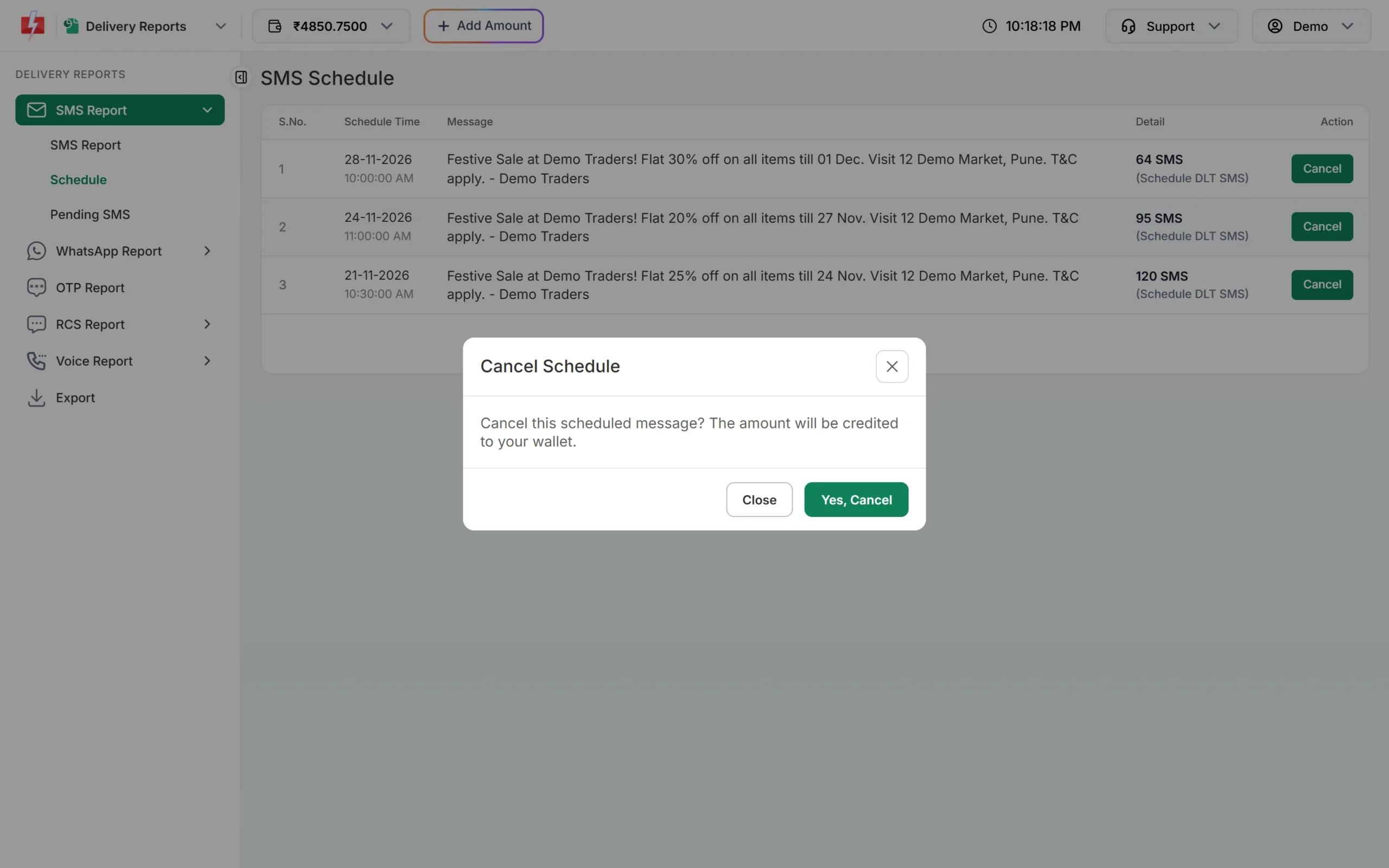
You can only cancel before the SMS is sent. If it has already gone out you see “This schedule cannot be cancelled.”
Error: Invalid Schedule Date & Time
{"return": false, "status_code": 424, "message": "Invalid Schedule Date & Time. The selected time is not greater than the current time."}This comes back with HTTP 401, not 400, so handle it by reading return and status_code. Causes and fixes:
| Cause | Fix |
|---|---|
| The time is in the past or right now | Send a future time. Leave a little margin for the request to arrive. |
| Server time zone is UTC and you built the text format from it | Build the time in Asia/Kolkata, or send a Unix timestamp. |
Wrong order or separators, for example 2026-11-21 10:30 or 21/11/2026 10:30 |
Use DD-MM-YYYY-HH-MM with hyphens only. |
12-hour time, for example 21-11-2026-06-45 meant as 6:45 PM |
Use the 24-hour clock: 21-11-2026-18-45. |
| Unix time in milliseconds | Send seconds (10 digits), not milliseconds (13 digits). |
Promotional SMS and night hours
If the template is Service Explicit or Promotional, or the sender is numeric, SMS are not sent at night. A promotional SMS that falls outside roughly 10 AM to 9 PM is held and sent the next morning. Schedule promotional messages inside daytime hours so they go out when you expect. Transactional (Service Implicit) templates can be scheduled for any time.
Frequently asked questions
Which time zone does schedule_time use?
The DD-MM-YYYY-HH-MM format is read as India time (IST). A Unix timestamp has no time zone.
How far ahead can I schedule?
No maximum is published. Any future time in the right format is accepted.
Can I change a scheduled SMS?
No. Cancel it in Schedule and send a new request with the new time or text.
Is the wallet refunded when I cancel?
Yes. The cancel window says the amount will be credited to your wallet, and it appears in Transaction History as “Schedule SMS Cancelled”.
Can I schedule OTPs?
No. OTPs must reach the user at once, and the Smart OTP API has no schedule option.
Do webhooks fire for scheduled SMS?
Scheduled API sends follow the normal webhook rules: the webhook fires for SMS sent through the API when the delivery report arrives within 24 hours of sending.