
Fast2SMS has two API routes for DLT messages: DLT SMS (route=dlt) and DLT Manual (route=dlt_manual). Both send from your own approved sender ID through /dev/bulkV2 and cost the same. The difference is what you send and who makes sure the text matches DLT. This page compares DLT SMS vs DLT Manual API side by side and helps you pick one.
Short answer
- Use DLT SMS (
route=dlt) for most apps. You send the template’s Message ID and the variable values. Fast2SMS builds the exact approved text, so it cannot drift from DLT. - Use DLT Manual (
route=dlt_manual) when your software already has the full text plus the DLT Entity ID and Template ID for each message, or when you cannot add every template in DLT Manager.
Side-by-side comparison
DLT SMS (dlt) |
DLT Manual (dlt_manual) |
|
|---|---|---|
What you send in message |
The Message ID from DLT Manager, for example 10001 | The full SMS text with variables filled in |
| Variables | variables_values, separated by |, each cut to 40 characters |
Already inside your text |
| DLT IDs | Not sent. Taken from DLT Manager | entity_id and template_id. Optional only if the text matches a template saved in DLT Manager |
| Template in DLT Manager | Required, approved and linked to the sender | Not required if you send both IDs |
| Sender ID check | Must be your approved sender in DLT Manager, exact case | Only checked for length (3 to 6 characters) |
| Text check | Fast2SMS builds the approved text, so it always matches | Not checked by Fast2SMS. Wrong text fails at the operator |
| Common error | 424 Invalid Message ID, 406 Invalid Sender ID | 500 “Add template in panel before using this api without template_id” |
| Cost | Same: plan rate x valid numbers x SMS parts. No first-recharge rule on either route. | |
| Scheduling, sms_details, udf1-3 | Supported on both | |
Many messages in one call (/dev/custom) |
Message ID per item | Text, entity_id and template_id required per item |
The same SMS on both routes
Approved template on sender DEMOTR: “Dear {#var#}, your order {#var#} of Rs.{#var#} is confirmed and will be delivered by {#var#}. – Demo Traders”.
DLT SMS
curl -X POST "https://www.fast2sms.com/dev/bulkV2" \
  -H "authorization: YOUR_API_KEY" -H "Content-Type: application/json" \
  -d '{"route":"dlt","sender_id":"DEMOTR","message":"10001","variables_values":"Rahul|DT10458|1240|21 Nov","numbers":"9999999999"}'
DLT Manual
curl -X POST "https://www.fast2sms.com/dev/bulkV2" \
  -H "authorization: YOUR_API_KEY" -H "Content-Type: application/json" \
  -d '{"route":"dlt_manual","sender_id":"DEMOTR","message":"Dear Rahul, your order DT10458 of Rs.1240 is confirmed and will be delivered by 21 Nov. - Demo Traders","entity_id":"YOUR_ENTITY_ID","template_id":"YOUR_TEMPLATE_ID","numbers":"9999999999"}'
Both reply the same way when accepted:
{"return": true, "request_id": "Sa1B2c3D4e5F6g7", "message": ["SMS sent successfully."]}How to choose
-
Are your templates in DLT Manager?
Open DLT Manager > Content Template. If your templates are there and Approved, each card has a Message ID and a Sample Code button. Use the DLT SMS route.
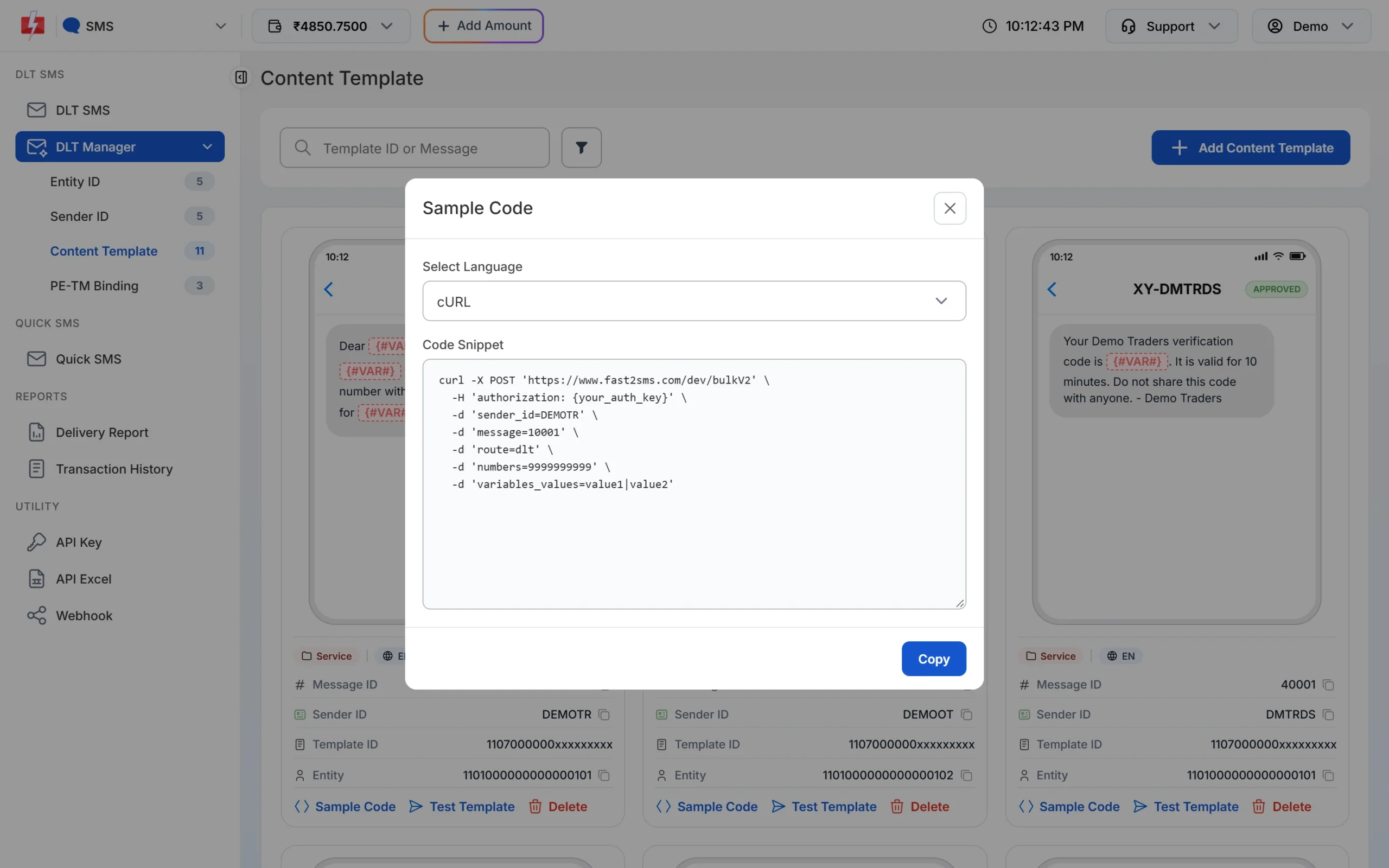
Sample Code on each template card is ready for the DLT SMS route. -
Does your software already store DLT IDs and text?
Many ERP, billing and school software tools ask for the Entity ID, Template ID and text for each message. Use DLT Manual and pass them as they are.
-
How much do you trust the text?
On DLT Manual a small change in the text, like a missing full stop, makes the operator reject the SMS, and it is not refunded. If people in your team edit message text in your software, the DLT SMS route is safer.
Pros and cons
DLT SMS
- Text always matches the approved template.
- Short requests: Message ID plus values.
- Sender and template are checked before sending, so mistakes come back as clear errors instead of operator failures.
- You must add each template in DLT Manager and wait for it to be approved there.
- Each variable value is cut to 40 characters.
DLT Manual
- Works without adding templates in DLT Manager, if you send both IDs.
- Easy to plug into software that already stores DLT IDs.
- Fast2SMS does not check your text. Wrong text, entity or template fails at the operator and is not refunded.
- Leaving out the IDs depends on text matching in DLT Manager, which can fail with error 500.
Frequently asked questions
Is one route cheaper?
No. Both charge your plan rate for each SMS part sent to each valid number. See the pricing page for current rates.
Is delivery faster on one route?
Choosing one route over the other does not change the price or the sender. Delivery time depends mainly on the operator and the mobile network.
Can I use both routes in the same account?
Yes. You can send some messages with route=dlt and others with route=dlt_manual using the same API key.
Which route should I use for OTP?
Either works with your own approved OTP template, and your app then makes and checks the code. If you want Fast2SMS to create and verify the OTP, use Smart OTP.
Do both routes show in Delivery Report?
Yes. Both are DLT routes. In the report filter, the DLT option covers both.
Do promotional SMS wait until morning on both routes?
SMS from a numeric (promotional) sender sent outside roughly 10 AM to 9 PM are held until the next morning on both routes. On the DLT SMS route, templates marked Service Explicit or Promotional in DLT Manager are held the same way.