
Moving your SMS API to a new provider in India takes less work than most teams expect. Your DLT entity, sender IDs and templates stay yours, so the work is mostly in your code: a new endpoint and API key, the new provider’s way of naming your template and sender, and a new place to get delivery reports. This guide is for developers moving an existing SMS integration to Fast2SMS. It maps the usual fields of an Indian SMS API to the Fast2SMS DLT SMS API, then shows how to test and move traffic without missing a single OTP.
What changes and what stays the same
| Item | When you change provider |
|---|---|
| DLT entity, sender IDs (headers), templates | Stay yours. You add them to the new provider’s panel. |
| PE-TM chain on your DLT portal | You add the new provider’s telemarketer ID. See PE-TM binding. |
| API endpoint, API key and request format | Change in your code. |
| How you name the template in the request | Often changes. Fast2SMS uses its own Message ID for each template, or the full text with your DLT IDs. |
| Delivery reports | Move to the new provider’s webhooks or report API. Old reports stay with the old provider. |
| Wallet balance | Stays with the old provider. Plan your last recharge there. |
The DLT side is covered step by step in Switching SMS provider in India: what changes on DLT. This page is about the code.
Map your old API fields to Fast2SMS
Most Indian SMS APIs ask for the same things under different names. Here is where each one goes in the Fast2SMS DLT SMS API (https://www.fast2sms.com/dev/bulkV2 with route=dlt):
| What your old code sends | Fast2SMS field | Notes |
|---|---|---|
| API key or auth token | authorization header |
Copy it from API Key in the panel. Send it as a header, not in the URL. |
| Template ID or flow ID | message |
The Fast2SMS Message ID shown on the template card in DLT Manager, not the 19-digit DLT Template ID. See Message ID vs DLT Template ID. |
| Sender ID or header | sender_id |
Must match your approved sender exactly, including upper and lower case. |
| Variables (named or numbered) | variables_values |
Values separated by |, in the same order as the {#var#} fields in the template. Each value is cut to 40 characters. |
| Mobile numbers | numbers |
Comma-separated 10-digit Indian mobiles. A leading 91 is removed for you. |
| Schedule time | schedule_time |
DD-MM-YYYY-HH-MM in IST, or a Unix timestamp. |
| Your own reference ID | udf1, udf2, udf3 |
Stored with the message and returned in webhooks. |
| Message ID returned by the old API | request_id in the response |
Save it to match delivery reports later. |
Your old code sends the full SMS text with the DLT entity and template IDs? Use the DLT Manual route (route=dlt_manual) instead. It takes message (the full approved text), entity_id and template_id, so you may not need to change how you build the text. Read DLT SMS vs DLT Manual to pick one.
Move your integration step by step
-
Add your DLT details in DLT Manager
Add your Entity ID, upload your sender IDs and templates in DLT Manager, and add the Fast2SMS telemarketer ID to your PE-TM chain on your DLT portal. Each approved template card shows its Message ID, Sender ID, Template ID and Entity. Note the Message ID of every template your code sends.
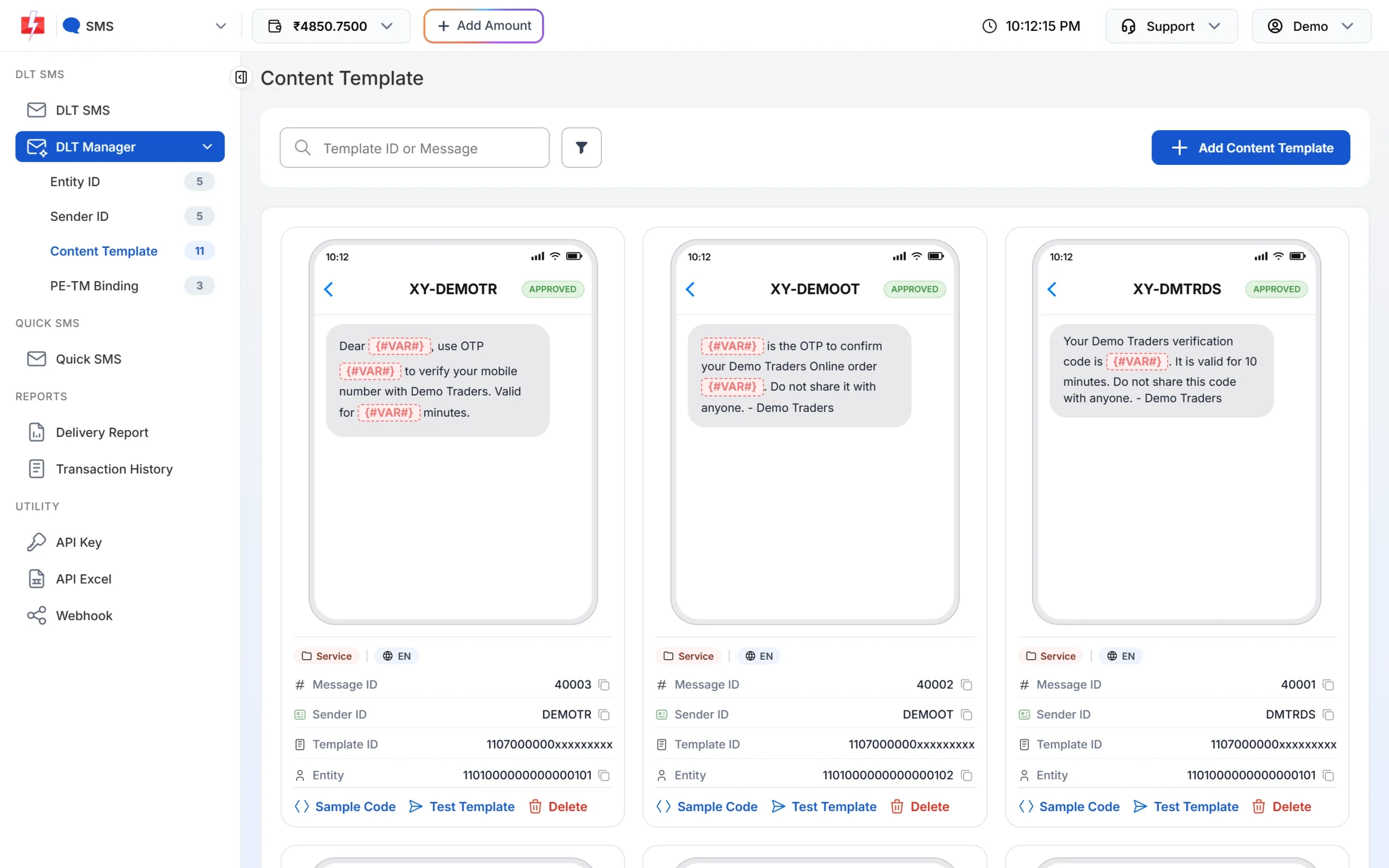
Each template card shows the Message ID to use in the API. -
Copy your API key
Open API Key under Account Setting, click View and copy the Authorization Key. Make sure API Access is on. If you want to allow calls only from your servers, add their IPs in API Security.
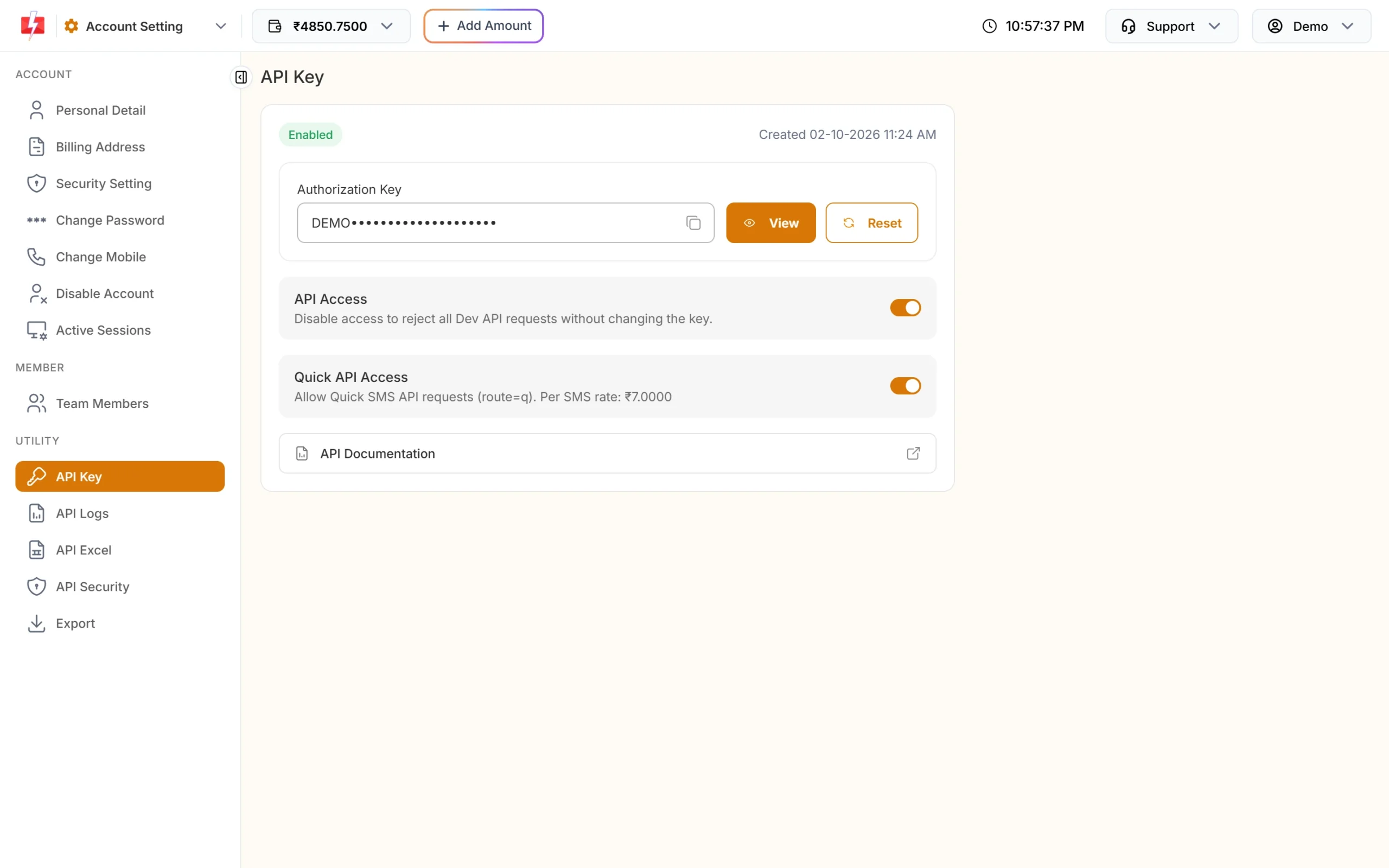
The API Key page: copy the key and keep API Access on. -
Change the request in your code
Point your SMS function at the new endpoint and map the fields as in the table above. A JSON POST looks like this:
curl -X POST "https://www.fast2sms.com/dev/bulkV2" \
  -H "authorization: YOUR_API_KEY" -H "Content-Type: application/json" \
  -d '{"route":"dlt","sender_id":"DEMOTR","message":"40003","variables_values":"Rahul|4821|10","numbers":"9999999999","udf1":"order-1042"}'
Code in PHP, Python, Node.js, Java and more is in the DLT SMS API guide.
-
Read the response the right way
A success returns
"return": trueand arequest_id. Always checkreturn, not only the HTTP code, because a low wallet balance can come back with HTTP 200 and"return": false. Addsms_details=1while testing to see the parts counted and the amount debited. Map the error codes you handled before to the Fast2SMS API error codes. -
Set up delivery reports
Pick one way to get delivery status. Webhooks push the status of every API message to your URL; see set up delivery report webhooks. Or poll
/dev/dlr/{request_id}. Do not use both for the same messages: pulling a report by API can stop the webhook for those messages. -
Test, then move traffic in stages
Send each template to your own numbers on different operators and compare the text with what you expect. Then move one message type at a time, for example order updates first and OTPs last, while the old provider stays ready as a fallback in your code. Retry only on network errors, not on every failure, so customers do not get the same SMS twice; see avoid duplicate SMS from API retries.
Common problems after switching
| Error or symptom | Usual cause and fix |
|---|---|
| 424 Invalid Message ID | You sent the 19-digit DLT Template ID, or the template is not linked to that sender. Send the Message ID from DLT Manager. |
| 406 Invalid Sender ID | The sender is not approved in your account, or the case differs (DEMOTR vs demotr). |
| Variable text cut short | Each value in variables_values is limited to 40 characters. |
| 412 Invalid Authentication | Wrong or old key, or extra spaces or quotes around it. Copy the key again from API Key. |
| Status stays Sent | The operator report is still pending. Check again later in the Delivery Report. |
| SMS fails at the operator | Usually a DLT mismatch: template text, sender or PE-TM chain. See delivery report statuses. |
What it costs on Fast2SMS
The API uses the same per-SMS rate as the panel: ₹0.25 per SMS from a ₹100 recharge, down to ₹0.11 on larger recharges, the same for promotional, transactional, OTP and service SMS, at the time of writing. There is no API plan, setup fee or monthly fee, and 18% GST is added on the recharge. See bulk SMS pricing.
Sending in bulk? For high SMS volumes our team offers discounted rates. Talk to our team or see SMS pricing.
Still choosing a provider? Compare published prices in Best bulk SMS providers in India (2026).
Frequently asked questions
Do I need to register on DLT again when I change SMS API provider?
No. Your entity, sender IDs and templates stay yours. You add the new provider’s telemarketer ID to your PE-TM chain and add the same senders and templates in its panel.
Do I need a developer to switch my SMS API?
Someone has to change the endpoint, key and field names in your code. If you send from WordPress, WooCommerce, Shopify or TallyPrime, you can install the free Fast2SMS plugin or app instead and add your API key there.
Can I run two SMS providers at the same time?
Yes. Keep both in your PE-TM chain while you test, and move traffic one message type at a time.
Will my old delivery reports move to Fast2SMS?
No. Download them from your old provider before you close that account. New messages get reports in Fast2SMS.
Which ID goes in the message field: Message ID or DLT Template ID?
For route=dlt, the Fast2SMS Message ID from DLT Manager. For route=dlt_manual, you send the DLT Template ID in template_id with the full text.
Can I send OTPs after switching?
Yes, with your approved OTP template on the DLT SMS API. For OTP on SMS and WhatsApp with fallback, Fast2SMS also has Smart OTP.
Is the API free?
Yes. There is no charge for the API or the key. You pay only for the SMS you send.