
SMS Not Delivered? Every DLT and Delivery Error Explained (100+ Answers)
Maybe your SMS was not delivered, a customer says the OTP never came, or your delivery report shows “failed”, “rejected” or “expired” with a reason you do not understand. This guide is for you. It is written for shop owners, D2C brands, clinics, schools, CA firms and app teams who send business SMS in India and want to know what went wrong and how to fix it.
Below you will find plain explanations of every common DLT and delivery error, grouped by where the message fails: DLT scrubbing, links, PE-TM chains, promotional rules, the customer’s phone, delivery reports, OTPs, and API or account issues. Every answer tells you what the error means and what to do next. We describe errors by their name and meaning, because the exact codes and labels differ from one provider and operator to another.
Signup NowSchedule Free Meeting
Quick answers
- Most business SMS failures in India are DLT scrubbing failures: the header, template, entity or text does not match what is registered.
- Your message must match the approved DLT template exactly, except the variable parts.
- From 30th September, operators block SMS whose PE-TM chain or TMD does not match the registered chain, and OTPs are not exempt.
- Promotional SMS can only go out between 10 AM and 9 PM and never reach numbers on DND/NCPR.
- Every link in an SMS must be whitelisted on DLT, or the message is blocked.
- “Expired” usually means the phone stayed off or out of coverage too long; “rejected” usually means a rule check stopped the message.
- OTPs belong on transactional templates with 6-letter headers, and a WhatsApp fallback helps when SMS is slow.
In this guide
- How an SMS travels and where it can fail
- DLT scrubbing errors: template, variables, header, entity
- URL and CTA errors
- PE-TM chain and TMD blocking
- Promotional-specific failures: DND and timing
- Number and handset issues
- Delivery report statuses explained
- OTP-specific delivery problems
- API and account-side errors
- How to troubleshoot step by step, and when to contact support
- Wrap-up
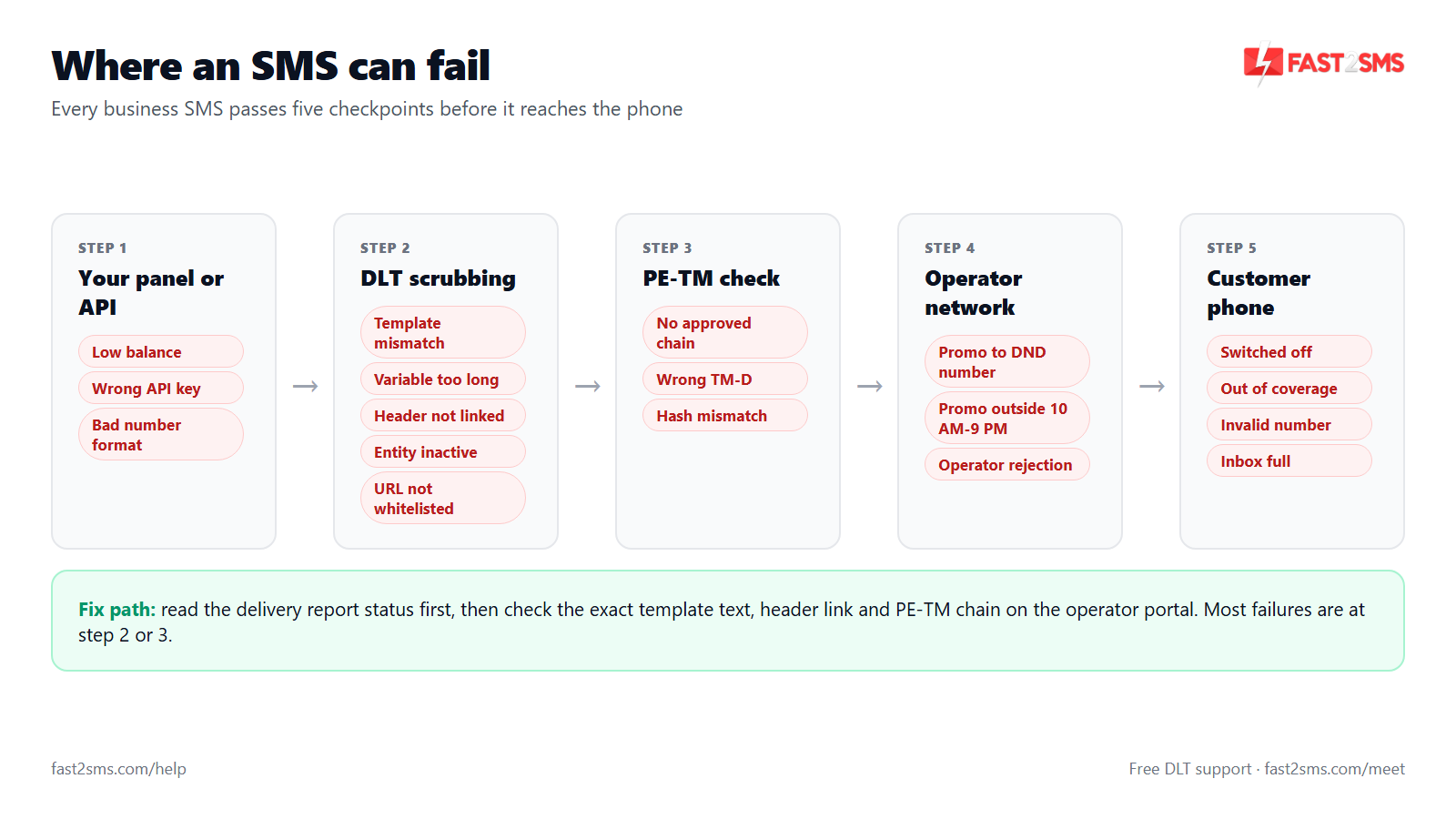
How an SMS travels and where it can fail
A business SMS does not go straight from your panel to the customer’s phone. It goes from your app or panel to your SMS provider, then to the operator’s DLT system, where it is checked against your registered entity, header, template and PE-TM chain. Only if every check passes does the operator’s network try to deliver it to the handset. A delivery report then travels back the same way. A failure can happen at any of these steps, and the error name tells you which step broke.
Here is a quick reference of the errors covered in this guide. Keep it handy when you read your delivery report.
| Error | What it means | How to fix |
|---|---|---|
| Template mismatch | The text you sent does not match the approved template outside the variable parts. | Copy the approved text exactly, including spaces, punctuation and line breaks, and send the right template ID. |
| Variable too long | A value is longer than its tag allows, for example more than 40 characters in {#alphanumeric#}. | Shorten the value, or register a template that uses the right tag, such as {#url#} for links. |
| Header not registered | The sender ID is not registered under your entity on DLT. | Register the header on your DLT portal and wait for approval before sending. |
| Header inactive or not linked | The header is deactivated, or the template is linked to a different header. | Reactivate the header, or send with the exact header the template is linked to. |
| Entity not found or inactive | The Principal Entity ID is wrong, missing or not active on DLT. | Check the PE ID saved with your provider and the entity status on your DLT portal. |
| Consent missing | The message type needs recorded customer consent that DLT cannot find. | Register the consent template and record consent, or use the correct template category. |
| Scrubbing failed | A general DLT check failed before the operator tried delivery. | Read the detailed reason, then compare header, template ID, entity and text one by one. |
| URL not whitelisted | A link in the message is not registered as a whitelisted URL or CTA. | Whitelist the URL on your DLT portal and use only that domain in messages. |
| PE-TM chain mismatch or TMD blocked | The route your SMS took does not match the telemarketer chain bound to your entity. | Bind your telemarketer on each operator portal and use a provider that delivers through its own registered TMD. |
| DND or NCPR block | A promotional SMS was sent to a number on the Do Not Disturb register. | Send promotions only to non-DND numbers; use a transactional or service template only for genuine service messages. |
| Outside 10 AM to 9 PM | A promotional SMS was sent outside the allowed time window. | Schedule promotional campaigns inside the window. |
| Invalid number | The number is the wrong length, badly formatted or not a working mobile number. | Clean your list and validate numbers before sending. |
| Not reachable or switched off | The phone could not be reached by the network. | Wait and resend if still useful, or reach the customer on WhatsApp. |
| Expired or timeout | The operator kept trying but the phone stayed unreachable until the message validity ended. | Resend only if the message is still relevant; for OTPs, let the user request a fresh one. |
| Rejected by operator | The operator refused the message because of a rule, policy or block. | Check the reason given, your content and your sender ID; ask your provider for the operator’s detail. |
| Insufficient balance | Your prepaid wallet does not have enough credit for the request. | Recharge the wallet and keep a buffer before large campaigns. |
Why is my SMS not delivered?
Most business SMS in India fail because a DLT check did not pass: the header, template ID, entity or message text does not match what is registered, or the route does not match your PE-TM chain. The rest fail because of the number, the phone, or promotional rules. Start by reading the exact status and reason in your delivery report, then match it to the table above. The reason field almost always points to one step: scrubbing, route, promotional rules, or the handset.
What happens to an SMS after I click send?
Your provider receives the message, attaches your entity ID, header and template ID, and sends it to the operator’s DLT system for scrubbing. If it passes, the operator’s message centre tries to deliver it to the handset and sends back a delivery report. If the phone is off, the network keeps retrying for a while before marking it expired. Each step can add a delay or an error, which is why “accepted by the API” and “delivered” are two different things.
What is DLT scrubbing?
DLT scrubbing is the automatic check an operator runs on every business SMS before delivery, comparing the entity, header, template, content, consent and PE-TM chain against what is registered on the DLT platform. If anything does not match, the SMS is blocked and never reaches the phone. Scrubbing happens in a fraction of a second, so a scrubbing failure usually shows up as failed or rejected almost immediately. If you are new to DLT, the beginner’s guide to DLT explains each part.
Where can an SMS fail between my system and the customer’s phone?
An SMS can fail at four points: in your own system or API call, at your provider (balance, wrong parameters), at DLT scrubbing (template, header, entity, consent, URL, PE-TM chain), or at the network and handset (invalid, switched off, not reachable). The status and reason in the delivery report tell you which one. Failures at the first two points usually come back as an API error. Failures at the last two come back later in the delivery report.
How do I know whether the problem is on my side or the operator’s side?
If the error names your template, header, entity, consent, URL or balance, the fix is on your side or your provider’s side; if it says switched off, not reachable or expired, the problem is with the customer’s phone or network. Send a test SMS to your own phone with the same template. If your test fails with the same reason, the setup is wrong. If your test arrives but one customer’s does not, the issue is likely that customer’s number or handset.
Does “sent” mean the SMS was delivered?
No, “sent” or “submitted” only means your provider accepted the message and passed it to the operator; “delivered” means the operator confirmed it reached the handset. A message can be sent and then fail at DLT scrubbing or expire because the phone was off. Always judge a campaign by the delivered count in the delivery report, not by the number of messages submitted.
Why do some numbers receive my SMS and others do not?
When only some numbers fail, the cause is usually specific to those numbers: DND registration for promotional SMS, invalid or inactive numbers, phones that are off, or a PE-TM chain that is correct on one operator but missing on another. Group the failed numbers by status and by operator. If all failures are on one operator, check your telemarketer binding on that operator’s DLT portal first.
Can a message be delivered on one operator and blocked on another?
Yes, because each operator runs its own scrubbing and PE-TM chains are bound separately on each operator’s DLT portal, so a chain that is complete on Airtel can still be missing on Jio or Vi. Your entity, headers and templates are shared across operators once registered, but the telemarketer binding is not. If failures cluster on one operator, open that operator’s portal and check the chain there.
Why did my SMS stop working suddenly when nothing changed on my side?
Sudden failures without any change on your side usually come from something outside your system: a header or template that was deactivated, a new operator rule such as PE-TM enforcement, your provider changing its route, or your wallet running out. Check your DLT portal for status changes and any warning SMS or email from an operator. Also ask your provider whether its route or TMD changed, since that can break your PE-TM chain without you touching anything.
DLT scrubbing errors: template, variables, header, entity
Scrubbing errors are the most common reason business SMS fail in India. The operator compares your message with the template you registered, character by character, and checks that the header, template and entity are all active and linked to each other. The good news is that these errors are fully in your control. Once your text, header and IDs match the registration, the message goes through.
What does template mismatch error mean?
A template mismatch error means the text you sent does not match any approved DLT template linked to your header, outside the variable parts, so the operator blocks the SMS. Even one changed word, missing comma or extra space outside a variable can cause it. Open the approved template on your DLT portal, copy the text exactly, and place your values only where the variable tags are. The sample DLT templates show how fixed text and variables sit together.
Why does my SMS fail with template mismatch when the text looks the same?
Text that looks the same can still differ in hidden ways: a double space, a different apostrophe or quote mark, a line break, a full stop at the end, or a character that changed when you copied from Word or WhatsApp. Scrubbing compares characters, not meaning. Paste both the approved template and your sent text into a plain text editor and compare them side by side. Also confirm you are sending the template ID of that exact template, not an older version.
Does an extra space or line break cause template mismatch?
It can, because scrubbing compares your message with the registered template closely, and extra spaces, missing spaces or line breaks in the fixed part of the text can make the message look like a different template. Do not assume small differences will be ignored. Keep line breaks exactly as registered, and trim spaces from values before you insert them into variables.
What does “variable too long” mean in DLT?
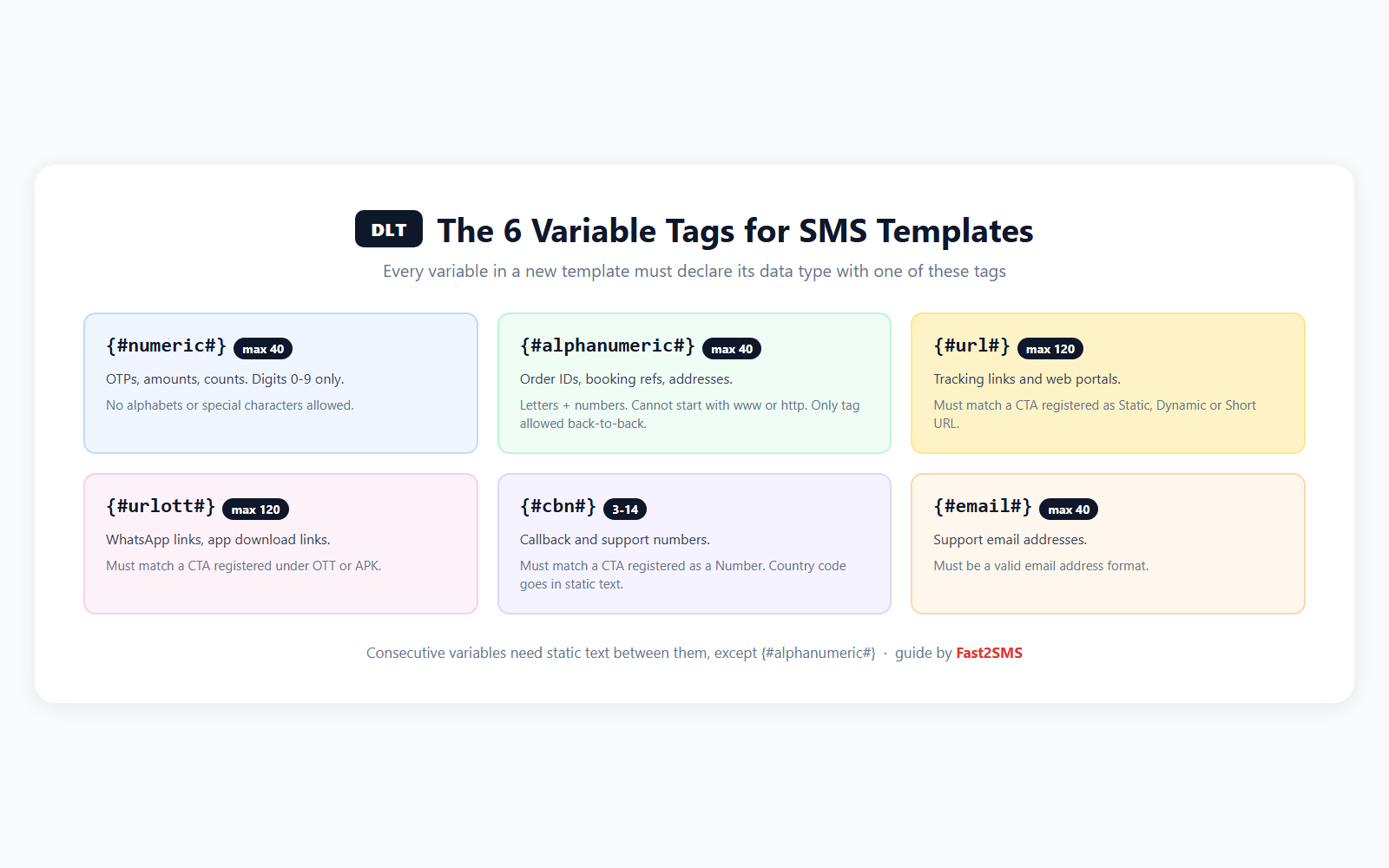
“Variable too long” means a value you inserted is longer than the limit for its tag, for example more than 40 characters in a {#alphanumeric#} tag or more than 120 characters in a {#url#} tag. The operator then treats the message as not matching the template. Shorten the value, split long content across two variables if the template has them, or register a new template with the right tag for that kind of value.
How many characters can a DLT variable hold?
{#numeric#} holds up to 40 digits, {#alphanumeric#} up to 40 characters, {#url#} and {#urlott#} up to 120 characters, {#cbn#} a callback number of 3 to 14 digits, and {#email#} up to 40 characters. Pick the tag that matches the kind of value you will send. The DLT variable tagging guide has examples for each tag.
Can I put a link inside a {#alphanumeric#} variable?
No, a {#alphanumeric#} value must not start with www or http, so a link placed in that tag will fail scrubbing. Links belong in a {#url#} tag, which allows up to 120 characters and is checked against your whitelisted URLs. If your template has only alphanumeric variables and you now need a link, register a new template with a {#url#} tag in the right place.
What does “header not registered” mean?
“Header not registered” means the sender ID you used is not registered under your entity on DLT, so the operator does not recognise it as yours and blocks the SMS. This often happens when someone types the header in the wrong case, uses an old sender ID, or sends with a header that belongs to another company. Register the header on your DLT portal, wait for approval, then add it to your provider account and use it exactly as registered.
Why does it say header inactive or not linked?
“Header inactive” means the sender ID exists but has been deactivated or suspended, while “not linked” means the template you used is attached to a different header. Either way, the combination of header and template in your message is not valid. Check the header status on your DLT portal. If it is active, look at which header the template is linked to and send with that one.
Can I use one template with a different sender ID?
No, one DLT template is linked to one header, so sending a template’s text with any other sender ID will fail scrubbing. If you want the same message to go from two sender IDs, register the template separately under each header. This is common when a business has one header for OTPs and another for order updates.
What does “template not found” or “template ID invalid” mean?
It means the DLT template ID sent with your SMS does not exist, is not approved, or does not belong to your entity, so the operator cannot match your message to any registered template. Typical causes are a typing error in the ID, a template still under review, or an ID copied from a different entity. Copy the ID straight from your portal rather than typing it, and check its status. The guide on finding your DLT template ID shows where it appears.
What happens if I send the wrong DLT template ID with my message?
If the template ID you send belongs to a different template than the text you sent, scrubbing compares your message with the wrong template and blocks it as a mismatch. This is easy to miss when you have many similar templates, such as several order-update messages. Keep a simple sheet of template name, ID, header and exact text, and map each message type in your code or plugin to the right ID.
What does “entity not found” or “entity inactive” mean?
It means the Principal Entity ID attached to your SMS is wrong, missing, or not active on the DLT platform, so the operator cannot confirm who is sending. This can happen if the PE ID in your provider account has a typing error, if your entity registration lapsed, or if you registered a new entity and did not update it with your provider. Log in to your DLT portal, confirm the entity is active, and copy the PE ID exactly into your provider settings.
Why was my DLT template approved but SMS still fails?
An approved template can still fail if the header linked to it is inactive, the template ID in your request is wrong, the text you send differs from the approved text, a link is not whitelisted, or your PE-TM chain is missing on that operator. Approval is only one of several checks. Work through them in order: header status, template ID, exact text, URLs, then the chain. Most people find the problem at the first or third step.
What does “consent missing” or “consent not found” mean?
“Consent missing” means the message type you used needs a recorded customer consent that the DLT system cannot find for that number or template. This comes up when a template is registered in a category that depends on consent and no matching consent record exists. Check the category you selected when you registered the template. If the message is a genuine service or transactional message, register it in the right category; if it truly needs consent, record the consent as your portal requires.
What does “scrubbing failed” mean in the delivery report?
“Scrubbing failed” is a general status meaning the operator’s DLT checks rejected the message before any delivery attempt, without always telling you which check failed. Look for a more detailed reason next to the status or ask your provider for it. If there is no detail, check the usual suspects one at a time: header, template ID, exact text, variable length, URLs, entity and PE-TM chain.
What is a template category mismatch?
A category mismatch happens when a template’s content does not fit the category it was registered in, or when it is sent through a route meant for another category, for example a promotional offer registered as transactional. Operators and DLT reviewers look at what the message actually says. Keep offers and discounts on promotional templates with 6-digit headers, and keep OTPs, order updates and alerts on transactional or service templates with 6-letter headers.
Why does my Hindi or regional-language SMS fail DLT checks?
Regional-language SMS usually fail because the template was registered as plain English text but the message is sent as Unicode, or because the approved Unicode text and the sent text use slightly different characters. Register the template with the Unicode content type and paste the exact script you will send. Remember that Unicode messages hold fewer characters per part (70 instead of 160), so long regional messages split into more parts.
Can I edit an approved DLT template?
On most DLT portals you cannot change the text of an approved template; you submit a new template with the corrected text and wait for its approval. Keep the old one active until the new one is live so your messages do not stop. If you are moving many templates to the new variable format, the DLT template migration guide walks through a safe order.
How soon can I use a new template after approval?
You can use a new template once it shows as approved on your DLT portal and is available in your provider account with the correct template ID and header. Some providers pick up templates automatically, others need you to add the ID yourself. Send one test SMS to your own number before switching live traffic. On Fast2SMS, the DLT system is automated and handles sender ID and template approvals, so approved templates are ready to use without manual syncing.
URL and CTA errors
Links in SMS are checked more strictly than plain text. Any URL, app link or download link in a business SMS must be whitelisted on DLT as a call-to-action (CTA). If the link or its domain is not on your whitelist, the message is blocked even when the template itself is approved. Phone numbers and email addresses also have their own tags and limits.
Why is my SMS with a link not delivered?
An SMS with a link is usually blocked because the URL is not whitelisted on DLT, the link sits in the wrong variable tag, or the link is longer than the 120-character limit of the {#url#} tag. Check all three. A common trap is changing your tracking or payment link provider, which changes the domain in the SMS to one that was never whitelisted.
What does “URL not whitelisted” mean?
“URL not whitelisted” means a link in your message, whether in the fixed text or a variable, belongs to a domain or address that is not registered as an approved CTA for your entity, so the operator blocks the SMS. Operators do this to stop phishing links from reaching customers. Add the URL on your DLT portal’s URL or CTA whitelisting section, wait for approval, and keep every link in your messages on that address.
How do I whitelist a URL for DLT SMS?
Log in to your DLT portal, open the URL or CTA whitelisting section, add the URL you will use in messages, and submit it for approval under your entity. Menu names differ between Jio, Airtel, Vi, BSNL, Tata and Smartping portals. After approval, use only that URL or domain in templates and variables. If you are unsure where the option sits on your portal, free DLT support can guide you.
Can I use a URL shortener in DLT SMS?
You can only if the shortened link’s domain is itself whitelisted for your entity, because the operator checks the domain that actually appears in the SMS, not the page it redirects to. Generic public shorteners are a frequent cause of blocked messages. The safest option is a short link on your own domain, whitelisted once, used for every campaign.
Do I need to whitelist every page or only my domain?
It depends on what your portal accepted when you registered the URL, so check how your whitelist entry was recorded before adding new links. Many businesses register the main address they use and keep all SMS links on it, which avoids new registrations for each page. If a new link on the same domain gets blocked, register that link too.
Why does a phone number in my SMS cause a failure?
A phone number in a variable usually fails because it was placed in the wrong tag or does not fit the {#cbn#} callback number tag, which allows 3 to 14 digits. Using {#numeric#} for a callback number or adding spaces and a plus sign can break the match. Register the template with {#cbn#} where a callback number goes, and send the number in plain digits.
Can I put an email address in a DLT variable?
Yes, use the {#email#} tag, which allows up to 40 characters, for an email address inside a DLT template. Do not put email addresses in {#alphanumeric#}, and keep them under the limit. If your support address is always the same, it is simpler to write it into the fixed text of the template.
Why does a link in the fixed text of my template still fail?
A link in the fixed part of a template still has to be whitelisted, because the URL check looks at every link in the message, not only the variable ones. Templates approved before URL whitelisting was enforced can start failing for this reason. Whitelist that link on your portal, or register a new template with a link you have already whitelisted.
PE-TM chain and TMD blocking
The PE-TM chain is the registered path from you (the Principal Entity) through the telemarketers who carry your SMS to the operator. From 30th September, operators validate every A2P SMS against this approved chain, the authorised delivery telemarketer (TM-D) and the hash code. If the route your message actually took does not match, the SMS is blocked, and OTPs are included. This is now one of the biggest causes of sudden delivery failure, especially for businesses whose provider sends traffic through someone else’s connectivity.
What is a PE-TM chain mismatch?
A PE-TM chain mismatch means the telemarketers that actually handled your SMS are not the ones bound to your entity on the operator’s DLT portal, so the operator cannot verify the route and blocks the message. It often happens when your provider passes traffic to another TMD for delivery. The PE-TM chain mismatch guide explains what the error looks like and how to respond.
Why is my SMS blocked because of PE-TM binding?
Your SMS is blocked because the operator checks that the PE, the telemarketers in between and the delivering TMD match the chain registered for your entity, and at least one link in that chain is missing or different. The usual reasons are that you never added your telemarketer on that operator’s portal, or your provider delivered through another company’s TMD. Fixing the binding on the portal, or moving to a provider with its own direct TMD connectivity, clears it. The full rules are in the TRAI PE-TM binding framework explainer.
What does TMD blocked mean?
“TMD blocked” means the telemarketer-delivery (TMD) company that handed your SMS to the operator is not the authorised TMD in your registered chain, so the operator refused the traffic. You do not always see this label directly; it can show up as a rejection or a PE-TM failure. Ask your provider which TMD delivers your messages and whether it is bound in your chain on every operator.
What is a TMD and why does it matter for delivery?
A TMD, or telemarketer-delivery, is the registered company with direct connectivity to operators that finally hands your SMS to the network, and it must be the one named in your PE-TM chain for delivery to succeed. If your provider is only a reseller, your SMS may pass through one or more other companies before reaching a TMD. Every extra hop is one more link that has to be bound correctly. A provider that is itself a registered TMD keeps the chain short.
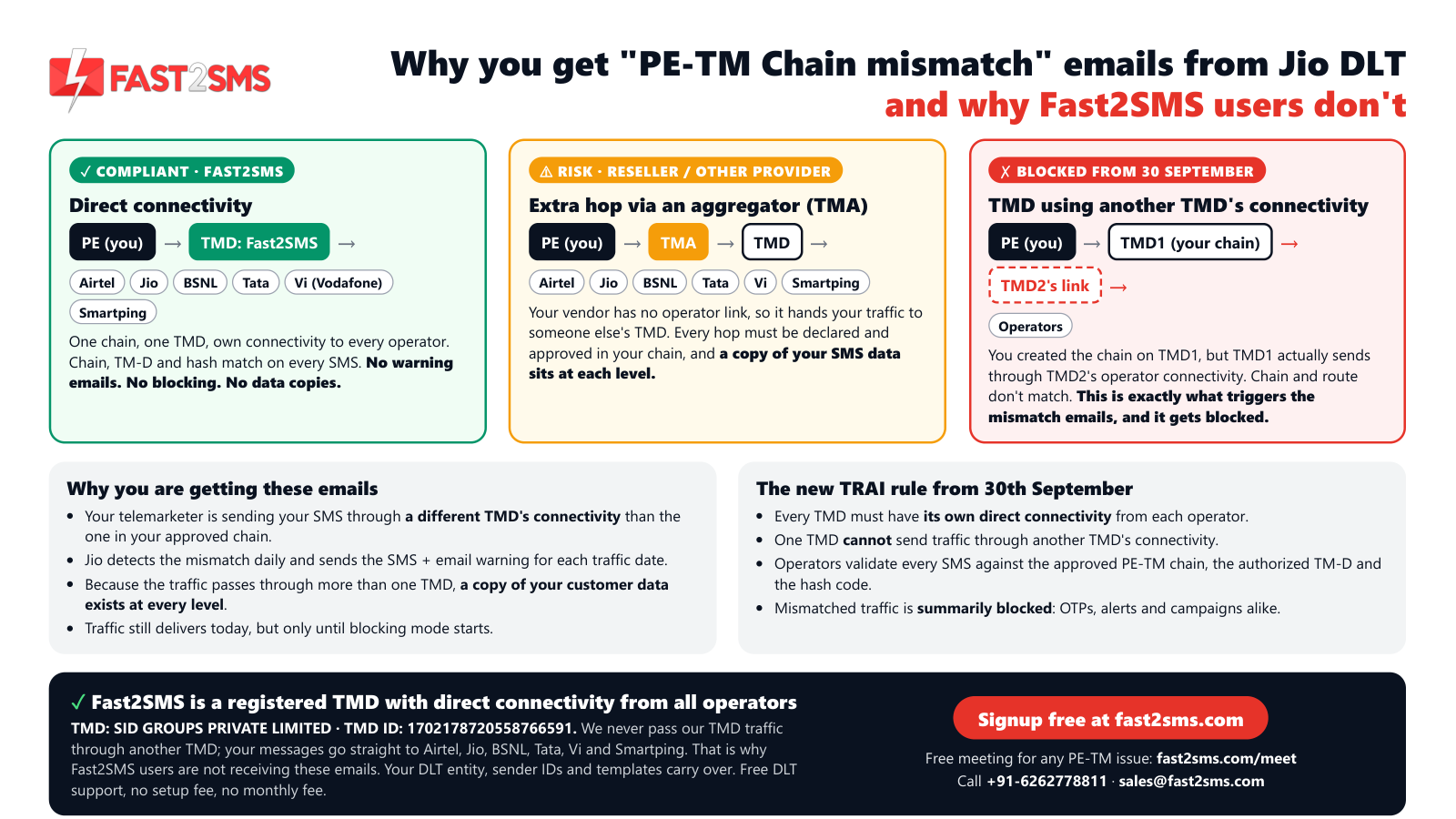
Fast2SMS registered TMD: SID GROUPS PRIVATE LIMITED · TMD ID 1702178720558766591
Fast2SMS has direct connectivity with Airtel, Jio, BSNL, Tata, Vi and Smartping, and never routes its TMD traffic through another TMD. Add this TMD ID in your PE-TM chain on each operator’s DLT portal and your chain stays short and easy to verify.
How do I check if my PE-TM chain is correct?
Log in to each operator’s DLT portal where your entity is registered, open the telemarketer or PE-TM binding section, and confirm that your provider’s telemarketer and its delivering TMD are listed and active. Do this on every operator portal, not only the one you registered on. Then ask your provider to confirm the TMD that actually delivers your traffic.
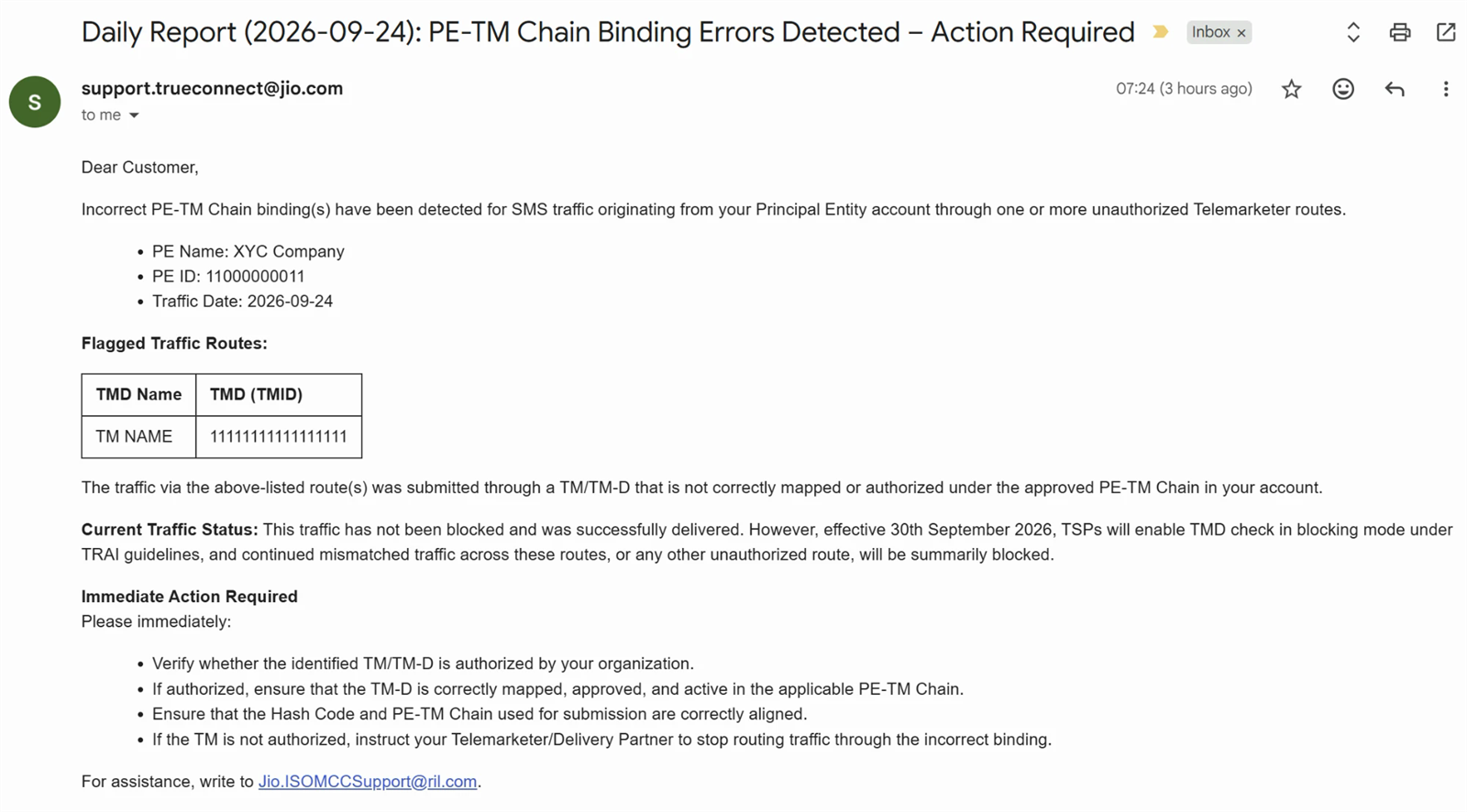
I got an email from Jio about PE-TM binding. What should I do?
Treat it as an early warning that some of your traffic does not match your registered chain, and fix the binding before the operator starts blocking it. Genuine warnings come from [email protected] by email and from JIODLT-S by SMS. Log in to Jio TrueConnect, check the telemarketers bound to your entity, and add your provider’s TMD if it is missing. The guide to the PE-TM mismatch email explains each line of the message.
What is the DLT hash code in a PE-TM chain?
The hash code is a verification value tied to your approved PE-TM chain that travels with your SMS, letting the operator confirm the message came through the registered route. If the hash does not match the chain, the message is blocked just like a missing binding. You do not usually create it by hand; it comes from your chain registration and your provider’s setup. The DLT hash code guide covers it in detail.
Do I need to bind my telemarketer on every operator portal?
Yes, because PE-TM chains are bound per operator portal, so you need to add your telemarketer on Jio, Airtel, Vi, BSNL, Tata and Smartping wherever your entity is registered, even though your templates and headers are shared. Step-by-step guides are available for Jio, Airtel, Vi, BSNL, Tata and Smartping.
Are OTPs also blocked if the PE-TM chain is wrong?
Yes, OTPs are not exempt: operators validate every A2P SMS against the PE-TM chain, so an OTP sent through an unbound route is blocked like any other message. This is why some apps suddenly see login failures even though their OTP template is fine. Fix the chain on every operator portal, and consider a second channel for OTPs so a single route problem does not lock users out.
My reseller changed routes and my SMS stopped. Why?
When a reseller moves your traffic to a different upstream provider or TMD, the new route is not in your PE-TM chain, so operators block your SMS until the new telemarketer is bound. You may not even be told about the change. Ask your reseller which TMD now delivers your messages and bind it on each portal, or move to a provider that owns its TMD so the route does not change under you. The causes and fixes guide lists other triggers.
How do I fix a PE-TM chain mismatch quickly?
Find out the exact TMD that delivers your SMS, add it and any telemarketer in between to your chain on each operator’s DLT portal, then send test messages on each operator to confirm delivery. If your provider cannot tell you its TMD, that is a sign the route passes through someone else. Fast2SMS is a registered TMD with direct operator connectivity and offers free DLT support to help you bind the chain.
What changed from 30th September for business SMS?
From 30th September, operators began validating every A2P SMS against the approved PE-TM chain, the authorised TM-D and the hash code, and blocking traffic that does not match. Before that, many chain problems only produced warnings. The practical change for you is that an incomplete binding now stops messages, including OTPs, instead of just generating an alert. If you have not checked your chain on every portal, do it now.
Promotional-specific failures: DND and timing
Promotional SMS follow extra rules that transactional SMS do not. They use 6-digit numeric headers, can only be sent between 10 AM and 9 PM, and cannot reach numbers registered on DND, also called NCPR. So a promotional campaign can have a good template and a correct chain and still show a large share of failures. These failures are expected behaviour, and the fix is in how you plan the campaign.
Why are my promotional SMS not delivered?
Promotional SMS usually fail because the recipient’s number is on DND/NCPR, the campaign went out outside the 10 AM to 9 PM window, or the template, header or link failed DLT scrubbing. Look at the reasons in the delivery report. If most failures say DND, the campaign itself worked and those customers simply cannot receive promotions. If they say template or header, fix the setup before sending again.
What is DND and NCPR?
DND (Do Not Disturb) is the customer’s choice to block commercial messages, and NCPR (National Customer Preference Register) is the national register where those preferences are stored and checked by operators. Customers can register by calling or sending an SMS to 1909, and can block all promotions or only some categories. Operators check the register at the time of sending, so a number can change status between two campaigns.
Can I send promotional SMS to DND numbers?
No, promotional SMS cannot be delivered to numbers registered on DND/NCPR for that category, and the operator will block them during scrubbing no matter which provider you use. Do not try to work around it by sending offers on a transactional template, because that is a category violation and can get your templates or headers suspended. For customers on DND, use channels they have opted into, such as WhatsApp.
What time can I send promotional SMS in India?
Promotional SMS can only be sent between 10 AM and 9 PM. Messages submitted outside this window are not delivered in that window. Transactional and service messages such as OTPs and order updates are not limited to this window. Plan large campaigns to start well inside the window so they finish before 9 PM, since big lists take time to process.
What happens to promotional SMS scheduled after 9 PM?
Promotional SMS submitted after 9 PM or before 10 AM fall outside the allowed window, so they are either rejected or held back depending on the provider and operator, and they are not delivered at that time. Do not count on them going out the next morning. Schedule the campaign again inside the window. If your panel supports scheduling, set the start time after 10 AM.
Why did my offer SMS reach only some customers?
When an offer SMS reaches only part of your list, the missing customers are usually on DND, have invalid or inactive numbers, or had phones off long enough for the message to expire. Download the delivery report and group failures by reason. Remove invalid numbers from your list, keep DND customers for other channels, and do not repeatedly resend to numbers that failed for DND.
My message is an order update. Why is it treated as promotional?
An order update is treated as promotional when the template or message includes offer language, discount codes, or links to sale pages, so the reviewer or operator classifies it by its content. A shipping message that ends with “Use code SAVE10 on your next order” is no longer a pure service message. Keep service templates strictly about the order, and send offers separately on a promotional template.
What happened to Service Explicit templates?
The Service Explicit category has been merged into Promotional, so messages that used to go as Service Explicit now follow promotional rules unless they are genuinely transactional or service messages. That can change who receives them and when. Review your old Service Explicit templates and move each one to the right category. The Service Explicit to Promotional guide explains the change and what to do.
Why is my promotional SMS showing a number instead of my brand name?
Promotional SMS show a 6-digit numeric header because that is the header format for promotional traffic, while 6-letter alphabetic headers are for transactional and service messages. This is the rule, not an error. If you want your brand name to show, the message must be a genuine transactional or service message registered with an alphabetic header.
How do I check if a number is on DND before sending?
You do not need to check each number yourself, because operators scrub promotional SMS against the DND register at the time of sending and the delivery report marks DND numbers. Use those reports to keep your list clean. Tag DND customers in your CRM so you stop sending them promotions and reach them through channels they opted into instead.
Stuck on a DLT or delivery error?
Share your delivery report with our team and we will help you find the failing step, from template mismatch to PE-TM binding. Schedule a free meeting, call +91-6262778811 or email [email protected].
Number and handset issues
Sometimes your setup is perfect and the problem is the number or the phone. The number may be mistyped, disconnected or recycled. The phone may be switched off, out of coverage, or filtering messages. These failures show up as invalid, not reachable, absent or expired in the delivery report, and they cannot be fixed on the DLT portal.
What does “invalid number” mean in an SMS delivery report?
“Invalid number” means the mobile number is wrongly formatted, has the wrong number of digits, or is not a working mobile number, so the operator cannot route the SMS at all. Common causes are extra digits, missing digits, landline numbers, or numbers with spaces and symbols. Validate numbers when customers enter them, strip spaces and symbols before sending, and check the number format your provider’s API expects.
Why does SMS fail when the phone is switched off?
When a phone is switched off, the network cannot hand over the SMS, so the operator stores it and retries for a limited time; if the phone stays off past that time, the message is marked expired or failed. If the customer switches the phone on in time, the SMS arrives late. For time-sensitive messages like OTPs, a late delivery is as bad as none, so give the user a resend option.
What does “number not reachable” mean?
“Number not reachable” means the network could not contact the handset when it tried, because the phone was out of coverage, in flight mode, switched off, or temporarily unregistered from the network. It is a handset or network condition, not a DLT problem. The message may still be retried. If the same number is unreachable for days, it may be inactive, and you should confirm it with the customer.
Why is SMS not received on a phone with full signal?
If the phone has full signal and the report says delivered, the SMS is probably on the phone but hidden by a spam filter, a blocked sender list, or the messaging app’s categories such as “Transactions” or “Promotions”. If the report says failed, the cause is on the sending side. Ask the customer to check spam, blocked senders and message categories, and to confirm the number they gave you.
Can a full phone inbox stop SMS delivery?
Yes, on some phones, especially older basic phones, a full message memory can stop new SMS from being stored, and the network may keep retrying until the message expires. Modern smartphones rarely hit this limit, but it still happens with feature phones. Ask the customer to delete old messages and request the SMS again.
Why do SMS not reach numbers that were ported to another operator?
Ported numbers usually receive SMS normally, because operators route by the number’s current network, but a PE-TM chain that is missing on the new operator’s portal will block messages to that customer. So when a customer moves from Airtel to Jio, for example, your Jio binding starts to matter for them. Keep your chain complete on every operator, and ported numbers stop being a special case.
Can a customer block my sender ID on their phone?
Yes, customers can block a sender ID in their messaging app, and then your SMS may still show as delivered in your report while the customer never sees it. The network handed it to the phone, and the phone hid it. There is no way to override this from your side. If a customer says they block you but need the messages, ask them to unblock the sender in their app settings.
Why do customers say they didn’t get the SMS when the report shows delivered?
If the report shows delivered, the operator confirmed the handset received it, so the message is usually in a spam folder, a filtered category, a blocked sender list, or on a different SIM or phone than the customer is checking. Ask them to search their messages for your header. Also confirm the number on record is the one they are checking, since typos and old numbers are common.
Can I send SMS to international numbers on Indian DLT routes?
No, Indian DLT routes are meant for delivering to Indian mobile numbers, and international numbers need a separate international SMS route with its own rules and pricing. If you have overseas customers, ask your provider whether it offers international SMS, or use WhatsApp, which works across countries on the same setup.
Why do SMS fail for recently deactivated or recycled numbers?
A deactivated number fails because it is no longer registered on the network, and a recycled number may be given to a new person who is not your customer, so the SMS reaches the wrong person or fails. Operators deactivate numbers that are unused for a long time and later reissue them. Ask customers to update their numbers, and remove numbers that fail repeatedly from your list.
Does a dual-SIM phone affect SMS delivery?
Dual-SIM phones receive SMS on both SIMs, but only if the SIM with the number you messaged is active and registered on the network at that time. If the customer turned off one SIM to save battery or data, SMS to that number wait or expire. Ask customers which number is active, and message that one.
Delivery report statuses explained (delivered, failed, pending, expired, rejected)
A delivery report, or DLR, tells you what happened to each SMS after it left your provider. Labels differ slightly between providers, but most use a small set of statuses: delivered, failed, pending, expired and rejected, sometimes with “submitted” or “sent” in between. Reading these correctly saves hours of guessing. The table below gives the usual meaning of each status and what you should do.
| Status | What it usually means | What to do |
|---|---|---|
| Submitted / Sent | Your provider accepted the SMS and passed it on. No final result yet. | Wait for the final status. |
| Pending | The operator is still trying, or the final report has not come back. | Wait; if many stay pending, ask your provider. |
| Delivered | The operator confirmed the handset received the SMS. | Nothing. If the customer cannot see it, check phone filters. |
| Failed | Delivery did not succeed; the reason field says why. | Read the reason and fix that step. |
| Expired | The phone stayed unreachable until the message validity ran out. | Resend later if still relevant. |
| Rejected | A rule check stopped the SMS before delivery: DLT, DND, timing, chain or policy. | Fix the setup; resending unchanged will fail again. |
What is an SMS delivery report?
An SMS delivery report is the status record the operator sends back for each message, telling you whether it was delivered, failed, expired, rejected or is still pending, usually with a reason and a time. It is the only reliable proof of delivery. Most providers show it in the panel, let you download it, and can push it to your system through the API or webhooks.
What does “delivered” status mean?
“Delivered” means the operator received confirmation that the SMS reached the customer’s handset. It does not guarantee the customer opened or read it, and phone-side filters can still hide it. For practical purposes, a delivered message has done its job on the network side. If a customer insists they did not receive a delivered message, look at their phone’s spam and blocked lists.
What does “failed” status mean in an SMS report?
“Failed” means the SMS was not delivered and will not be retried, and the reason field tells you whether the cause was DLT scrubbing, the number, the handset, the route, or your account. Failed is a broad status, so the reason is what matters. Sort your failed messages by reason, fix the largest group first, and then resend only where it makes sense.
What does “pending” mean and how long can it stay?
“Pending” means the SMS has left your provider but the final delivery report has not come back yet, usually because the phone is off or out of coverage and the operator is still retrying. Most messages to reachable phones leave pending quickly. Messages to unreachable phones can stay pending until the operator’s validity period ends and they turn expired or failed. If a whole campaign stays pending, contact your provider.
What does “expired” status mean?
“Expired” means the operator kept trying to deliver the SMS but the phone stayed switched off or unreachable until the message’s validity ran out, so it gave up. The message was valid and passed DLT; the phone just was not available. Resend only if the content still matters. An expired OTP should not be resent; let the user request a new one.
What does “rejected” status mean?
“Rejected” means the SMS was refused before any delivery attempt, usually by DLT scrubbing, DND, the promotional time window, the PE-TM chain check, or operator policy. It is a setup or rule problem, not a phone problem. Resending the same message unchanged will be rejected again. Read the reason, fix the template, header, chain or timing, and then send.
What is the difference between failed and rejected?
Rejected means the SMS was stopped by a rule before the network tried to deliver it, while failed means delivery was attempted or processed and did not succeed, often because of the number or handset. In simple terms, rejected points to your setup and failed points more often to the recipient’s side. Some providers use “failed” for both, so always read the reason text.
What does “submitted” or “sent” mean in the delivery report?
“Submitted” or “sent” means your provider accepted your SMS and passed it to the operator, but no final delivery result has come back yet. It is an in-between status. Do not count submitted messages as delivered. Wait for the report to update to delivered, failed, expired or rejected.
Why is my delivery report stuck on pending?
A report stuck on pending usually means the recipient’s phone is off or out of coverage and the operator is still retrying, or the final report from the operator has been delayed. For a few numbers, that is normal. For a whole campaign, it can point to an operator-side delay or a route issue. Wait a while, then ask your provider to check the operator’s response for a sample of message IDs.
How long does it take for a delivery report to arrive?
For a phone that is on and in coverage, the delivery report usually comes back within seconds of sending; for phones that are off or unreachable, it can take much longer because the operator keeps retrying until validity ends. Rejections at DLT scrubbing usually come back almost immediately. So a long wait on one number is normal, but long waits across all numbers are not.
Can I get delivery reports automatically in my system?
Yes, most providers can push delivery reports to your server through webhooks, so your app updates the status of each message without polling. This is useful for OTP flows, order updates and CRM records. Fast2SMS supports webhooks for SMS, OTP, WhatsApp and RCS; the webhooks guide explains how the callbacks work and what data they carry.
Am I charged for SMS that fail?
It depends on your provider’s billing model and the reason for failure, so check your plan terms or ask your provider how failed and rejected SMS are billed. Some channels are billed only on delivery. On Fast2SMS, WhatsApp messages are billed on delivery with failed messages refunded automatically within 48 hours, and RCS messages are also charged on delivery with failed ones refunded.
OTP-specific delivery problems
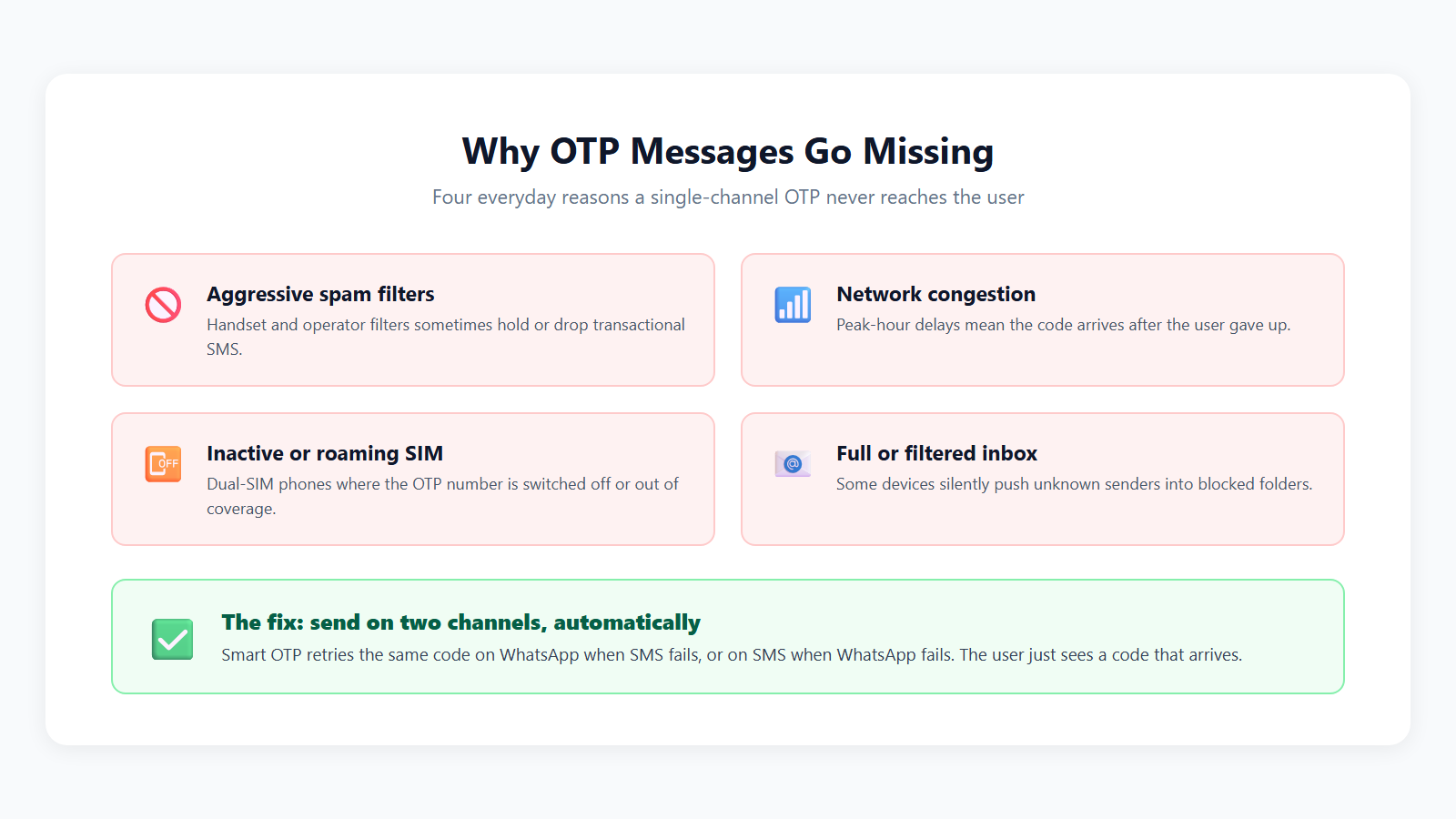
OTPs are the messages customers notice most when they fail, because a missing OTP means a failed login, signup or payment. They go through the same DLT checks as any other SMS, but they also have to arrive within seconds to be useful. Most OTP problems come from the template, the route, the PE-TM chain, or the user’s phone. A second channel as a fallback removes much of the risk.
Why is my OTP not received?
An OTP is usually not received because the template text does not match the approved OTP template, the PE-TM chain is missing on the user’s operator, the phone is off or out of coverage, or the message went into a filtered folder. Check the delivery report for that number first. If it says rejected or scrubbing failed, fix the template or chain. If it says delivered, ask the user to check spam and blocked senders.
Why is my OTP SMS delayed?
OTP delays usually come from weak network coverage at the user’s end, a congested route at the provider, or a phone that was briefly unreachable and got the message on a retry. Long routes through several telemarketers can also add delay. Use a provider with direct operator connectivity for OTP traffic, keep your OTP validity reasonable, and give users a clear resend option after a short wait.
Can I send OTP to DND numbers?
Yes, OTPs sent on a transactional template with a 6-letter header are not blocked by DND, because DND restrictions apply to promotional messages. Transactional now covers OTPs even for non-bank businesses. If your OTPs are failing for DND reasons, the template has probably been registered or sent in the wrong category. Register a proper OTP template in the transactional category.
Why does my OTP work on Airtel but not on Jio?
When OTPs work on one operator and fail on another, the cause is usually a PE-TM chain that is bound on one operator’s portal but missing on the other, since chains are bound per operator. Your templates and headers are shared, so they are rarely the issue. Log in to the failing operator’s DLT portal and bind your telemarketer there, then test with a number on that operator.
Should OTP go on the transactional or promotional route?
OTP must go on the transactional route with a 6-letter alphabetic header and a template registered in the transactional category. Sending OTPs on promotional routes means DND customers will not receive them and messages after 9 PM will not go out, which breaks logins at night. The OTP SMS API guide shows a typical OTP template and API call.
Why does my OTP template give a mismatch error?
OTP templates usually mismatch because the sent text adds or changes words, such as the app name, validity time or a security warning, that are not in the approved template, or because the OTP value is not placed where the {#numeric#} tag is. Keep the OTP in a {#numeric#} variable and copy the fixed words exactly. If your app adds an auto-read hash, it must be part of the approved template too.
Why does OTP not auto-fill on Android?
OTP auto-fill on Android usually fails because the app uses a method that needs a specific app hash at the end of the SMS, and that hash is missing, wrong, or not allowed by the approved template. Other auto-read methods show a prompt instead of needing a hash. Ask your app developer which method is used, and make sure the exact final text, including any hash, matches your DLT template.
How do I stop users requesting OTP again and again?
Add a resend timer so the user waits a short time before they can request another OTP, limit the number of OTP requests per number within a period, and show a clear message that the OTP is on its way. Repeated requests usually mean the first OTP was slow, not missing. Limits also protect your wallet from bots that trigger OTPs to random numbers.
What is the best fallback when OTP SMS fails?
The best fallback is a second channel, usually WhatsApp, so that if the SMS OTP is slow or blocked, the user can still get the code through another route. You can send on WhatsApp first and fall back to SMS, or the other way round. Fast2SMS Smart OTP sends the OTP on WhatsApp with SMS as the fallback, so one route problem does not lock your users out.
Is WhatsApp OTP more reliable than SMS OTP?
WhatsApp OTP is not automatically more reliable, but it uses a separate path that avoids SMS-specific issues like DLT scrubbing and PE-TM chains, while depending on the user having WhatsApp and a data connection. SMS works without data but depends on DLT setup and network coverage. Using both together covers more users than either one alone. Authentication templates on WhatsApp are priced at ₹0.25 per message on Fast2SMS.
Why do OTPs fail during a sale or at peak hours?
OTPs fail or slow down at peak times when your provider’s route is congested, when your OTP traffic shares a queue with bulk promotional traffic, or when your own servers time out while calling the SMS API. Keep OTPs on a transactional route separate from campaigns, test your OTP flow before big sales, and add a WhatsApp fallback. For WooCommerce stores, the WooCommerce OTP verification guide shows a setup that handles checkout and login OTPs.
API and account-side errors
Some errors never reach DLT or the operator, because your request is refused by your provider first. These come back instantly as an API response or an error in your panel or plugin. They are about your account, your credentials, your wallet or the parameters you sent. They are usually the quickest to fix once you read the error message carefully.
What does the insufficient balance error mean?
“Insufficient balance” means your prepaid wallet does not have enough credit to send the request, so the provider refuses to submit the SMS at all. Large campaigns and multi-part messages use more credit than you might expect. Recharge the wallet and keep a buffer before big sends. On Fast2SMS you pay per message from a prepaid wallet, with no setup, monthly or per-number fee.
Why does my API return an invalid API key or authorization error?
An invalid API key or authorization error means the key in your request is wrong, expired, regenerated, missing, or sent in the wrong place, such as the body instead of the header the API expects. Copy the key again from your provider dashboard, check for extra spaces, and confirm where the API expects it. If you regenerated the key recently, update every server and plugin that uses the old one.
Why does the API accept my request but the SMS never arrives?
If the API returns success but the SMS never arrives, the request was accepted by your provider and then failed later at DLT scrubbing, the PE-TM check, or the handset. API success only means the request was valid. Look up the message ID in your delivery report to see the real status and reason. The bulk SMS API guide explains how message IDs and reports connect.
What does “invalid sender ID” mean in an API response?
“Invalid sender ID” means the header in your request is not approved or not added in your provider account, is typed differently from the registered header, or does not fit the route you chose. For example, a 6-digit promotional header on a transactional request will be refused. Use the exact header from your DLT portal, and match the header type to the route.
How do I send the right DLT template ID through the API?
Send the DLT template ID that belongs to the exact text you are sending, together with the header it is linked to, in the parameter your provider’s API expects for it. Keep a map in your code from each message type to its template ID and header. Test each message type once after any change. Parameter names and formats are in the Fast2SMS API docs.
Why does my WordPress or WooCommerce plugin not send SMS?
A plugin usually fails to send SMS because the API key is wrong, the wallet is empty, the sender ID or template ID is not set, or the message text in the plugin settings does not match the approved DLT template. Open the plugin settings and check each of these. Then place a test order or trigger the event yourself and read the delivery report. The free Fast2SMS WordPress plugin guide shows where each setting sits.
Why are my SMS failing after I changed my DLT template?
SMS fail after a template change when your system still sends the old text with the new template ID, the new text with the old ID, or the new template is not yet approved or linked to your header. Every change needs the text, ID and header to be updated together. Keep the old template active until the new one is tested and live.
Why does my SMS use more credits than I expected?
Long SMS are split into parts, and each part is billed, so a message above one part’s limit costs more than one SMS. A plain English part holds 160 characters, and a Unicode part (Hindi, regional languages, some special symbols) holds 70, with multi-part messages holding a little less per part. A single smart quote or emoji can switch the whole message to Unicode. Shorten the text or remove special characters to save credits.
Can my account or sender ID be blocked from sending SMS?
Yes, operators and providers can suspend a header, template or account if it sends content outside its category, sends unsolicited promotions, or attracts spam complaints from customers. Suspended headers and templates cause every message on them to fail. Send only to customers who expect your messages, keep promotions on promotional templates, and respond quickly to any warning from your provider or operator.
How to troubleshoot step by step, and when to contact support
When SMS fail, a calm, fixed order of checks finds the cause faster than changing things at random. Start with the delivery report, then check your account, then your DLT setup, then the route, then the handset. Most problems are found in the first three steps. If you still cannot find it, your provider can see operator responses you cannot, so that is the time to contact support.
How do I troubleshoot an SMS that was not delivered?
Read the status and reason in the delivery report, send a test to your own phone with the same template, then check in order: wallet and API key, header status, template ID and exact text, variable lengths, URLs, category, and PE-TM chain on that operator. Change one thing at a time and test again. If only one customer fails, look at their number and phone instead.
What should I check first when SMS fail?
Check the delivery report reason first, because it tells you which step failed; then check whether your own test SMS on the same template arrives. Those two checks separate setup problems from customer-side problems in a few minutes. If your test fails too, the setup is wrong. If your test arrives, focus on the failing numbers, operators or times.
How do I test a DLT template before a big campaign?
Send the exact message, with real-looking variable values at their maximum length, to a few of your own numbers on different operators, and confirm each one shows delivered in the report. Include any links you will use. Also check the timing if it is a promotional campaign. This small test catches template mismatch, URL and chain problems before they hit thousands of customers.
When should I contact my SMS provider’s support?
Contact support when the delivery report reason is unclear, when your own test fails and you cannot find the cause, when failures are concentrated on one operator, or when many messages stay pending for a long time. Also contact them after any warning SMS or email from an operator about PE-TM binding. Your provider can see operator-level responses and route details that are not visible in your panel.
What information should I send to support for a failed SMS?
Send the message ID, the recipient number, the time of sending, the header, the template ID, the exact text you sent, and the status and reason from the delivery report. A screenshot of the report helps. With this, support can trace the message quickly instead of asking you questions back and forth. Never share your account password or full API key in a support email.
Can Fast2SMS help fix my DLT and delivery errors?
Yes, Fast2SMS offers free DLT support and can help you check templates, headers, URLs and your PE-TM chain on each operator portal, and its automated DLT system handles sender ID and template approvals. You can start with a free signup and ₹50 test credit at fast2sms.com, or book a free meeting with the team for a walkthrough.
How do I avoid SMS delivery errors in future?
Keep a single sheet of every header, template ID and exact text, copy text from it rather than typing, whitelist every link before use, keep your PE-TM chain complete on every operator, and test after any change. Keep promotions inside 10 AM to 9 PM and away from DND numbers. Review your delivery reports weekly. The DLT SMS FAQ is a good reference to keep handy.
More 100-question guides
- DLT registration A to Z
- Bulk SMS in India: 100+ questions
- OTP via SMS and WhatsApp
- WhatsApp Business API in India
- WhatsApp template rejected? Approval FAQ
- WhatsApp marketing without getting banned
- RCS business messaging in India
Wrap-up
Almost every SMS delivery error in India comes down to a few steps: the DLT scrubbing check, the link whitelist, the PE-TM chain, promotional rules, and the customer’s number and phone. Read the delivery report reason, match it to the right step, fix one thing at a time and test on your own phone. If the reason is unclear or failures cluster on one operator, ask your provider for the operator-level detail. With your templates, headers and chain in order, most of these errors simply stop happening.
Signup NowSchedule Free Meeting
Sales: +91-6262778811 · [email protected] | Support: [email protected]