
This guide shows how to send SMS and OTP from PHP with the Fast2SMS API, using only PHP’s built-in cURL. You will send a DLT SMS from your own sender ID, send and verify a login OTP with Smart OTP, read the delivery report and handle errors. At the end there is one small PHP class you can copy into any project, plain PHP or a framework.
Before you start
- PHP 7 or later with the cURL and JSON extensions. Most hosting plans have both switched on.
- API key: from API Key under UTILITY in the panel, with API Access switched on.
- For DLT SMS: an approved entity, sender ID and content template added in DLT Manager. You need the template’s Message ID.
- For OTP: a Smart OTP template in OTP Template List. You need its OTP ID.
- Wallet balance for the messages you send. Every SMS and every OTP send is charged.
- Server-side code only. Call the API from your PHP backend. Never print the key into a web page or JavaScript.
Get your API key, Message ID and OTP ID
-
Copy your API key
Open Account Setting, then API Key. Click View, enter the OTP sent to your account mobile and copy the Authorization Key. Keep the API Access switch on.
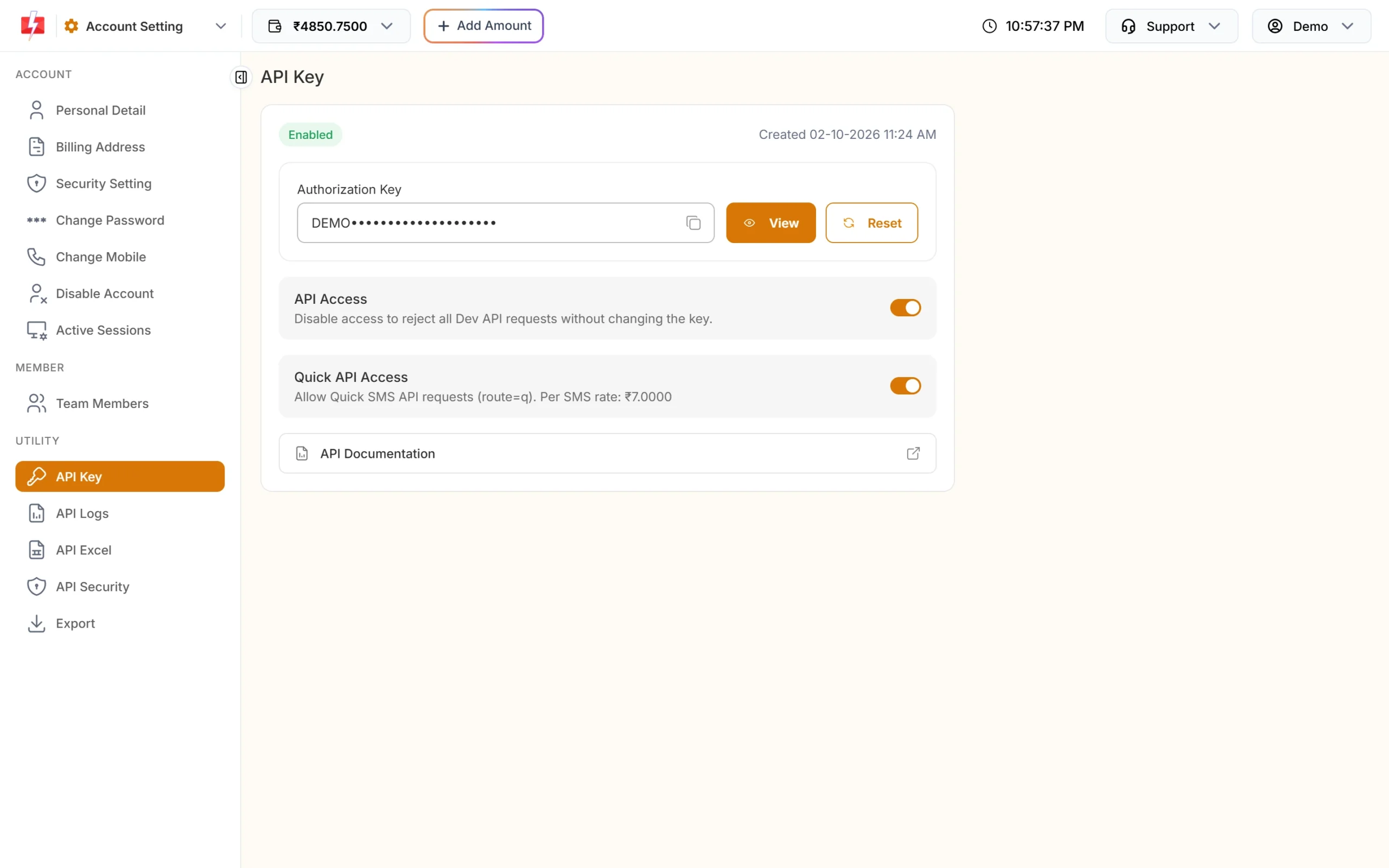
The key goes in the authorization header of every request. -
Copy the Message ID of your DLT template
In the SMS app, open DLT Manager and then Content Template. Each approved template card shows a Message ID and the linked Sender ID. Copy both. The Message ID is the short number, not the 19-digit Template ID.
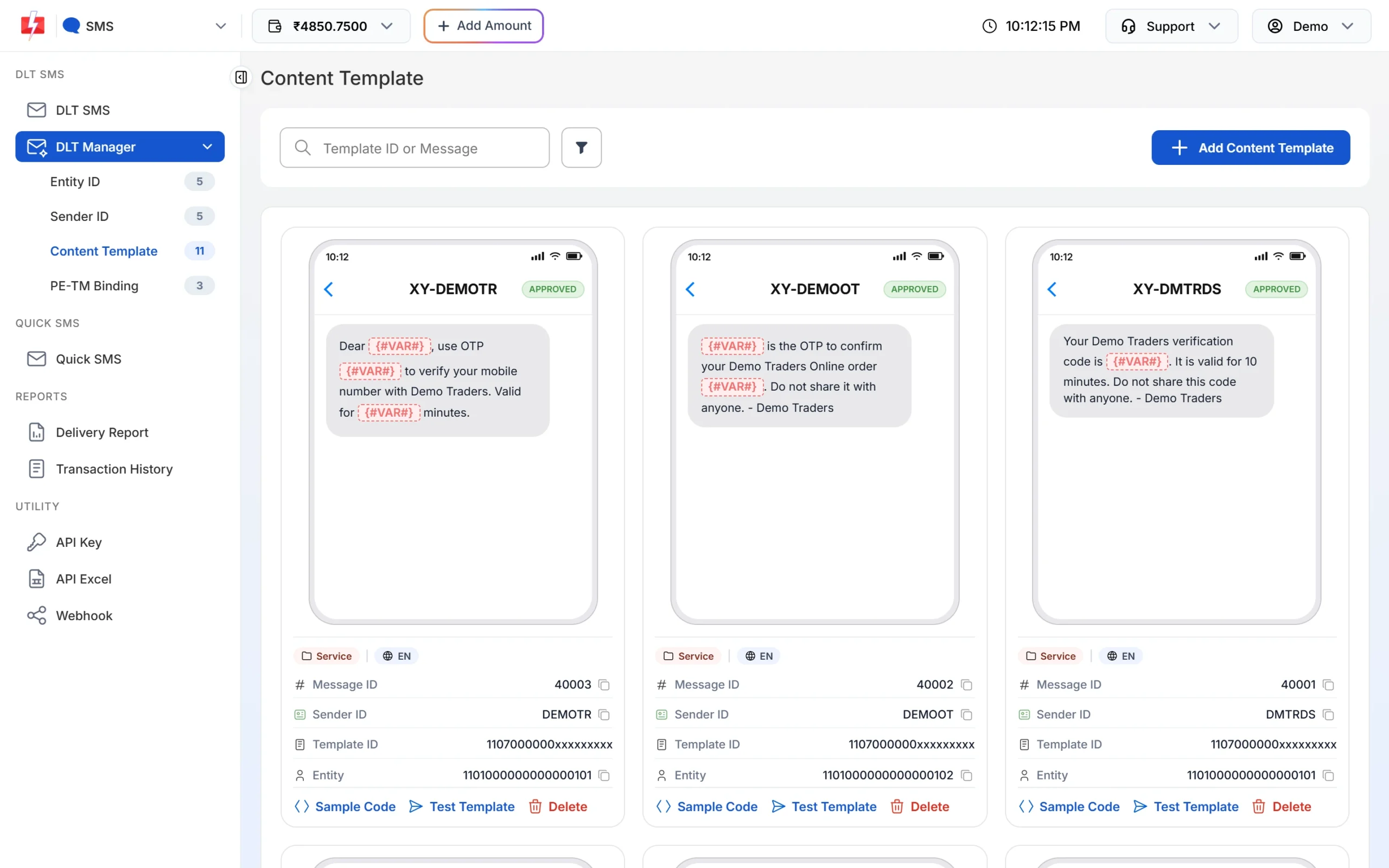
Use the Message ID and Sender ID from the same card. -
Copy your OTP ID
Open Smart OTP and then OTP Template List. Each card has an OTP ID with a copy icon. If you have no card yet, click Add OTP Template and link your approved OTP template first.
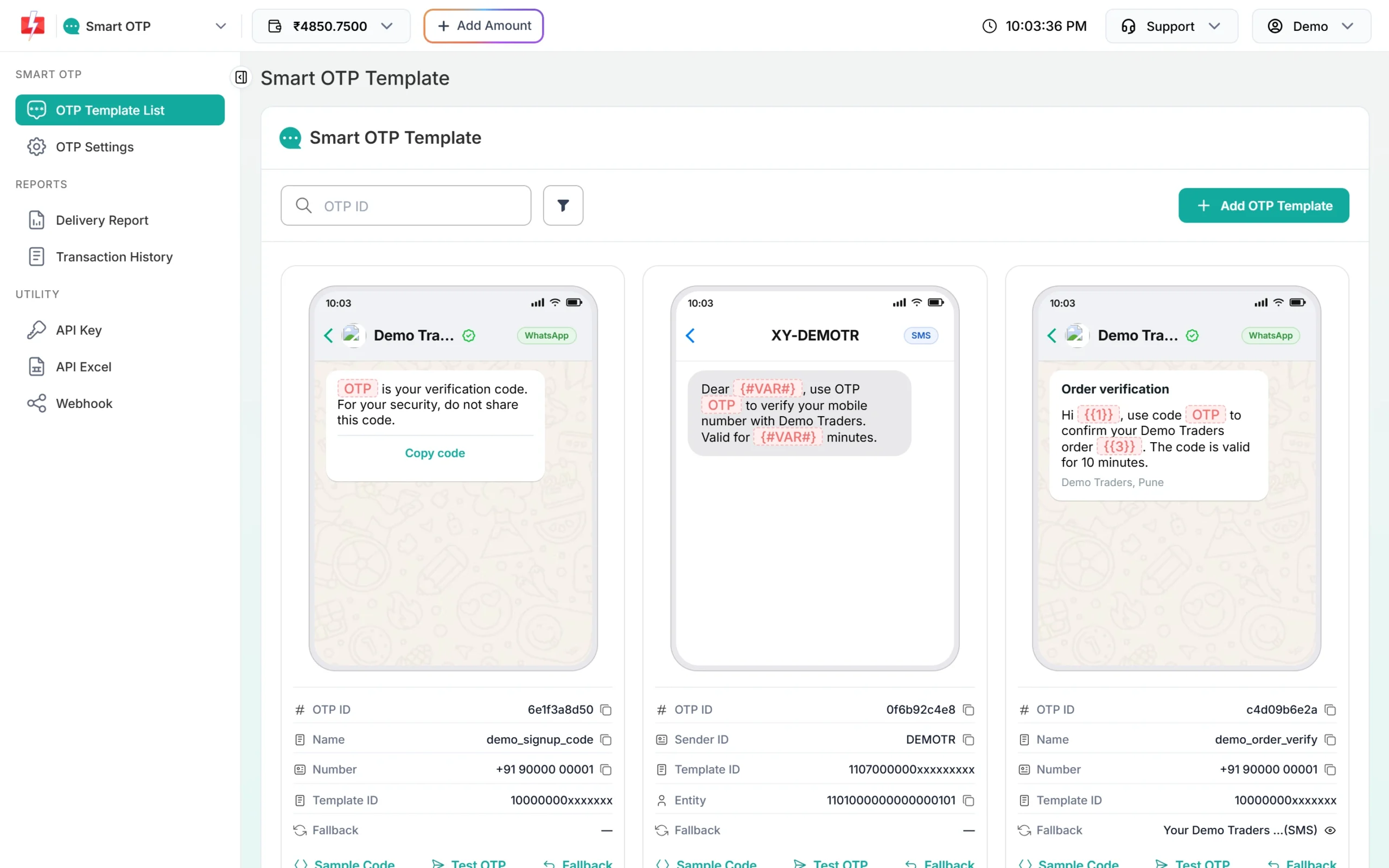
One OTP ID per OTP template.
Set up your PHP project
You do not need Composer or any SMS library. Store the API key outside your code, for example in an environment variable or a config file that is not in your web root or Git repository.
# .env or server environment
FAST2SMS_API_KEY=YOUR_API_KEY
Read it in PHP with getenv('FAST2SMS_API_KEY'). If your host does not support environment variables, use a config.php placed one folder above public_html.
All the examples below use one small helper that sends a JSON POST and returns the decoded reply with the HTTP code:
<?php
function fast2sms_post(string $path, array $data): array
{
    $ch = curl_init('https://www.fast2sms.com' . $path);
    curl_setopt_array($ch, [
        CURLOPT_POST           => true,
        CURLOPT_RETURNTRANSFER => true,
        CURLOPT_CONNECTTIMEOUT => 5,
        CURLOPT_TIMEOUT        => 15,
        CURLOPT_HTTPHEADER     => [
            'authorization: ' . getenv('FAST2SMS_API_KEY'),
            'Content-Type: application/json',
            'Accept: application/json',
        ],
        CURLOPT_POSTFIELDS     => json_encode($data),
    ]);
    $body = curl_exec($ch);
    $err  = curl_error($ch);
    $http = curl_getinfo($ch, CURLINFO_HTTP_CODE);
    curl_close($ch);

    if ($body === false) {
        return ['ok' => false, 'http' => 0, 'error' => $err, 'data' => null];
    }
    $data = json_decode($body, true);
    $ok   = $http >= 200 && $http < 300 && is_array($data) && ($data['return'] ?? false) === true;
    return ['ok' => $ok, 'http' => $http, 'error' => null, 'data' => $data];
}
Send a DLT SMS from PHP
DLT SMS uses /dev/bulkV2 with route=dlt. You send the sender ID, the template’s Message ID, the values for its variables and the numbers. Fast2SMS builds the text from your approved template.
The example template is Message ID 10001 on sender DEMOTR: “Dear {#var#}, your order {#var#} of Rs.{#var#} is confirmed and will be delivered by {#var#}. – Demo Traders”. Use your own values.
<?php
$res = fast2sms_post('/dev/bulkV2', [
    'route'            => 'dlt',
    'sender_id'        => 'DEMOTR',          // exact case, as in DLT Manager
    'message'          => '10001',           // Message ID, not the 19-digit Template ID
    'variables_values' => 'Rahul|DT10458|1240|21 Nov',
    'numbers'          => '9999999999',      // comma-separated for more numbers
    'udf1'             => 'order-DT10458',   // optional, comes back in webhooks
]);

if ($res['ok']) {
    $requestId = $res['data']['request_id'];   // starts with S, save it
    echo "Queued. Request ID: $requestId";
} else {
    $code = $res['data']['status_code'] ?? $res['http'];
    $msg  = $res['data']['message'] ?? $res['error'];
    echo "Not sent ($code): " . (is_array($msg) ? implode(' ', $msg) : $msg);
}
Points to remember:
- Variable values go in the same order as the
{#var#}places, separated by|. Each value is cut to 40 characters. - The sender ID is case-sensitive. DEMOTR and demotr are different.
- On success,
messageis a list:["SMS sent successfully."]. It means the SMS is accepted and queued, not delivered. - For a later time, add
'schedule_time' => '25-11-2026-10-30'(DD-MM-YYYY-HH-MM, IST) or a Unix timestamp.
Send and verify an OTP with Smart OTP
Smart OTP creates the code, sends it on SMS or WhatsApp from your template and checks it for you. You do not store the OTP in your database. You need three calls: send, verify and (optionally) resend.
Send the OTP
<?php
$res = fast2sms_post('/dev/otp/send', [
    'mobile'     => '9999999999',
    'otp_id'     => 'YOUR_OTP_ID',
    'otp_expiry' => 5,   // minutes, 1 to 10080, default 15
    'otp_length' => 6,   // 4 to 10, default 6
]);

if ($res['ok']) {
    echo 'OTP sent';   // request_id starts with O
} else {
    echo $res['data']['message'] ?? 'Could not send OTP';
}
If your template has other variables, such as a name, send them in variables_values in order, without the OTP. Fast2SMS fills the OTP variable itself.
Verify the code the user typed
<?php
$mobile = preg_replace('/\D/', '', $_POST['mobile'] ?? '');
$otp    = trim($_POST['otp'] ?? '');

$res = fast2sms_post('/dev/otp/verify', ['mobile' => $mobile, 'otp' => $otp]);

if ($res['ok']) {
    session_regenerate_id(true);
    $_SESSION['verified_mobile'] = $mobile;   // log the user in
    echo 'Verified';
} else {
    // e.g. "Invalid OTP", "OTP expired", "OTP not found or already verified"
    echo $res['data']['message'] ?? 'Verification failed';
}
Verify needs no OTP ID. It always checks the latest unverified OTP sent to that mobile. If you send a new OTP, every older OTP for that number stops working.
Resend the same OTP
<?php
$res = fast2sms_post('/dev/otp/resend', ['mobile' => '9999999999']);
echo $res['ok'] ? 'Sent again' : ($res['data']['message'] ?? 'Resend failed');
Resend sends the same code again and is charged like a new send. It works for 10 minutes after the first send, and at most 5 sends in that window, counting the first. So a user gets 4 resends. The wait between sends comes from OTP Settings (default 10 seconds).
Read the delivery report
“SMS sent successfully” only means Fast2SMS accepted the message. To know if it reached the phone, use one of these two methods. Pick one: calling the DLR API for a request can stop the webhook from sending those same rows.
Option 1: ask for the status (DLR API)
<?php
$requestId = 'Sa1B2c3D4e5F6g7';
$ch = curl_init('https://www.fast2sms.com/dev/dlr/' . urlencode($requestId));
curl_setopt_array($ch, [
    CURLOPT_RETURNTRANSFER => true,
    CURLOPT_TIMEOUT        => 15,
    CURLOPT_HTTPHEADER     => ['authorization: ' . getenv('FAST2SMS_API_KEY')],
]);
$data = json_decode(curl_exec($ch), true);
curl_close($ch);

foreach ($data['data'][0]['delivery_status'] ?? [] as $row) {
    echo $row['mobile'] . ': ' . $row['status'] . PHP_EOL;  // Delivered, Failed or Sent
}
The DLR API looks back 7 days. Sent means the operator report has not come yet. Do not call it every second; check a few minutes after sending.
Option 2: receive a webhook
Create a webhook in the panel under Webhook, then SMS (or OTP), with your URL, method POST and content type JSON. The Standard Webhook format sends fields like request_id, mobile, status, status_description and udf1.
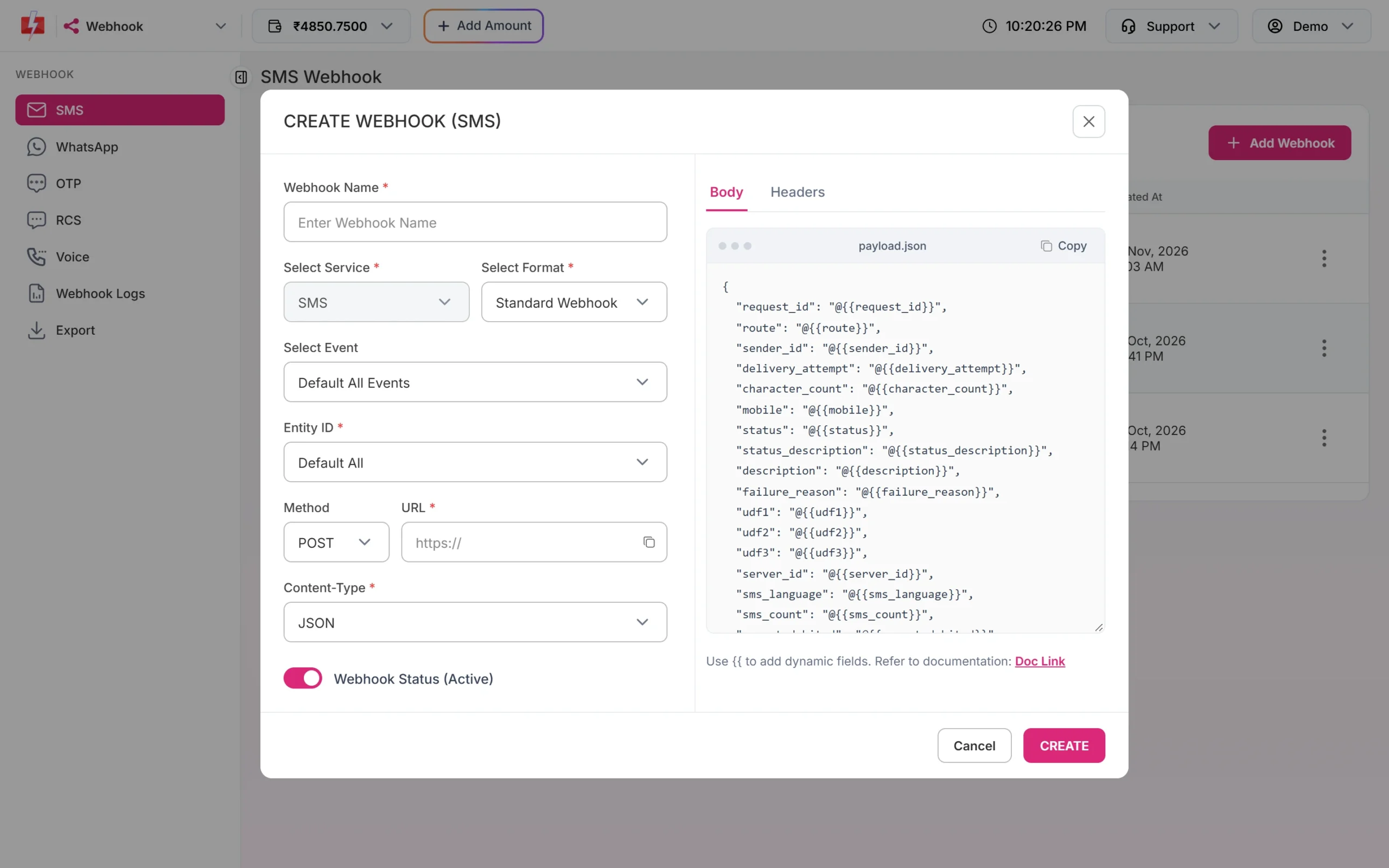
A simple receiver, saved as fast2sms-webhook.php:
<?php
// Optional: add your own header in the webhook's Headers tab, e.g. X-Webhook-Token
if (($_SERVER['HTTP_X_WEBHOOK_TOKEN'] ?? '') !== getenv('MY_WEBHOOK_TOKEN')) {
    http_response_code(401);
    exit;
}

$payload = json_decode(file_get_contents('php://input'), true);
if (is_array($payload)) {
    $requestId = $payload['request_id'] ?? '';
    $mobile    = $payload['mobile'] ?? '';
    $status    = $payload['status'] ?? '';        // delivered or failed
    $reason    = $payload['status_description'] ?? '';
    // Save it, e.g. UPDATE messages SET status = ? WHERE request_id = ? AND mobile = ?
}

http_response_code(200);
echo 'OK';
Answer with HTTP 200 quickly. Fast2SMS waits up to 10 seconds and tries again up to 3 times, 60 seconds apart, on timeouts and 5xx errors. Every attempt shows in Webhook Logs for 7 days. Webhooks fire only for messages sent through the API, not for campaigns sent from the panel.
Handle errors the right way
- Check
return, not only the HTTP code. A low wallet balance can come back with HTTP 200 and"return": false(status_code 416). - Do not retry a send by itself. If a send request times out after reaching Fast2SMS, a retry can send the SMS twice and charge twice. Retry once only when the connection could not be opened at all. Verify calls are free and safe to retry once.
- Show friendly text to users and log the real
status_codeandmessagefor yourself. - Look at API Logs. Every call with a valid key is in API Logs for 7 days, with the request, the response and your server IP.
| Error | Where | Fix |
|---|---|---|
| 412 Invalid Authentication, Check Authorization Key (HTTP 401) | SMS | Wrong, old or empty key. Copy it again from API Key. |
| Invalid authorization key (HTTP 401) | OTP | Wrong key, or “Bearer ” added in front. |
| 413 Authorization Key Disabled | All | Turn API Access on. |
| 414 IP is blacklisted from Dev API section | All | API Security is on. Add your server’s public IP in API Security. |
| 406 Invalid Sender ID | SMS | Use your approved sender in the exact case. |
| 424 Invalid Message ID | SMS | Use the Message ID linked to that sender, not the 19-digit Template ID. |
| 411 Invalid Numbers | SMS | Every number was invalid. Use 10-digit Indian mobiles starting with 6 to 9. |
| 416 You don’t have sufficient wallet balance | SMS | Recharge the wallet. |
| 429 Invalid characters … not valid UTF-8 | SMS | Save your PHP files and data as UTF-8. Nothing was sent or charged. |
| Invalid OTP ID | OTP | Copy the OTP ID again. It must be from the same account as the key. |
| Please wait N seconds before requesting a new OTP | OTP | Show a countdown. The wait is set in OTP Settings. |
| Invalid OTP / OTP expired | OTP verify | Let the user retry, or send a new OTP if expired. |
| OTP not found or already verified (HTTP 404) | OTP verify | Already used, replaced by a newer OTP, or never sent. Send a new one. |
| Maximum verification attempts reached | OTP verify | Too many wrong tries. Send a new OTP. |
Full copy-paste example: a small Fast2SMS class
Save this as Fast2SMS.php. It works in plain PHP, Laravel, CodeIgniter or WordPress code.
<?php
final class Fast2SMS
{
    private string $key;
    private string $base = 'https://www.fast2sms.com';

    public function __construct(?string $key = null)
    {
        $this->key = $key ?? (string) getenv('FAST2SMS_API_KEY');
    }

    public function sendDlt(string $senderId, string $messageId, array $vars, array $numbers, array $extra = []): array
    {
        return $this->call('POST', '/dev/bulkV2', array_merge([
            'route'            => 'dlt',
            'sender_id'        => $senderId,
            'message'          => $messageId,
            'variables_values' => implode('|', $vars),
            'numbers'          => implode(',', $numbers),
        ], $extra));
    }

    public function sendOtp(string $mobile, string $otpId, int $expiryMinutes = 5, array $vars = []): array
    {
        $data = ['mobile' => $mobile, 'otp_id' => $otpId, 'otp_expiry' => $expiryMinutes];
        if ($vars) {
            $data['variables_values'] = implode('|', $vars);
        }
        return $this->call('POST', '/dev/otp/send', $data);
    }

    public function verifyOtp(string $mobile, string $otp): array
    {
        return $this->call('POST', '/dev/otp/verify', ['mobile' => $mobile, 'otp' => $otp]);
    }

    public function resendOtp(string $mobile): array
    {
        return $this->call('POST', '/dev/otp/resend', ['mobile' => $mobile]);
    }

    public function deliveryReport(string $requestId): array
    {
        return $this->call('GET', '/dev/dlr/' . rawurlencode($requestId));
    }

    private function call(string $method, string $path, array $data = []): array
    {
        $ch = curl_init($this->base . $path);
        $opts = [
            CURLOPT_RETURNTRANSFER => true,
            CURLOPT_CONNECTTIMEOUT => 5,
            CURLOPT_TIMEOUT        => 15,
            CURLOPT_HTTPHEADER     => [
                'authorization: ' . $this->key,
                'Content-Type: application/json',
                'Accept: application/json',
            ],
        ];
        if ($method === 'POST') {
            $opts[CURLOPT_POST]       = true;
            $opts[CURLOPT_POSTFIELDS] = json_encode($data);
        }
        curl_setopt_array($ch, $opts);
        $body = curl_exec($ch);
        $http = (int) curl_getinfo($ch, CURLINFO_HTTP_CODE);
        $err  = curl_error($ch);
        curl_close($ch);

        if ($body === false) {
            return ['ok' => false, 'http' => 0, 'status_code' => null, 'message' => 'Network error: ' . $err, 'request_id' => null, 'raw' => null];
        }
        $json = json_decode($body, true);
        if (!is_array($json)) {
            return ['ok' => false, 'http' => $http, 'status_code' => null, 'message' => 'Non-JSON response', 'request_id' => null, 'raw' => $body];
        }
        $ok  = $http >= 200 && $http < 300 && (($json['return'] ?? false) === true || ($json['success'] ?? false) === true);
        $msg = $json['message'] ?? '';
        return [
            'ok'          => $ok,
            'http'        => $http,
            'status_code' => $json['status_code'] ?? null,
            'message'     => is_array($msg) ? implode(' ', $msg) : (string) $msg,
            'request_id'  => $json['request_id'] ?? null,
            'raw'         => $json,
        ];
    }
}

// Usage
$sms = new Fast2SMS();

$r = $sms->sendDlt('DEMOTR', '10001', ['Rahul', 'DT10458', '1240', '21 Nov'], ['9999999999']);
echo $r['ok'] ? "SMS queued: {$r['request_id']}\n" : "SMS error: {$r['message']}\n";

$r = $sms->sendOtp('9999999999', 'YOUR_OTP_ID', 5);
echo $r['ok'] ? "OTP sent\n" : "OTP error: {$r['message']}\n";

$r = $sms->verifyOtp('9999999999', '482913');
echo $r['ok'] ? "OTP verified\n" : "Verify error: {$r['message']}\n";
The DLR API answers with success instead of return, which is why the class checks both.
If you would rather start from a ready project, Fast2SMS starter kits for plain PHP and Laravel include the same calls with a login page, a mock server and tests.
Common problems and fixes
- Works on my laptop but not on the server: check that the server’s outgoing HTTPS is allowed and that, if API Security is on, the server’s public IP is whitelisted (error 414).
- “SSL certificate problem” from cURL: your server’s CA certificates are old. Update the CA bundle. Do not switch off SSL checks.
- Hindi text shows as ???: your file, database or form is not UTF-8. Use UTF-8 everywhere (utf8mb4 in MySQL).
- OTP verify always says “OTP not found or already verified”: your code may be sending a new OTP on page reload, which cancels the earlier one. Send only when the user clicks the button.
- Webhook never arrives: the URL must be public HTTPS or HTTP, not localhost. Check Webhook Logs for the HTTP code your server returned.
Frequently asked questions
Do I need a Composer package to use Fast2SMS in PHP?
No. The API is plain HTTPS with JSON, so PHP’s built-in cURL is enough. The class above is all you need.
Can I use GET instead of POST in PHP?
Yes, the SMS and OTP endpoints accept GET with query parameters too. POST with JSON keeps the values out of server logs and avoids URL-encoding problems, so it is the better choice.
How do I send one SMS to many numbers?
Join the numbers with commas in numbers. Invalid numbers are dropped and not charged. You get error 411 only if every number is invalid.
Can I send an OTP without Smart OTP?
Yes. Send your own approved DLT OTP template with route=dlt and put the code your PHP app made in variables_values. Then your app must store and check the code itself. Smart OTP does that work for you.
Why does the API say sent but the SMS did not arrive?
“Sent successfully” means queued. Check the delivery report for the request ID. Failed DLT SMS are not refunded automatically, so check the reason in Delivery Report.
Is the OTP verify call charged?
No. Send and resend are charged. Verify is not.
Where do I find the full list of error codes?
Open API Documentation from the API Key page, or see the error codes guide linked below.