
A ready-made phone sign-in SDK from a global app platform is quick to add if your app already uses that platform, and it handles sign-in for you. An Indian OTP provider like Fast2SMS gives you your own DLT-registered sender and message text, a WhatsApp backup when SMS fails, delivery reports for every OTP, and billing in rupees from a prepaid wallet. Many Indian apps start with a sign-in SDK and move OTP sending to an Indian OTP API once volumes grow or delivery complaints start.
This page compares the two for developers building login, sign-up or checkout OTP for users in India. Check your SDK’s own documentation for its current plans and limits.
Phone sign-in SDK vs Fast2SMS Smart OTP at a glance
| Global phone sign-in SDK | Fast2SMS Smart OTP | |
|---|---|---|
| What it is | A sign-in feature of the platform’s user system. It sends the code and signs the user in to that platform. | OTP API: send, verify and resend calls from your server. Your app keeps its own login system. |
| Plan and billing | Usually billed per SMS on a card-billed cloud account. Check the platform’s pricing page. | Prepaid wallet in rupees. See the OTP SMS page for current rates. |
| Message text and sender | Often a fixed message that fills in your app name. Check whether you can set your own text or sender ID. | Your own DLT-approved template and header, such as DMTRDS, so users see your brand |
| Channels | Usually SMS only | SMS and WhatsApp, with automatic fallback to the other channel when the first fails |
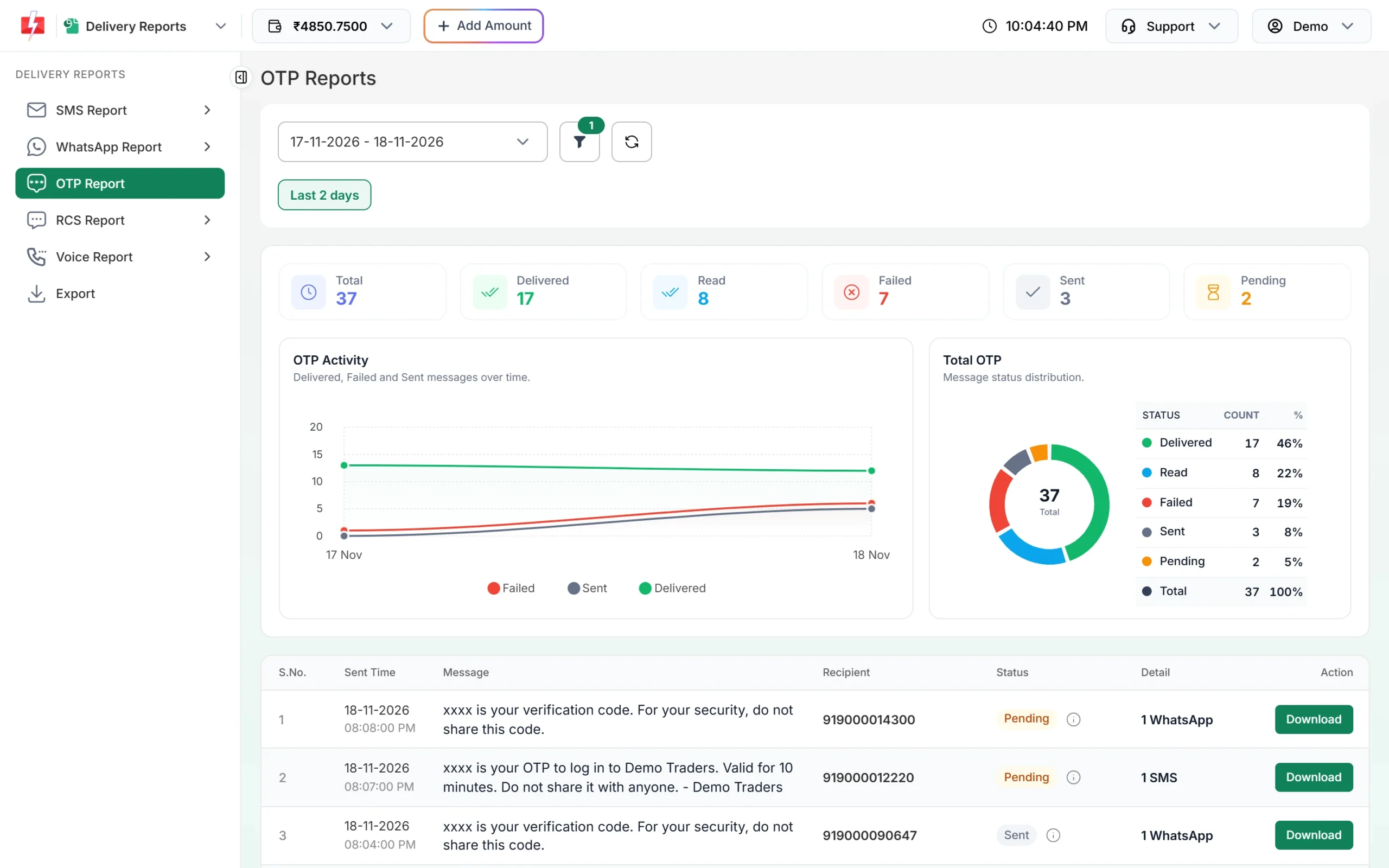
| Delivery visibility | Usually only success or failure of the sign-in flow in your app | OTP report with status per number (Delivered, Read, Failed, Sent, Pending), channel and reason |
| Abuse protection | Built-in app checks and limits from the platform | Resend wait and verify-attempt limits in OTP Settings, resend cap, API key IP whitelist. Add your own rate limits and CAPTCHA. |
| Where you call it | Client SDK in the app or website | From your server, with your API key kept secret |
| DLT setup needed | No setup on your side | Yes for SMS: entity, header and an OTP content template. Not needed for WhatsApp OTP. |
When a phone sign-in SDK is a good fit
- Your app already uses that platform’s user system and security rules.
- You are building a prototype or a small app and want sign-in working in a day.
- Your users are in many countries and you want one sign-in flow for all of them.
- You do not need your brand name as the SMS sender or a WhatsApp option.
When an Indian OTP provider is the better choice
- Your users are in India. A provider registered on DLT sends OTPs with your own approved header and template, the way Indian operators expect business SMS.
- You want a backup channel. With Smart OTP, if the SMS fails, the same OTP goes on WhatsApp within the fallback window, or the other way round.
- Support asks “why didn’t the OTP come?” The OTP report shows each number with its status and reason, such as “Number switch off or low signal”.
- You want to control costs in rupees from a prepaid wallet with GST invoices, instead of a card-billed cloud account.
- You use your own backend login (Laravel, Node, Django, WordPress) and only need send and verify, not a separate user system.
How to move from a sign-in SDK to Smart OTP
-
Get your OTP template approved
For SMS, register your entity, header and a Transactional OTP template on a DLT portal, then add them in Fast2SMS DLT Manager. For WhatsApp, connect your number and get an Authentication template approved. See DLT OTP template rules.
-
Create a Smart OTP template
In Smart OTP > OTP Template List, click Add OTP Template, pick your template, choose the variable that holds the code and add a fallback on the other channel. You get an OTP ID for the API.
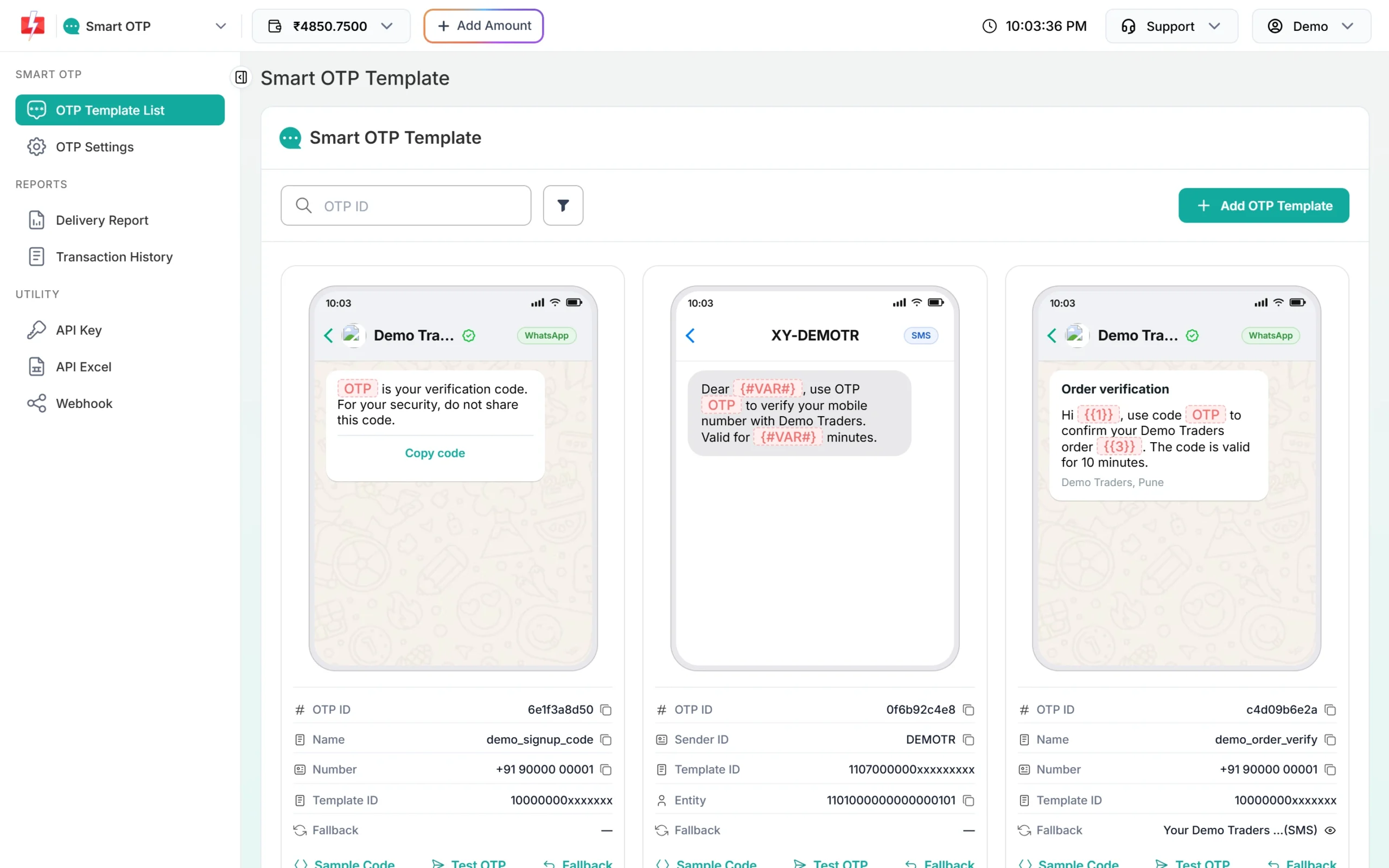
Each Smart OTP template has its own OTP ID. -
Replace the SDK calls with your server calls
Your app sends the phone number to your server. Your server calls Smart OTP send, and later verify with the number and the code the user typed. If verify succeeds, your server logs the user in or issues your own session token. See Send OTP API and Verify OTP API.
-
Keep your abuse protection
The SDK checked the app before sending. With your own backend, add a CAPTCHA or app check on the OTP form, rate limits per IP and per number, and set the resend wait in OTP Settings. See Smart OTP best practices.
Frequently asked questions
Can I use my own sender name with a phone sign-in SDK?
Check the SDK’s documentation. Many use a fixed message and sender. With Fast2SMS you use your own DLT header and template.
Can I keep my current sign-in platform and use Fast2SMS for OTPs?
Yes. Verify the phone number with Smart OTP on your server, then sign the user in to your existing platform the way it allows for a server-verified user, so you keep it for sessions and security rules.
Does Smart OTP work outside India?
No. The Smart OTP API takes 10-digit Indian mobile numbers.
Which is faster in India?
Speed depends mostly on the user’s network. Smart OTP sends on a priority route and can switch to WhatsApp when SMS fails.
Do I need DLT to use Smart OTP?
For SMS OTPs, yes. For WhatsApp OTPs, you need an approved WhatsApp Authentication or Utility template instead.