
When WhatsApp messages reach most customers but not some numbers, the reason is almost always about those numbers, not your account. The number may not be on WhatsApp, the person may have stopped your marketing messages, or Meta may be limiting how many offers that person gets. This page lists every common reason, how to see which one applies in Fast2SMS, and what to do.
Step 1: find the reason for each number
-
Open the campaign in the WhatsApp Report
Go to Delivery Report > WhatsApp Report. Pick the date range and, if you like, filter Delivery Status by Failed. For one customer, use the Mobile Number filter.
-
Read the Description column
Click the campaign message to open Delivery Details. Each number in the Receivers table has a Status and a Description with the reason and Meta’s error code.
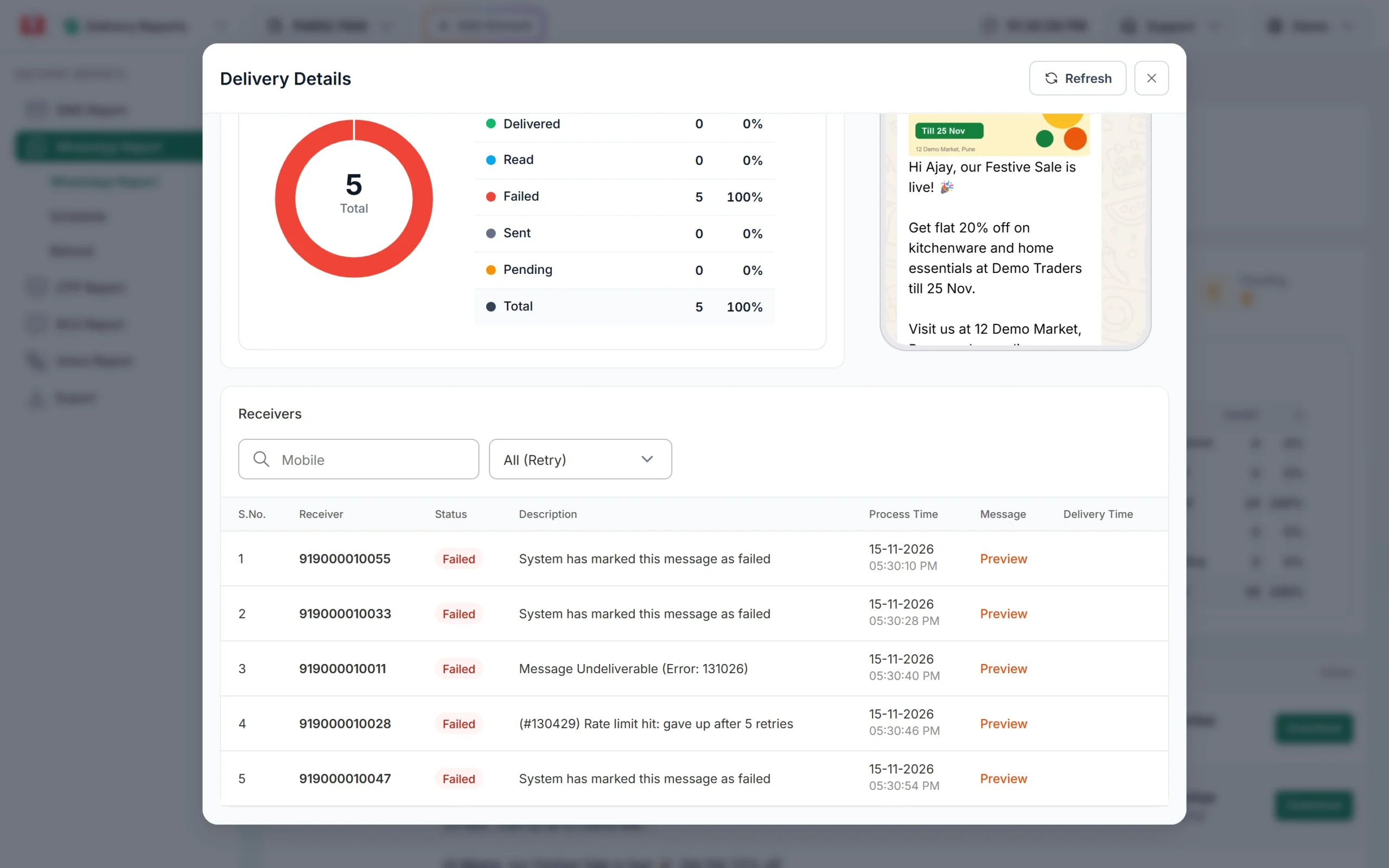
The reason for each failed number.
Step 2: match the reason and fix it
| Reason in the report | What it means | What to do |
|---|---|---|
| Message Undeliverable (Error: 131026) | Not on WhatsApp, very old app, or WhatsApp terms not accepted | Check the number; ask the customer to update WhatsApp; use SMS |
| Error 131049 | Meta limited marketing messages to this person for now | Wait at least 24 hours before trying again; send fewer offers |
| Error 131050 | The person stopped marketing messages from you | Remove from offer lists; do not retry |
| Error 130472 | The person is in a Meta test group that gets no marketing messages | Use SMS for important offers; do not retry |
| Error 131047 | Free-form message sent after the 24-hour window | Send an approved template |
| Error 131056 | Too many messages to this one number in a short time | Wait a little, then send |
| Error 130403 | Your business has blocked this user on WhatsApp | Unblock the user, for example from the chat in Live Chat |
| You can not send message to your own number | The receiver is your sender number | Test with a different phone |
The Retry Failed toggle in WhatsApp Manager > Numbers resends yesterday’s template messages that failed with 131026 or 131049 the next morning. It can recover some of these numbers without any work from you.
Numbers rejected before sending
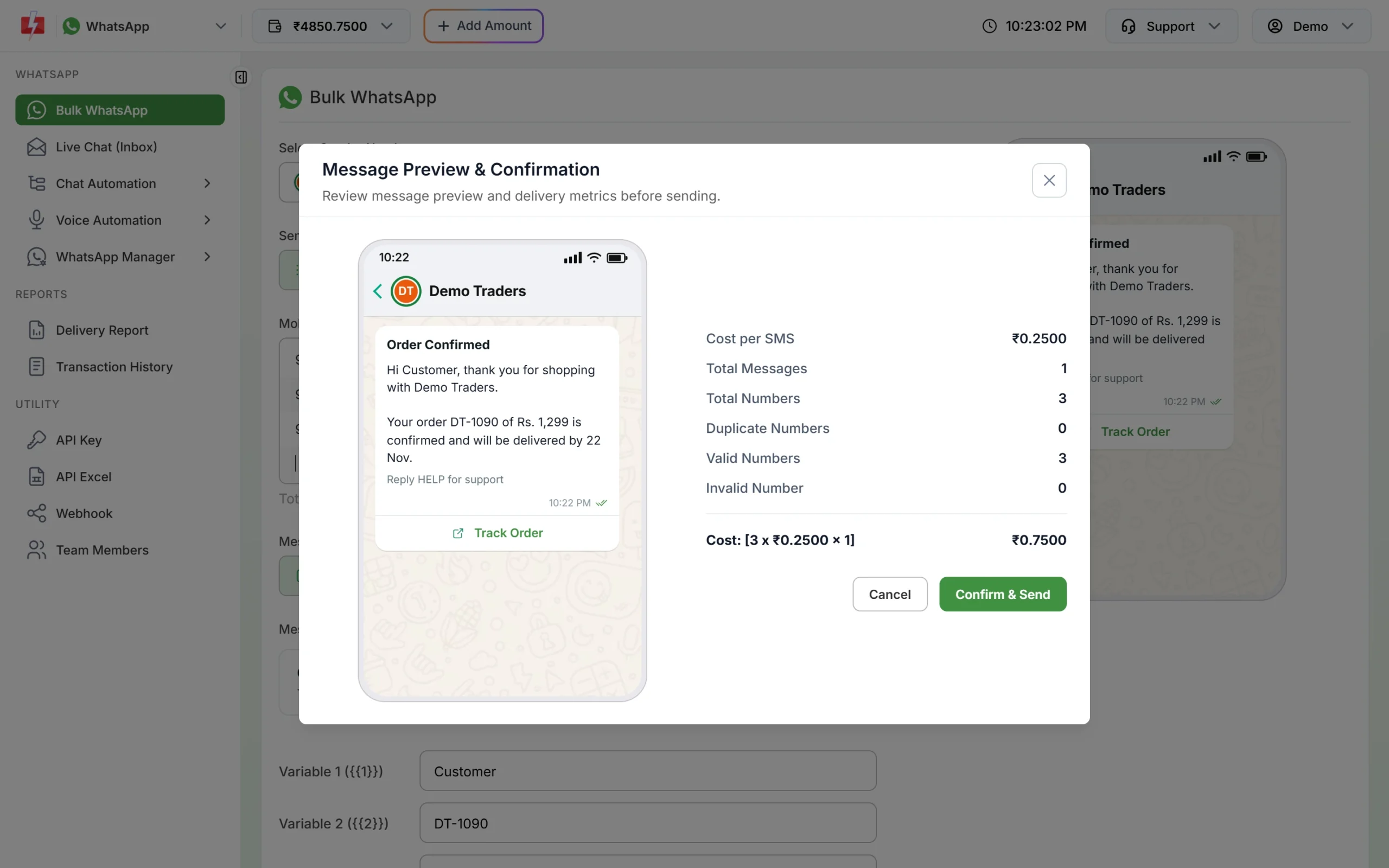
Some numbers never reach WhatsApp at all. When you click Send in Bulk WhatsApp, the Message Preview & Confirmation window shows Total Numbers, Duplicate Numbers, Valid Numbers and Invalid Number, and the cost is worked out on the valid numbers. Check these counts before you click Confirm & Send.
- Remove spaces, dashes and letters from numbers in your file.
- Do not mix landlines into a WhatsApp list.
- Bulk WhatsApp accepts 10-digit Indian mobile numbers starting with 6, 7, 8 or 9. Other numbers are counted as invalid and not sent.
- A number repeated in the list is sent only once and counted under Duplicate Numbers.
Numbers outside India
Bulk WhatsApp and the simple WhatsApp API in Fast2SMS are built for Indian mobile numbers. Also note that, at the time of writing, Meta does not deliver marketing templates to people with United States phone numbers (+1 with a US area code).
Frequently asked questions
Why do WhatsApp messages go to some numbers and not others?
Because each number is checked on its own. One may not be on WhatsApp, another may have opted out of offers. The Description column shows the reason for each.
Why does one customer never get my offers but gets order updates?
They have probably stopped marketing messages from you (131050), or Meta is limiting their marketing messages (131049). Utility messages are separate.
Am I charged for numbers that failed?
No. Fast2SMS refunds every failed WhatsApp message to your wallet automatically, about two days after sending.
Can a customer block my business number?
Yes, any customer can block a business. Blocks are the customer’s private choice, and many blocks lower your number’s quality rating, so send only messages people expect.
Should I resend to numbers that failed?
Only for reasons that can change, such as 131049 after 24 hours or 131026 after the customer updates WhatsApp. Never resend to 131050 or 130472.