
These WhatsApp utility templates for restaurants and cloud kitchens cover what happens after a customer orders or books a table: order received, ready for pickup, on the way, delayed, item not available, table confirmed, table ready, the bill and a feedback request about that order. Each one has the variables, sample values, a suggested button and the reason it fits the utility category. Demo Kitchen is a made-up name; use your own.
What makes a restaurant message utility
A restaurant message is utility when it is about an order, booking or payment the customer made, and it does not try to sell. “Your order is on the way” is utility. “Your order is on the way, and try our new dessert” is marketing, because Meta treats any mix of an update and a promotion as marketing. Messages that only make sense once the variables are filled in, like “Hi {{1}}, {{2}}”, are also treated as marketing.
Meta makes the final call on the category during review, and it can change the category of an approved template later. Nothing here guarantees approval or a category. For the general rules with side-by-side pairs, read WhatsApp utility vs marketing template examples.
The category also sets the price. At the time of writing, Fast2SMS charges ₹0.25 for each utility message and ₹0.95 for each marketing message, and your own account may have different rates. So an order update costs the utility rate, while a weekend combo offer costs the marketing rate. Every template is charged at its category rate, whether or not the customer messaged you in the last 24 hours. The full rate table is in WhatsApp API price in India.
Sending in bulk? For high WhatsApp volumes our team offers discounted rates. Talk to our team or see WhatsApp pricing.
Before you copy these templates
- Connect your WhatsApp number in Fast2SMS, and collect the customer’s consent to get order updates on WhatsApp, for example on your ordering page. See WhatsApp opt-in rules.
- Most of these are sent one at a time when an order changes status, so they are usually sent by API from your ordering or billing software, not as a bulk campaign. See sending a template with the Fast2SMS API.
- Each body has fixed text before and after the variables. Keep it that way; the rules are in WhatsApp template character limits and variable rules.
- Change the times and policies in the fixed text (holding a table, reporting a missing item) to what your restaurant actually does.
Delivery and takeaway order templates
These follow the order from the kitchen to the customer. Each one names the order number, which is what makes it clearly about that customer.
| Template name and body | Sample values | Suggested button | Why it is utility |
|---|---|---|---|
order_receivedHi {{1}}, thank you for ordering from Demo Kitchen. Your order {{2}} of Rs. {{3}} has been received and is being prepared. |
Priya | DK-1042 | 640 | Call Phone Number: “Call Restaurant” | Confirms an order the customer just placed. |
order_ready_pickupHi {{1}}, your order {{2}} is ready for pickup at the counter. Please show this message when you collect it. |
Rahul | DK-1043 | None | A status update on the customer’s own order. |
order_out_for_deliveryHi {{1}}, your order {{2}} is on the way. Our rider {{3}} will reach you in about {{4}} minutes. |
Priya | DK-1042 | Imran | 25 | Visit website (dynamic): “Track Order” | Delivery status of a specific order. |
order_delayedHi {{1}}, sorry, your order {{2}} is running about {{3}} minutes late because of {{4}}. We will message you again when it leaves the kitchen. |
Neha | DK-1050 | 15 | heavy rain | None | Tells the customer about a delay in their own order. |
item_unavailableHi {{1}}, {{2}} from your order {{3}} is not available right now. Please choose an option below so we can continue. |
Anil | Paneer Tikka | DK-1051 | Custom: “Replace item”, “Remove item” | Asks the customer to decide about their own order. |
order_deliveredHi {{1}}, your order {{2}} has been delivered. If anything is missing or wrong, reply to this message within 2 hours. |
Rahul | DK-1043 | Custom: “Report a problem” | Closes the order and offers support for it. |
order_cancelled_refundHi {{1}}, your order {{2}} has been cancelled. Rs. {{3}} will be refunded to your original payment method within {{4}} working days. |
Neha | DK-1050 | 640 | 5 | None | Confirms a cancellation and refund for one order. |
Table booking and dine-in templates
| Template name and body | Sample values | Suggested button | Why it is utility |
|---|---|---|---|
table_booking_confirmedHi {{1}}, your table for {{2}} guests at Demo Kitchen is confirmed for {{3}} at {{4}}. We will hold the table for 15 minutes after the booking time. |
Priya | 4 | 21 Dec | 8:30 PM | Call Phone Number: “Call Restaurant” | Confirms a booking the customer made. |
table_booking_reminderHi {{1}}, a reminder of your table booking {{2}} today at {{3}}. Please tap a button below to let us know your plan. |
Rahul | TB-311 | 8:30 PM | Custom: “I am coming”, “Cancel booking” | Reminder about the customer’s own booking. |
table_ready_waitlistHi {{1}}, your table at Demo Kitchen is ready. Please come to the host desk within 10 minutes so we can seat you. |
Anil | None | Answers the customer’s waitlist request. |
dine_in_billHeader: Document (PDF) Hi {{1}}, thank you for dining at Demo Kitchen. Your bill {{2}} for Rs. {{3}} is attached for your records. |
Neha | B-7781 | 2,140 | None | Sends the bill for a visit that just happened. |
catering_order_confirmedHi {{1}}, your catering order {{2}} for {{3}} guests is confirmed for {{4}}. Our team will call you a day before to confirm the menu and timing. |
Priya | CT-58 | 60 | 28 Dec 2026 | None | Confirms a large order the customer placed. |
order_feedbackHi {{1}}, how was your order {{2}} from Demo Kitchen today? Please tap a button below to rate the food. |
Rahul | DK-1043 | Custom: “Loved it”, “It was okay”, “Not good” | Feedback on one specific order, which Meta lists as a utility use. |
Restaurant messages that would be marketing
Offers, new menus and “we miss you” messages are normal for restaurants. Send them as marketing templates, only to customers who agreed to get offers.
| Message | Why Meta would treat it as marketing | What to do instead |
|---|---|---|
| Hi {{1}}, your order {{2}} is delivered. Use code TASTY20 for 20% off your next order. | An order update with a coupon is mixed content, which Meta treats as marketing. | Send order_delivered as utility and the coupon in a separate marketing template with a Copy offer code button. |
| Hi {{1}}, it has been a month since your last order. Come back this weekend for a free dessert. | It is retargeting. Meta says retargeting messages are marketing. | Use a marketing template for win-back messages. |
| Hi {{1}}, our new winter menu is here. See it and order now. | It promotes products and is not about any order. | Create it as marketing, with a “View Menu” button. |
How to keep restaurant templates utility
- Name the order or booking number in each template. A message that could go to your whole customer list reads as a broadcast.
- Do not add “order again”, combo deals, new dishes or loyalty points offers to an order update.
- Pick service buttons: “Track Order”, “Call Restaurant”, “Report a problem”. Leave “Order Now” and “View Menu” for marketing.
- Ask for feedback about the order the customer just had. A general “tell us what you think of our food” survey is not utility.
- If you share a code the rider must check at handover, send it in an authentication template, not in these. Meta does not allow passcodes in utility templates.
If Meta has already moved one of your order templates to marketing, remove the promotional line and submit it as a new utility template. Fast2SMS also has a separate help guide on rewriting a marketing template as utility.
How to add WhatsApp utility templates for restaurants in Fast2SMS
-
Open the template form
Go to WhatsApp Manager > Templates and click Add Template. If you have more than one number, pick the sender number at the top right.
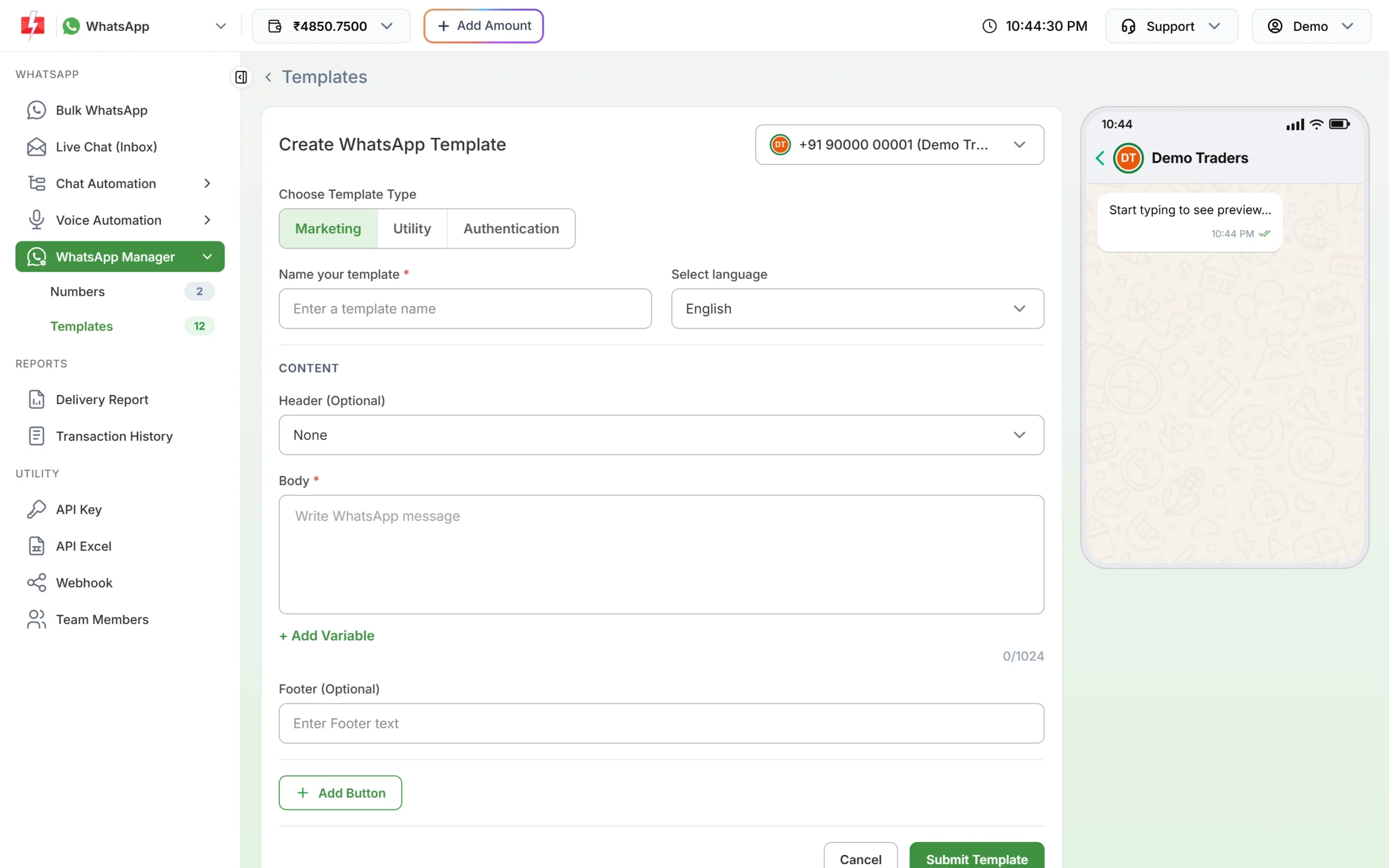
The template form. Choose Utility for order and booking updates. -
Choose Utility, then name the template
Under Choose Template Type, click Utility. Type a name such as
order_out_for_delivery(small letters, numbers and underscores only) and choose the language the text is written in: English, Hindi or Gujarati. -
Paste the body and fill the samples
Paste the fixed text. Put the cursor where each {{1}}, {{2}} goes and click + Add Variable so the numbering stays right. Under Samples for body content, type a realistic value for each variable, like the ones in the tables above. Use samples like a real order number and a believable time, not “test”.
-
Add the header and button, then submit
For the bill, choose Document under Header (Optional) and upload a sample PDF. Click Add Button for buttons such as Custom “Replace item” or Call Phone Number “Call Restaurant”. For time-sensitive templates, turn on the message validity period. Click Submit Template, check the preview and confirm. Meta’s review can take up to 24 hours.
-
Check the category on the card, then send
When the template is approved, its card shows the category under the preview. If you chose Utility and the card says Marketing, Meta approved it as marketing. Click Test on the approved card to send it to your own phone first, with your own values in each variable box.
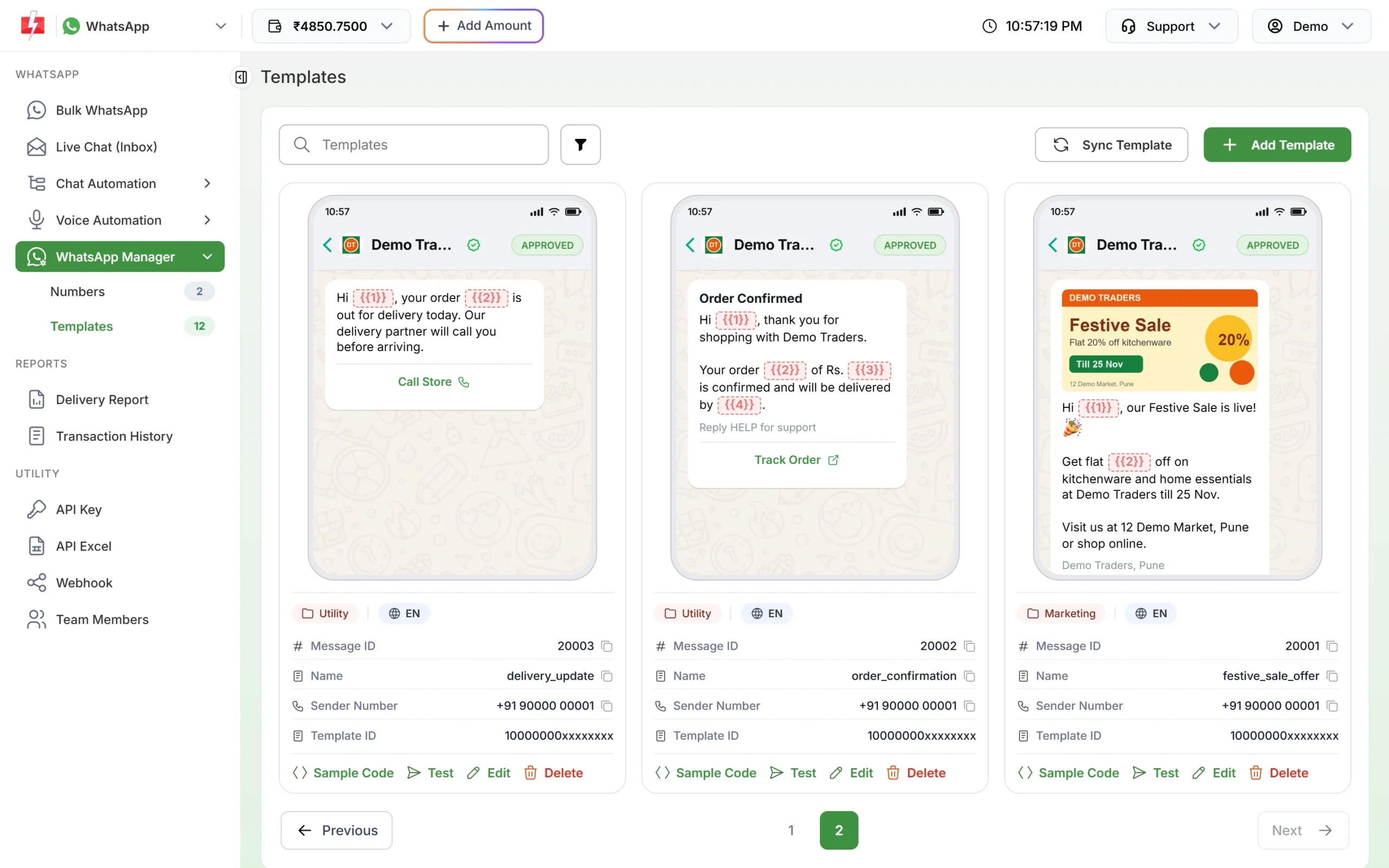
The category shows on each template card after review. 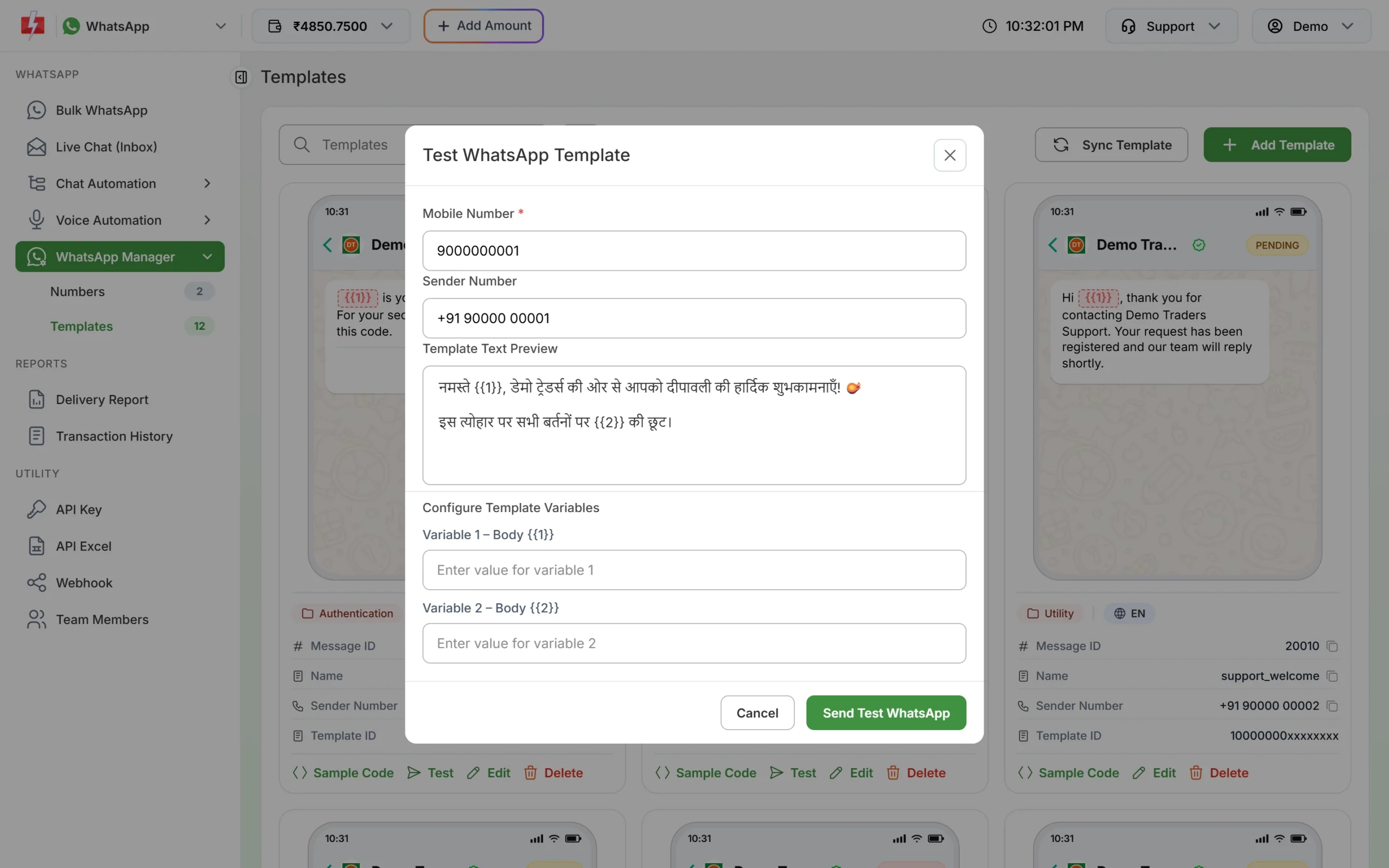
Send a test to your own phone before connecting the template to your ordering system.
If Meta changes the category
Meta checks the category when it reviews a template, and it keeps checking approved templates later. At the time of writing:
- A template you submit as utility that Meta sees as marketing is usually approved as marketing instead of being rejected. Some are still rejected for the wrong category.
- An approved utility template can be moved to marketing later, normally with one day’s notice. It keeps working, at the marketing rate.
- You have 60 days to ask Meta to review a category change.
- Businesses that keep sending marketing content as utility can have their utility messages limited, or all their utility templates moved to marketing for a period. See WhatsApp error 131064.
To move a template to another category yourself, see editing an approved template or its category.
Frequently asked questions
Is an order confirmation from a restaurant a utility template?
Usually yes, if it only confirms the order and has no offer or upsell in it. Meta decides the category during review.
Can I send the restaurant bill on WhatsApp?
Yes. Use a utility template with a Document header. For a different bill per customer, send it by API with each bill’s file link. See sending a template with a PDF by API.
Is a “we miss you” message utility?
No. Messages that try to bring back old customers are retargeting, and Meta treats retargeting as marketing.
Can I add a coupon to the delivery message?
You can, but then the whole template is marketing and costs the marketing rate. Send the coupon in its own marketing template.
How do I send these automatically when the order status changes?
Call the Fast2SMS WhatsApp API from your ordering or POS software with the template’s message ID and the variable values. See sending WhatsApp templates with the API.
Where do button taps like “Replace item” go?
Quick reply taps come back as messages in Live Chat, and to your webhook if you set one, so your team or system can act on them.
Can I send order updates in Hindi?
Yes. The template form offers English, Hindi and Gujarati, and each language is a separate template. See WhatsApp templates in Hindi and Gujarati.
Related guides
- WhatsApp Marketing and Bulk SMS for Restaurants and Cloud Kitchens
- WhatsApp utility vs marketing templates: examples
- WhatsApp template examples by use case
- WhatsApp template buttons: quick reply, website, call and copy code
- WhatsApp template character limits and variable rules
- WhatsApp API price in India