
These WhatsApp utility templates for travel and hotels cover the messages a guest or traveller expects after they book: confirmations, vouchers, payment updates, itineraries, pickup details, schedule changes, refunds and a feedback request about their stay. Each template comes with its variables, sample values, a suggested button and one line on why it fits the utility category. Hotel Demo Residency and Demo Holidays are made-up names; change them to your own.
What makes a travel or hotel message utility
Meta calls a template utility when it follows something the customer did, such as a booking or a payment, and has no promotion in it. A booking confirmation with the guest’s dates is utility. The same confirmation with “add breakfast for Rs. 299” at the end is marketing, because it now tries to sell something. Meta also treats a template as marketing when its meaning is unclear without the variables.
Meta decides the category, not you. The category you pick in the form is a request, and Meta can approve a template under a different category or change it later. No wording on this page is a promise of approval or of a category. The side-by-side rules are in WhatsApp utility vs marketing template examples; this page only gives travel and hotel wording.
The category also sets the price. At the time of writing, Fast2SMS charges ₹0.25 for each utility message and ₹0.95 for each marketing message, and your own account may have different rates. So a booking confirmation costs the utility rate, while a holiday package offer costs the marketing rate. Every template is charged at its category rate, whether or not the customer messaged you in the last 24 hours. The full rate table is in WhatsApp API price in India.
Sending in bulk? For high WhatsApp volumes our team offers discounted rates. Talk to our team or see WhatsApp pricing.
Before you copy these templates
- Your WhatsApp number must be connected in Fast2SMS, and the traveller must have agreed to get WhatsApp messages from you (for example a tick box on your booking form). See WhatsApp opt-in rules.
- No body starts or ends with a variable, and each one has enough fixed text to make sense on its own. Keep it that way when you edit. The limits are in WhatsApp template character limits and variable rules.
- Button labels should stay within 25 characters. Button types and limits are in the WhatsApp template buttons guide.
- Change check-in times, refund periods and policies in the fixed text to what your business really offers.
Booking and payment templates
These go out right after the guest books or pays. They carry the booking number, so each message is clearly about that person’s booking.
| Template name and body | Sample values | Suggested button | Why it is utility |
|---|---|---|---|
hotel_booking_confirmedHi {{1}}, your booking {{2}} at Hotel Demo Residency is confirmed for {{3}} to {{4}}. Check-in is from 12 noon. Please carry a valid photo ID. |
Priya | HDR-20431 | 12 Dec 2026 | 14 Dec 2026 | Call Phone Number: “Call Hotel” | Confirms a booking the guest made, with their own dates. |
booking_voucherHeader: Document (PDF) Hi {{1}}, the voucher for your booking {{2}} is attached. Please show it at the reception at check-in. |
Rahul | DH-88120 | None | Shares the customer’s own booking document. |
booking_payment_receivedDear {{1}}, we have received Rs. {{2}} for booking {{3}}. The balance of Rs. {{4}} is payable at check-in. |
Priya | 4,500 | HDR-20431 | 3,200 | None | Confirms a payment for a specific booking. |
trip_balance_dueHi {{1}}, the balance of Rs. {{2}} for your trip {{3}} is due on {{4}}. Please ignore this message if you have already paid. |
Anil | 18,000 | DH-88120 | 20 Dec 2026 | Visit website (dynamic): “Pay Balance” | Reminds about money due on a trip the customer already booked. |
online_checkin_openHi {{1}}, online check-in for booking {{2}} is now open. Upload your guest details before {{3}} to save time at the reception. |
Priya | HDR-20431 | 11 Dec 2026 | Visit website (dynamic): “Check In Online” | A service step for the guest’s own stay, with no offer. |
Trip and stay updates
Use these while the trip is coming up or under way. Schedule changes are the messages travellers value most, so send them as soon as you know.
| Template name and body | Sample values | Suggested button | Why it is utility |
|---|---|---|---|
itinerary_readyHi {{1}}, the itinerary for your trip {{2}} starting {{3}} is ready. Tap the button below to see the day-wise plan and hotel names. |
Neha | DH-88120 | 18 Dec 2026 | Visit website (dynamic): “View Itinerary” | Details of a trip the customer bought. |
travel_tickets_issuedHeader: Document (PDF) Hi {{1}}, your {{2}} tickets for trip {{3}} have been issued and are attached. The PNR is {{4}}. Please check the names and travel date on the ticket. |
Neha | train | DH-88120 | 4521367890 | None | Delivers tickets for the customer’s own booking. |
hotel_arrival_detailsHi {{1}}, we look forward to hosting you on {{2}}. The hotel address is {{3}}. Reply to this message if your arrival time changes. |
Rahul | 12 Dec 2026 | 14 MG Road, Pune | Visit website (static): “Get Directions” | Practical information for a confirmed stay. |
pickup_driver_detailsHi {{1}}, your pickup for booking {{2}} is confirmed. Driver {{3}} ({{4}}) will meet you at the arrival gate with a name board. |
Priya | DH-88120 | Suresh | 9999999999 | None | Service details the traveller needs for their trip. |
schedule_changedHi {{1}}, the departure time of your {{2}} on {{3}} has changed to {{4}}. We are sorry for the trouble. Reply to this message if you need help. |
Anil | Goa flight | 18 Dec 2026 | 4:40 PM | Call Phone Number: “Call Travel Desk” | An operational change that affects the customer’s booking. |
trip_documents_pendingHi {{1}}, we still need some documents to complete trip {{2}}. Please upload them before {{3}} using the button below. |
Neha | DH-88120 | 5 Dec 2026 | Visit website (dynamic): “Upload Documents” | A step the customer must finish for their own booking. |
Cancellation, checkout and feedback
| Template name and body | Sample values | Suggested button | Why it is utility |
|---|---|---|---|
booking_cancelled_refundHi {{1}}, your booking {{2}} has been cancelled as requested. A refund of Rs. {{3}} will reach your original payment method within {{4}} working days. |
Rahul | HDR-20431 | 4,500 | 7 | None | Confirms the customer’s cancellation request and refund. |
checkout_invoiceHeader: Document (PDF) Hi {{1}}, thank you for staying at Hotel Demo Residency. Your invoice {{2}} for Rs. {{3}} is attached for your records. |
Priya | INV-5521 | 7,700 | None | Sends the bill for a stay the guest just finished. |
stay_feedbackHi {{1}}, how was your stay with us from {{2}} to {{3}}? Please tap a button below to rate it. |
Priya | 12 Dec | 14 Dec | Custom: “Good”, “Average”, “Poor” | Feedback on one specific stay, which Meta lists as a utility use. |
Travel and hotel messages that would be marketing
These are fine messages to send, but as marketing templates, to people who agreed to get offers. Submitting them as utility only gets them moved to marketing, or rejected.
| Message | Why Meta would treat it as marketing | What to do instead |
|---|---|---|
| Hi {{1}}, your booking {{2}} is confirmed. Add a spa package to your stay for just Rs. 999. | An upsell inside a booking confirmation makes the whole template mixed, and Meta treats mixed content as marketing. | Send the confirmation as utility and the spa offer as a separate marketing template. |
| Hi {{1}}, thank you for staying with us. Book your next stay before 31 Dec and get 20% off. | A thank-you with a discount is promotional, even after a real stay. | Keep stay_feedback clean. Put repeat-stay offers in a marketing template. |
| Hi {{1}}, summer holiday packages to Goa are now open. Reply YES to know more. | It is not linked to any booking. It sells a new trip. | Use a marketing template and send it only to opted-in customers. |
How to keep travel and hotel templates utility
- Put the booking number, trip ID or invoice number in every template. It ties the message to one customer’s action.
- Leave out room upgrades, meal plans, spa offers, “book again” lines and coupon codes. Even one line of upsell turns the template into marketing.
- Use service buttons: “View Itinerary”, “Pay Balance”, “Call Hotel”, “Get Directions”. A “Book Now” or “See Packages” button points to marketing.
- Ask for feedback about a specific stay or trip only. Meta says a general survey is not approved as utility.
- Do not ask for passport, Aadhaar or card numbers in the chat. Send a link to your own secure page instead, as trip_documents_pending does.
- Never put a one-time login or verification code in these templates. Codes need an authentication template; Fast2SMS Smart OTP is the recommended way to send them.
If a template you already use got moved to marketing, the fix is usually to delete the promotional line and submit it again as a new utility template. A separate Fast2SMS help guide on rewriting marketing templates as utility covers the general method.
How to add WhatsApp utility templates for travel and hotels in Fast2SMS
-
Open the template form
Go to WhatsApp Manager > Templates and click Add Template. If you have more than one number, pick the sender number at the top right.
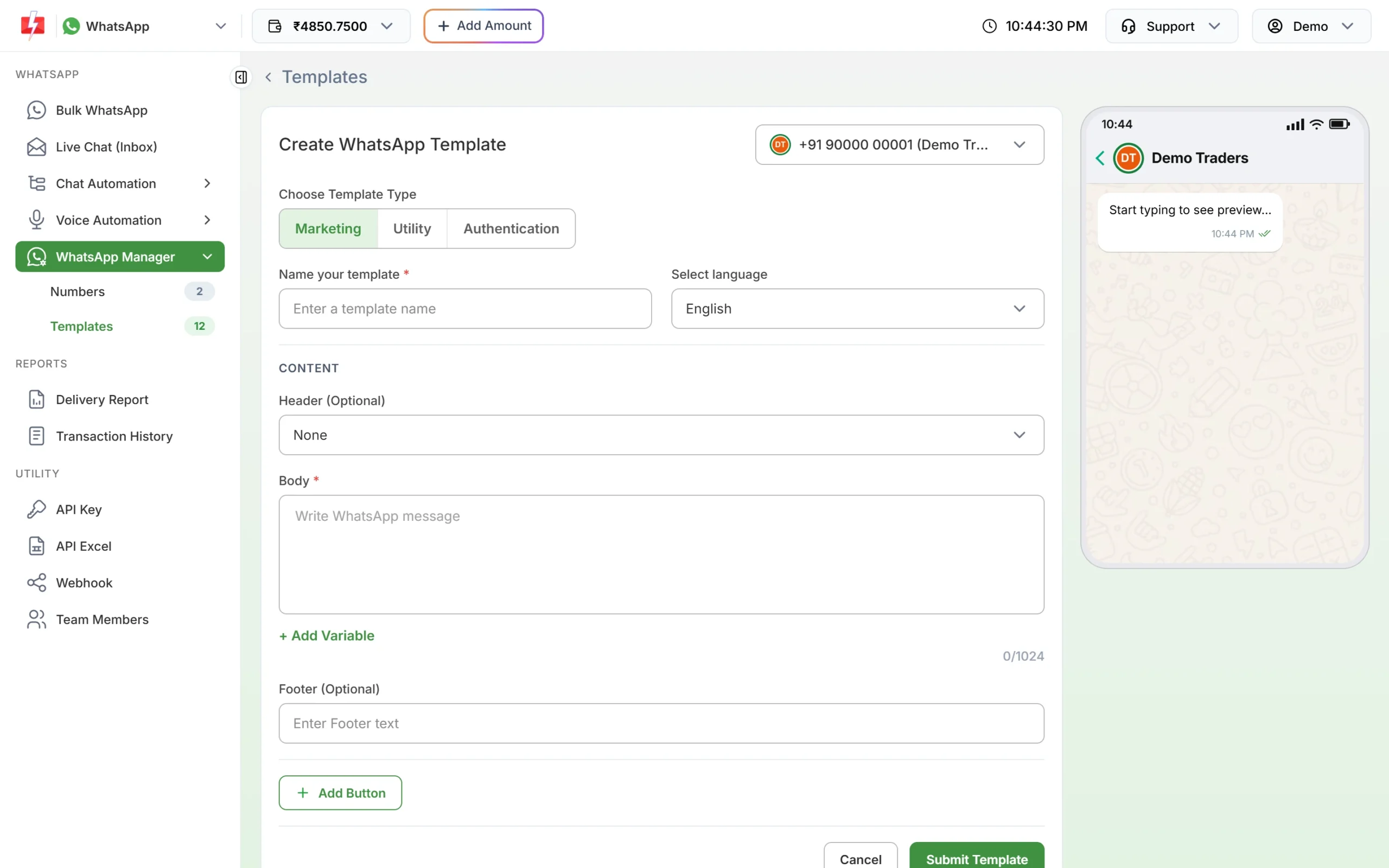
The template form. Click Utility under Choose Template Type. -
Choose Utility, then name the template
Under Choose Template Type, click Utility. Type a name such as
hotel_booking_confirmed(small letters, numbers and underscores only) and choose the language the text is written in: English, Hindi or Gujarati. -
Paste the body and fill the samples
Paste the fixed text. Put the cursor where each {{1}}, {{2}} goes and click + Add Variable so the numbering stays right. Under Samples for body content, type a realistic value for each variable, like the ones in the tables above. Good samples here are a real-looking name, a booking number and a date, not “test” or “abc”.
-
Add the header and button, then submit
For a voucher or invoice, choose Document under Header (Optional) and upload a sample PDF. Then click Add Button and pick the type from the table, such as Visit website for “View Itinerary”. Click Submit Template, check the preview and confirm. Meta’s review can take up to 24 hours.
-
Check the category on the card, then send
When the template is approved, its card shows the category under the preview. If you chose Utility and the card says Marketing, Meta approved it as marketing. Click Test on the approved card to send it to your own phone first, with your own values in each variable box.
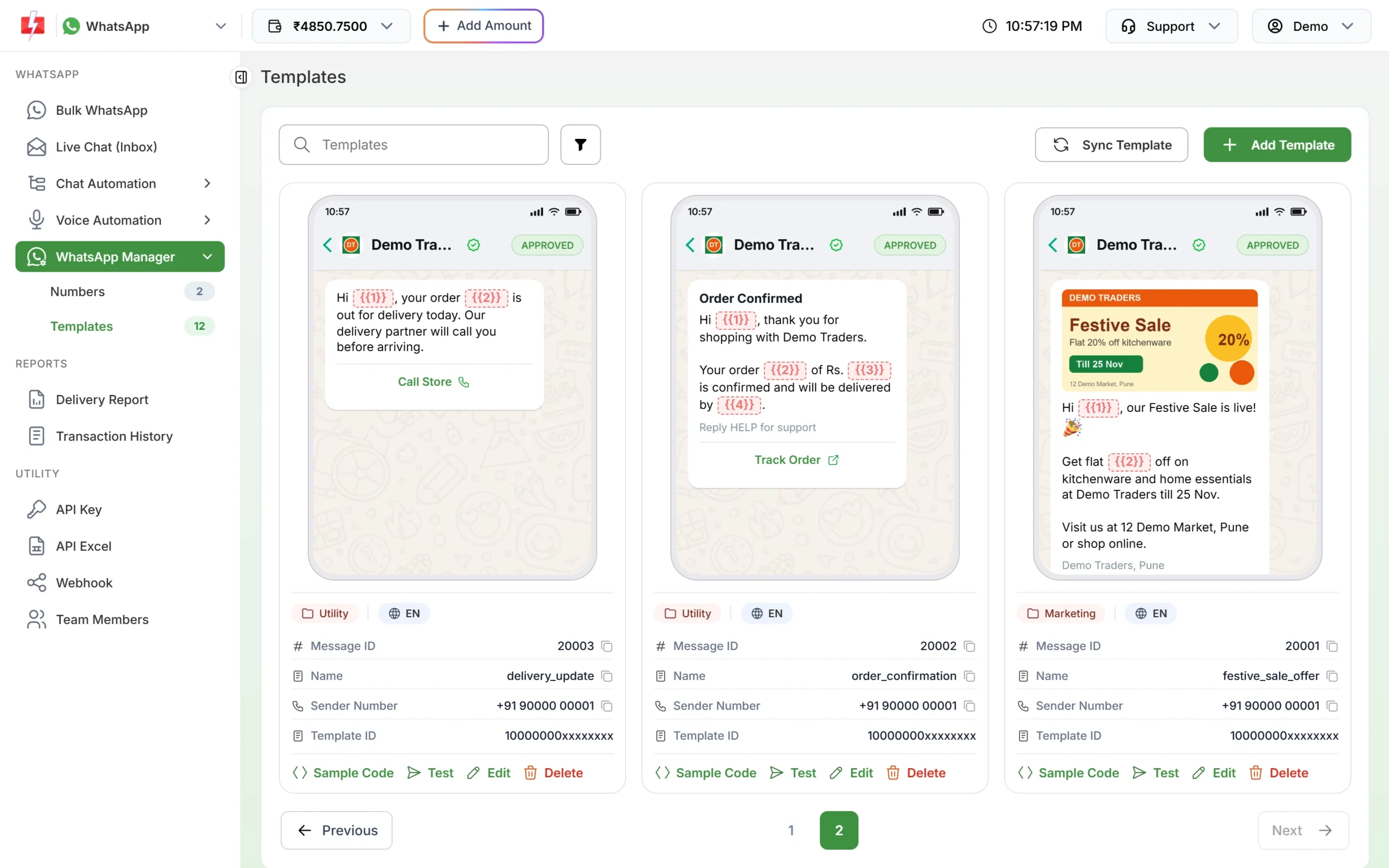
Approved templates show their category, Utility or Marketing, under the preview. 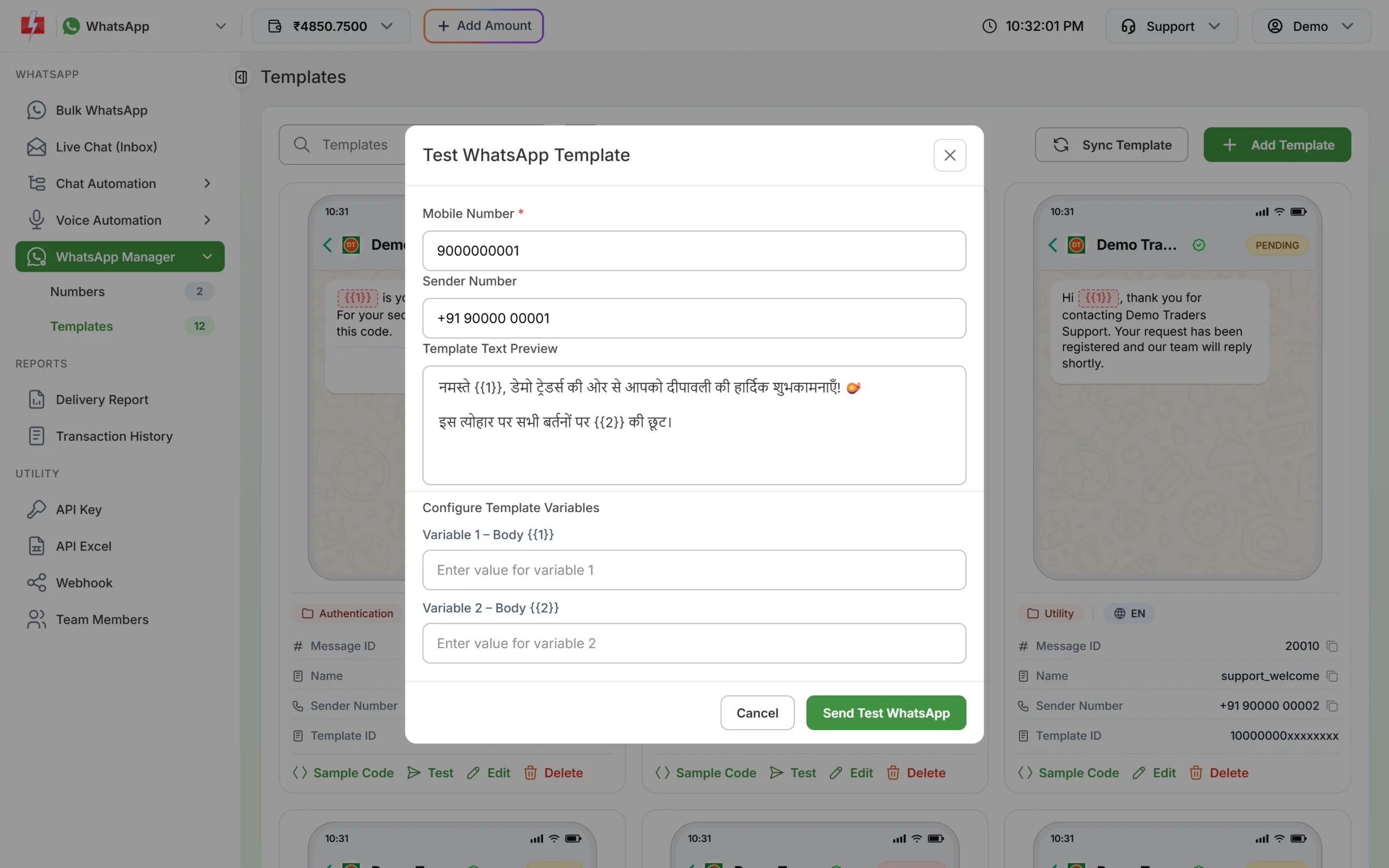
Send a test to your own phone before the first real booking update.
If Meta changes the category
Meta checks the category when it reviews a template, and it keeps checking approved templates later. At the time of writing:
- A template you submit as utility that Meta sees as marketing is usually approved as marketing instead of being rejected. Some are still rejected for the wrong category.
- An approved utility template can be moved to marketing later, normally with one day’s notice. It keeps working, at the marketing rate.
- You have 60 days to ask Meta to review a category change.
- Businesses that keep sending marketing content as utility can have their utility messages limited, or all their utility templates moved to marketing for a period. See WhatsApp error 131064.
To move a template to another category yourself, see editing an approved template or its category.
Frequently asked questions
Is a hotel booking confirmation a utility template?
Usually yes, as long as it only confirms the booking and has no offer, upsell or coupon in it. Meta makes the final decision during review.
Is a check-in reminder utility or marketing?
A reminder about the guest’s own booking, with the date and practical details, fits utility. A reminder that also pushes add-ons or a future stay is marketing.
Can I send flight or train schedule changes on WhatsApp?
Yes. A message that tells a customer their booked departure time has changed is a service update, so write it as utility with the booking details as variables.
Can each guest get their own voucher PDF?
Yes, by API. Send the same approved template with a different file link for each guest. In Bulk WhatsApp, one uploaded file goes to everyone in that campaign.
Is a holiday package offer utility?
No. Any message that promotes a trip or a package is marketing, even to a past guest. Create it as a marketing template.
Can I write these templates in Hindi?
Yes. The Fast2SMS template form offers English, Hindi and Gujarati. Create a separate template for each language. See WhatsApp templates in Hindi and Gujarati.
Do I need DLT approval for these WhatsApp templates?
No. DLT applies to SMS. WhatsApp templates are approved by Meta. See Is DLT needed for WhatsApp, RCS or voice calls?
Related guides
- Bulk SMS and WhatsApp for Hotels and Travel Agencies
- WhatsApp utility vs marketing templates: examples
- WhatsApp template examples by use case
- WhatsApp template buttons: quick reply, website, call and copy code
- WhatsApp template character limits and variable rules
- Which WhatsApp messages are free and which are charged?