
These WhatsApp utility templates for insurance companies, brokers and agents follow a policy from proposal to claim: proposal received, medical check-up, policy issued, premium due and received, grace period, nominee changes, cashless approval and claim updates. Each one has the body text, sample values, buttons and the reason it fits the utility category. The section on renewals matters most, because a renewal notice is where insurance templates most often turn into marketing.
Before you use these templates
- Your WhatsApp number is connected in Fast2SMS, and your customers agreed to get WhatsApp messages from you. See WhatsApp opt-in and opt-out rules.
- Pick Utility as the template type. Meta still decides the final category and can change it later, so nobody can promise that a template stays utility.
- Every body below starts and ends with fixed words, never a variable, because Meta rejects that. Keep it that way when you edit. See template character limits and variable rules.
- Fast2SMS allows up to 3 quick reply (Custom) buttons, 2 Visit website buttons and 1 Call Phone Number button per template. See WhatsApp template buttons.
- Do not put health details, diagnoses, full bank or card numbers in a template. Send a link to your secure portal instead.
- Promotional insurance messages must also follow IRDAI’s rules on insurance advertisements. Have your compliance team approve marketing text.
Proposal and policy issue
1. Proposal received
Template name: proposal_received
Hi {{1}}, we have received your proposal {{2}} for {{3}}. Our underwriting team will review it and update you here within {{4}} working days.- Sample values: {{1}} = Arjun, {{2}} = PR-30418, {{3}} = Demo Term Plan, {{4}} = 5
- Header and buttons: None
- Why it is utility: It confirms a proposal the customer submitted.
2. Medical check-up booked
Template name: medical_checkup_booked
Hi {{1}}, the medical check-up for your proposal {{2}} is booked at {{3}} on {{4}} at {{5}}. Please carry a photo ID and follow the instructions shared at booking.- Sample values: {{1}} = Arjun, {{2}} = PR-30418, {{3}} = Demo Diagnostics, Baner, {{4}} = 24 Nov, {{5}} = 8:30 AM
- Header and buttons: Custom (quick reply): “Change time”
- Why it is utility: An appointment that is part of the customer’s own proposal.
3. Document pending
Template name: proposal_document_pending
Hi {{1}}, your proposal {{2}} is waiting for {{3}}. Please upload it with the button below so we can complete the review.- Sample values: {{1}} = Arjun, {{2}} = PR-30418, {{3}} = a copy of your address proof
- Header and buttons: Visit website, Dynamic URL: “Upload document” (link ending in the proposal number)
- Why it is utility: It asks for something the customer’s proposal needs.
4. Policy issued
Template name: policy_issued_pdf
Hi {{1}}, your {{2}} policy {{3}} has been issued and the policy document is attached. Please check the details and tell us within the free-look period if anything is wrong.- Sample values: {{1}} = Arjun, {{2}} = Demo Term Plan, {{3}} = TP-7781020
- Header and buttons: Document header (PDF) with the policy document
- Why it is utility: It delivers the customer’s own policy.
Premiums and renewals
At the time of writing, Meta lists “a subscription expiring soon, with a discount to renew” as a marketing example, while a plain billing reminder is utility. Keep renewal notices factual: the policy, the amount, the due date and a way to pay. Any discount, loyalty bonus, upgrade or “renew now and save” makes the template marketing.
5. Premium due
Template name: premium_due_notice
Hi {{1}}, the premium of Rs {{2}} for your policy {{3}} is due on {{4}}. You can pay with the button below. Please ignore this message if you have already paid.- Sample values: {{1}} = Sunita, {{2}} = 18,640, {{3}} = HP-2210945, {{4}} = 1 Dec
- Header and buttons: Visit website, Dynamic URL: “Pay premium” (link ending in the policy number)
- Why it is utility: A billing reminder for an existing policy, with no offer.
6. Grace period running
Template name: grace_period_notice
Hi {{1}}, the premium for your policy {{2}} was due on {{3}} and has not been received yet. Your cover continues until the grace period ends on {{4}}. Please pay before that date to keep your policy active.- Sample values: {{1}} = Sunita, {{2}} = HP-2210945, {{3}} = 1 Dec, {{4}} = 31 Dec
- Header and buttons: Visit website: “Pay premium” and Call Phone Number: “Call us”
- Why it is utility: It tells the customer the status of their own policy and the date that matters.
7. Premium received
Template name: premium_receipt
Hi {{1}}, we have received your premium of Rs {{2}} for policy {{3}} on {{4}}. The receipt is attached for your records.- Sample values: {{1}} = Sunita, {{2}} = 18,640, {{3}} = HP-2210945, {{4}} = 28 Nov
- Header and buttons: Document header (PDF) with the receipt
- Why it is utility: A receipt for a payment the customer made.
8. Nominee updated
Template name: nominee_change_confirmation
Hi {{1}}, the nominee for your policy {{2}} was updated on {{3}} as you requested. If you did not ask for this change, call us right away.- Sample values: {{1}} = Arjun, {{2}} = TP-7781020, {{3}} = 20 Nov
- Header and buttons: Call Phone Number: “Call us”
- Why it is utility: It confirms a change on the customer’s policy and protects against fraud.
Claims
Keep claim messages free of medical details. Name the documents you need, not the illness.
9. Claim registered
Template name: claim_registered
Hi {{1}}, your claim {{2}} for policy {{3}} was registered on {{4}}. Our claims team will contact you, and you can check the status with the button below.- Sample values: {{1}} = Rohan, {{2}} = CL-90031, {{3}} = MV-4410287, {{4}} = 19 Nov
- Header and buttons: Visit website, Dynamic URL: “Track claim” (link ending in the claim number)
- Why it is utility: It confirms a claim the customer raised.
10. Claim documents needed
Template name: claim_documents_needed
Hi {{1}}, to process your claim {{2}} we need {{3}}. Please upload them with the button below, or reply to this message with clear photos.- Sample values: {{1}} = Rohan, {{2}} = CL-90031, {{3}} = the repair estimate and your driving licence
- Header and buttons: Visit website: “Upload documents”
- Why it is utility: It asks for what the customer’s own claim needs. Photos sent as replies arrive in Live Chat (Inbox).
11. Cashless request approved
Template name: cashless_approved
Hi {{1}}, the cashless request {{2}} under policy {{3}} has been approved for Rs {{4}}. The hospital has been informed, and the approval letter is attached.- Sample values: {{1}} = Sunita, {{2}} = CS-11873, {{3}} = HP-2210945, {{4}} = 85,000
- Header and buttons: Document header (PDF) with the approval letter
- Why it is utility: An update on the customer’s own claim, with no health details in the text.
12. Claim settled
Template name: claim_settled
Hi {{1}}, your claim {{2}} has been settled and Rs {{3}} was paid to your bank account ending {{4}} on {{5}}. The settlement letter is attached.- Sample values: {{1}} = Rohan, {{2}} = CL-90031, {{3}} = 42,500, {{4}} = 6620, {{5}} = 2 Dec
- Header and buttons: Document header (PDF) with the settlement letter
- Why it is utility: It reports a payment on the customer’s claim.
13. Claim not approved
Template name: claim_decision_letter
Hi {{1}}, we could not approve your claim {{2}}. The reason and the next steps, including how to ask for a review, are in the attached letter. Please call us if you have questions.- Sample values: {{1}} = Rohan, {{2}} = CL-90044
- Header and buttons: Document header (PDF) and Call Phone Number: “Call claims team”
- Why it is utility: It reports the outcome of the customer’s own claim.
These would be marketing
These messages go to your own policyholders, but each one sells. Send them as marketing templates, only to customers who agreed to get offers.
| Message | Why Meta treats it as marketing | What to do instead |
|---|---|---|
| Hi {{1}}, your policy {{2}} is due for renewal. Renew now and get a 10% loyalty discount. | A renewal reminder with a discount is Meta’s own marketing example. | Send the premium due template above without the discount. |
| Hi {{1}}, raise your health cover with a super top-up plan from Rs {{2}} a month. | It sells a new product. | Marketing template, with compliance approval. |
| Thank you for your premium of Rs {{1}}. Did you know our term plan covers your family too? | A cross-sell added to a receipt makes the whole template marketing. | Send the receipt template above, and the offer separately. |
What these templates cost
At the time of writing, Fast2SMS charges ₹0.25 per utility message and ₹0.95 per marketing message, and your account may have its own rates. A utility template with a policy PDF costs the same as a text-only utility message. An insurer sending 3 premium reminders to 4,000 policyholders a month sends 12,000 messages: ₹3,000 as utility, or ₹11,400 if a loyalty discount turned the reminder into marketing. See WhatsApp API price in India.
Sending in bulk? For high WhatsApp volumes our team offers discounted rates. Talk to our team or see WhatsApp pricing.
How to add these insurance templates in Fast2SMS
-
Open the template form
Go to WhatsApp Manager > Templates and click Add Template. If you have more than one WhatsApp number, pick the sender number at the top right.
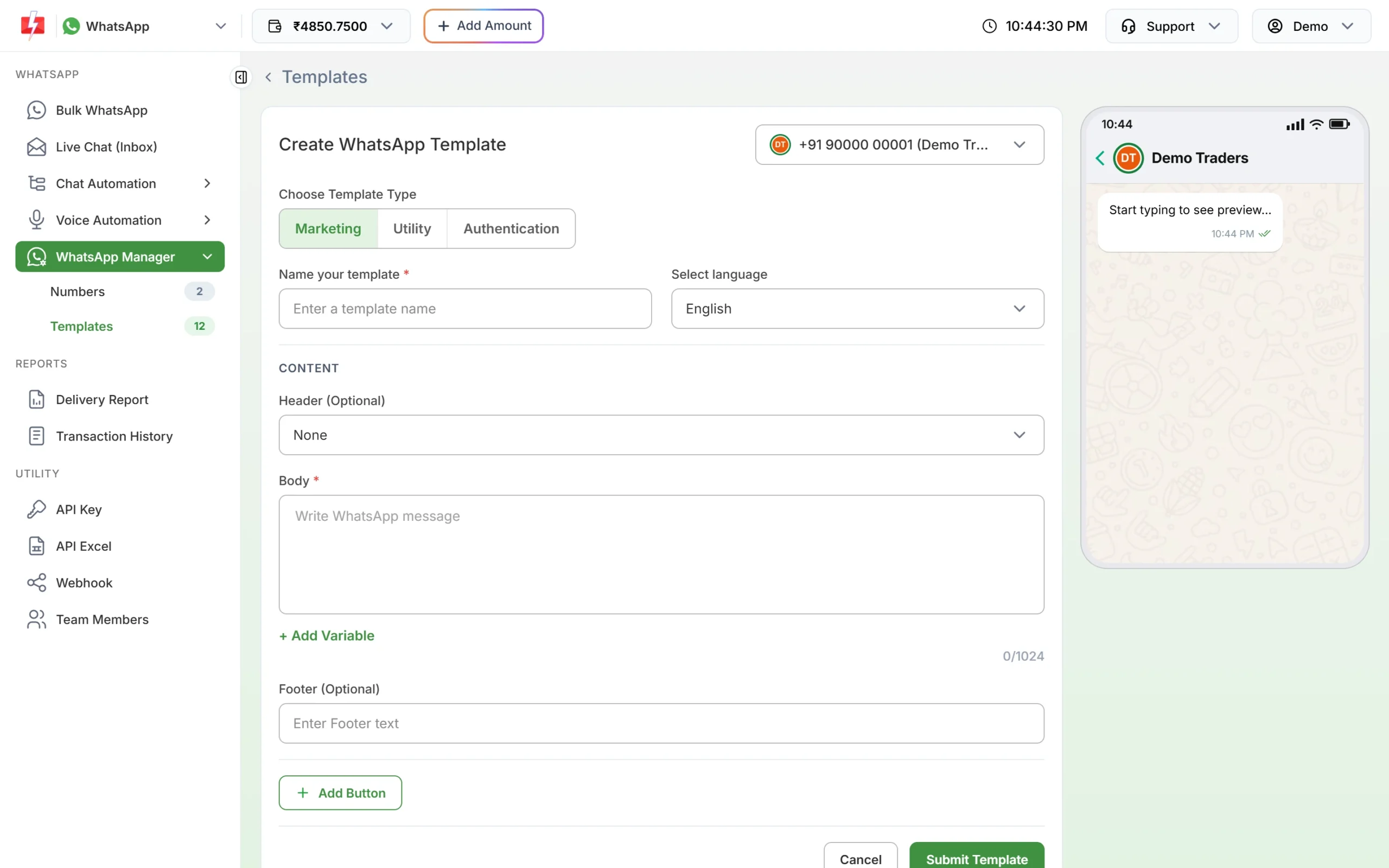
Click Utility under Choose Template Type. -
Choose Utility and paste the text
Under Choose Template Type, click Utility. Type the template name, for example premium_due_notice, and pick the language. Paste the body, put each value in with + Add Variable, and fill the boxes under Samples for body content with the sample values from this page.
-
Add the header and buttons, then submit
For policy documents, receipts and claim letters, set Header to Document and upload a sample PDF (up to 100MB). Click Add Button for the buttons listed with each template, then Submit Template. Meta reviews it, usually within 24 hours.
-
Check the category after approval
Click Sync Template to fetch the latest status. The badge under each approved card shows the category Meta gave it. If a template you submitted as Utility shows Marketing, Meta approved it as marketing; read the template again for any promotional line.
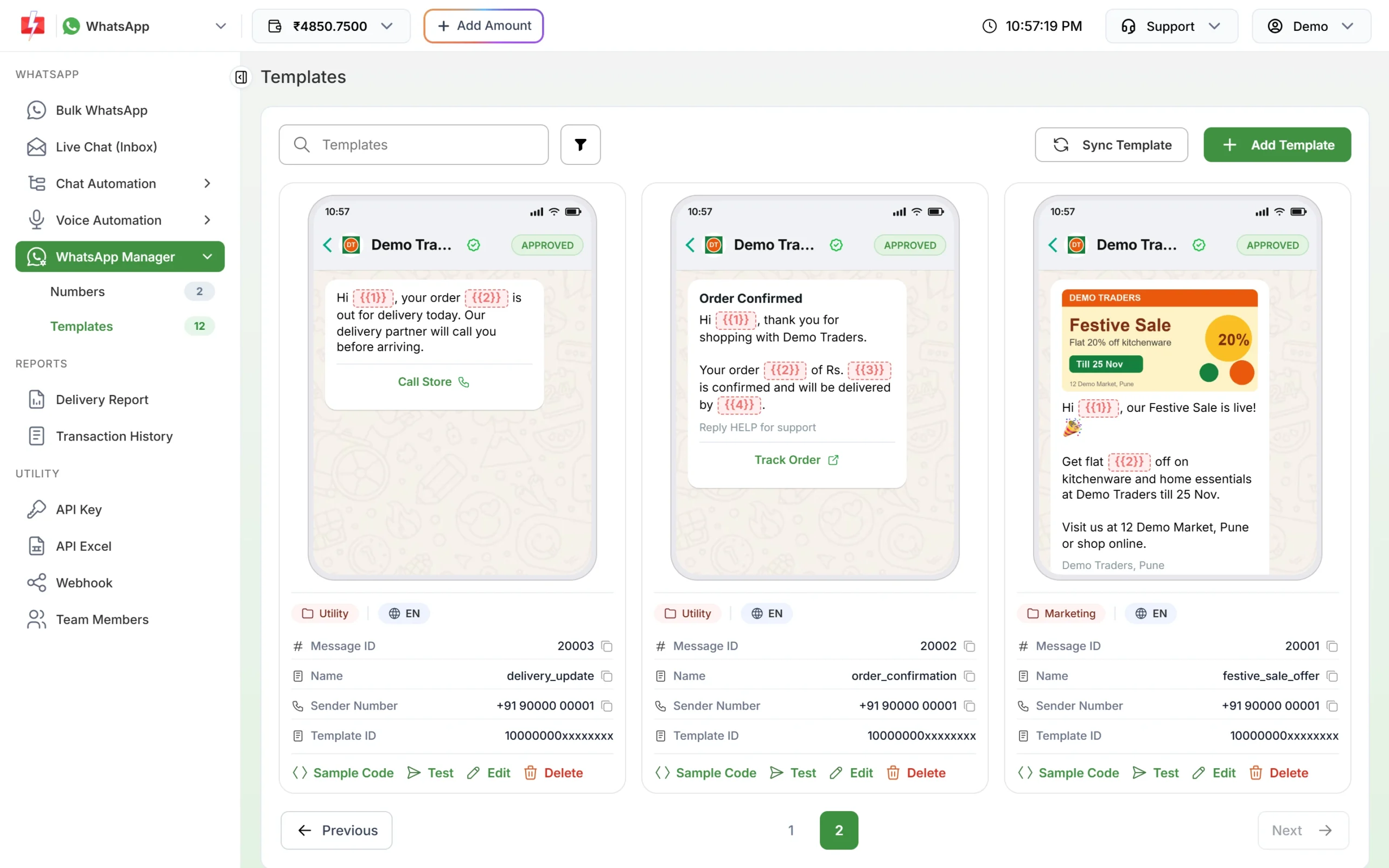
Check that Meta approved each template as Utility. -
Send it
Upload the month’s premium list as a CSV with one column per variable in Bulk WhatsApp and schedule the reminders; the template picker has a Utility tab. For claim updates from your policy system, use the WhatsApp template API.
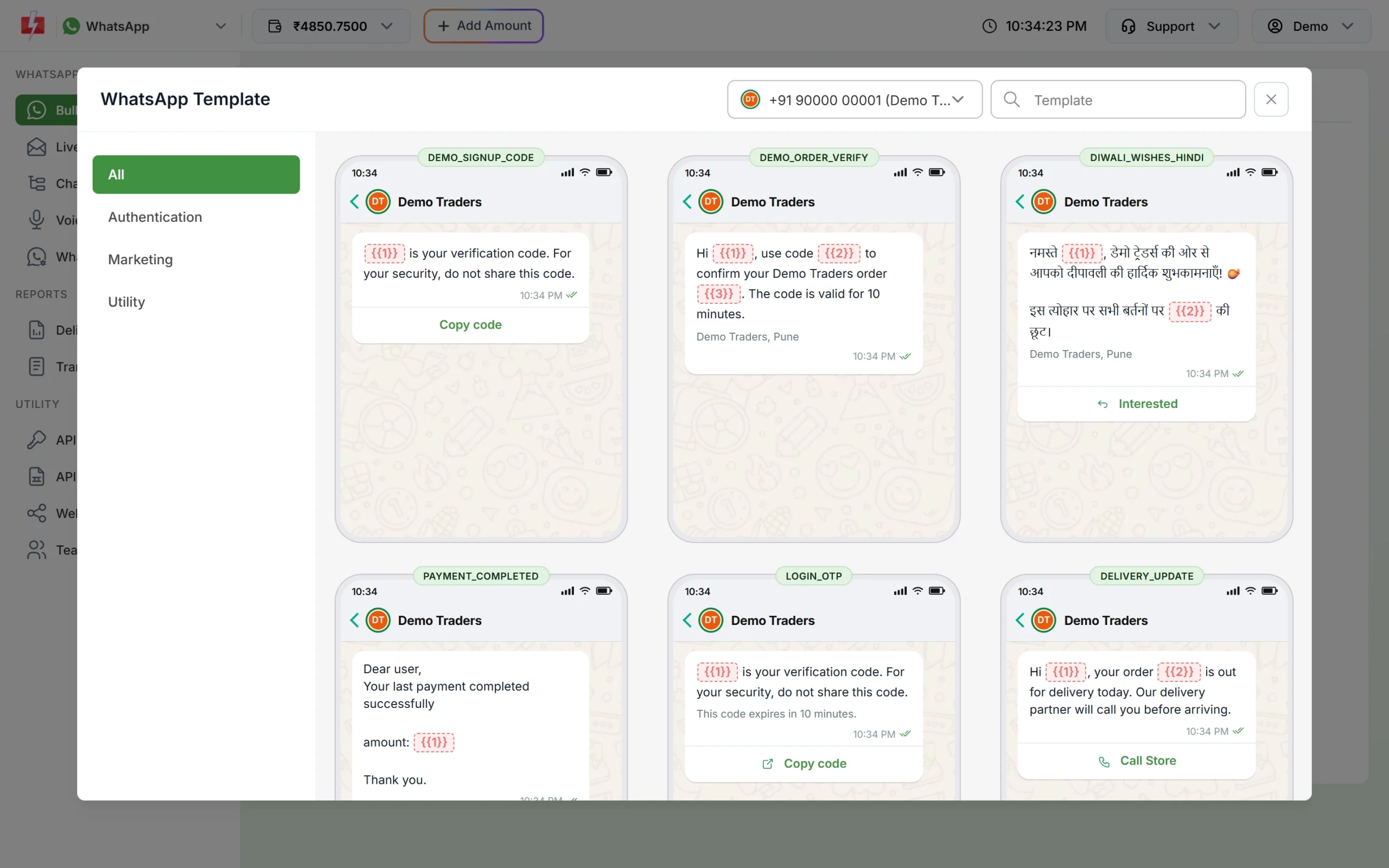
The Utility tab lists your approved utility templates.
Frequently asked questions
Is a policy renewal reminder utility or marketing?
A factual notice that a premium is due on an existing policy fits utility. A reminder with a discount or a push to upgrade is marketing. Meta decides the category and can change it, so keep the wording plain.
Can I send the policy document on WhatsApp?
Yes. Use a utility template with a Document header and attach each policy PDF when you send.
Can an individual insurance agent use these templates?
Yes. Connect your own WhatsApp Business number in Fast2SMS and create the templates under it.
Can I mention the illness or treatment in a claim update?
Avoid it. Keep health details out of the template and send a link to your secure portal for anything sensitive.
Can I send an OTP to verify a proposal?
Use an authentication template, not utility. Smart OTP can send it on WhatsApp or SMS.
Why was my premium reminder approved as marketing?
Look for words such as renew now, save, bonus, upgrade or new plan. Remove them and submit a new utility template.
Related guides
- Bulk SMS and WhatsApp for Insurance Companies and Agents
- WhatsApp utility vs marketing templates: examples that get the right category
- Can I edit an approved WhatsApp template or change its category?
- Send a WhatsApp template with image, video or PDF by API
- How to schedule a WhatsApp campaign in Fast2SMS