
These WhatsApp utility templates for events, weddings and conferences cover what a registered guest or ticket buyer needs: registration and payment confirmations, tickets and entry passes, reminders, directions, schedule and venue changes, cancellations and refunds, RSVP confirmations, guest stay and pickup details, certificates and a feedback request. Each template has variables, sample values, a suggested button and why it fits the utility category. Demo Events and Demo Tech Summit are made-up names; use your own.
What makes an event message utility
An event message is utility when it is about a registration, ticket, booking or RSVP the person already made, and it has no promotion in it. “Your ticket for Saturday is attached” is utility. “Your ticket is attached. Early bird passes for next year are now open” is marketing, because Meta treats an update mixed with a promotion as marketing.
The first invitation is the tricky part. An invitation asks someone to come, register or buy a ticket, so Meta is likely to treat it as marketing, even for a wedding. Once the guest has registered or replied, updates about their attendance fit utility. Meta decides the category during review and can change it later, so none of these examples is a promise of approval or category. The general rules are in WhatsApp utility vs marketing template examples.
The category also sets the price. At the time of writing, Fast2SMS charges ₹0.25 for each utility message and ₹0.95 for each marketing message, and your own account may have different rates. So a venue change alert costs the utility rate, while an early bird ticket offer costs the marketing rate. Every template is charged at its category rate, whether or not the customer messaged you in the last 24 hours. The full rate table is in WhatsApp API price in India.
Sending in bulk? For high WhatsApp volumes our team offers discounted rates. Talk to our team or see WhatsApp pricing.
Before you copy these templates
- Connect your WhatsApp number in Fast2SMS and collect consent for WhatsApp updates on your registration or RSVP form. See WhatsApp opt-in rules.
- For large events, check your number’s daily messaging limit before the event day. See WhatsApp messaging limits.
- Bodies start and end with fixed text and have enough words around each variable. See WhatsApp template character limits and variable rules.
- Change gate timings, refund periods and rules in the fixed text to your own.
Registration, payment and ticket templates
These go out after someone registers or pays. The registration or booking ID ties each message to that guest.
| Template name and body | Sample values | Suggested button | Why it is utility |
|---|---|---|---|
registration_confirmedHi {{1}}, your registration for Demo Tech Summit is confirmed. Your registration ID is {{2}} and your pass type is {{3}}. Thank you for registering. |
Priya | DTS-40021 | Delegate | None | Confirms a registration the person made. |
ticket_payment_receivedHi {{1}}, we have received Rs. {{2}} for booking {{3}}. Your tickets will be sent to this number shortly. |
Rahul | 3,000 | DE-7714 | None | Confirms a payment the customer made. |
ticket_issuedHeader: Document (PDF) Hi {{1}}, your ticket for {{2}} on {{3}} is attached. Please show the QR code on the ticket at the entry gate. |
Rahul | Demo Music Night | 27 Dec 2026 | None | Delivers the customer’s own ticket. |
event_reminderHi {{1}}, a reminder that {{2}} starts on {{3}} at {{4}}. Gates open one hour before the start time. |
Priya | Demo Tech Summit | 15 Jan 2027 | 10 AM | Visit website (static): “Get Directions” | Reminder about an event the person registered for. |
venue_parking_infoHi {{1}}, the venue for {{2}} is {{3}}. Parking is available at {{4}}. Use the button below for directions. |
Priya | Demo Tech Summit | Hall 3, Demo Convention Centre | Gate 2 | Visit website (static): “Get Directions” | Practical details for a registered guest. |
Change, cancellation and refund templates
Changes are where WhatsApp helps most on the event day. Send them to everyone holding a ticket as soon as you know.
| Template name and body | Sample values | Suggested button | Why it is utility |
|---|---|---|---|
schedule_changedHi {{1}}, there is a change in the schedule for {{2}}. The {{3}} session has moved to {{4}}. All other timings stay the same. |
Priya | Demo Tech Summit | keynote | 11:30 AM in Hall 1 | None | An operational change that affects the guest’s event. |
venue_changedHi {{1}}, the venue for {{2}} on {{3}} has changed to {{4}}. Your ticket stays valid at the new venue. |
Rahul | Demo Music Night | 27 Dec | Demo Grounds, Kharadi | Visit website (static): “Get Directions” | A disruption that affects the customer’s booking. |
event_cancelled_refundHi {{1}}, we are sorry to tell you that {{2}} on {{3}} has been cancelled. A refund of Rs. {{4}} will reach your original payment method within 7 working days. |
Rahul | Demo Music Night | 27 Dec | 3,000 | None | Tells the ticket holder about a cancellation and their refund. |
Wedding and guest management templates
For wedding planners and hosts, after guests have received the invitation and replied.
| Template name and body | Sample values | Suggested button | Why it is utility |
|---|---|---|---|
rsvp_confirmedHi {{1}}, thank you for confirming your attendance at {{2}} on {{3}}. We have noted {{4}} guests in your name. |
Mr. Mehta | the wedding of Ananya and Rohan | 14 Feb 2027 | 3 | None | Confirms the guest’s own RSVP. |
guest_room_bookedHi {{1}}, your room at {{2}} is booked for {{3}} to {{4}} for the wedding. Our guest desk in the hotel lobby will help you on arrival. |
Mr. Mehta | Hotel Demo Residency | 13 Feb | 15 Feb | Call Phone Number: “Call Guest Desk” | Stay details arranged for the guest. |
guest_pickup_detailsHi {{1}}, your pickup from {{2}} is arranged on {{3}}. Driver {{4}} will call you 30 minutes before arrival. |
Mr. Mehta | Pune station | 13 Feb, 4 PM | Suresh | None | Travel details arranged for the guest. |
function_timing_updateHi {{1}}, the {{2}} on {{3}} will now start at {{4}} at the same venue. We look forward to seeing you there. |
Mr. Mehta | sangeet | 13 Feb | 8 PM | None | A timing change for a function the guest is attending. |
After the event
| Template name and body | Sample values | Suggested button | Why it is utility |
|---|---|---|---|
certificate_sharedHeader: Document (PDF) Hi {{1}}, thank you for attending {{2}}. Your participation certificate is attached for your records. |
Priya | Demo Tech Summit 2027 | None | Shares the attendee’s own document. |
session_resourcesHi {{1}}, the slides and recordings of the {{2}} sessions you attended are now available. Use the button below to view them. |
Priya | Demo Tech Summit | Visit website (dynamic): “View Resources” | Content the attendee registered for, with no promotion. |
event_feedbackHi {{1}}, how was your experience at {{2}}? Please tap a button below to rate the event. |
Priya | Demo Tech Summit | Custom: “Great”, “Okay”, “Poor” | Feedback on one event the person attended, which Meta lists as a utility use. |
Event messages that would be marketing
Invitations and ticket sales are a normal part of events. Send them as marketing templates, only to people who agreed to get them.
| Message | Why Meta would treat it as marketing | What to do instead |
|---|---|---|
| Hi {{1}}, early bird tickets for Demo Tech Summit 2027 are open till 31 Dec. Book now and save 20%. | It sells tickets and offers a discount. | Create ticket sales as marketing. |
| You are invited to the wedding of Ananya and Rohan on 14 Feb. Please join us. | An invitation asks people to come. Meta is likely to treat it as marketing even for a personal event. | Send the first invitation as marketing. After the guest replies, rsvp_confirmed and the updates can be utility. |
| Hi {{1}}, thanks for attending. Register for next year now and get 25% off. | A thank-you with an offer is mixed content. | Keep certificate_shared and event_feedback clean and send offers separately. |
How to keep event templates utility
- Put the registration ID, booking number or event date in every template.
- Keep sponsor promotions, next-event offers, merchandise and “bring a friend” lines out of tickets and updates.
- Use service buttons: “Get Directions”, “View Resources”, “Call Guest Desk”. Leave “Buy Tickets” for marketing.
- A ticket number or the QR code on a ticket is fine. A one-time code that the guest must type to log in or verify belongs in an authentication template; Fast2SMS Smart OTP is the recommended way to send it.
- Ask for feedback about the event the person attended, not a general survey about your company.
If Meta moved one of your event updates to marketing, remove the invitation or offer wording and submit it as a new utility template. Fast2SMS also has a separate help guide on rewriting a marketing template as utility.
How to add WhatsApp utility templates for events in Fast2SMS
-
Open the template form
Go to WhatsApp Manager > Templates and click Add Template. If you have more than one number, pick the sender number at the top right.
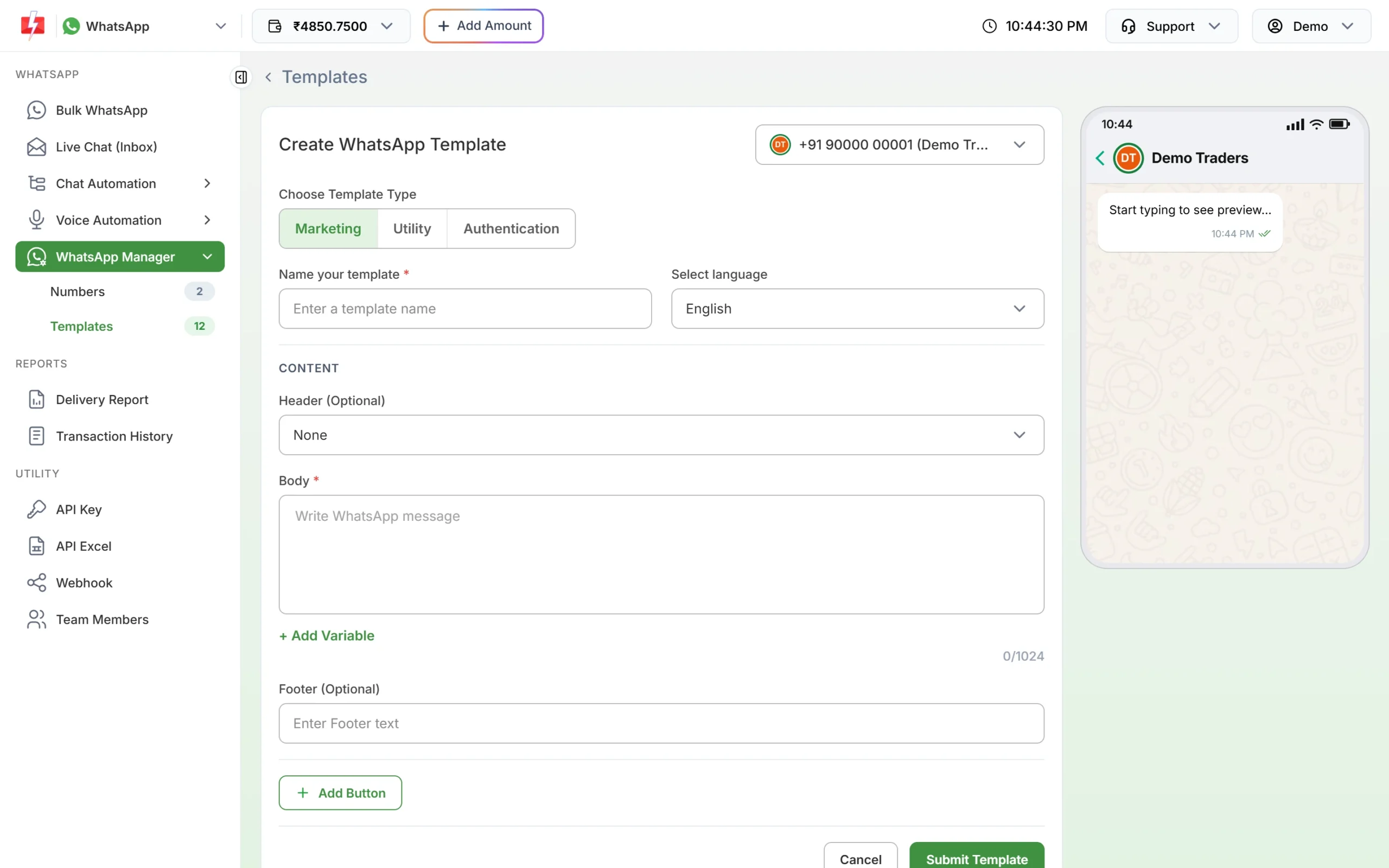
The template form. Choose Utility for tickets and event updates. -
Choose Utility, then name the template
Under Choose Template Type, click Utility. Type a name such as
venue_changed(small letters, numbers and underscores only) and choose the language the text is written in: English, Hindi or Gujarati. -
Paste the body and fill the samples
Paste the fixed text. Put the cursor where each {{1}}, {{2}} goes and click + Add Variable so the numbering stays right. Under Samples for body content, type a realistic value for each variable, like the ones in the tables above. Use a real-looking event name, date and booking ID as samples.
-
Add the header and button, then submit
For tickets and certificates, choose Document under Header (Optional) and upload a sample PDF. Click Add Button for a Visit website button such as “Get Directions” or a Call Phone Number button for your guest desk. Click Submit Template, check the preview and confirm. Meta’s review can take up to 24 hours.
-
Check the category on the card, then send
When the template is approved, its card shows the category under the preview. If you chose Utility and the card says Marketing, Meta approved it as marketing. In Bulk WhatsApp, open the template picker and use the Utility tab to find it. Only approved templates are listed.
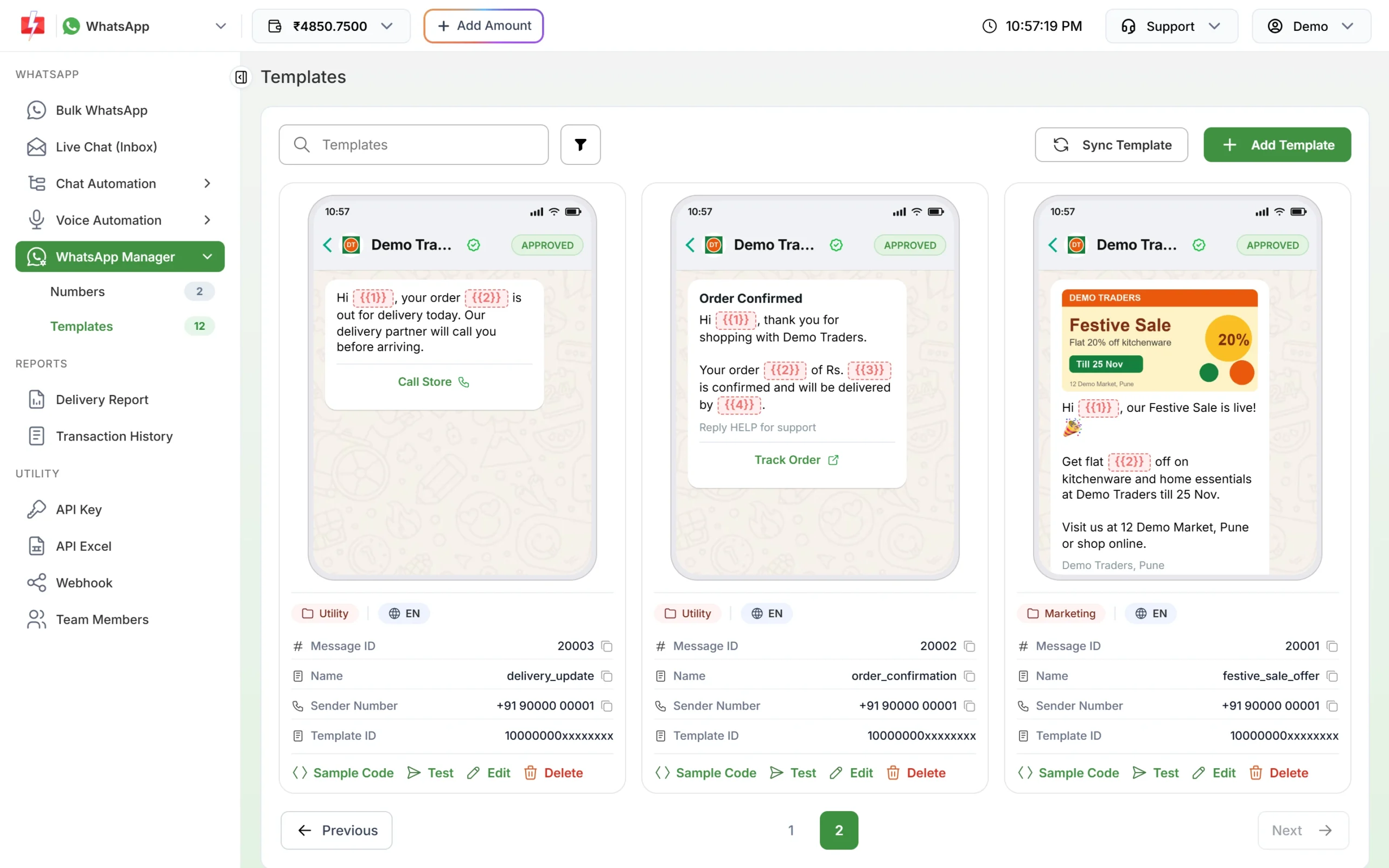
After review, each card shows the category Meta approved. 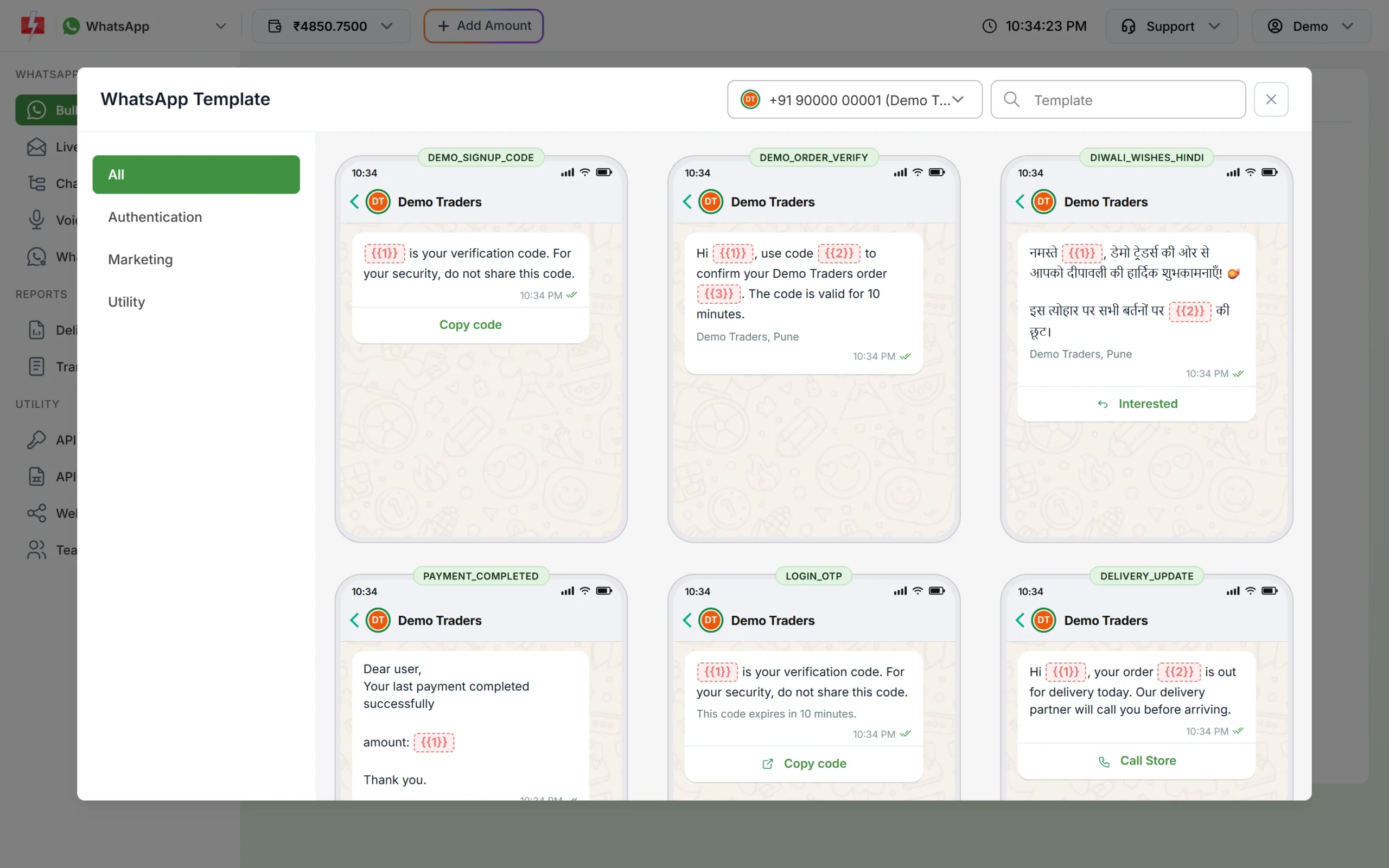
Approved utility templates are under the Utility tab when you send a schedule change from Bulk WhatsApp.
If Meta changes the category
Meta checks the category when it reviews a template, and it keeps checking approved templates later. At the time of writing:
- A template you submit as utility that Meta sees as marketing is usually approved as marketing instead of being rejected. Some are still rejected for the wrong category.
- An approved utility template can be moved to marketing later, normally with one day’s notice. It keeps working, at the marketing rate.
- You have 60 days to ask Meta to review a category change.
- Businesses that keep sending marketing content as utility can have their utility messages limited, or all their utility templates moved to marketing for a period. See WhatsApp error 131064.
To move a template to another category yourself, see editing an approved template or its category.
Frequently asked questions
Is a wedding invitation on WhatsApp a utility template?
Meta is likely to treat an invitation as marketing, because it asks people to attend. RSVP confirmations and updates sent after the guest replies can be utility.
Can I send event tickets on WhatsApp?
Yes. Use a utility template with a Document header. Send tickets by API so each guest gets their own file with their own QR code.
Is a venue or schedule change utility?
Usually yes. A change that affects an event the person registered for is an operational update. Keep it to the facts.
Can I send event reminders as utility?
Usually yes, if the person registered or bought a ticket and the reminder has no offer in it. Meta decides the category during review.
Is a thank-you message after the event utility?
A thank-you that shares the attendee’s certificate or asks for feedback on that event fits utility. Add an offer for the next event and it becomes marketing.
How do I message thousands of attendees on the event day?
Check your number’s Meta messaging tier before the event, then send from Bulk WhatsApp with an Excel file or address book group. See how to send WhatsApp messages to 10,000 contacts.
Related guides
- Bulk SMS and WhatsApp for Events and Weddings
- WhatsApp utility vs marketing templates: examples
- WhatsApp template examples by use case
- WhatsApp template buttons: quick reply, website, call and copy code
- WhatsApp template character limits and variable rules
- Which WhatsApp messages are free and which are charged?