
These WhatsApp utility templates for bills and outages are for electricity boards and distributors, gas agencies, broadband, cable and telecom providers. They cover bills, due dates, payment receipts, planned and unplanned outages, service restored, complaints, technician visits, usage alerts and connection requests. Each one has variables, sample values, a suggested button and why it fits the utility category. Demo Power, Demo Gas and Demo Net are made-up names; use your own.
What makes a bill or outage message utility
Meta’s utility category covers messages about a service the customer already has, such as a bill for their connection or a complaint they raised, as long as they do not promote anything. Meta also names system outages and operational disruptions as essential messages that can be utility. So “power will be off in your area on Sunday from 10 AM to 2 PM” fits utility.
The line is crossed by upselling and renewals. Meta says account updates must not include promotion, upselling or renewal attempts, and lists subscription renewal reminders as marketing. “You have used 90% of your data, upgrade to a bigger plan” is marketing. Meta decides the category during review and can change it later, so none of these examples is a promise of approval or category. The general rules are in WhatsApp utility vs marketing template examples.
The category also sets the price. At the time of writing, Fast2SMS charges ₹0.25 for each utility message and ₹0.95 for each marketing message, and your own account may have different rates. So a bill alert costs the utility rate, while a plan upgrade offer costs the marketing rate. Every template is charged at its category rate, whether or not the customer messaged you in the last 24 hours. The full rate table is in WhatsApp API price in India.
Sending in bulk? For high WhatsApp volumes our team offers discounted rates. Talk to our team or see WhatsApp pricing.
Before you copy these templates
- Connect your WhatsApp number in Fast2SMS. Message only customers who agreed to get updates on WhatsApp, for example when they gave their number for the connection. See WhatsApp opt-in rules.
- Bill alerts go to many customers with different values, so upload an Excel file with one column per variable. See bulk WhatsApp from Excel with variables.
- Bodies start and end with fixed text and give enough context around each variable. The rules are in WhatsApp template character limits and variable rules.
- WhatsApp limits how many different customers a number can message in 24 hours. Check your number’s tier before a big bill run. See WhatsApp messaging limits.
Bill and payment templates
These are about one customer’s account and amount, which keeps them clearly utility.
| Template name and body | Sample values | Suggested button | Why it is utility |
|---|---|---|---|
bill_generatedDear {{1}}, your Demo Power bill for {{2}} is Rs. {{3}} for consumer number {{4}}. The due date is {{5}}. Please pay on time to avoid a late fee. |
Priya | November 2026 | 1,846 | 160045821 | 15 Dec 2026 | Visit website (dynamic): “Pay Bill” | A bill for the customer’s own connection. |
bill_due_reminderDear {{1}}, Rs. {{2}} for account {{3}} is due on {{4}}. Please ignore this message if you have already paid. |
Rahul | 799 | DN-55102 | 10 Dec 2026 | Visit website (dynamic): “Pay Bill” | Reminder of an amount the customer owes, with no offer. |
payment_receivedDear {{1}}, we have received your payment of Rs. {{2}} for account {{3}} on {{4}}. Thank you. |
Rahul | 799 | DN-55102 | 8 Dec 2026 | None | Confirms a payment the customer made. |
overdue_noticeDear {{1}}, Rs. {{2}} for account {{3}} is overdue. As per your connection terms, service may be disconnected after {{4}}. Please pay the dues to avoid this. |
Anil | 2,310 | 160045877 | 20 Dec 2026 | Visit website (dynamic): “Pay Bill” | An account alert about the customer’s own service. |
bill_pdfHeader: Document (PDF) Dear {{1}}, your bill for account {{2}} for {{3}} is attached. Please check the details and pay before the due date. |
Neha | DN-55140 | November 2026 | None | Sends the customer’s own bill. |
Outage and service templates
Outage alerts reach many customers in one area at once. Meta lists outages and operational disruptions among the essential uses of utility templates.
| Template name and body | Sample values | Suggested button | Why it is utility |
|---|---|---|---|
planned_outageDear customer, the supply in {{1}} will be off on {{2}} from {{3}} to {{4}} for maintenance work. We regret the inconvenience. |
Baner Road | 22 Dec | 10 AM | 2 PM | None | Warns customers of a disruption to their service. |
unplanned_outageDear customer, there is a service outage in {{1}} because of {{2}}. Our team is working on it and expects service back by {{3}}. We will update you. |
Kothrud | a cable fault | 6 PM | None | An operational disruption affecting the customer. |
service_restoredDear customer, service in {{1}} was restored at {{2}}. If you still face a problem, reply to this message with your account number. |
Kothrud | 5:40 PM | None | Closes the outage update. |
complaint_registeredDear {{1}}, your complaint {{2}} about {{3}} has been registered. We will resolve it by {{4}}. Reply to this message to add details. |
Priya | CMP-77812 | no internet | 21 Dec, 6 PM | None | Confirms a request the customer raised. |
technician_visitHi {{1}}, our technician {{2}} will visit you on {{3}} between {{4}} for complaint {{5}}. Please keep someone available at the address. |
Priya | Mahesh | 21 Dec | 2 PM and 4 PM | CMP-77812 | Call Phone Number: “Call Support” | Schedules a visit the customer asked for. |
complaint_resolvedHi {{1}}, complaint {{2}} has been marked resolved. Please tap a button below to tell us if the problem is fixed. |
Priya | CMP-77812 | Custom: “Fixed”, “Still a problem” | Feedback on the customer’s own complaint. |
Account and connection templates
| Template name and body | Sample values | Suggested button | Why it is utility |
|---|---|---|---|
data_usage_alertHi {{1}}, you have used {{2}} of the {{3}} data in your Demo Net plan for this billing cycle. Your plan terms apply after the limit. |
Rahul | 450 GB | 500 GB | None | Usage alert on a plan the customer pays for, with no upgrade push. |
plan_change_confirmedHi {{1}}, your Demo Net plan for account {{2}} has been changed to {{3}} as requested, from {{4}}. Your next bill will show the new plan. |
Neha | DN-55140 | 100 Mbps | 1 Jan 2027 | None | Confirms a change the customer asked for. |
cylinder_booking_confirmedHi {{1}}, your cylinder booking {{2}} for consumer number {{3}} is confirmed. Delivery is expected by {{4}}. Please keep the empty cylinder ready. |
Anil | BK-301772 | 7012345 | 23 Dec | None | Confirms an order the customer placed. |
new_connection_statusHi {{1}}, your application {{2}} for a new {{3}} connection has reached the {{4}} stage. We will message you when the next step is done. |
Neha | APP-10442 | broadband | site survey | None | Status of the customer’s own application. |
Utility and telecom messages that would be marketing
These messages are common in the industry but Meta would treat them as marketing. Send them as marketing templates, to customers who agreed to get offers.
| Message | Why Meta would treat it as marketing | What to do instead |
|---|---|---|
| Hi {{1}}, your plan expires on {{2}}. Recharge now with our 84-day plan and get extra data. | It is a renewal reminder with an offer. Meta lists renewal reminders as marketing. | Create recharge and renewal reminders as marketing templates. |
| Hi {{1}}, you have used 90% of your data. Upgrade to 300 Mbps today. | Meta does not allow upselling in utility account updates. | Keep data_usage_alert factual and send the upgrade offer as marketing. |
| Dear {{1}}, your bill is Rs. {{2}}. Pay through our app and get cashback. | A bill alert mixed with a promotion is marketing. | Send bill_generated as utility and app offers separately. |
How to keep bill and outage templates utility
- Name the account, consumer or complaint number in account messages. For area outages, name the area and the time.
- Leave out plan upgrades, cashback, new products and app download pushes.
- Treat prepaid recharge and plan renewal reminders as marketing. Meta lists renewal reminders under marketing.
- Use service buttons: “Pay Bill”, “Call Support”, or quick replies like “Fixed”. Leave “See Plans” for marketing.
- Never ask for card numbers or bank details in the chat. Link to your own payment page with a dynamic “Pay Bill” button.
If Meta moved a bill template to marketing, look for offer or upgrade wording, remove it and submit a new utility template. Fast2SMS also has a separate help guide on rewriting a marketing template as utility.
How to add WhatsApp utility templates for bills and outages in Fast2SMS
-
Open the template form
Go to WhatsApp Manager > Templates and click Add Template. If you have more than one number, pick the sender number at the top right.
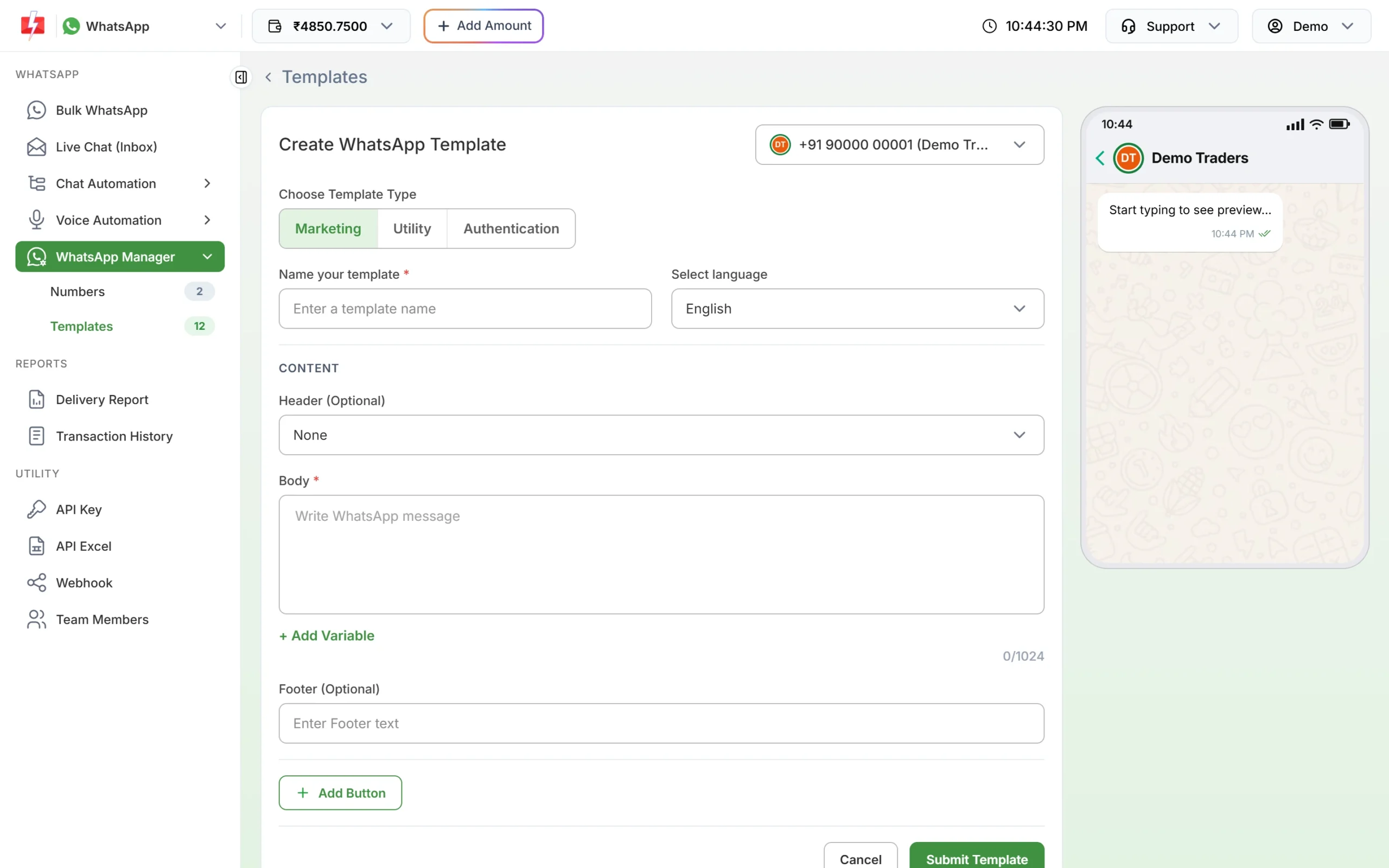
The template form. Choose Utility for bills, outages and complaints. -
Choose Utility, then name the template
Under Choose Template Type, click Utility. Type a name such as
planned_outage(small letters, numbers and underscores only) and choose the language the text is written in: English, Hindi or Gujarati. -
Paste the body and fill the samples
Paste the fixed text. Put the cursor where each {{1}}, {{2}} goes and click + Add Variable so the numbering stays right. Under Samples for body content, type a realistic value for each variable, like the ones in the tables above. Use a real-looking consumer number, area and date as samples.
-
Add the header and button, then submit
For a bill PDF, choose Document under Header (Optional). Click Add Button and choose Visit website with a dynamic URL for “Pay Bill”, so each customer opens their own bill page. Click Submit Template, check the preview and confirm. Meta’s review can take up to 24 hours.
-
Check the category on the card, then send
When the template is approved, its card shows the category under the preview. If you chose Utility and the card says Marketing, Meta approved it as marketing. In Bulk WhatsApp, open the template picker and use the Utility tab to find it. Only approved templates are listed.
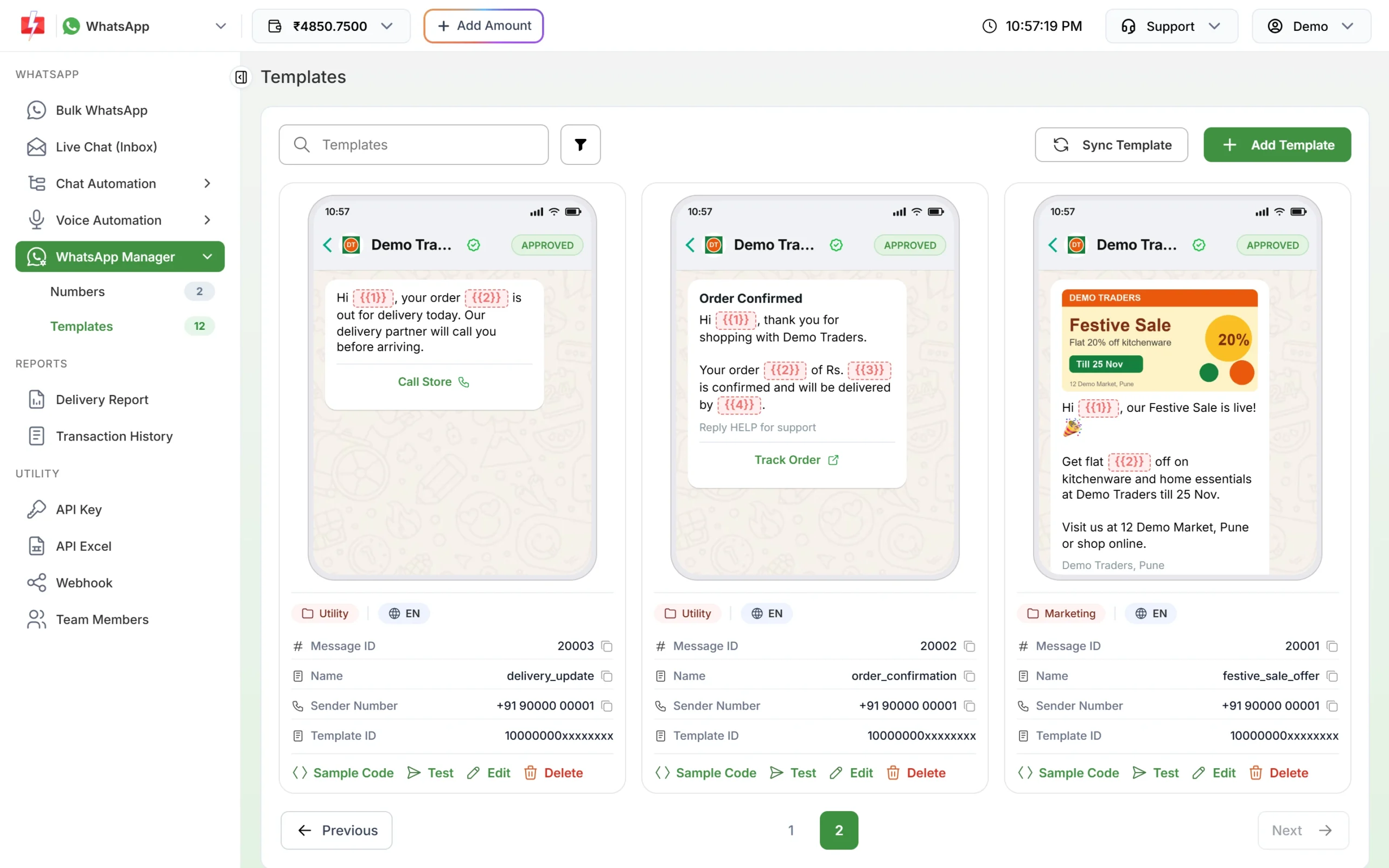
After Meta’s review, each card shows the approved category. 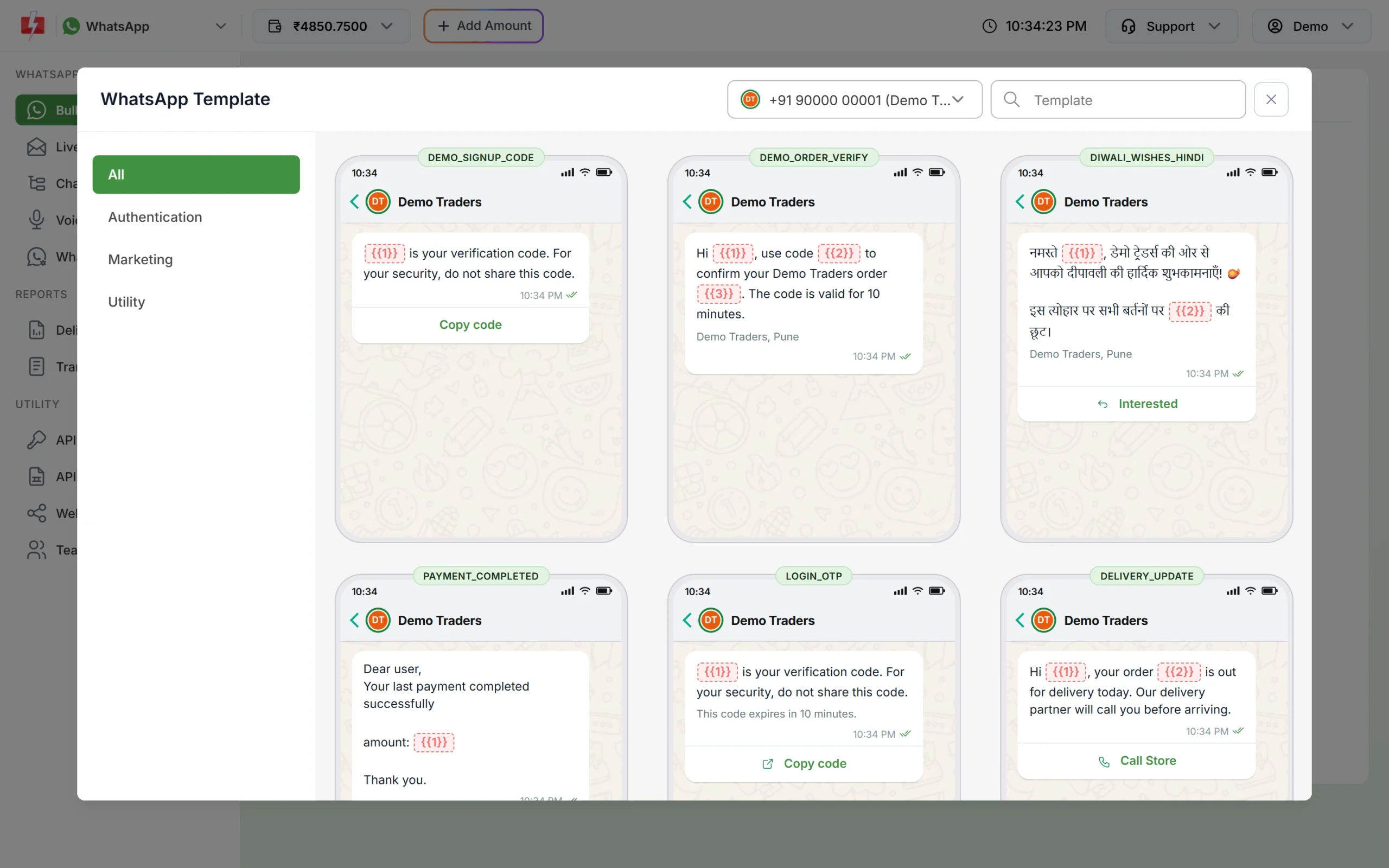
Find approved utility templates under the Utility tab when you send a bill run from Bulk WhatsApp.
If Meta changes the category
Meta checks the category when it reviews a template, and it keeps checking approved templates later. At the time of writing:
- A template you submit as utility that Meta sees as marketing is usually approved as marketing instead of being rejected. Some are still rejected for the wrong category.
- An approved utility template can be moved to marketing later, normally with one day’s notice. It keeps working, at the marketing rate.
- You have 60 days to ask Meta to review a category change.
- Businesses that keep sending marketing content as utility can have their utility messages limited, or all their utility templates moved to marketing for a period. See WhatsApp error 131064.
To move a template to another category yourself, see editing an approved template or its category.
Frequently asked questions
Is an electricity bill alert a utility template?
Usually yes. A bill for the customer’s own connection, with no offer, fits utility. Meta decides the category during review.
Can I send power cut or outage alerts on WhatsApp?
Yes. Meta names outages and operational disruptions as essential uses of utility templates. Keep the message to the area, time and reason.
Is a prepaid recharge reminder utility?
Meta lists subscription renewal reminders as marketing, so a recharge or renewal reminder is likely to be approved as marketing.
Can I send a different bill amount to each customer?
Yes. Upload an Excel file with one row per customer and one column per variable in Bulk WhatsApp, or send by API from your billing system. See bulk WhatsApp from Excel with variables.
Can I send the bill PDF itself?
Yes, with a Document header. For a different PDF per customer, send by API with each customer’s file link. See sending a template with a PDF by API.
Do I need DLT for WhatsApp bill alerts?
No. DLT applies to SMS. WhatsApp templates are approved by Meta. See Is DLT needed for WhatsApp, RCS or voice calls?
How many customers can I message in a day?
It depends on your number’s Meta messaging tier, which starts at 250 unique customers in 24 hours for many new unverified businesses and 2K after business verification, at the time of writing. See WhatsApp messaging limits.
Related guides
- Bulk SMS and WhatsApp for Internet, Cable and Utility Providers
- WhatsApp utility vs marketing templates: examples
- WhatsApp template examples by use case
- WhatsApp template buttons: quick reply, website, call and copy code
- WhatsApp template character limits and variable rules
- Which WhatsApp messages are free and which are charged?