
These WhatsApp utility templates for HR, payroll and recruitment teams cover two groups of people. For employees: salary credited, payslips, shift schedules and changes, leave status, attendance, policy updates and office closures. For candidates: application received, interview scheduled and reminded, documents needed, offer letter, joining details and a closing update. Each template has variables, sample values, a suggested button and why it fits the utility category. Demo Industries is a made-up employer name; use your own.
What makes an HR or recruitment message utility
A message is utility when it is about something the person is part of, such as their job, salary, leave request or job application, and it does not promote anything. “Your interview is on Monday at 11 AM” is utility. “New openings that match your profile, apply now” is a different case: it promotes jobs the person has not applied for, and Meta is likely to treat it as marketing.
Meta decides the category during review and can change it on an approved template later. None of these examples is a promise of approval or category. For the general rules with side-by-side pairs, read WhatsApp utility vs marketing template examples.
The category also sets the price. At the time of writing, Fast2SMS charges ₹0.25 for each utility message and ₹0.95 for each marketing message, and your own account may have different rates. So a salary credited alert costs the utility rate, while a referral bonus campaign costs the marketing rate. Every template is charged at its category rate, whether or not the customer messaged you in the last 24 hours. The full rate table is in WhatsApp API price in India.
Sending in bulk? For high WhatsApp volumes our team offers discounted rates. Talk to our team or see WhatsApp pricing.
Before you copy these templates
- Connect your WhatsApp number in Fast2SMS. Get consent for WhatsApp updates from employees (for example in the joining form) and from candidates (on the application form). See WhatsApp opt-in rules.
- Salary and payslip messages carry personal data. Send them only to the employee’s own number and keep amounts and documents to what the employee needs.
- Every body starts and ends with fixed text, with enough words around the variables. See WhatsApp template character limits and variable rules.
- For a salary run with different values per person, upload an Excel file with one column per variable. See bulk WhatsApp from Excel with variables.
Payroll and employee templates
For staff on your payroll. Each one is about the employee’s own pay, shift, leave or workplace.
| Template name and body | Sample values | Suggested button | Why it is utility |
|---|---|---|---|
salary_creditedHi {{1}}, your salary for {{2}} of Rs. {{3}} has been credited to your bank account ending {{4}}. Please contact HR if you see any difference. |
Ravi | November 2026 | 32,450 | 4821 | None | An account update about the employee’s own pay. |
payslip_sharedHeader: Document (PDF) Hi {{1}}, your payslip for {{2}} is attached. Please keep it for your records and contact HR with any questions. |
Ravi | November 2026 | None | Shares the employee’s own document. |
weekly_shift_scheduleHi {{1}}, your shift for the week of {{2}} is {{3}} at {{4}}. Please tap a button below to confirm. |
Sunita | 22 Dec | 7 AM to 3 PM | Plant 2 | Custom: “Confirm”, “Need a change” | The employee’s own work schedule. |
shift_changedHi {{1}}, your shift on {{2}} has changed from {{3}} to {{4}}. Please reply to confirm you have seen this message. |
Sunita | 24 Dec | 7 AM | 3 PM | None | A change that affects the employee’s work. |
leave_request_statusHi {{1}}, your leave request {{2}} for {{3}} has been {{4}}. Please check the HR portal for details. |
Arjun | LV-2291 | 26 to 28 Dec | approved | Visit website (static): “Open HR Portal” | Answers the employee’s own request. |
attendance_missing_punchHi {{1}}, we could not find your punch-out for {{2}}. Please update your attendance in the HR portal by {{3}}. |
Arjun | 19 Dec | 23 Dec | Visit website (static): “Open HR Portal” | An alert about the employee’s own record. |
policy_updateHeader: Document (PDF) Dear team, the updated {{1}} policy is attached and applies from {{2}}. Please read it and reply to confirm you have received it. |
leave | 1 Jan 2027 | Custom: “Received” | A workplace notice for employees, with no promotion. |
office_closedDear team, the {{1}} office will remain closed on {{2}} because of {{3}}. Please follow the instructions from your manager. |
Pune | 25 Dec | a local holiday | None | An operational change that affects employees. |
Recruitment and onboarding templates
For candidates who applied or are joining. Each message is about their own application.
| Template name and body | Sample values | Suggested button | Why it is utility |
|---|---|---|---|
application_receivedHi {{1}}, thank you for applying for the {{2}} role at Demo Industries. Your application {{3}} has been received and our team will review it. |
Kiran | Sales Executive | APP-7712 | None | Confirms an application the candidate made. |
interview_scheduledHi {{1}}, your interview for the {{2}} role is scheduled on {{3}} at {{4}}. Please tap a button below to confirm your slot. |
Kiran | Sales Executive | 23 Dec | 11 AM | Custom: “Confirm”, “Reschedule” | Schedules a step in the candidate’s own application. |
interview_reminderHi {{1}}, a reminder of your interview today at {{2}} at {{3}}. Please carry a copy of your resume. |
Kiran | 11 AM | our Hinjewadi office | Visit website (static): “Get Directions” | Reminder about the candidate’s own interview. |
joining_documents_neededHi {{1}}, to complete your joining for the {{2}} role, please upload {{3}} by {{4}} using the button below. |
Meena | Accounts Assistant | your relieving letter | 28 Dec | Visit website (dynamic): “Upload Documents” | A step the candidate must finish for their own joining. |
offer_letter_sharedHeader: Document (PDF) Hi {{1}}, your offer letter for the {{2}} role at Demo Industries is attached. Please review it and reply with your decision by {{3}}. Thank you. |
Meena | Accounts Assistant | 30 Dec | None | Shares the candidate’s own offer. |
joining_detailsHi {{1}}, your joining date is {{2}}. Please report to {{3}} at {{4}} and ask for {{5}} at the reception. |
Meena | 4 Jan 2027 | our Baner office | 9:30 AM | Ms. Rao | None | Details for the candidate’s own first day. |
application_closedHi {{1}}, thank you for your interest in the {{2}} role. We have decided to move ahead with other candidates this time. We wish you the best. |
Kiran | Sales Executive | None | Final status of the candidate’s own application. |
HR and recruitment messages that would be marketing
These are common, but they promote or sell. Send them as marketing templates, and only to people who agreed to get them.
| Message | Why Meta would treat it as marketing | What to do instead |
|---|---|---|
| Hi {{1}}, 5 new openings match your profile. Apply now. | It promotes jobs the candidate did not apply for. Meta is likely to treat job alerts as marketing. | Send job alerts as marketing to candidates who opted in to them. |
| Refer a friend for our open roles and earn a referral bonus of Rs. 5,000. | It persuades people to act for a reward. | Create referral campaigns as marketing. |
| Hi {{1}}, your salary is credited. Get an instant loan from our partner at low interest. | A salary alert mixed with an offer is marketing. | Keep salary_credited clean. Do not mix partner offers into payroll messages. |
How to keep HR templates utility
- Tie each message to the person’s own salary month, shift, request number or application ID.
- Keep job promotions, referral rewards, partner loans and company product offers out of payroll and application messages.
- Use service buttons like “Open HR Portal”, “Upload Documents”, “Confirm” or “Reschedule”.
- Ask candidates to upload documents on your own portal. Do not ask them to type PAN, Aadhaar or bank account numbers in the chat.
- Never send a login or verification code in these templates. Codes need an authentication template; Fast2SMS Smart OTP is the recommended way to send them.
If Meta moved one of your HR templates to marketing, remove any job promotion or offer wording and submit it as a new utility template. Fast2SMS also has a separate help guide on rewriting a marketing template as utility.
How to add WhatsApp utility templates for HR in Fast2SMS
-
Open the template form
Go to WhatsApp Manager > Templates and click Add Template. If you have more than one number, pick the sender number at the top right.
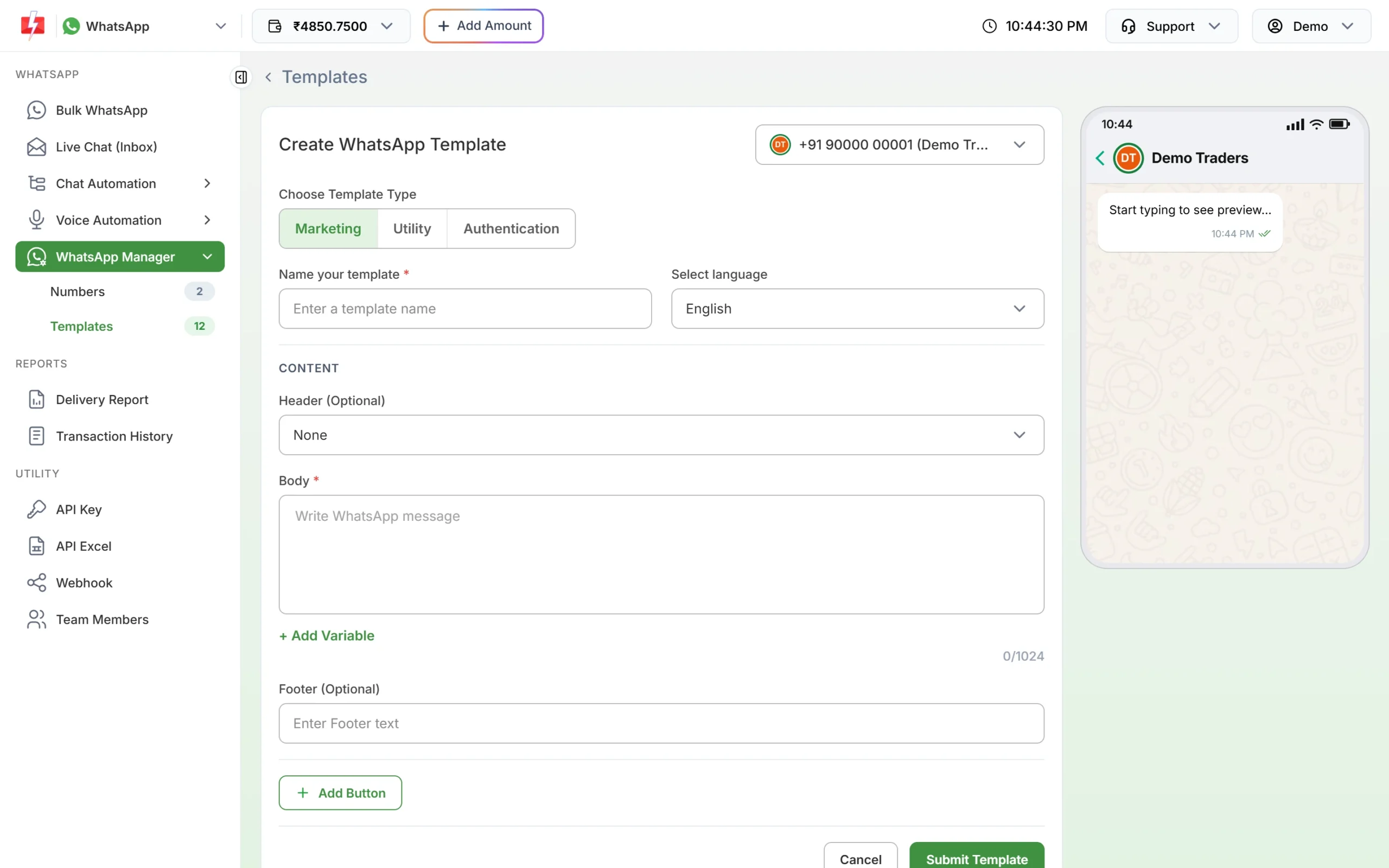
The template form. Choose Utility for payroll and interview updates. -
Choose Utility, then name the template
Under Choose Template Type, click Utility. Type a name such as
interview_scheduled(small letters, numbers and underscores only) and choose the language the text is written in: English, Hindi or Gujarati. -
Paste the body and fill the samples
Paste the fixed text. Put the cursor where each {{1}}, {{2}} goes and click + Add Variable so the numbering stays right. Under Samples for body content, type a realistic value for each variable, like the ones in the tables above. Use realistic samples such as a role name, a date and an application ID.
-
Add the header and button, then submit
For payslips, policies and offer letters, choose Document under Header (Optional) and upload a sample PDF. Click Add Button for Custom buttons like “Confirm” or a Visit website button for your HR portal. Click Submit Template, check the preview and confirm. Meta’s review can take up to 24 hours.
-
Check the category on the card, then send
When the template is approved, its card shows the category under the preview. If you chose Utility and the card says Marketing, Meta approved it as marketing. Click Test on the approved card to send it to your own phone first, with your own values in each variable box.
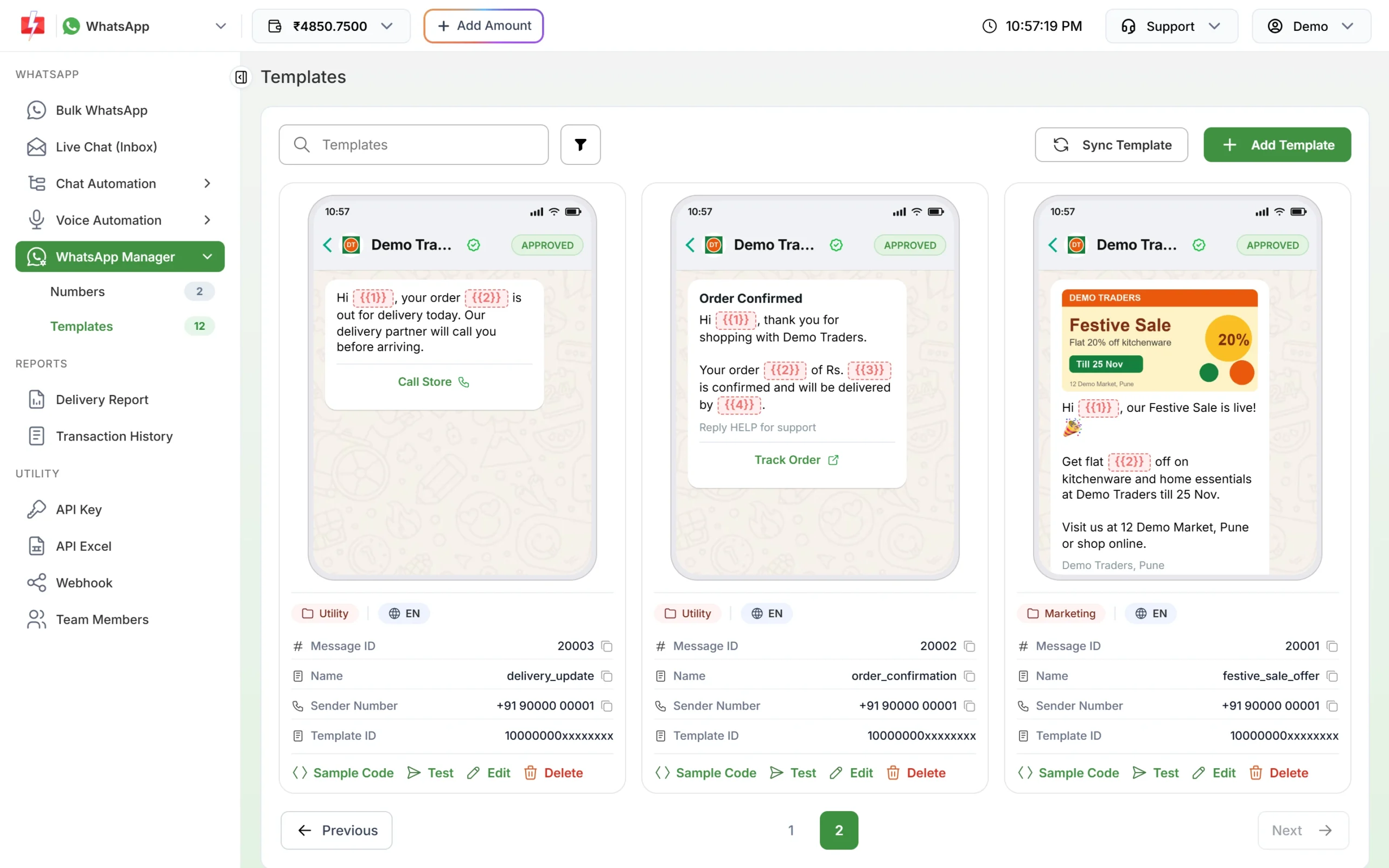
The category Meta approved shows on each template card. 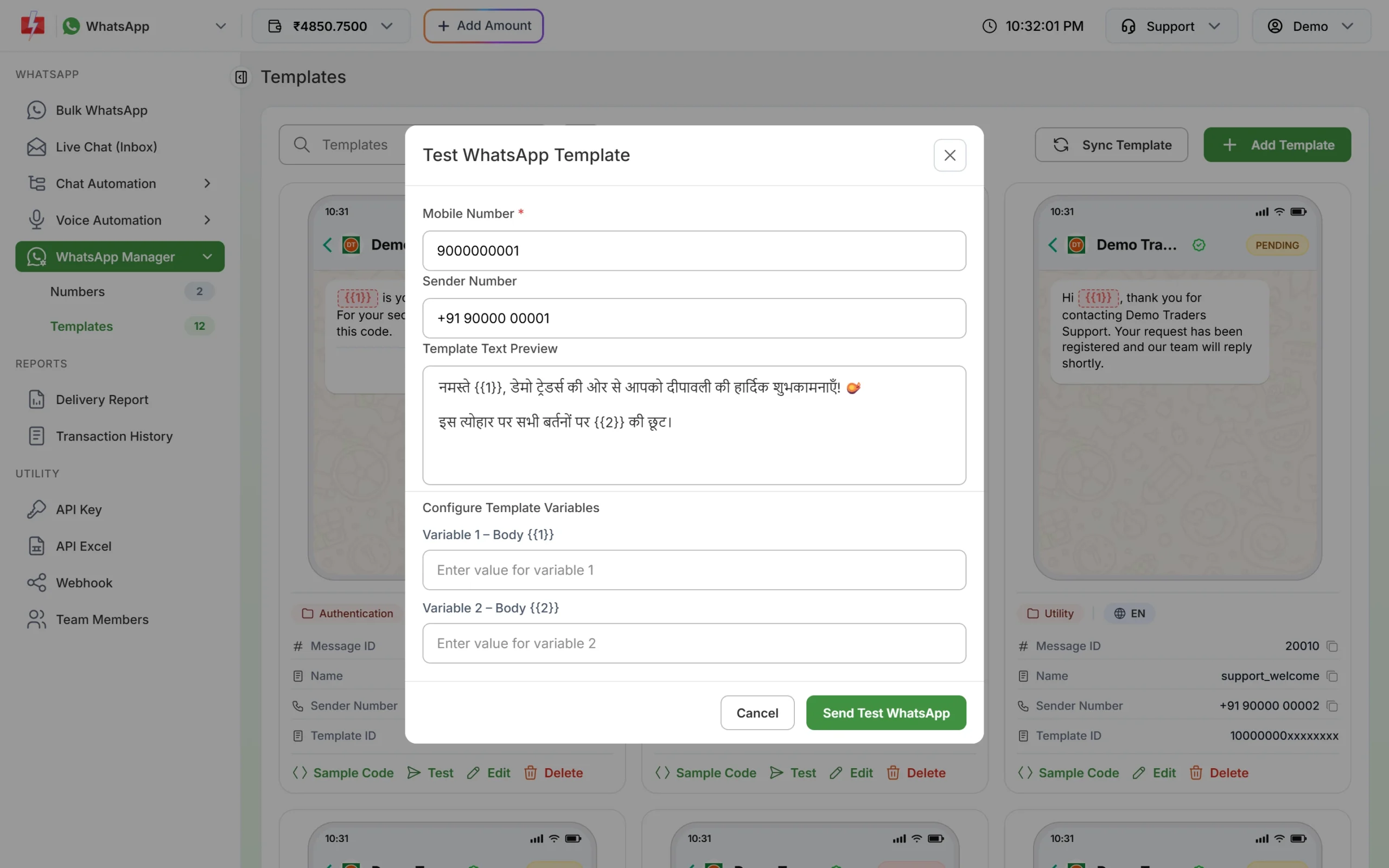
Send a test to your own phone before the first salary or interview run.
If Meta changes the category
Meta checks the category when it reviews a template, and it keeps checking approved templates later. At the time of writing:
- A template you submit as utility that Meta sees as marketing is usually approved as marketing instead of being rejected. Some are still rejected for the wrong category.
- An approved utility template can be moved to marketing later, normally with one day’s notice. It keeps working, at the marketing rate.
- You have 60 days to ask Meta to review a category change.
- Businesses that keep sending marketing content as utility can have their utility messages limited, or all their utility templates moved to marketing for a period. See WhatsApp error 131064.
To move a template to another category yourself, see editing an approved template or its category.
Frequently asked questions
Is a salary credited message a utility template?
Usually yes. It is an account update about the employee’s own pay, with no promotion. Meta decides the category during review.
Can I send payslips on WhatsApp?
Yes, as a PDF in a utility template with a Document header. Send them by API so each employee gets their own file, since a Bulk WhatsApp campaign sends the same file to everyone.
Are interview reminders utility?
Usually yes, when the candidate applied and the message is about their own interview. Meta makes the final call.
Are job alerts utility or marketing?
Job alerts promote openings the person has not applied for, so Meta is likely to treat them as marketing. Send them as marketing templates.
Can candidates confirm or reschedule from WhatsApp?
Yes. Add Custom buttons like “Confirm” and “Reschedule”. Taps arrive in Live Chat and at your webhook if you set one.
Can I send HR messages in Hindi?
Yes. The template form offers English, Hindi and Gujarati, and each language is a separate template. See WhatsApp templates in Hindi and Gujarati.
Can I send these from my HR software?
Yes, through the Fast2SMS WhatsApp API with the template’s message ID and the variable values. See sending WhatsApp templates with the API.
Related guides
- Bulk SMS and WhatsApp for HR and Employee Alerts
- Bulk SMS and WhatsApp for Recruitment and Staffing Agencies
- WhatsApp utility vs marketing templates: examples
- WhatsApp template examples by use case
- WhatsApp template buttons: quick reply, website, call and copy code
- WhatsApp template character limits and variable rules